How to Maximize Battery Life on an iPad or iPhone

I receive frequent requests for info about things that can be done to maximize the battery life on an iPad or iPhone. So I’m sharing the resource that I have bookmarked for this.

Disclaimer: Please think through the pros/cons of any of the options mentioned in the article. For example, adjusting the brightness might not fit some user’s visual needs, toggling off Bluetooth would interfere with use of a Bluetooth speaker, toggling off Location Services may interfere with being able to use “Find My”, etc…

Use of these iOS devices for AAC takes more consideration than other uses. So weigh the pros/cons to make a thoughtful decision. Sometimes having an external battery pack available can be a solution to recharging on the go.

Here’s the article: https://www.igeeksblog.com/how-to-improve-ipad-battery-life/

Updated 9/23/22: Also read about how use of haptic feedback in the iOS keyboard on iOS 16 drains the battery: https://www.idownloadblog.com/2022/09/22/iphone-keyboard-haptics-battery-life-impact/ (thankfully it’s set to “off” by default)


Have a question? The best way to reach me is via Facebook messaging over on my OMazing Kids page: https://www.facebook.com/OMazingKidsAAC/


Angela Moorad, MS, CCC-SLP, Founder of OMazing Kids, LLC, OMazing Kids AAC Consulting

• Teachers Pay Teachers Store: https://www.teacherspayteachers.com/Store/Omazing-Kids-Aac-Consulting

• YouTube: https://youtube.com/user/amoorad1

• Ko-Fi: https://ko-fi.com/omazingkidsaac

• OMazing Kids AAC Consulting Facebook Page: https://www.facebook.com/OMazingKidsAAC/

• AppPeeps Facebook Group: https://www.facebook.com/groups/OMazingKidsAppPeeps/

• GoTalk Now AAC & GoVisual Visual Scene Apps – Ideas and Sharing Facebook Group: https://bit.ly/GoTalkNowAACappGroup

• Instagram: https://www.instagram.com/omazingkidsaac

• Twitter: https://www.twitter.com/amoorad

• Pinterest: http://pinterest.com/OMazingKids/

• Linktree: https://linktr.ee/amoorad1

• LinkedIn: https://www.linkedin.com/in/angelamooradomazingkidsaac

• Blog: https://omazingkidsllc.com
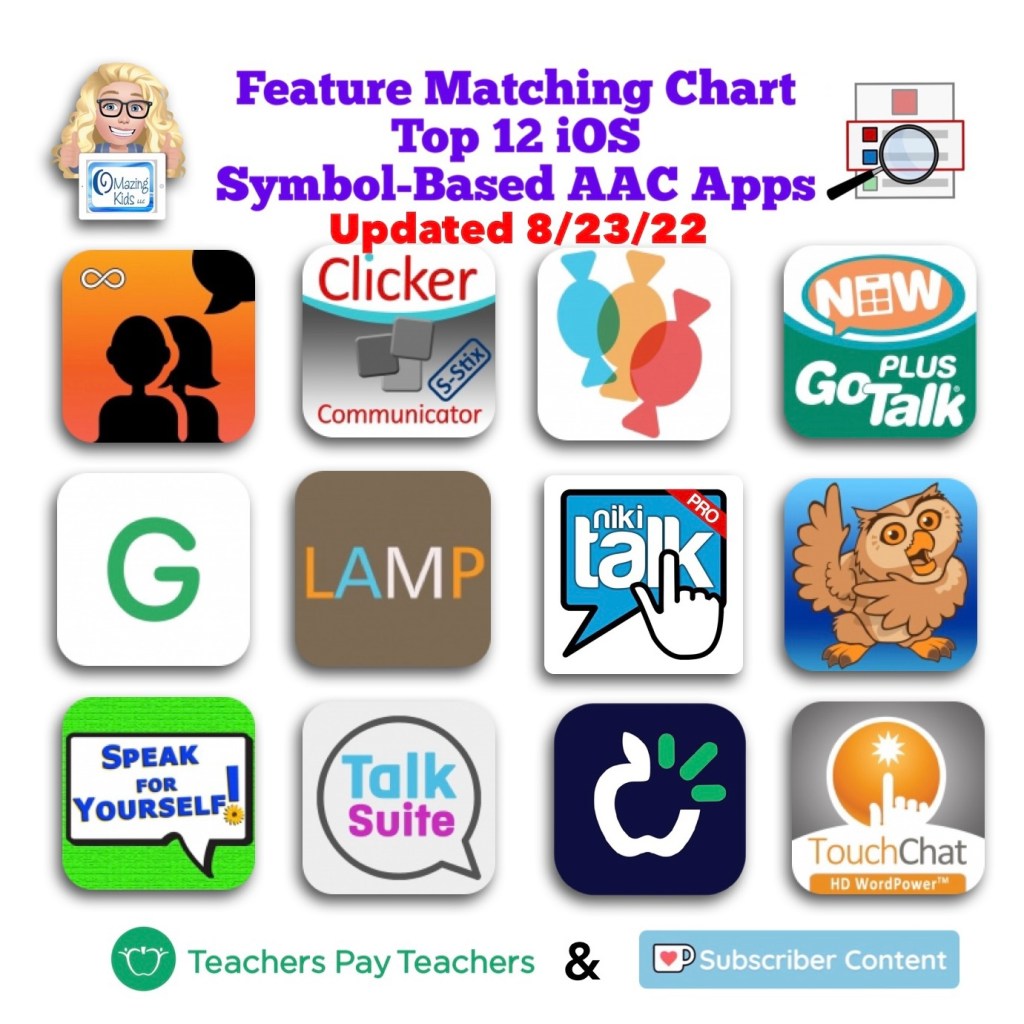
Updated Feature Matching Chart for the Top 12 Robust iOS Symbol-Based AAC Apps (8/23/22)

🎉 Resource Update Alert 🎉 8/23/22 Updated Feature Matching Chart for the Top 12 Robust iOS Symbol-Based AAC Apps. Those who have previously purchased this resource can download the latest version for no additional cost on TPT: https://bit.ly/SymbolBasedAACapps.

Current Ko-fi subscribers can access the latest update on today’s post: https://ko-fi.com/post/Update-for-iOS-Symbol-Based-AAC-Feature-Matching-C-K3K4EKXN5 or on the pinned post: https://ko-fi.com/Post/Links-to-posts-about-most-current-feature-matching-F1F5C9DMD


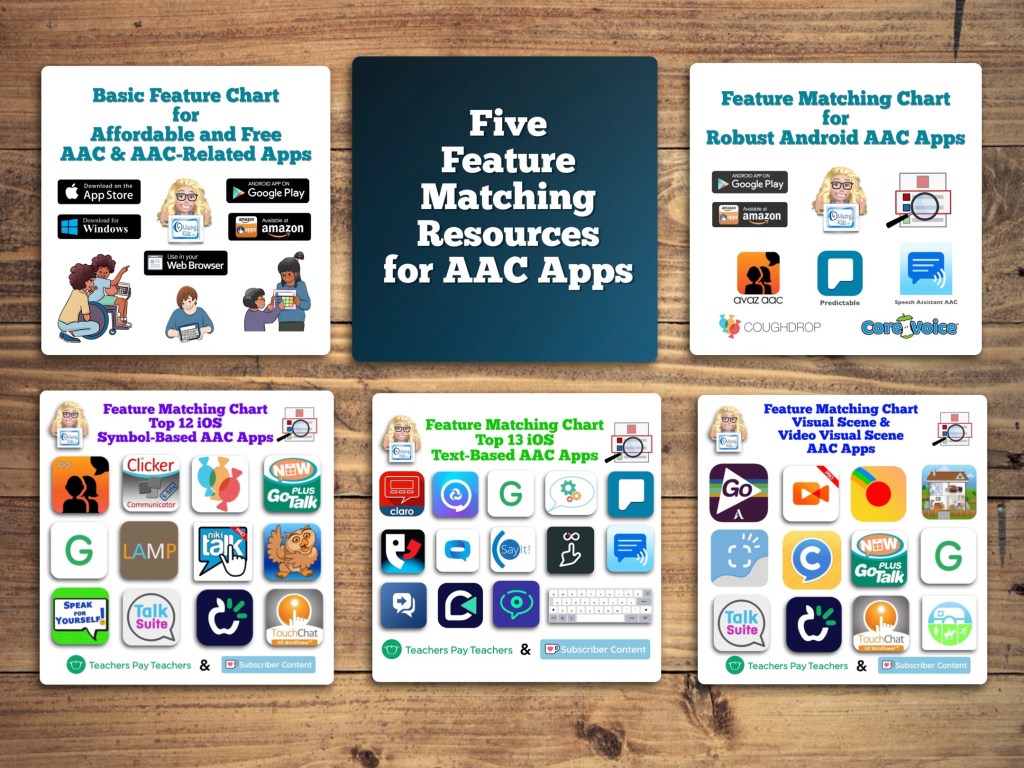
Want more info? See this blog post: Five Feature Matching Resources for AAC Apps (comparing features in AAC apps) + several videos comparing AAC apps across platforms (iPad, Android, Amazon Fire, Windows), https://bit.ly/5aacFeatureMatchingResources


Navigating Through AAC App Options (Recorded Webinar + Interactive Handout): https://bit.ly/NavigatingThruAACapps


Have a question? The best way to reach me is via Facebook messaging over on my OMazing Kids page: https://www.facebook.com/OMazingKidsAAC/


Angela Moorad, MS, CCC-SLP, Founder of OMazing Kids, LLC, OMazing Kids AAC Consulting

• Teachers Pay Teachers Store: https://www.teacherspayteachers.com/Store/Omazing-Kids-Aac-Consulting

• YouTube: https://youtube.com/user/amoorad1

• Ko-Fi: https://ko-fi.com/omazingkidsaac

• OMazing Kids AAC Consulting Facebook Page: https://www.facebook.com/OMazingKidsAAC/

• AppPeeps Facebook Group: https://www.facebook.com/groups/OMazingKidsAppPeeps/

• GoTalk Now AAC & GoVisual Visual Scene Apps – Ideas and Sharing Facebook Group: https://bit.ly/GoTalkNowAACappGroup

• Instagram: https://www.instagram.com/omazingkidsaac

• Twitter: https://www.twitter.com/amoorad

• Pinterest: http://pinterest.com/OMazingKids/

• Linktree: https://linktr.ee/amoorad1

• LinkedIn: https://www.linkedin.com/in/angelamooradomazingkidsaac

• Blog: https://omazingkidsllc.com
Affordable AAC: Amazon Fire vs. Android vs. iPad

In addition to creating communication boards, flip books and true object based icons for non-tech AAC, I look at using whatever tech an individual has and finding a good affordable option to put on that so they have something to use immediately.

These can be helpful to use until an AAC eval can be completed, until a more robust option can be purchased, to meet a short term need or as a secondary tool to offer features that might not be available in their main AAC device, etc.

Or this may be what they use long term. Unfortunately not everyone has access to getting an AAC eval or options for funding more robust AAC so there are individuals who may rely on these affordable devices and apps as their only option.

It is also a reality that not everyone can afford an iPad so that’s why this blog post covers the three main app stores.

This is intended to give you a *general* idea of the overall cost of purchasing AAC for use on Amazon Fire vs. Android vs. iPad.


Total cost of a good model of tablet + good case with a rotating stand + a robust symbol-based AAC app:

• Amazon Fire: $310.00

• Android: $480.00

• iPad: $520.00

Prices would be $100 less if purchasing the app during a 50% off sale (typically in April and October). Additional savings if purchasing a tablet or iPad during a sale. These prices don’t include any extras like in-app purchases for premium symbols, premium voices, extra pagesets / vocab files, Apple Care, a screen protector or a extremely protective case, etc…


If the cost of purchasing a robust AAC app is too high even during a sale, consider a robust app that offers a monthly subscription or check out the “Basic Feature Chart for Affordable and Free AAC apps & AAC-Related Apps (iOS, Android Google Play, Amazon Fire, Windows + a few Web-Based options)” (everything featured in that resource is priced under $10.00 and many are free)


How I came up with these numbers …

This is a cost comparison based on prices of devices and cases that I purchased and is just a general comparison. Avaz and CoughDrop are used in this comparison since they are the most robust symbol-based AAC apps available across all three platforms. Prices will vary based on the AAC app and whether or not you wait to purchase during sales.

Amazon Fire Tablet:

Amazon Fire HD 8 Tablet (2020 release): https://a.co/d/j0doVDO, $89.99 ($44.99 during Amazon Prime Days Sale)

Pepkoo Case: https://a.co/d/gyG3ZY9, $18.99

Total: $108.98 ($63.98 during Amazon Prime Days Sale)

Robust symbol-based AAC app options:

• Avaz (Free app, 2 week free trial, then subscription ($9.99/mo or $99.99/yr) or a one time $199.99 purchase), side loaded from Google Play App Store

• CoughDrop (Free app, 2 month free trial, then subscription ($6/mo) or one-time purchase ($200). More info about their other subscription options: https://bit.ly/3h8aEC1)

• CoreVoice: $49.99

Total cost of tablet + case + robust symbol-based AAC app:

~ $158.97 – $308.98 (or as low as $113.97 – $163.98 if you get the tablet on sale and get Avaz or CoughDrop when they are 50% off – typically in April & in October).


Android Tablet:

Samsung Galaxy Tab S6 Lite 10.4″, 64GB: https://a.co/d/07JEMhI, $249.99 (the price has gone down since I purchased mine for $299)

Case with rotating stand (similar to the Pepkoo). I ended up purchasing one on eBay (https://www.ebay.com/itm/374088538546. Sadly that case is out of stock. I contacted the seller on eBay and they won’t be getting any more). It’s difficult to find cases with this type of rotating stand for the Samsung Galaxy Tab S6 Lite 10.4” Android tablet. I found this one but haven’t seen it in person: https://www.ebay.com/itm/114920453285, $28.99

Total: ~ $278.98

Updated 9/20/22: Looking for an affordable option for pocket-sized AAC? Many users prefer to just add an app to their iPhone or Android phone but some settings don’t allow phones (or it would be a battle to get an exception). The iPod Touch used to be my “go to” option for this. Since the iPod Touch was discontinued I purchased an Android Samsung Galaxy A03s (prepaid TracFone that has NOT been activated for cellular service) on Amazon. Shout out to Karen Erickson for sharing that idea in a comment in the AAC for the SLP group. It was only $59.88 and essentially gives me an Android equivalent to an iPod Touch (which Apple has discontinued) for pocket-sized AAC. I added a $12.99 case that has a tiny ring stand and sliding cover for the camera. So for $72.87 (+ the cost of the app) I have a very affordable pocket-sized AAC device: https://omazingkidsllc.com/2022/09/20/affordable-pocket-sized-android-aac/


Robust symbol-based AAC app options:

• Avaz (Free app, 2 week free trial, then subscription ($9.99/mo or $99.99/yr) or a one time $199.99 purchase)

• CoughDrop (Free app, 2 month free trial, then subscription ($6/mo) or one-time purchase ($200). More info about their other subscription options: https://bit.ly/3h8aEC1)

• CoreVoice: $49.99

Total cost of tablet + case + robust symbol-based AAC app:

~ $328.97 – $478.98 (or $378.98 if you get Avaz or CoughDrop when they are 50% off – typically in April & in October)


iPad:

iPad 9th gen, 64GB: https://a.co/d/3VSOLY7, $299

Pepkoo case: https://a.co/d/curQA4K, $20.99

OR

If you also need a shoulder carrying strap look at the Pepkoo Triple Shockproof Case: https://a.co/d/0RyWDMz, $26.99

Total: ~ $319.99 – $325.99

Robust symbol-based AAC app options:

• Avaz: Free app, 2 week free trial, then $9.99/mo or $99.99/yr subscription or $199.99 one time purchase

• Clicker Communicator: $199.99

• CoreVoice: $49.99

• CoughDrop: Free app, 2 month free trial, then $6/mo subscription or $200 one time purchase. More info about their other subscription options: https://bit.ly/3h8aEC1

• GoTalk Now / GoTalk Now Plus: $99.99 / $169.99

• Grid for iPad: free version with 30 day free trial, then $10.99/mo subscription or $399.99 one time purchase

• LAMP Words for Life: $299.99

• Niki Talk 2 Pro: $89.99

• Proloquo + Proloquo Coach: free app, 30 day free trial, then $9.99/mo or $99.99/yr subscription

• Proloquo2Go: $249.99

• Speak for Yourself: free version with 30 day free trial, then $299.99 one time purchase

• Talk Suite Pro: $199.99

• TD Snap: free version with 60 day free trial, then $49.99 one time purchase

• TouchChat with WordPower: free version with 30 day free trial, then $299.99 one time purchase

Total cost of iPad + case + robust symbol-based AAC app:

~ $369.98 – $725.98 (varies depending on the app, some of these apps are ~50% off twice a year. As a comparison to the Amazon & Android versions, the total if you got Avaz or CoughDrop for 50% off = ~ $419.99

If you are looking for a cost comparison of digital PODD options see this post: https://omazingkidsllc.com/2021/01/09/review-comparison-of-features-in-digital-podd-ipad-apps-in-2021-simpodd-grid-for-ipad-snap-core-first-and-podd-with-compass/


Updated 10/18/22

Apple launched the iPad 10th gen today (10/18/22). Unfortunately they changed the size. It’s 10.9” instead of 10.2”.

Which means the cases that we have been using/recommending for the 7th gen/8th gen/9th gen iPads won’t fit the 10th gen.

It might be awhile before case manufacturers get good cases for the 10th gen on the market. Especially cases with the features that we want for AAC users.

Apple also raised the price by $120.

  • 10th gen, 64GB: $449
  • 9th gen, 64G: $329

Amazon currently has the 9th gen, 64GB iPad on sale for $269: Limited-time deal: 2021 Apple 10.2-inch iPad (Wi-Fi, 64GB) – Silver https://a.co/7YHiqTO

<< sigh >> 😢

I had hoped that Apple would continue to leave that base model iPad at the same size and price since we had been having a good multi-year run of Apple leaving the base model iPad specs alone. So on the verge of a recession they decided that it’s time for a $120 price jump and put stress on case manufacturers with the size change. This is why we have lost so many great case options over the years (GripCase, LifeProof Nüüd, etc..). Apple claims to care about accessibility but then is this clueless 🙄😢

If you know someone who was thinking about getting an iPad for AAC, I’d let them know so they can get a good price on the 9th gen before those are no longer available


Windows: The cost would vary greatly depending on the type of tablet or laptop purchased. The Windows tablet that I purchased would not be durable enough for primary use for AAC.


This post is not implying that price should be the sole factor when choosing AAC but it is acknowledging that in real life many folks have to purchase this on their own and price is a factor.


How to Install the Google Play Store on an Amazon Fire Tablet: https://www.howtogeek.com/232726/how-to-install-the-google-play-store-on-your-amazon-fire-tablet/ (I like that he keeps that post updated. Pay close attention to the instructions for your exact model of tablet & follow the precise instructions)

Tips: If you are using an Android tablet & an Amazon Fire Tablet with the Google Play App Store side loaded, be sure to toggle on Family Sharing before making app purchases & make the purchases from the Google Play App Store on your Amazon Fire Tablet. Those have been recognized by Google Play on my Android tablet. The reverse was hit and miss (likely due to the side loading).


In-depth post about the Pepkoo cases: https://omazingkidsllc.com/2021/04/30/pepkoo-ipad-8th-gen-case-features/


A series of three videos comparing AAC options across four platforms: Apple iOS, Android Google Play, Amazon Fire & Windows:


* Comparison of voice loudness and quality for AAC: iPad, Samsung Android, Amazon Fire & Windows (4:20):

* Considerations for AAC on Different Platforms: iPad, Android, Amazon Fire & Windows (6:17):

* A look at AAC options across platforms: Windows, Amazon Fire, Android Google Play, Apple (12:55):

* Comparison of Samsung tablet vs Samsung phone:


Those who have access to a funding source and want in-depth info about the features in AAC apps should read: Five Feature Matching Resources for AAC Apps (comparing features in AAC apps) + several videos comparing AAC apps across platforms (iPad, Android, Amazon Fire, Windows), https://omazingkidsllc.com/2022/08/10/five-feature-matching-resources-for-aac-apps-comparing-features-in-aac-apps-several-videos-comparing-aac-apps-across-platforms-ipad-android-amazon-fire-windows/


Have a question? The best way to reach me is via Facebook messaging over on my OMazing Kids page: https://www.facebook.com/OMazingKidsAAC/

Angela Moorad, MS, CCC-SLP, Founder of OMazing Kids, LLC, OMazing Kids AAC Consulting

• Teachers Pay Teachers Store: https://www.teacherspayteachers.com/Store/Omazing-Kids-Aac-Consulting

• YouTube: https://youtube.com/user/amoorad1

• Ko-Fi: https://ko-fi.com/omazingkidsaac

• OMazing Kids AAC Consulting Facebook Page: https://www.facebook.com/OMazingKidsAAC/

• AppPeeps Facebook Group: https://www.facebook.com/groups/OMazingKidsAppPeeps/

• GoTalk Now AAC & GoVisual Visual Scene Apps – Ideas and Sharing Facebook Group: https://bit.ly/GoTalkNowAACappGroup

• Instagram: https://www.instagram.com/omazingkidsaac

• Twitter: https://www.twitter.com/amoorad

• Pinterest: http://pinterest.com/OMazingKids/

• Linktree: https://linktr.ee/amoorad1

• LinkedIn: https://www.linkedin.com/in/angelamooradomazingkidsaac

• Blog: https://omazingkidsllc.com
New Resource: Basic Feature Chart for Affordable and Free AAC apps & AAC-Related Apps (iOS, Android Google Play, Amazon Fire, Windows + a few Web-Based options)

This new resource was inspired by the frequent requests that I receive for info about less expensive options and for info about apps for devices beyond just the iPad. Everything featured in this chart is priced under $10


Available on TPT: https://www.teacherspayteachers.com/Product/Basic-Feature-Chart-for-Affordable-and-Free-AAC-apps-AAC-Related-Apps-8327157

Recurring Ko-fi subscribers can find the free download link on this post: https://ko-fi.com/post/Basic-Feature-Chart-for-Affordable-and-Free-AAC-Y8Y7E02Q1 or https://ko-fi.com/Post/Links-to-posts-about-most-current-feature-matching-F1F5C9DMD


It has 11 columns with the following info for each app:

• App Name

• App Store link(s)

• Website

• Price

• Is it Robust (Yes, Partially, No, or Not applicable)

• Type of App

• Type of Keyboard

• Voice Options (includes option for Recorded Speech)

• Option to Play Videos

• Backup & Sharing capabilities

• Basic info about other features in the app. For iOS, it includes info about device compatibility and minimum iOS requirements


There are 123 rows with apps available across each of the major platforms: Apple App Store, Google Play, Amazon & Windows + a few Web-Based options


Why this is helpful to you is I have done all of the digging and sifted through hundreds of apps to get you straight to the ones worth considering. This is a vetted resource where everything was tested on my personal devices.


Preview video:


See the description on my TPT store for more info about this new resource and why it was created.


Have a question? The best way to reach me is via Facebook messaging over on my OMazing Kids page: https://www.facebook.com/OMazingKidsAAC/


Angela Moorad, MS, CCC-SLP, Founder of OMazing Kids, LLC, OMazing Kids AAC Consulting

• Teachers Pay Teachers Store: https://www.teacherspayteachers.com/Store/Omazing-Kids-Aac-Consulting

• YouTube: https://youtube.com/user/amoorad1

• Ko-Fi: https://ko-fi.com/omazingkidsaac

• OMazing Kids AAC Consulting Facebook Page: https://www.facebook.com/OMazingKidsAAC/

• AppPeeps Facebook Group: https://www.facebook.com/groups/OMazingKidsAppPeeps/

• GoTalk Now AAC & GoVisual Visual Scene Apps – Ideas and Sharing Facebook Group: https://bit.ly/GoTalkNowAACappGroup

• Instagram: https://www.instagram.com/omazingkidsaac

• Twitter: https://www.twitter.com/amoorad

• Pinterest: http://pinterest.com/OMazingKids/

• Linktree: https://linktr.ee/amoorad1

• LinkedIn: https://www.linkedin.com/in/angelamooradomazingkidsaac

• Blog: https://omazingkidsllc.com
RadSounds – Cause and Effect App (direct touch and switch accessible)

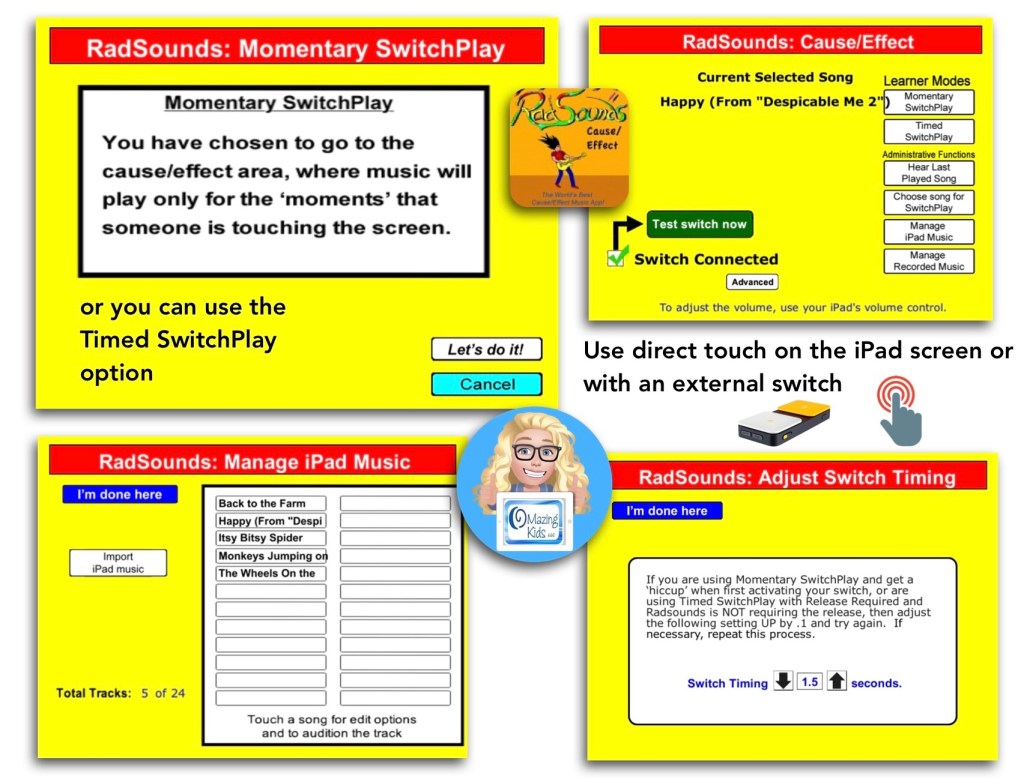
The RadSounds – Cause and Effect app has a Momentary SwitchPlay option that can be used to only play the music while the screen is being touched or switch is being pressed.

It also has a Timed option to allow music to play without having to hold down the switch or touch the screen the whole time.

Surprisingly the app works on the latest iOS (iPadOS 15.3.1) even though it’s been quite awhile since the app has been updated.


Demo video:


The iPad-only app is very affordable (has been priced at $1.99 in the USA App Store since 9/15/17): https://apps.apple.com/us/app/radsounds-cause-effect/id420977569.


Have questions? The best way to reach me with any questions is via messaging on the OMazing Kids Facebook page: https://www.facebook.com/OMazingKidsAAC/. That way AAC related messages don’t get lost among the spam in my e-mail.


Angela Moorad, MS, CCC-SLP, Founder of OMazing Kids, LLC, OMazing Kids AAC Consulting

Ultimate App and Digital Resource Guide for SLPs

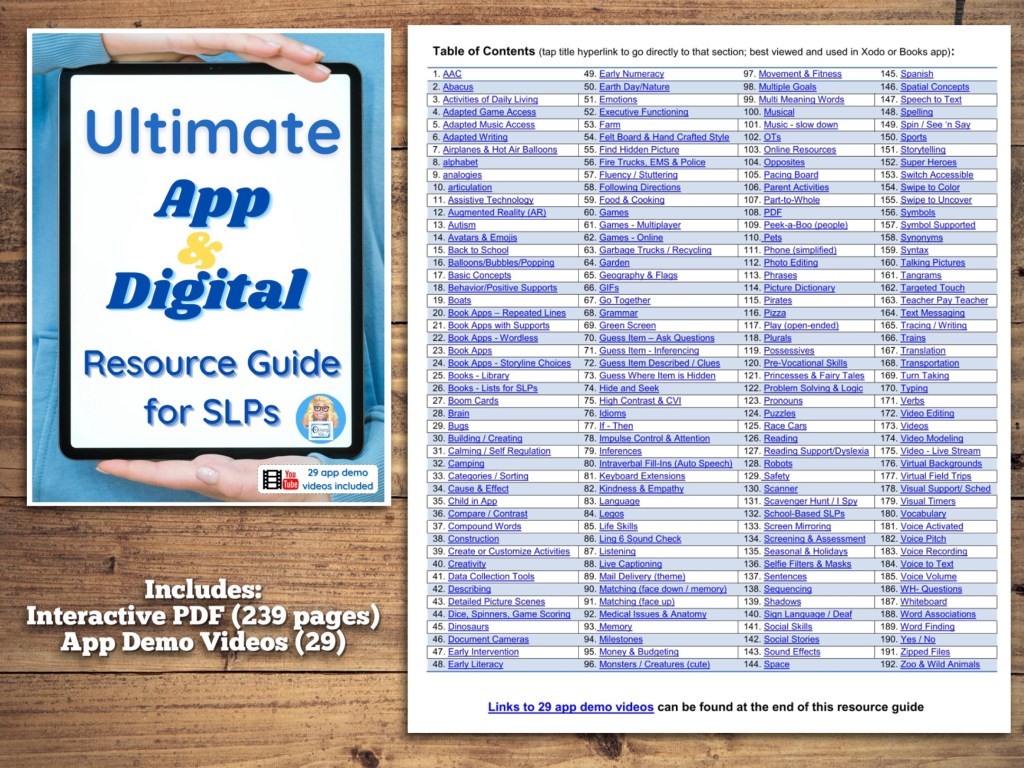
Want info about hundreds of apps and digital resources at your fingertips? Check out this brand new item on my TPT store: Ultimate App and Digital Resource Guide for SLPs, https://www.teacherspayteachers.com/Product/Ultimate-App-and-Digital-Resource-Guide-for-SLPs-7267356.

It’s on sale for 25% off for its debut in my store. It will go up to full price on 10/22/21.

It includes:

• Interactive PDF (239 pages with linked Table of Contents) full of hundreds of apps and digital resources organized by goal areas and themes

• App Demo Videos (29 unlisted YouTube videos)

See the full product description on TPT for more info.


Have a question? The best way to reach me is via Facebook messaging over on my OMazing Kids page: https://www.facebook.com/OMazingKidsAAC/


Angela Moorad, MS, CCC-SLP, Founder of OMazing Kids, LLC, OMazing Kids AAC Consulting

Teachers Pay Teachers Store: https://www.teacherspayteachers.com/Store/Omazing-Kids-Aac-Consulting

YouTube: https://youtube.com/user/amoorad1

Ko-Fi: https://ko-fi.com/omazingkidsaac

OMazing Kids AAC Consulting Facebook Page: https://www.facebook.com/OMazingKidsAAC/

AppPeeps Facebook Group: https://www.facebook.com/groups/OMazingKidsAppPeeps/

Instagram: https://www.instagram.com/omazingkidsaac

Twitter: https://www.twitter.com/amoorad

Pinterest: http://pinterest.com/OMazingKids/

Linktree: https://linktr.ee/amoorad1

Tech Tips: AAC & “Screen Time”

Have you encountered resistance to AAC use due to someone thinking that all “screen time” is bad?

Or they want to limit AAC options to only low-tech or no-tech out of a misguided fear that AAC use would expose them to “screen time” that could inhibit their development?

This free handout will help you dispel those myths with easy to understand info about the differences between active and passive screen time, key discussion points and links to where you can find more info from the American Speech Language and Hearing Association & the US Department of Education.

It’s available as a freebie on my TPT store: https://bit.ly/3xAqYCi


Want to save time and have tons of AAC info at your fingertips?

Check out info and shout outs for my Feature Matching Chart for the Top 11 iOS Symbol-Based AAC Apps: https://omazingkidsllc.com/2021/07/20/feature-matching-chart-for-the-top-11-robust-ios-symbol-based-aac-apps/.

It’s available for purchase here on my TPT store: https://www.teacherspayteachers.com/Product/Feature-Matching-Chart-for-the-Top-11-Robust-iOS-Symbol-Based-AAC-Apps-6867853


Have questions? The best way to reach me with any questions is via messaging on the OMazing Kids Facebook page: https://www.facebook.com/OMazingKidsAAC/. That way messages don’t get lost among the spam in my e-mail.


Angela Moorad, MS, CCC-SLP, Founder of OMazing Kids, LLC, OMazing Kids AAC Consulting

Teachers Pay Teachers Store: https://www.teacherspayteachers.com/Store/Omazing-Kids-Aac-Consulting

YouTube: https://youtube.com/user/amoorad1

Ko-Fi: https://ko-fi.com/omazingkidsaac

OMazing Kids AAC Consulting Facebook Page: https://www.facebook.com/OMazingKidsAAC/

AppPeeps Facebook Group: https://www.facebook.com/groups/OMazingKidsAppPeeps/

Instagram: https://www.instagram.com/omazingkidsaac

Twitter: https://www.twitter.com/amoorad

Pinterest: http://pinterest.com/OMazingKids/

Linktree: https://linktr.ee/amoorad1

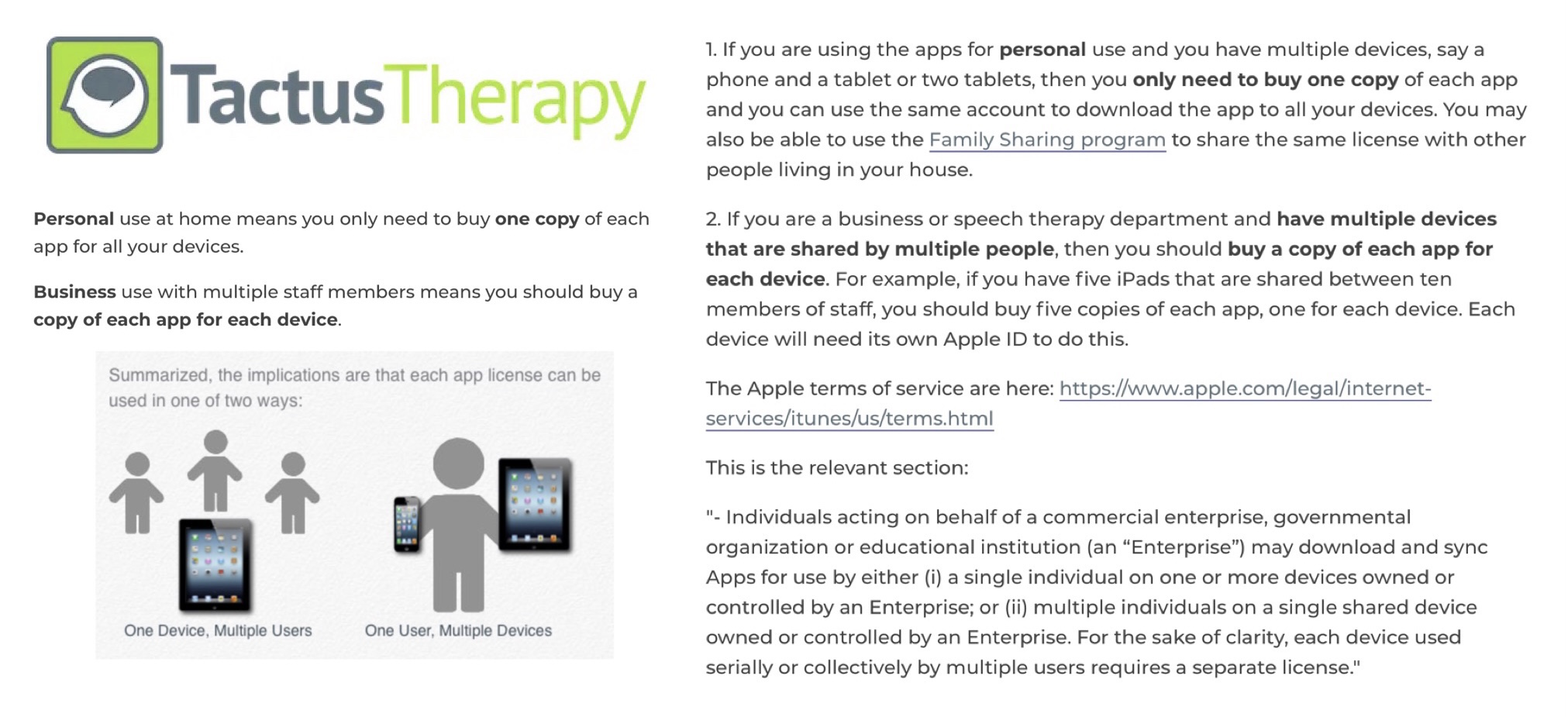
Tech Tips: Installing iOS Apps on Multiple Devices

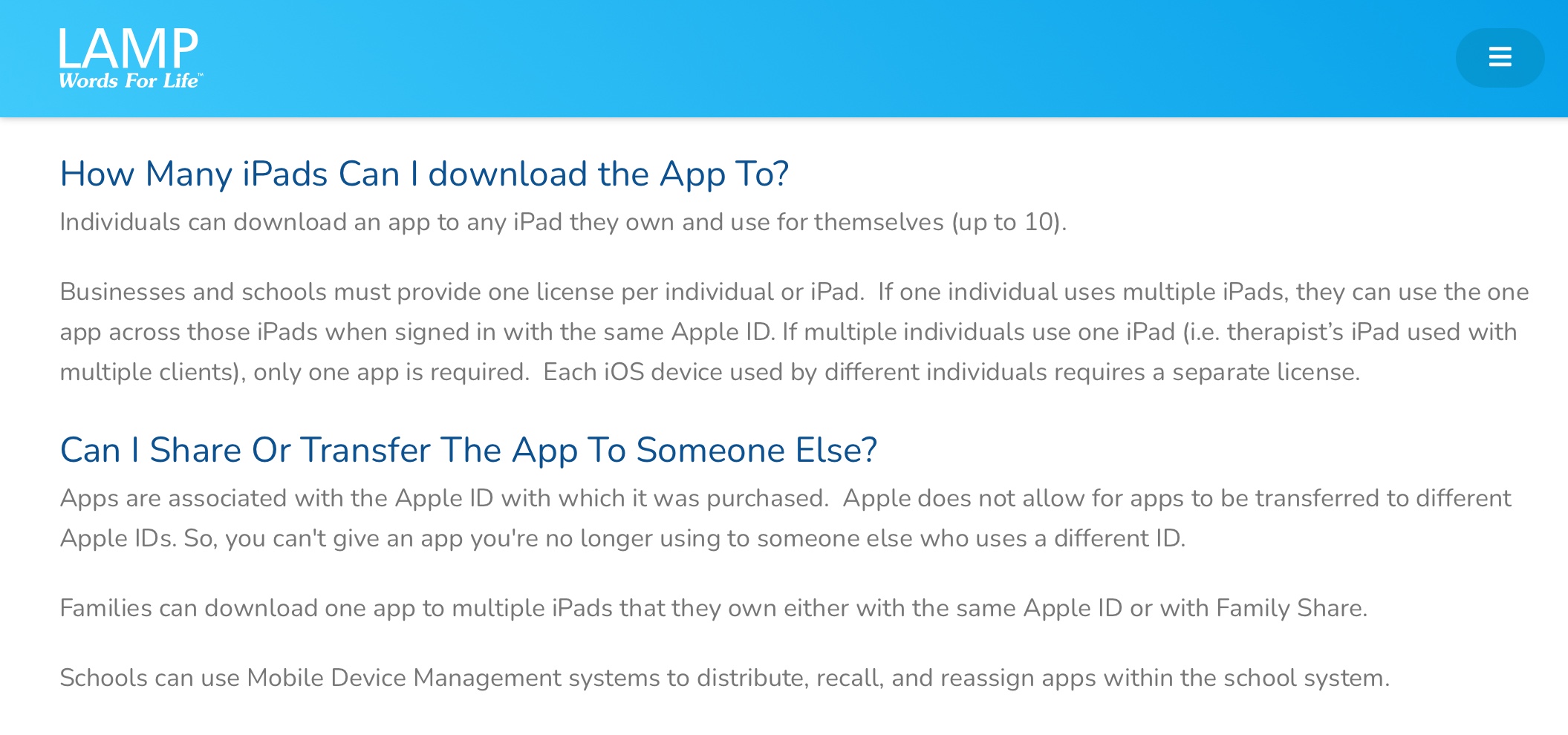
Have you ever wondered how many devices you can load an iOS app on? Or the legalities surrounding app usage?

The new website for LAMP Words for Life has a nice simple summary. Here’s a screenshot:

https://lampwflapp.com/support/faqs.

Most major AAC app developers have similar info on their website or defer to the Apple info linked below.


I also frequently share this easy to understand info from Tactus Therapy:

https://help.tactustherapy.com/hc/en-us/articles/360024699251-We-have-lots-of-devices-How-many-copies-or-licenses-of-each-app-should-I-buy-


If you want to read more in-depth legal descriptions about this, read the Apple Media Services Terms and Conditions: https://www.apple.com/legal/internet-services/itunes/us/terms.html.

See more about devices associated with an Apple ID: https://support.apple.com/en-us/HT204074. You can have up to ten devices (no more than five computers) associated with your Apple ID for purchases at one time.

And info about Family Sharing for those in the household: https://www.apple.com/family-sharing/ (FYI…. in-app purchases and subscriptions may not be eligible for Family Sharing)

School systems and other organizations can get a discount when purchasing apps in bulk. See the Apple School Manager info: https://support.apple.com/guide/apple-school-manager/how-to-buy-content-apde19b23f7f/1/web/1 (also: https://support.apple.com/en-us/HT206960 & https://www.apple.com/business/docs/site/Apple_Business_Manager_Getting_Started_Guide.pdf)


Note: Rules regarding app usage may vary outside of the USA


If you are looking for a way to share customized programming with another person who owns an app, check that AAC app company’s website.

Want to save time and have all of that info (and so much more) at your fingertips? Check out my Feature Matching Chart for the Top 11 iOS Symbol-Based AAC Apps: https://omazingkidsllc.com/2021/07/20/feature-matching-chart-for-the-top-11-robust-ios-symbol-based-aac-apps/


This info is also available as a FREE handout on my TPT store: https://www.teacherspayteachers.com/Product/Tech-Tips-Installing-iOS-Apps-on-Multiple-Devices-7127363


Have questions? The best way to reach me with any questions is via messaging on the OMazing Kids Facebook page: https://www.facebook.com/OMazingKidsAAC/. That way messages don’t get lost among the spam in my e-mail.


Angela Moorad, MS, CCC-SLP, Founder of OMazing Kids, LLC, OMazing Kids AAC Consulting

Teachers Pay Teachers Store: https://www.teacherspayteachers.com/Store/Omazing-Kids-Aac-Consulting

YouTube: https://youtube.com/user/amoorad1

Ko-Fi: https://ko-fi.com/omazingkidsaac

Personal Professional Facebook Page (linked to OMazing Kids): https://www.facebook.com/angela.moorad (adding “friends” who have a direct role in AAC or Assistive Technology – AAC / AT app or product developers, AAC / AT consultants, SLPs who specialize in AAC, other professionals who specialize in AAC or AT, etc.)

OMazing Kids AAC Consulting Facebook Page: https://www.facebook.com/OMazingKidsAAC/

AppPeeps Facebook Group: https://www.facebook.com/groups/OMazingKidsAppPeeps/

Instagram: https://www.instagram.com/omazingkidsaac

Twitter: https://www.twitter.com/amoorad

Pinterest: http://pinterest.com/OMazingKids/

Linktree: https://linktr.ee/amoorad1

Tech Tips: Troubleshooting iPad Sound Problems

Having issues with sound on your iPad? Here’s a free handout for some things to try: https://www.teacherspayteachers.com/Product/Tech-Tips-Troubleshooting-iPad-Sound-Problems-6922686


Not on Teachers Pay Teachers? You can also download the free PDF from my blog: https://omazingkidsllc.com/wp-content/uploads/2021/06/tech-tips-troubleshooting-ipad-sound-problems.pdf


Have questions? The best way to reach me with any questions is via messaging on the OMazing Kids Facebook page: https://www.facebook.com/OMazingKidsAAC/. That way messages don’t get lost among the spam in my e-mail.


Angela Moorad, MS, CCC-SLP, Founder of OMazing Kids, LLC OMazing Kids AAC Consulting

Teachers Pay Teachers Store: https://www.teacherspayteachers.com/Store/Omazing-Kids-Aac-Consulting

Ko-Fi: https://ko-fi.com/omazingkidsaac

Personal Professional Facebook Page (linked to OMazing Kids): https://www.facebook.com/angela.moorad (adding “friends” who have a direct role in AAC or Assistive Technology – AAC / AT app or product developers, AAC / AT consultants, SLPs who specialize in AAC, other professionals who specialize in AAC or AT, etc.)

OMazing Kids Business Facebook Page: https://www.facebook.com/OMazingKidsAAC/

AppPeeps Facebook Group: https://www.facebook.com/groups/OMazingKidsAppPeeps/

Instagram: https://www.instagram.com/omazingkidsaac/

Twitter: https://www.twitter.com/amoorad

Pinterest: http://pinterest.com/OMazingKids/

Linktree: https://linktr.ee/amoorad1

Blog: http://omazingkidsllc.com


iPad Cases with Rotating Stand for iPad 7th gen / 8th gen / 9th gen: Pepkoo & Rug-Ed Buddy 10. Pepkoo for iPad 10th gen. & iPad Air 11” (M2) 2024 (plus cases for Samsung Galaxy Tab S6 Lite tablet, Samsung Galaxy A03s phone, Amazon Fire HD 8 tablet & Microsoft Surface Go 2) – updated 6/16/25

I recently bought this Pepkoo case for my new iPad (8th gen) and here’s what I LOVE about it:

https://youtu.be/83R_tk-5aig

* Nice thick foam with a similar “feel” as my GripCase, deep recessed openings and comfortable shape on the back (easy to hold)

* Good quality plastic case edging around the front of the iPad that does NOT have a built in plastic screen protector. If needed, you could add a Zagg (or other high quality) tempered glass screen protector to your iPad before putting it in the case.

* Built-in stand that can rotate 360 degrees so it can accommodate AAC apps in Portrait and Landscape orientation. The stand lays flush when pushed in so the case doesn’t wobble when it’s used flat on the table / desk.

* Comes in four color combos:

– Green Blue (as seen in this video)

– Blue Mint

– Pink Purple

– Gray Black

* Affordable ($19.99 – $20.99 varies based on the color, prices may vary outside the USA and prices tend to vary over time on Amazon)

Update: I just checked again on Amazon and it now shows that this case also fits the iPad 9th gen model

PEPKOO Kids Case for iPad 9th 8th 7th Generation 10.2 inch 2021 2020 2019 – Lightweight Flexible Shockproof, Folding Handle Stand, Full Body Boy Girl Cover for Apple iPad 9th 8th 7th Gen, Green Blue https://smile.amazon.com/dp/B08CKCF5FG/ref=cm_sw_r_em_api_glt_i_S8YEV5D6DJ1C2X92RTVZ?psc=1

Update 10/29/24: The Pepkoo case is now available under a different seller’s store on Amazon. Not sure why. Here’s the link:

NLR FUN Pepkoo Kids EVA Case for iPad | Multi-Direction Stable Stand | Compatible with 10.2-Inch iPad 2021/2020/2019 (9th/8th/7th Generation) (Green+Blue) 
https://a.co/d/0MFeq6i


Update 10/29/24: When I messaged the maker of the Pepkoo case on Amazon a few months ago they indicated they were not going to offer a version for the iPad 10th generation. Well it turns out that wasn’t entirely true. There IS one available for that model but it’s under a different company name: NLR Fun. Here’s the link. I just ordered one for my new iPad 10th gen. I’ll add more details about it after it arrives.

NLR Fun Pepkoo Kids Case for iPad, Shockproof Cover for 10.9” iPad 10th Generation (2022), Lightweight Full Body Protective Case with Foldable Handle/Stand (Blue+Green): https://a.co/d/9KEe4YS (also available in Green-Blue, Grey-Black, Mint-Orange, and Pink-Blue. Price: $20.99 (prices and availability may vary outside of the USA)

I was excited that this case has the same design and feel as the one that I got back in 2021. The same nice thick foam and great rotating ring stand. The only flaw is there’s no way to use fingerprint recognition to unlock the iPad or other purposes. The sensor requires your whole finger to lay flat on it.

The opening is too deep to allow use of the fingerprint sensor
The forward facing camera is at the top when in Landscape orientation to support use of the integrated eye tracking in iPadOS 18
High contrast version of the Voco Chat grid set in Grid for iPad
The Default scrolling board in Weave Chat AAC
The Morgan Board in Weave Chat AAC

How I hacked a NLR Fun Pepkoo 10.9” iPad 10th Generation (2022) case to work with an iPad Air 11” (M2) 2024: https://bit.ly/HackPepkooCase4iPadAirM2-2024


Pepkoo case for iPad Air 11” (M2) 2024

Updated 2/21/25: Great news! NLR Fun finally released a Pepkoo case specifically for the iPad Air 11” (M2) 2024. I bought it on Amazon and am glad that I did. It fits perfectly and allows the fingerprint ID button to work since it’s not as thick as the case that I had hacked.

https://a.co/d/fQ7saSF ($22.99, I got it on sale for $20.99)


Here are some additional pictures of the Pepkoo for the iPad 7th, 8th and 9th gen…

When held in Landscape orientation, the thickest part of the border (plastic + foam) on each side is about 1.25” (closer to 1.5” at the corners)

When held in Landscape orientation, it’s about .5” border (plastic and foam)

The back of the case. The stand lays flush enough that it doesn’t wobble when the case is laid flat on the back on a table or desk.

The stand is easy to pop out and can be rotated 360 degrees. This is in Landscape orientation at one angle

This is also Landscape orientation at a different angle.

The stand can also lay flat and up to be used as a carrying handle.


It is also available for the iPad Mini 5: https://www.amazon.com/dp/B08M9W4KHR/ref=cm_sw_r_cp_api_glt_fabc_7XSQV6G7VT8PMNGPEYCW?psc=1


Unfortunately they never offered a Pepkoo case for the iPad Mini 6 or iPad Mini 7. This case looks similar so it might be worth trying: Kids Case for iPad Mini 7 (A17 Pro) 2024 / Mini 6th Gen 2021 8.3 inch: https://a.co/d/atY5UeP (I have not personally tried this case since I don’t own an iPad Mini 6 or iPad Mini 7… just sharing it as a a similar style of case)


Update 1/27/24: See this post by a parent describing how the Pepkoo + a tempered glass screen protector protected her son’s iPad AAC device during a fall down 5 flights of stairs:

https://www.facebook.com/story.php/?id=100084827601023&story_fbid=346895681481349


The only thing missing is a carrying strap but I’ve seen Christine Baudin, SLP share a hack about drilling holes in the top edge of thick foam cases to add a strap.

She has a video that shows how she drilled holes into the top to attach a strap.

Here’s the strap that she used: https://www.amazon.com/dp/B08B8PZ8KT

Another option if you want much thicker attachments: https://www.amazon.com/dp/B07DY2S52Z.


Pepkoo case
Pepkoo case

Updated 2/4/24: Christine shared pics of the same hack working to drill holes to add a carrying strap to the Pepkoo case


Updated 7/15/22: If you need a case with a carrying strap see the other case that Pepkoo now offers ⬇️. (Note: The foam isn’t as thick though so I prefer the original Pepkoo case. You could use Christine’s hack to add a strap if you need one)


Update 7/15/22: I just saw a new version of the Pepkoo case that includes a carrying strap: PEPKOO Triple Shockproof Case for iPad 9th/8th/7th Generation 10.2 inch 2021/2020/2019, Air 3rd Generation 10.5 inch, Heavy Duty Cover with Pencil Holder, Handle Kickstand, Shoulder Strap, Navy Blue https://a.co/3ka4bIC (comes in lots of different colors)


Rug-Ed Buddy 10 case

Updated 10/22/22: Looking for a similar style case that can be purchased on a website that accepts Purchase Orders? Rug-Ed offers a Buddy 10 case. I won one in a giveaway and chose the Blue Mint color. It’s a beautiful color combo that those who want a more muted look will appreciate. I have my new iPad 9th gen in this case but it will also fit an iPad 8th gen and iPad 7th gen.

The Buddy 10 case is similar to a Pepkoo case but more muted colors, a little slimmer, has a spot to hold an Apple Pencil and the attached rotating stand doesn’t lay quite as flush as the one on the Pepkoo (so it may wobble a little if laid flat).

Rug-Ed offers 3 different styles of cases with an attached rotating stand:

Rug-Ed included 2 Premium Tempered Glass Screen Protectors with this case and offers a way to do bulk purchases: https://rug-ed.com/products/buddy-coming-soon-in-november-2021

Also available on Amazon: Rug-Ed Buddy iPad Case + 2 Tempered Glass Screen Protectors, Foam iPad Case for Kids, 360 Rotating Carrying Handle & Stand, Rugged Drop Protection, for Apple iPad 7th, 8th, 9th Generation, Blue Mint https://a.co/h4tdqKi


Updated 11/21/22: Looking for a protective sleeve that will fit the Pepkoo 10.2” and Rug-ed Buddy 10 cases? I finally found one. See my new blog post for details: https://omazingkidsllc.com/2022/11/21/perfect-tablet-sleeve-to-fit-the-rug-ed-buddy-10-or-pepkoo-10-2-ipad-case-7th-8th-9th-gen/


Updated 1/20/23: Looking for a cute crossbody bag that can hold the Pepkoo 10.2”, the Rug-Ed Buddy 10 or the Samsung Galaxy Tab S6 Lite in a similar style of case? The Vera Bradley Tablet Hipster is a great option. See my video. After I finished the video I discovered that my Google Pixelbook Go 13.3″ Chromebook will even fit in it.

.

6/16/25: Excited to add another vintage Vera Bradley “Tablet Hipster” to my collection. It can hold my Pixelbook Go 13.3″ Chromebook OR my Samsung Galaxy Tab A9+ 11″ 2024 in a Riaour case OR my iPad Air 11″ (M2) 2024 in a Pepkoo case.


Amazon Fire HD 8

Update 7/15/22: I bought an Amazon Fire HD 8 tablet during the recent Prime Days Sale and was thrilled to discover that a Pepkoo case was available for it. It doesn’t have the plastic edging around the screen which might make it easier for those needing to attach a keyguard for AAC use. PEPKOO Kids Case for Fire HD 8/HD 8 Plus Tablet, 10th Generation 2020 Release, https://a.co/j8fWelE


BORXJNM All-New Fire HD 10 Tablet Case for Kids(2023/2021 Release, 13th/11th Generation),Light Weight Shock Proof Handle Friendly 360 Rotating Grip Stand Kid-Proof Case (Blue) 
https://a.co/d/7BLeJNM


Samsung Galaxy Tab S6 Lite 10.4”

Update 7/19/22: I finally found a good case with a rotating stand for my Samsung Galaxy Tab S6 Lite 10.4” Android tablet. It’s very similar to the Pepkoo: https://www.ebay.com/itm/374088538546.

Update 8/9/22: Sadly that case is out of stock. I contacted the seller on eBay and they won’t be getting any more. It’s difficult to find cases with this type of rotating stand for the Samsung Galaxy Tab S6 Lite 10.4” Android tablet. I found this one but haven’t seen it in person: https://www.ebay.com/itm/114920453285 & https://www.ebay.com/itm/402978358313

Update 10/21/22: The stand that I ordered appears to be back in stock on eBay: https://www.ebay.com/itm/374088538546


Samsung Galaxy A03s phone

Update 9/21/22: Here is the case that I purchased for my Android Samsung Galaxy A03s phone. I like the small rotating ring stand and sliding cover to protect the camera lenses: https://a.co/d/aWUB0F7


Microsoft Surface Go 2

Updated 8/17/23: It took quite awhile to find a case that I liked with a rotating stand for my Microsoft Surface Go 2. I bought it on Amazon: https://a.co/d/gMKBP4W. See my video for details:


Note: It’s important to consider what features are needed in a case based on that individual’s needs. I am not making recommendations for individual patients and am not liable for purchasing decisions. Just sharing info that may be helpful as you are looking for cases.


The best way to reach me with any questions is via messaging on the OMazing Kids Facebook page: https://www.facebook.com/OMazingKidsAAC/. That way AAC related messages don’t get lost among the spam in my e-mail


Angela Moorad, MS, CCC-SLP, Founder of OMazing Kids, LLC, OMazing Kids AAC Consulting

• Teachers Pay Teachers Store: https://www.teacherspayteachers.com/Store/Omazing-Kids-Aac-Consulting

• YouTube: https://youtube.com/user/amoorad1

• Ko-Fi: https://ko-fi.com/omazingkidsaac

• OMazing Kids AAC Consulting Facebook Page: https://www.facebook.com/OMazingKidsAAC/

• AppPeeps Facebook Group: https://www.facebook.com/groups/OMazingKidsAppPeeps/

• GoTalk Now AAC & GoVisual Visual Scene Apps – Ideas and Sharing Facebook Group: https://bit.ly/GoTalkNowAACappGroup

• Instagram: https://www.instagram.com/omazingkidsaac

• Twitter: https://www.twitter.com/amoorad

• Pinterest: http://pinterest.com/OMazingKids/

• Linktree: https://linktr.ee/amoorad1

• LinkedIn: https://www.linkedin.com/in/angelamooradomazingkidsaac

• Blog: https://omazingkidsllc.com