Angela Moorad, MS, CCC-SLP. Over 36 years experience in AAC. OMazing Kids AAC and app consulting. Creator of several AAC Feature Matching resources (https://omazingkidsllc.com/omazing-kids-aac-resource-links/). Includes info about unique features to support Gestalt Language Processors
This is a major update. Be sure to download the new PDF for the most current information.
Flexspeak VPP has been added.
This is the final time that Coughdrop will be included in this feature matching resource (it hasn’t been updated in over a year and has no signs of the increasing glitchiness being resolved. I no longer recommend this app. It will be removed from this resource in the next update.).
The “Unique Features in Symbol-Based AAC Apps to Support Gestalt Language Processors” supplemental handout linked within it has also been updated.
Looking for other in-depth AAC feature matching resources? See this blog post: https://bit.ly/5aacFeatureMatchingResources. That post also includes videos comparing the best AAC apps on various devices on various platforms.
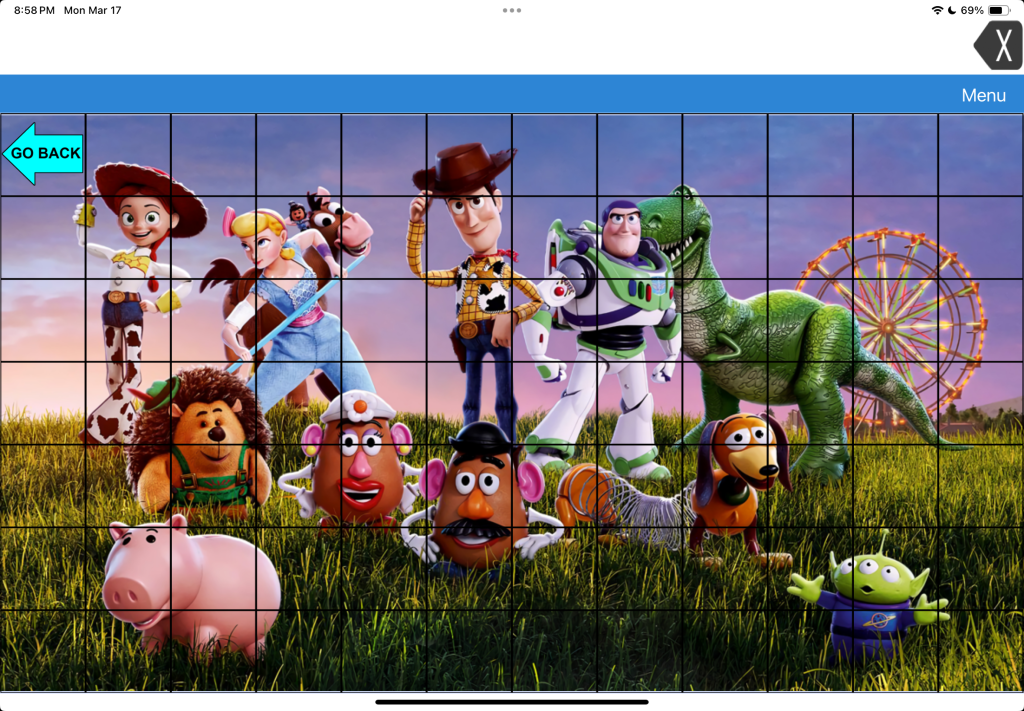
LAMP Words for Life doesn’t “officially” offer a way to add Visual Scenes like the company’s TouchChat app does. So this is an “off label” hack.
LAMP Words for Life doesn’t have any premade Visual Scene pages like TouchChat (both premade hybrid visual scenes and a way to create visual scenes with hotspots on a picture) and doesn’t have all of the same editing options (can’t resize individual buttons, can’t resize the grid).
But in LAMP Words for Life you canimport a photo onto a page background and create transparent buttons to be hot spots. Each of the buttons have to be set to Transparent in order for the background photo to be visible.
It’s a bit trickier to place the hotspots since you can’t resize the grid or the individual buttons.
These hotspot buttons could play recorded audio and could even use the Open Website button action to open a URL to a specific YouTube video. Or any other button action available.
If the individual is still learning the motor plans to individual words then I likely wouldn’t add phrase buttons on a Visual Scene in it.
But I might add character names or audio clips if that’s highly interesting to that individual.
I would only add something like this to LAMP if it’s something that will spark joy and interest in using it, the user wants it added and we would do it in a mindful way to not disrupt the integral design or motor plans in this app.
👀 Looking for in-depth AAC feature matching resources? See this blog post: https://bit.ly/5aacFeatureMatchingResources. That post also includes videos comparing AAC apps on various devices on various platforms.
I’ve seen numerous posts and comments from folks frustrated and confused by the change in the way that all of the PRC-Saltillo AAC apps (LAMP Words for Life, TouchChat with WordPower and Dialogue AAC) handle languages, voices and bilingual / multilingual vocab files.
I’m doing this roundup post of videos and tips to make it easier to share.
My video with tips:
Looking for info about this in Spanish? Check out this video from Halya Lenard, Bilingual AAC SLP (@speechieontheroad):
Official videos and resources from PRC-Saltillo…
PRC-Saltillo overview of the changes in the 2.52.0 app updates
It’s important to read the PRC-Saltillo written announcements in addition to watching their videos. It often contains extra info not shown in the video. In this case the written post was the only way that I figured out why the Acapela and Almagu voices kept disappearing from the pick lists in the apps.
Their post says: “To give you the best voice experience, there will be voice limits. When setting up your files for multilingual use, you may choose:
Up to two Acapela voices
One Almagu voice
Unlimited Apple voices
When you reach the limit of a voice synthesizer, the options for that voice synthesizer will be hidden from the selection list until you unselect the maximum number.”
So after reading that I knew to change one of my voices to an Apple iOS voice in order to see the Acapela or Almagu appear in the pick list again. I have already provided feedback to the company that they should dim them instead of hiding them and provide some sort of popup info within the apps regarding this voice limit. I’m very well versed in problem solving and troubleshooting in AAC apps so if I was extremely frustrated and confused by this I can only imagine how many others will be.
Want to be notified when they make announcements like this?
If you need them, the “legacy” Spanish/English and Canadian French/English bilingual vocab files are available for download on their website: https://lampwflapp.com/features/languages
Using the “Go to Vocabulary” button action to create a button in different vocab files to toggle between them. This offers a much simpler way vs. creating Profiles. The only reason to mess with Profiles anymore would be if you needed to save particular different setups of settings.
Workaround: Uninstall and reinstall the app. In the library menu, check Menu > Languages & Regions, ensure your preferred languages are in the list.
Highlight Spoken Word not working with Acapela voices
Auto Clear feature not working with Acapela voices
Acapela or Almagu voices are not visible in the menu
Workaround: There is a voice cap (Almagu: one voice; Acapela: two voices). If you have one of these voices selected and not seeing any additional Almagu or Acapela voices, select an Apple voice to see all your voice options.
Dialogue AAC:
I only found the 2.52 update PRC-Saltillo announcement linked above … not any specific videos or written info about how to add languages, select voices or link vocab files in the Dialogue AAC app. But the under hood architecture is very similar to the other two apps so the information above should help you sort any issues out.
Thankfully the 2.52.1 app updates for all 3 apps on March 6, 2025 appear to have resolved the major glitches caused by the 2.52.0 (app crashes, vocab builder lists appearing to be lost (actually hidden), some folks losing customized vocab files, etc…)
Hopefully over time folks will become accustomed to the new way these three apps handle languages, voices and creation of bilingual/multilingual setups.
To be honest I found it very confusing and frustrating too but once I figured out what the company had done I can see how this new design will provide the app architecture to support adding vocab files in more languages and providing more flexibility in how to link them for bilingual or multilingual use.
There are a few known remaining glitches caused by the 2.52.0 app updates. Hopefully those will be fixed soon.
✅ Be sure to like/follow OMazing Kids on Facebook. I tend to post most frequently there and often post about known issues in AAC apps. I also create short tutorial videos frequently and share some of those publicly on my YouTube channel. Some videos are unlisted if I create them for a very specific situation or to share with app developers to provide feedback about glitches I’m experiencing in their app(s). See my social media links below.
👀 Looking for in-depth AAC feature matching resources? See this blog post: https://bit.ly/5aacFeatureMatchingResources. That post also includes videos comparing AAC apps on various devices on various platforms.
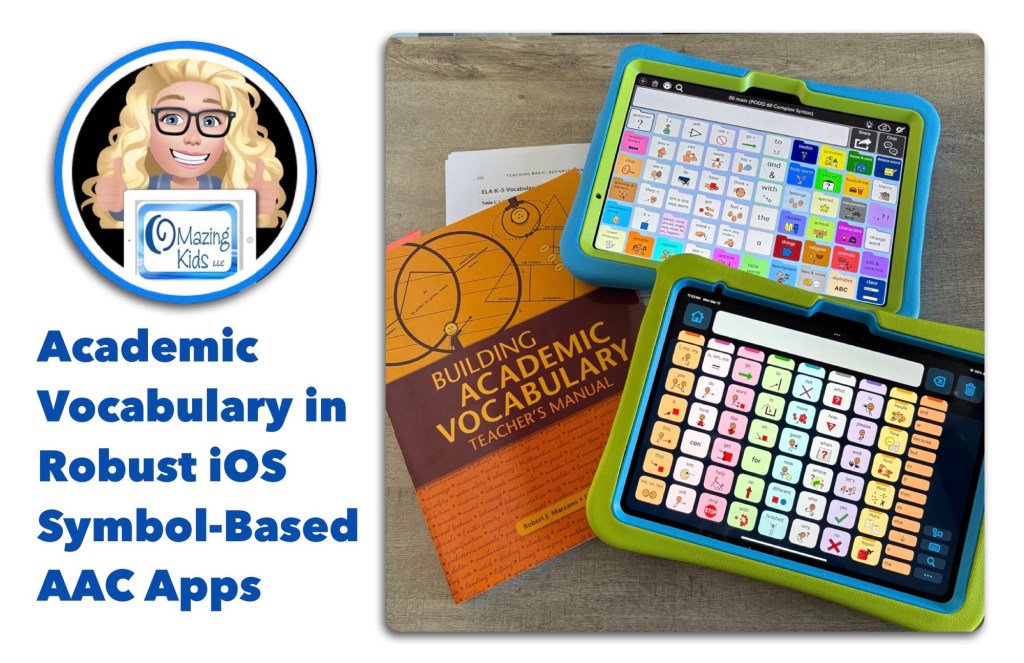
I recently took a deep dive into looking at inclusion of premade Kindergarten math, language arts, science, and social studies academic vocabulary in USA English in 23 vocabulary options in robust iOS symbol-based AAC apps.
✅ Here’s a ranking summary of how the vocabulary fared with inclusion of 147 specific wordson 3/15/25:
🥇 Proloquo (the newer app, different from Proloquo2Go): 147/147 = 100% (20 of the words are only available as a Related Word. So for those who are unable to use buttons that small or buttons without symbol support the score would drop to 127/147 but that’s still 1st place in this comparison)
🥈 PODD 60 Complex Syntax (same in all apps that offer PODD): 126/147 = 86%
🥉 Quick Core 112 in CoughDrop: 120/147 = 82%
SuperCore 50 Teen/Adult in Grid for iPad: 117/147 = 80%
Avaz 117 grid & Motor Plan 66in TD Snap (MP30 & MP40 have the same vocabulary as MP66): 116/147 = 79%
Speak for Yourself: 115/147 = 78%
Avaz 60 grid: 114/147 = 78%
SuperCore 50 Child in Grid for iPad: 108/147 = 73%
Full Vocabulary in LAMP Words for Life: 106/147 = 72%
Weave Chat AAC 7×15: 105/147 = 71%
9×16 Crescendo Advanced Core in Proloquo2Go: 104/147 = 71%
7×11 Crescendo Intermediate Core in Proloquo2Go: 102/147 = 69%
WordPower60 Basic & WordPower108 in TouchChat with WordPower: 100/147 = 68%
Talk Suite Pro 7×10: 99/147 = 67%
Flexspeak: 96/147 = 65%
Core First 8×10 in TD Snap: 94/147 = 64%
Quick Core 60 in CoughDrop: 85/147 = 58%
Gateway Developing Language & Gateway Advanced Communicator both 9×12 (really 9×11) in Proloquo2Go: 83/147 = 56%
Gateway Child Language and Literacy 9×11 grid in TD Snap: 80/147 = 54%
Note: The rankings in this comparison will change over timeas AAC app developers add new vocabulary to their app(s). Gateway in TouchChat with WordPower wasn’t included in the comparison since it doesn’t have a Search unless you edit to add it. Gateway in Mind Express 5 and WordPower in Grid 3 weren’t included in the comparison since those are only available on Windows.
❓How I decided on a list of 147 specific academic words:
I do NOT trust Artificial Intelligence (AI) to create accurate information and therefore did not use it when working on this comparison.
❓Where you can find a copy of the specific vocabulary list, data, and notes from my comparison:
This information is included in the most recent update for my Feature Matching Chart for the Top 13+ Robust iOS Symbol-Based AAC Apps on 3/15/25. Available on TPT: https://bit.ly/SymbolBasedAACapps. Those who have previously purchased this resource on TPT can download the newest version for no additional cost.
I will be emailing a copy to each of the AAC app developers included in this comparison.
❓How I determined if an app included these words:
This was based on a fresh install of the most current version of each app out of the box (official from that company, no editing done) on 3/15/25. Only included robust iOS symbol-based apps with a Search available. I personally checked all 147 words in all 23 vocabulary files in these apps.
❓Why my comparison is only for Kindergarten vocabulary:
I needed a manageable task to actually get it done. I don’t have access to an automated way to do this. It took me hours to search each word in all of these vocabulary options.
I have used Proloquo (the newer app, different from Proloquo2Go) enough to know the gap between the depth of academic vocabulary it offers vs. other AAC apps will widen even more as you look at academic vocabulary beyond Kindergarten. Proloquo offers academic vocabulary on up to an adult level.
❓Why my comparison is only for USA English vocabulary:
I am not a native or fluent speaker of any other language. Hopefully folks who speak other languages will do a similar comparison.
❓Why my comparison only includes symbol-based AAC:
Most Kindergarten students who use AAC tend to use symbol-based AAC. Of course some might be able to type or use text-based AAC… I’ve had kids as young as 3 1/2 years old who could…. but this isn’t typically the case.
⭐️ Conclusions:
The Proloquo app (newer app, different from Proloquo2Go) has excellent academic vocabulary but the half-sized Related Words buttons may pose accessibility issues for some individuals due to the small size and lack of symbol support. Hopefully AssistiveWare will eventually add this same depth of academic vocabulary to their Proloquo2Go app.
We need more AAC apps to come pre-programmed with robust academic vocabulary across grade levels that can be used by AAC users with a wide range of access needs.
Relying too heavily or solely on “descriptive teaching / descriptive language” will not allow individuals access to enough vocabulary to be successful in academic settings. This is feedback that I’m hearing directly from AAC users and those supporting them. Having more academic vocabulary pre-programmed will reduce the burden currently put on parents and/or AAC users to add this. I’ve personally experienced folks taking “descriptive language” to an extreme when I questioned why particular commonly used words weren’t in an AAC apps. In one instance I was told to use “round + sandwich” when the word “hamburger” wasn’t in an app. That happened to be one of that child’s favorite foods so of course I added that word.
✅ ❌ Important Notes:
Of course we can’t expect an AAC app to have EVERY word in the English language. Even Proloquo doesn’t have EVERY word and I see occasional posts from folks asking for advice on where to add a particular word or related word. Every AAC app is going to need to be personalized. That’s different from the academic vocabulary being discussed here.
I am NOT implying these are the only academic words a Kindergarten student might need. That might vary depending from state to state and from school district to school district.
I am NOT implying that AAC use should become “work” or used primarily for “academic” activities.
I am NOT implying that these 147 words are only “academic”. Words are words. They might be used to share information about highly preferred topics and used across environments (not just at school).
This is just a comparison of one aspect out of hundreds of features in robust AAC apps. It should not be the only thing considered when considering AAC options. It’s important to do comprehensive feature matching and a consideration of all of the things that individual might need in a robust AAC system (which often needs to include more than one tool). See my roundup post of in-depth Feature Matching Resources for AAC Apps (comparing features in AAC apps) + several videos comparing AAC apps across platforms (iPad, Android, Amazon Fire, Windows):https://bit.ly/5aacFeatureMatchingResources
I’m NOT saying that Descriptive Teaching / Descriptive Language isn’t a helpful strategy. But I am listening to AAC users and parents supporting them when they express frustration in how that is often used as an excuse to not provide enough academic vocabulary in AAC apps for them/their child to have access to enough vocabulary to be successful in academic settings.
Two things can be true at the same time. It will be helpful to have more academic vocabulary included in symbol-based AAC apps AND “descriptive teaching / descriptive language” strategies can be helpful when a particular word isn’t available in that particular AAC app yet.
🎯 The purpose of this comparison is to raise awareness of robust academic vocabulary needing to be included as part of an AAC system/toolkit. See this blog post for more info: https://bit.ly/DearAAC-appDevelopers.
Looking for in-depth AAC feature matching resources? See this blog post: https://bit.ly/5aacFeatureMatchingResources. That post also includes videos comparing AAC apps on various devices on various platforms.
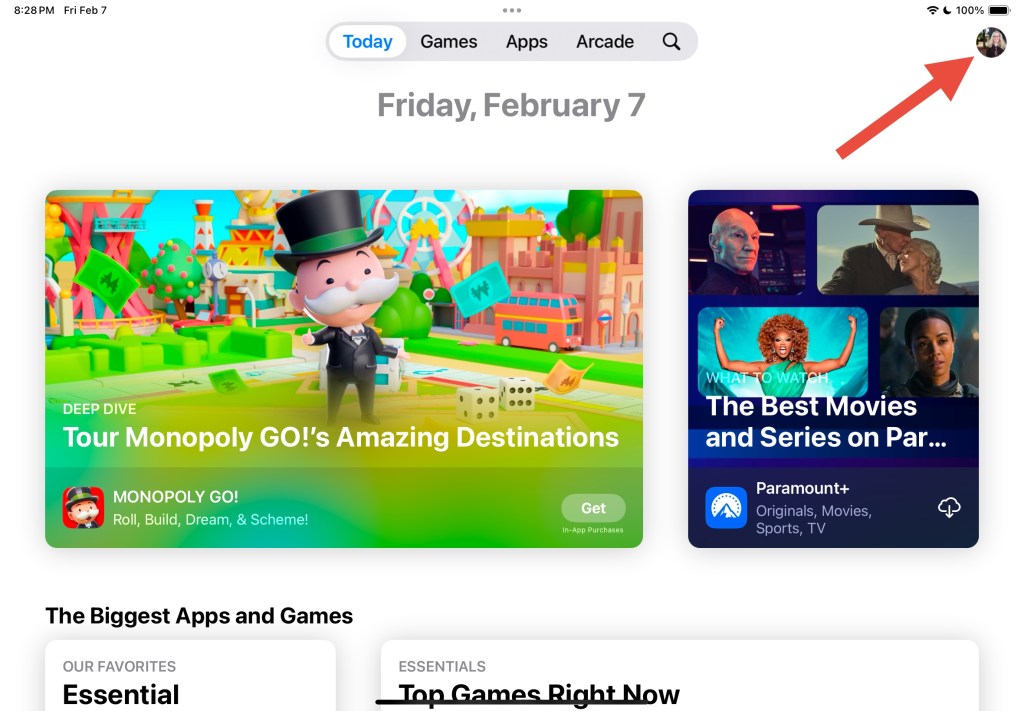
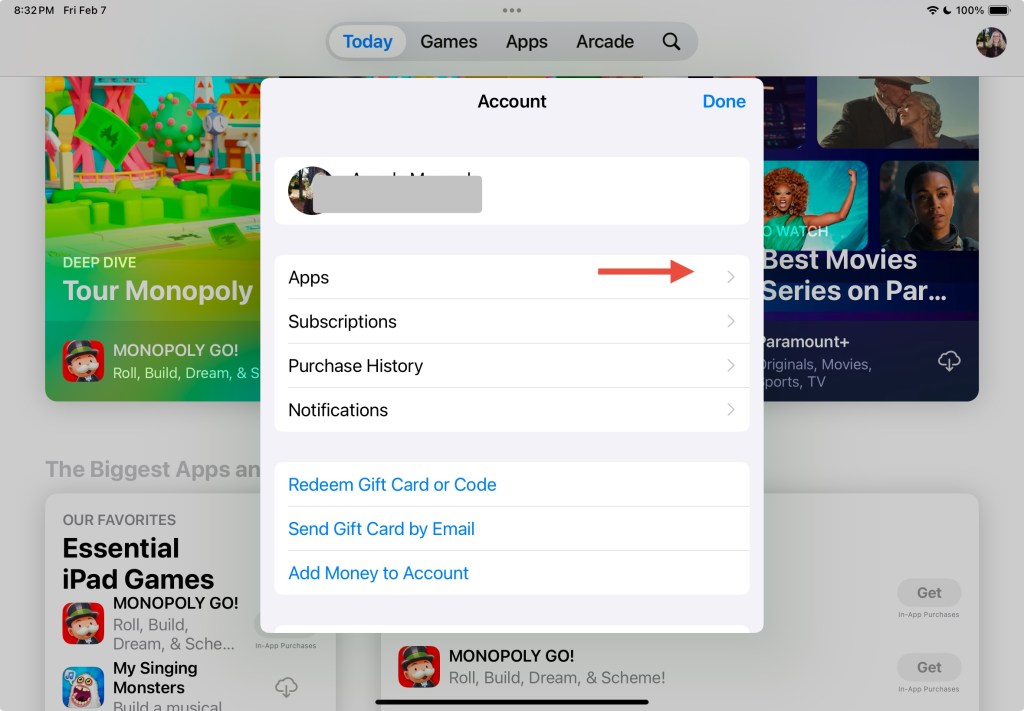
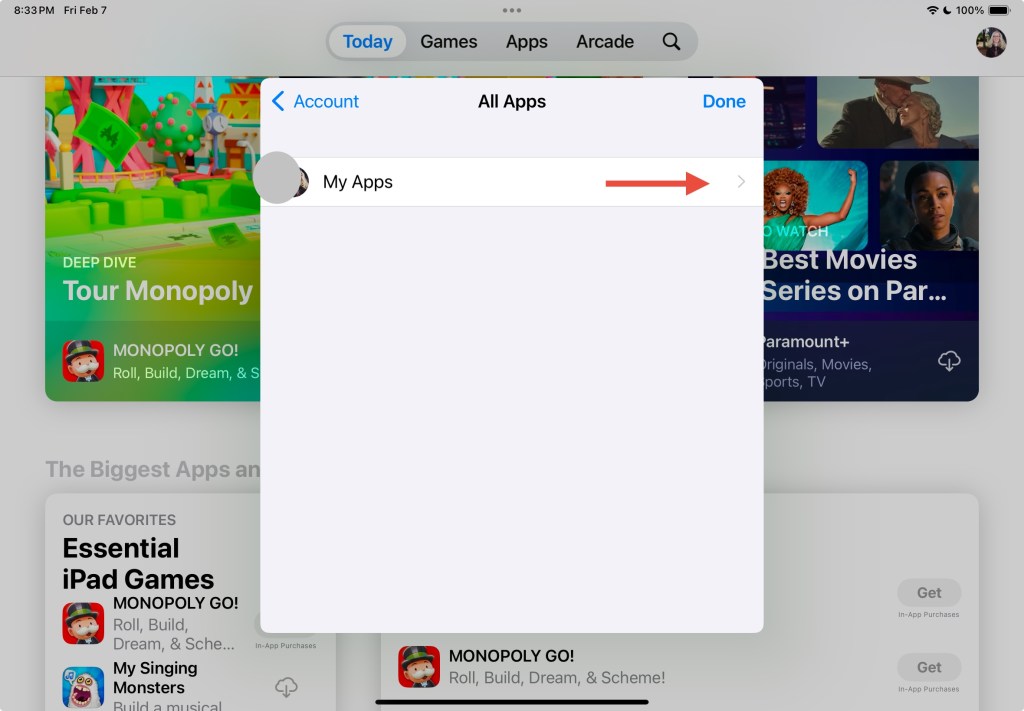
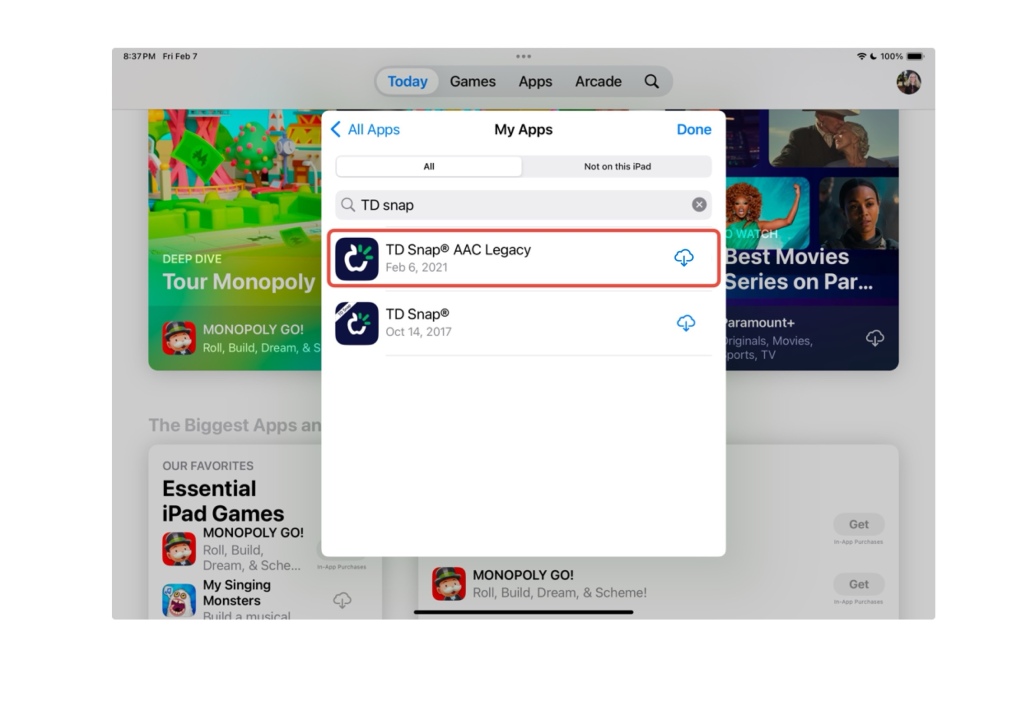
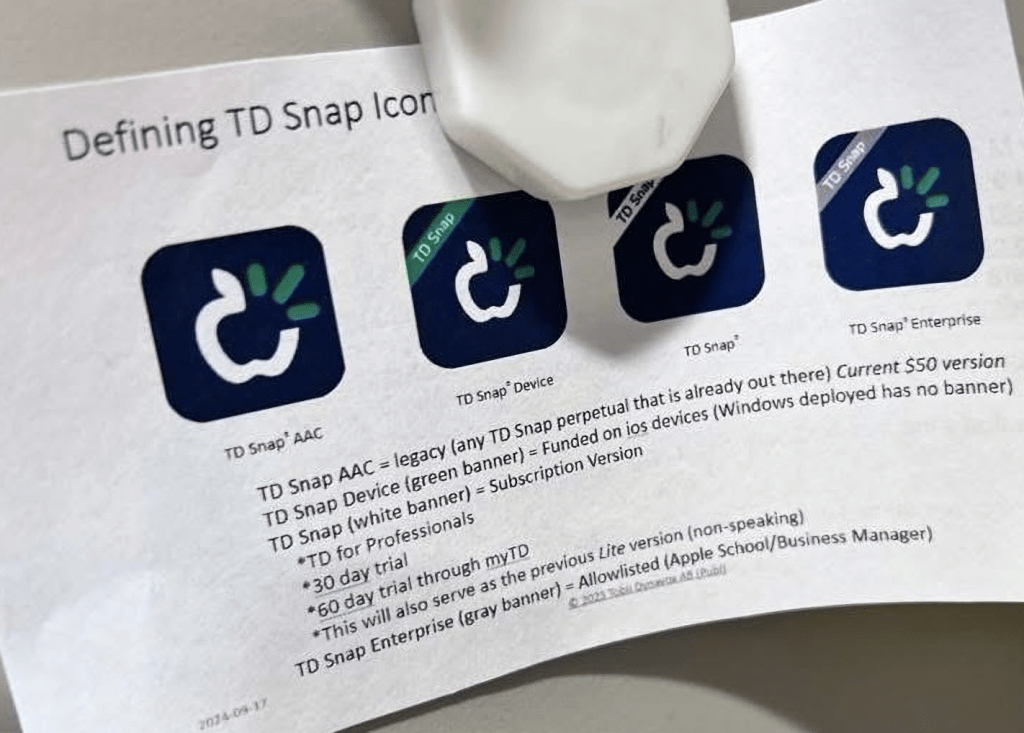
If you purchased the full paid version of TD Snap AAC prior to May 21, 2024 and need to reinstall it you need to look in your Apps – My Apps section in the App Store for “TD Snap AAC Legacy”. That area is in the top right corner of the App Store.
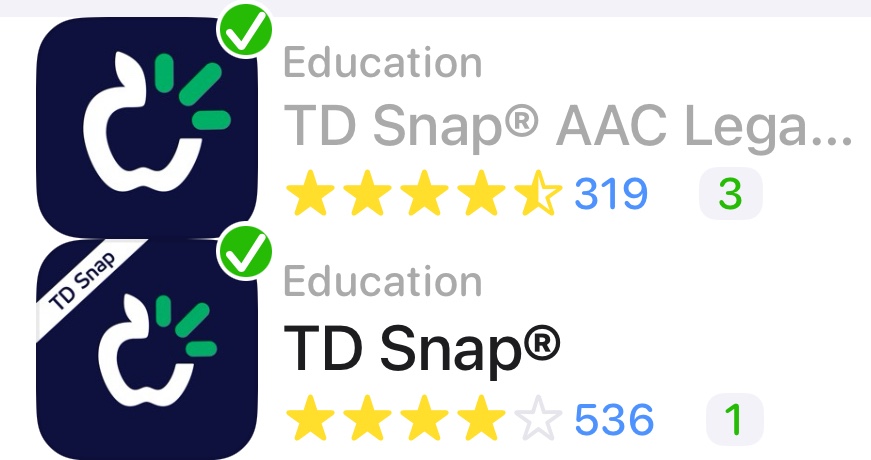
The red arrow is pointing to the top right corner where you tap to find the Apps – My Apps section. Yours will have a different picture. a closer look at the two different app icons. The one *without* the white banner in the top left corner is the Legacy version of the app
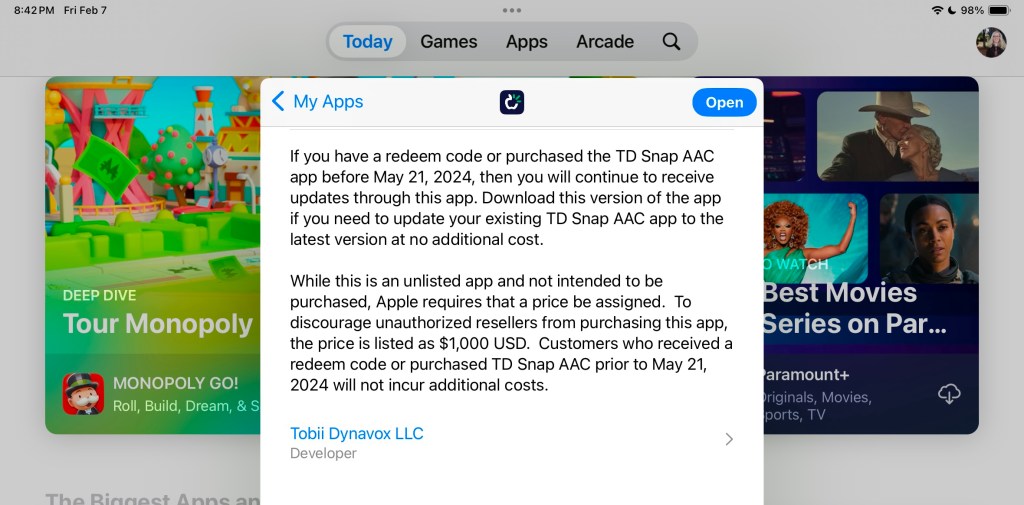
TD Snap AAC Legacy is “unlisted” in the App Store so it won’t show up in a search in the main part of the App Store.
Read the app description in the App Store for information about why it is listed this way and why a $1,000.00 price is shown.
(Note: If you are looking to purchase the app in a school district please see my post about TD Snap Enterprise for an alternative way to purchase it for a significantly lower 1x purchase price)
Important:
You must be logged into the same Apple ID / Apple Account originally used to purchase TD Snap AAC prior to May 21, 2024.
If you are seeing a price instead of a downward facing download arrow then log out of the App Store – do a Forced Restart on that iPad – when it starts back up log back into the App Store making sure that it’s with the same Apple ID / Apple Account used to originally purchase that app.
If you still see a price instead of the download arrow after doing a Forced Restart and you are sure that you are logged into the same Apple ID / Apple Account originally used to purchase the full paid version of this app, you should contact Tobii Dynavox Customer Support for assistance. (I don’t have any affiliation with the company so I can’t assist you with this)
If your iPad is on any type of MDM device management system then you will need to contact the company or school district managing it for assistance.
Update 1/24/26: I saw this helpful handout comparing the 4 versions of the app icons shared in a comment on a post in the TD Snap Core First English group on Facebook: https://www.facebook.com/share/p/1AMWnmNeaH/?
Note: This is NOT an endorsement of the company’s decision to abruptly no longer offer the general public a way to make a 1x app-only purchase of TD Snap as of 5/21/24. It was inequitable to do that.
Looking for in-depth AAC feature matching resources? See this blog post: https://bit.ly/5aacFeatureMatchingResources. That post also includes videos comparing AAC apps on various devices on various platforms.
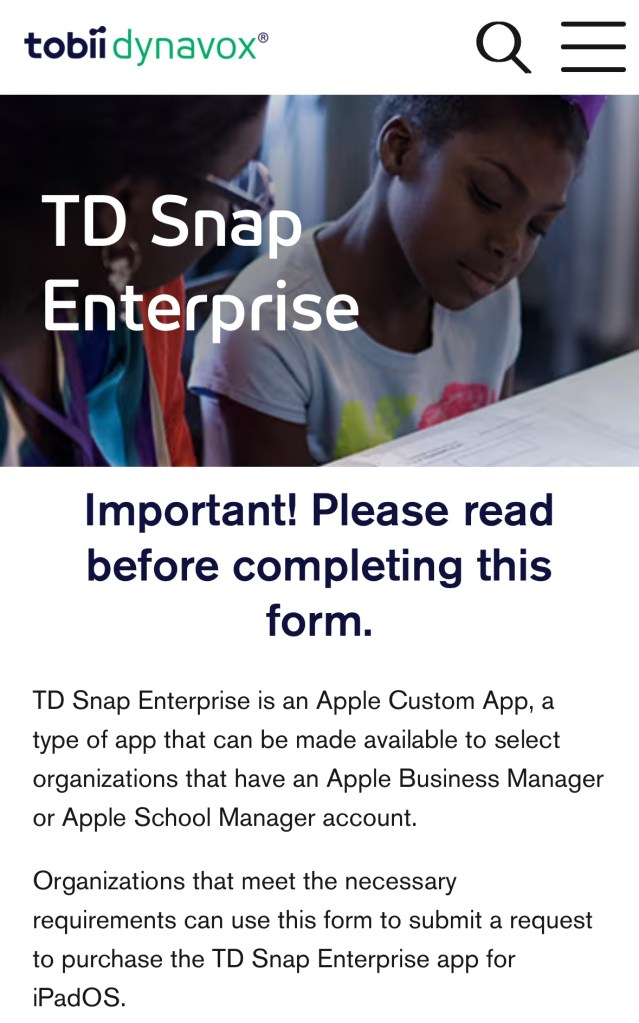
Organizations that have an Apple Business Manager or Apple School Manager account and meet the necessary Tobii Dynavox requirements may qualify for making 1x purchases of the alternative TD Snap Enterprise option (no subscription required).
The last time that I checked the price for TD Snap Enterprise is a 1x purchase of $149.99 (USA) and includes all of the pagesets + the PODD pagesets.
9/9/25 Based on a comment in the AAC for the SLP group on Facebook TD Snap Enterprise does not qualify for an additional discount via bulk purchasing.
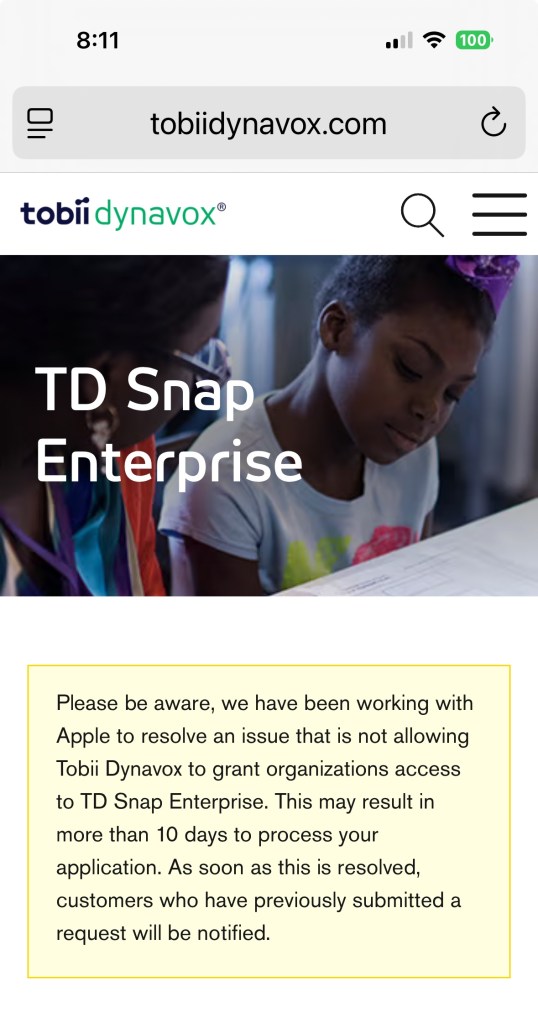
Update 10/17/25: According to an official comment in the Tobii Dynavox Community Facebook group this issue has finally been resolved and that notice pictured in my screenshot is no longer on the application website. “TD Snap Enterprise remains available for organizations that meet the necessary requirements and we are processing the application requests within 10 business days. Anyone applying for TD Snap Enterprise will receive direct updates from our dedicated team. If you would like an update on your application status, please feel free to contact the team at css@tobiidynavox.com.”
9/9/25 Note: There is currently an issue with this. I hope they get it resolved soon.
Screenshot 9/9/25
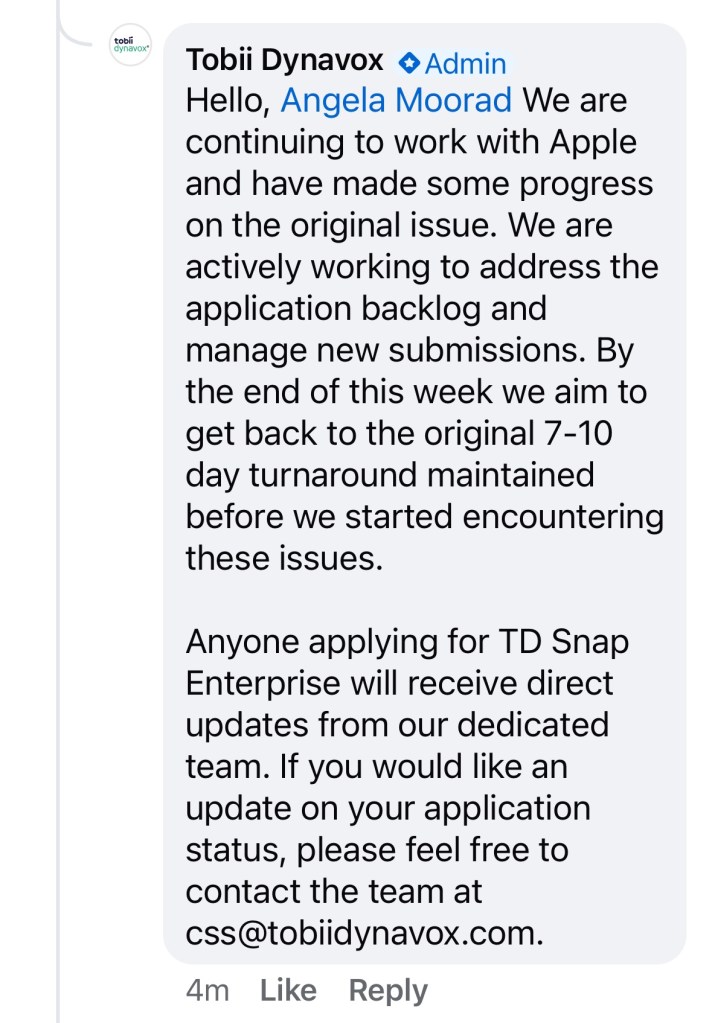
Update 10/6/25:
I asked over in the Tobii Dynavox® Community and received this official reply in a comment on this post:
“Hello, Angela Moorad We are continuing to work with Apple and have made some progress on the original issue. We are actively working to address the application backlog and manage new submissions. By the end of this week we aim to get back to the original 7-10 day turnaround maintained before we started encountering these issues.
Anyone applying for TD Snap Enterprise will receive direct updates from our dedicated team. If you would like an update on your application status, please feel free to contact the team at css@tobiidynavox.com.”
Update 1/24/26: I saw this helpful handout comparing the 4 versions of the app icons shared in a comment on a post in the TD Snap Core First English group on Facebook: https://www.facebook.com/share/p/1AMWnmNeaH/?
Note: This is NOT an endorsement of the company’s decision to abruptly no longer offer the general public a way to make a 1x app-only purchase of TD Snap as of 5/21/24. It was inequitable to do that.
Note: They still offer the Tobii Dynavox for Professionals program. SLPs/SLTs and other AAC professionals should continue to use that for full FREE access to the TD Snap app with voice output and access to all pagesets + access to the extra PODD and Gateway pagesets: https://www.mytobiidynavox.com/#/morestuff/professionals
Looking for in-depth AAC feature matching resources? See this blog post: https://bit.ly/5aacFeatureMatchingResources. That post also includes videos comparing AAC apps on various devices on various platforms.
Looking for in-depth AAC feature matching resources? See this blog post: https://bit.ly/5aacFeatureMatchingResources. That post also includes videos comparing AAC apps on various devices on various platforms.
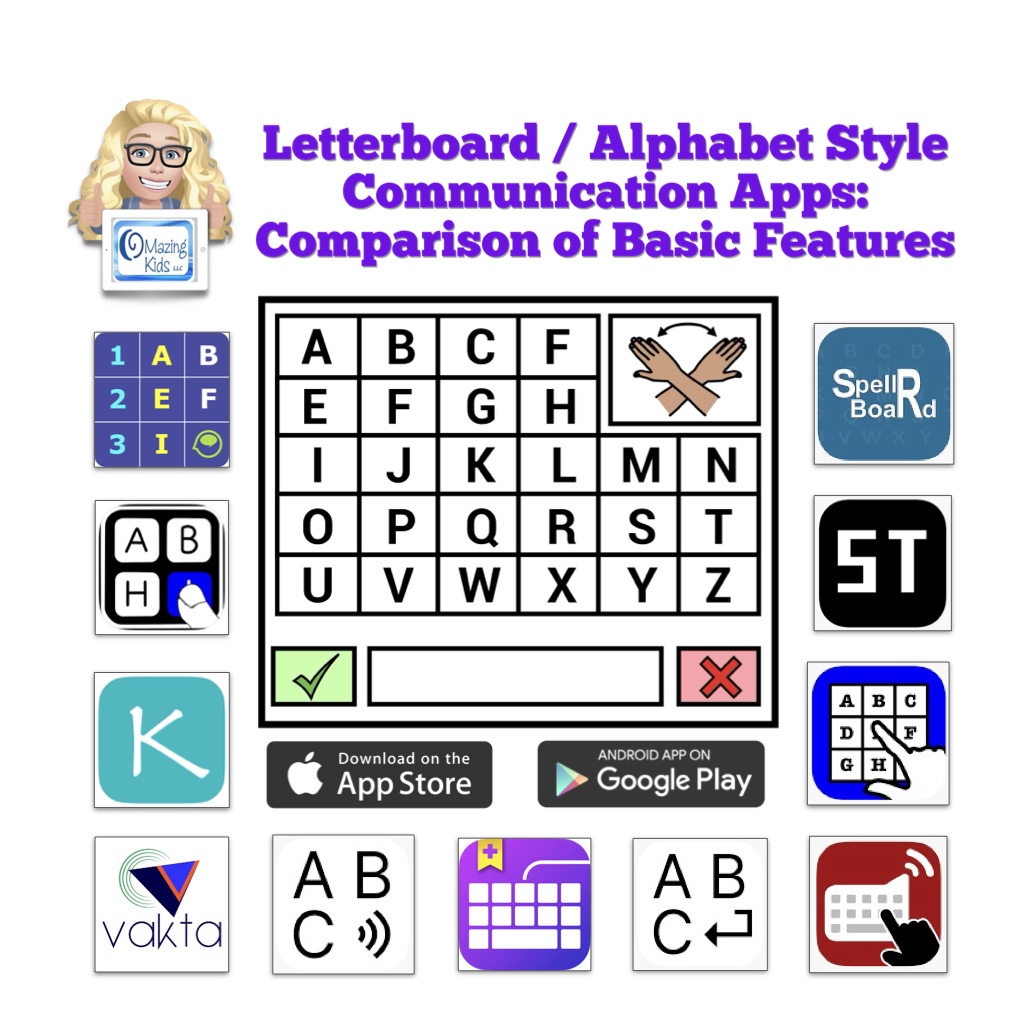
This resource provides a comparison of basic features in several Letterboard / Alphabet style communication apps. All are available for iOS and some are also available for Android.
Apps specifically designed as a Letterboard / Alphabet board:
AlphaTopics – AAC
iMean
Kirsty Types
MyABCboard
Spell 2 Speak
Spell Tap
SpellRBoard
Vakta
Vani Letterboard
The following info is provided for each app:
App Store link(s)
Device Compatibility
Website
Price
Cost over Time (1 year, 3 years, 5 years)
Board Types
Message Window
Letter Case on Buttons
Letter Case in Message Window
Spelling Correction
Word Prediction
Design
Languages
Voice Options
Additional Features
Additional Info
This info is based on my personal use of each app on my devices (iPad, iPhone, Android tablet, Android phone, Chromebook, Amazon Fire tablet)
This resource also includes:
A list of 4 robust AAC apps that have a premade Letterboard style board (different than an ABC alphabetical keyboard)
A list of 14 AAC apps that offer an in-app ABC (alphabetical) keyboard or letters area option within the app and those letters can be combined and spoken as words in the Message Window
A list of 12 symbol-based AAC Apps that allow use of iOS Keyboard extension apps and which text-based apps don’t.
A list of 6 iOS & 1 Android Keyboard Apps that offer an ABC (alphabetical) option
Additional Info About Using Letter / Alphabet Boards for Communication. Includes links to information and demo videos about Partner Assisted Scanning, Partner Assisted Spelling, PODD as an Alternative Pencil, and other means of spelling for communication, free printable non-tech Letterboards, Alphabet boards, Eye Gaze Boards and Flip Books that I found online, commercially available non-tech physical keyboards with an alphabetical layout option, links to research related to spelling for communication, etc…
Important Information:
The PDF is not intended to be printed. It one very long page that’s interactive so you can scroll, zoom in to see content and tap on links. It’s best viewed in the free Xodo PDF reader that can be used on almost any platform. See this blog post for new info about Xodo: https://omazingkidsllc.com/2021/11/06/free-xodo-pdf-reader-app/. It can also be viewed in the Books app on your iPad.
Important info for those wanting to view the PDF on a Mac computer: Save the PDF to your computer and then open the PDF online in Xodo: https://www.xodo.com/app/#/
A link to the Alternative Printable Version can be found at the very bottom left corner within this PDF. That version includes a link to the alternative printable version of the supplemental handout. That will allow you access to a separate PDF that can be downloaded and is formatted for printing. The link to that will change when I update this resource.
This resource is NOT promoting any particular approach/method/intervention/program. It is intended to be an AAC feature matching tool to help folks make informed decisions when choosing iOS and Android Letterboard / Alphabet style AAC apps for potential purchase and to provide additional information related to these unique types of AAC. The information in this chart was compiled based on my personal use of each app using the most current version on devices running the most current iOS/OS, reading through app user guides, watching recent recorded webinars, etc.. This is intended to be an unbiased view of the features. I do not have a financial affiliation with any company. Apps included in this resource are subject to change as features and app availability changes over time. The apps in this resource are uniquely designed tools in an AAC toolbox that are designed in very specific ways to meet unique needs.
If you are looking for in-depth information about more commonly used AAC apps please see my other AAC feature matching resources:
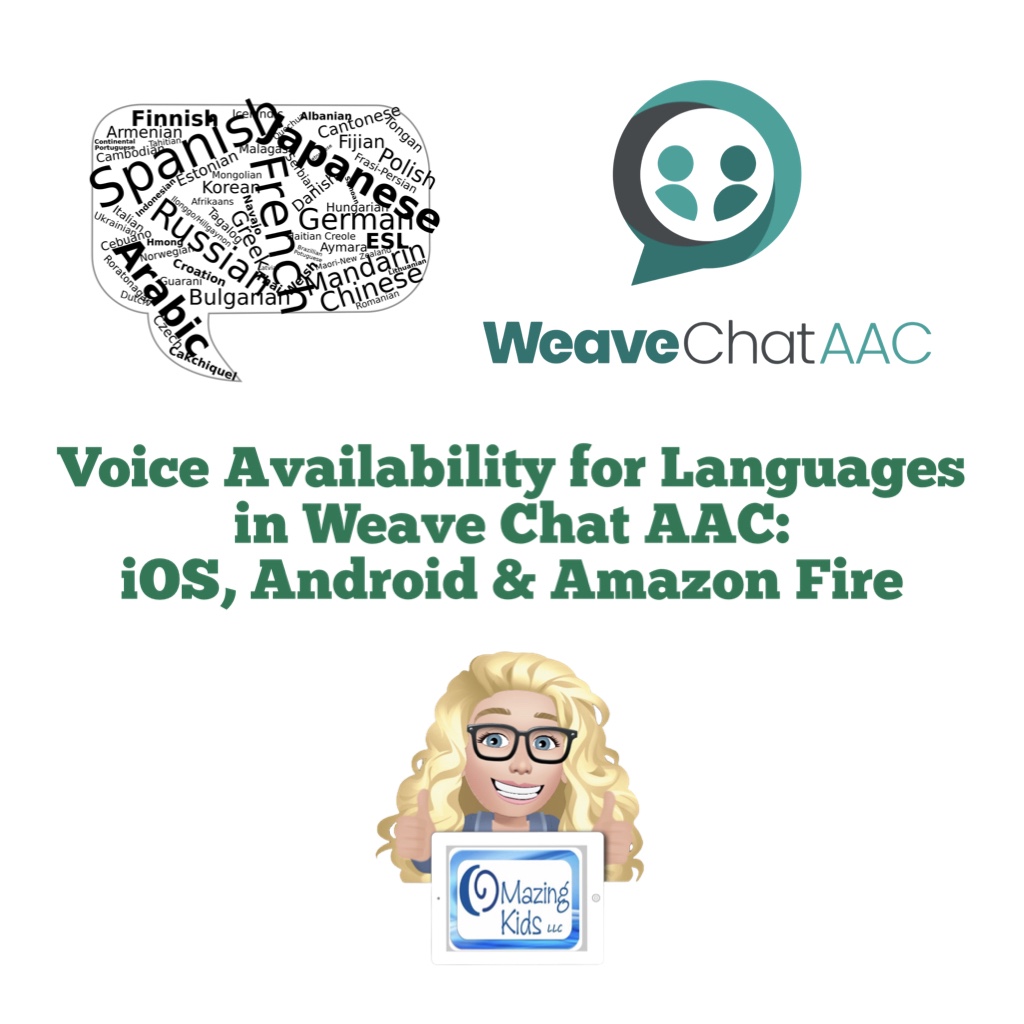
As of 1/10/25 Weave Chat AAC has the following languages:
English USA
English UK
English Australia
Azerbaijani
Dutch
German
Greek
Icelandic
Italian
Macedonian
Norwegian
Polish
Spanish (Spain)
Spanish (Latin American)
Tagalog (Filipino)
Vietnamese
Important Note: English has full grammar support. The remaining languages are initially released in “Alpha” phase (lacks grammar rules and language specific words). Weave Chat uses a group of native and fluent speakers of each language who volunteer to do the translation and localization to insure accuracy and cultural relevance. Each language will eventually have grammar support and language specific vocabulary added with Spanish being the first focus for completion.
If you are reading this post and are fluent in Haitian Creole please consider volunteering to help bring that language to Weave Chat AAC. The work is about 50% completed. There are currently no AAC options on any platform for Haitian Creole. I get pretty frequent messages from folks asking about options for that language and I done exhaustive searches several times and haven’t found anything.
Disclaimer: I’m not affiliated with the app developer. I just help spread the word about this app and help provide info about how to get voices on the various platforms to use in it. And I have in-depth info about the app in my various AAC feature matching resources.
Looking for in-depth AAC feature matching resources? See this blog post: https://bit.ly/5aacFeatureMatchingResources. That post also includes videos comparing AAC apps on various devices on various platforms.
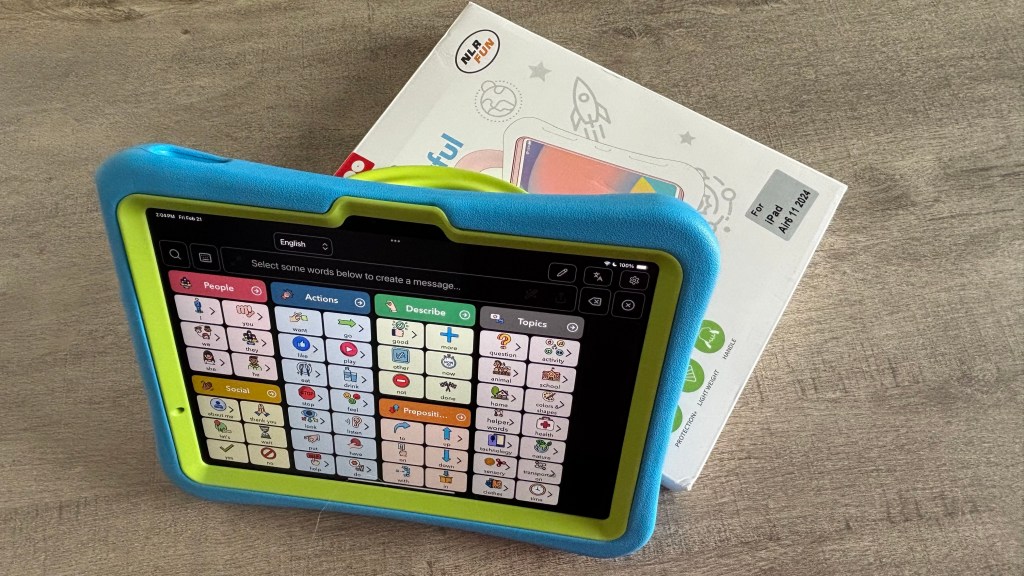
I bought an iPad Air 11” (M2) 2024 specifically to be able to use any Apple Intelligence AI features that Apple rolls out and to be ready in case any AAC app developers find ways to incorporate it into their apps.
The downside of getting a brand new model of iPad is it is often awhile before there are lots of case options to choose from. See this blog post for more info about the Pepkoo case: https://bit.ly/iPadCasesPepkooAndMore.
I hope that NLR Fun eventually offers a Pepkoo case specifically for the iPad Air 11” (M2) 2024.
Until then I was glad to be able to hack their Pepkoo case for the iPad 10th gen well enough to meet my needs.
Updated 2/21/25: Great news! NLR Fun finally released a Pepkoo case specifically for the iPad Air 11” (M2) 2024. I bought it on Amazon and am glad that I did. It fits perfectly and allows the fingerprint ID button to work since it’s not as thick as the case that I had hacked.
Disclaimer: Use caution when using any tools. I knew I might run the risk of damaging the case when modifying it and worked on it very slowly and carefully. Obviously the iPad was removed from the case and placed in a safe location far away from where I was using tools. I am not liable for any outcomes that folks might have. Just sharing how I did this for my own personal use.
Links to items seen in my video (all items were available when I uploaded this on 12/8/24. I have no way to know about future availability and pricing or availability and pricing outside of the USA):
NLR Fun Pepkoo Kids Case for iPad, Shockproof Cover for 10.9” iPad 10th Generation (2022), Lightweight Full Body Protective Case with Foldable Handle/Stand (Blue+Green): https://a.co/d/ge5Jc99
HARDELL Mini Cordless Rotary Tool Kit, 5-Speed and USB Charging with 61 Accessories, Multi-Purpose 3.7V Power Rotary Tool for Sanding, Polishing, Drilling, Etching, Engraving, DIY Crafts: https://a.co/d/fniTASR (I bought it on sale for $19.82)
Exacto knife (I’ve had a very long time)
anezus Self Healing Sewing Mat, Rotary Cutting Mat Double Sided 5-Ply Craft Cutting Board for Sewing Crafts Hobby Fabric Precision Scrapbooking Project 9inch x 12inch(A4), https://a.co/d/dDtpWg5
Plastic (I used a piece of a painting drop cloth but you could easily use a small plastic sack to make cleanup easier)
Note: I don’t have any affiliate stuff set up on Amazon. These are just regular Amazon links.
Looking for in-depth AAC feature matching resources? See this blog post: https://bit.ly/5aacFeatureMatchingResources. That post also includes videos comparing AAC apps on various devices on various platforms.