Unknown's avatar

About OMazing Kids

Angela Moorad, MS, CCC-SLP. Over 36 years experience in AAC. Experience using almost every AAC app on iOS, Android, Amazon Fire, Chromebook and Windows devices + traditional Speech Generating Devices (SGDs). Creator of AAC-Related Resources & App-Related Resources. AAC Consulting & App Consulting.

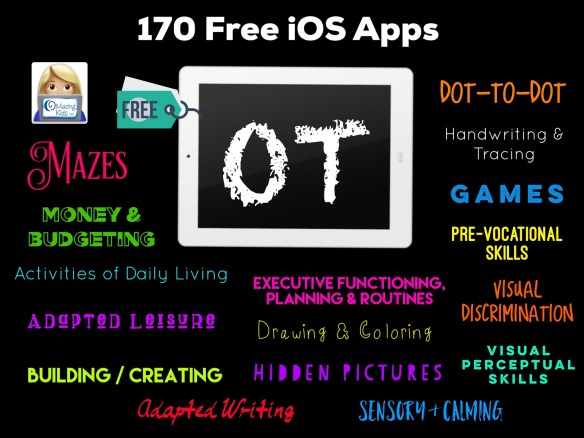
170 Free iOS Apps for Occupational Therapists – list compiled by Angela Moorad, MS, CCC-SLP, Founder of OMazing Kids

Here is a list of 170 iOS apps that are currently FREE that pediatric Occupational Therapists may find helpful to use in therapy or as carryover activities to share with families. Some of the apps could target multiple goals but I’ve tried to generally organize them in the list. Most of these apps are not just for use by OTs. I used most of these apps but for different therapeutic reasons as a SLP. And many of them can just be used for fun. I downloaded and tried out all apps before adding them to the list. All apps prices and availability were verified in the USA App Store at the time I wrote this post at 6:00pm CST on 5/13/20. You can save the PDF of this post in the iBooks app on your iPad and then tap on each link to go to that app in the App Store (it’s an 8-page PDF).  I only have access to the USA App Store so be sure to check prices before downloading in other countries.

Tips:

  1. Many of the apps have IAPs (in-app purchases) to add extra features or have unsecured links so make sure the iPad is in “airplane mode” and toggle off the ability to download IAPs in the Settings area BEFORE opening the app. Even apps with “secured links” could be hacked by some kids so it’s always wise to go ahead do these two things before using apps with kids. I typically avoid apps with ads (some can be blocked via “airplane mode” but others cannot).  It’s also wise to use Guided Access to prevent exiting the app you are using.
  2. If you like a “lite” version of an app, it is always a good idea to see if there is a full paid version of the app to purchase vs. using an IAP to upgrade within a free lite app. I’ve had enough problems with IAPs and trying to restore IAPs to avoid them as much as possible. Also most schools & public agencies have purchasing regulations that make it difficult or impossible to purchase items via IAP but can purchase a full paid app. This is the same reason that I typically avoid apps that require a subscription.
  3. If you are looking for Android apps, the quickest way to see if an app has an Android version is to copy the name of an app and then paste into the search area on the Google Play app store or Amazon app store. If the app is available it may not be free on those platforms and/or may contain ads so look closely at each app description. Also look at reviews to see how well apps function since Android versions of apps may not be updated as frequently as iOS apps.

Disclaimers: I’m an SLP not an OT. But I worked with enough fabulous OTs and COTAs over my career and connected virtually with a few others to have a general idea of the types of apps that may be helpful to them. Of course every app that I share will not be a good fit for every child so it’s up to you to determine the ones to use with your particular patients. The purpose of this list is to share free resources but I also want folks to know there are hundreds of fabulous apps that are often very affordably priced or may even be free on a particular day. Please see this blog post and follow OMazing Kids on social media: https://omazingkidsllc.com/2016/12/31/the-ipad-the-slp-in-2017-app-list-for-slps-sorted-by-goal-area/. I plan on updating that huge post soon. 

Activities of Daily Living:

  1. iDo Hygiene –Daily life skills activities, for individuals with special needs (full version) by C.E.T – THE CENTER FOR EDUCATIONAL TECHNOLOGY, https://apps.apple.com/us/app/ido-hygiene-daily-life-skills-activities-for-individuals/id994899641
  2. iDo Community – kids with special needs learn to act independently in the community by C.E.T – THE CENTER FOR EDUCATIONAL TECHNOLOGY, https://apps.apple.com/us/app/ido-community-kids-special-needs-learn-to-act-independently/id931891099
  3. iDo Food – Kids with special needs learn dining skills (Full version) by C.E.T – THE CENTER FOR EDUCATIONAL TECHNOLOGY, https://apps.apple.com/us/app/ido-food-kids-special-needs-learn-dining-skills-full/id931891855
  4. iDo Chores – Daily activities and routine tasks for kids with special needs (Full version) by C.E.T – THE CENTER FOR EDUCATIONAL TECHNOLOGY, https://apps.apple.com/us/app/ido-chores-daily-activities-routine-tasks-for-kids/id931894090 (all IAPs are free)
  5. iDo Getting Dressed – Learn the Routine of wearing clothes, for individuals with special needs. (Full version) by C.E.T – THE CENTER FOR EDUCATIONAL TECHNOLOGY, https://apps.apple.com/us/app/ido-getting-dressed-learn-routine-wearing-clothes-for/id994900654
  6. Sequence it! – Create and arrange sequences, for kids with autism and other special needs by C.E.T – THE CENTER FOR EDUCATIONAL TECHNOLOGY, https://apps.apple.com/us/app/sequence-it-create-arrange-sequences-for-kids-autism/id1054793304
  7. Sago Mini Babies Dress Up by Sago Mini, https://apps.apple.com/us/app/sago-mini-babies-dress-up/id1132213599
  8. WoodieHoo Dress Up: Animal Fun by RTL DISNEY Fernsehen GmbH & Co. KG, https://apps.apple.com/us/app/woodiehoo-dress-up-animal-fun/id1450403346
  9. WoodieHoo Brushing Teeth by RTL DISNEY Fernsehen GmbH & Co. KG, https://apps.apple.com/us/app/woodiehoo-brushing-teeth/id1436715435
  10. Philips Sonicare For Kids by Philips, https://apps.apple.com/us/app/philips-sonicare-for-kids/id1002285219
  11. Brush Teeth with The Wiggles by The Wiggles International Pty Limited, https://apps.apple.com/us/app/brush-teeth-with-the-wiggles/id1113805211
  12. Toothbrush Games by Ogilvy & Mather Deutschland GmbH, https://apps.apple.com/us/app/toothbrush-games/id641153644
  13. TVOKids Tooth Time by TVO Apps, https://apps.apple.com/us/app/tvokids-tooth-time/id628201571
  14. 32teeth by appomart.com, https://apps.apple.com/us/app/32teeth/id1440048812
  15. Harry’s Healthy Garden by BabyFirst, https://apps.apple.com/us/app/harrys-healthy-garden/id944767396
  16. Feed Twip – Kids learn how to cook healthy food by GAMABILIS, https://apps.apple.com/us/app/feed-twip-kids-learn-how-to-cook-healthy-food/id1173483671
  17. Kid Eats by Learning Games Lab, NM State University, https://apps.apple.com/us/app/kid-eats/id1164545702
  18. Foodsburg by BubbleBud Kids by Dweek Studios, https://apps.apple.com/us/app/foodsburg-by-bubblebud-kids/id1445107729
  19. Veggie Bottoms HD Healthy Eating Made Fun for Kids by Red Card Studios, https://apps.apple.com/us/app/veggie-bottoms-hd-healthy-eating-made-fun-for-kids/id626569693
  20. Veggie Bottoms Kitchen Helper – Timer & Converter by Red Card Studios, https://apps.apple.com/us/app/veggie-bottoms-kitchen-helper-timer-converter/id1120279485 (I liked the content enough to share it but be sure iPad is in “airplane mode” to block ads. Also has links to other apps in App Store so be sure to toggle off ability to purchase apps or IAPs)
  21. Pick Your Plate! by Smithsonian Institution, https://apps.apple.com/us/app/pick-your-plate/id1471647935
  22. HEALTHY HAROLD, HEALTHY ME by Life Education Australia, https://apps.apple.com/us/app/healthy-harold-healthy-me/id983491310
  23. Bento Box Shapes by Two Bulls, https://apps.apple.com/us/app/bento-box-shapes/id665768495
  24. Space Chef by The Lawrence Hall of Science, https://apps.apple.com/us/app/space-chef/id1024085303
  25. Laugh & Learn™ Puppy’s Nose by Fisher-Price, https://apps.apple.com/us/app/laugh-learn-puppys-nose/id415895632

Adapted Leisure:

  1. CanTunes by University of Victoria, https://apps.apple.com/us/app/cantunes/id670015849 (adapted access to music)
  2. YouTube Kids by Google LLC, https://apps.apple.com/us/app/youtube-kids/id936971630
  3. Just Dice by Code Redman Ltd, https://apps.apple.com/us/app/just-dice/id470876937
  4. Miney Mo by One to Zero, https://apps.apple.com/us/app/miney-mo/id1242461053
  5. Chwazi Finger Chooser by Tenda Digital, https://apps.apple.com/us/app/chwazi-finger-chooser/id689674978
  6. Picture Dots by New York Hall of Science, https://apps.apple.com/us/app/picture-dots/id1225538365

Adapted Writing:

  1. SnapType by SnapType, https://apps.apple.com/us/app/snaptype/id1124115982 (free lite version)

Building / Creating:

  1. Build A Truck by Duck Duck Moose LLC, https://apps.apple.com/us/app/build-a-truck/id734640915
  2. Labo Train (4+) by Labo Lado Inc., https://apps.apple.com/us/app/labo-train-4/id914323527 (free with IAP for more content. I always just use the easiest level)
  3. Labo Brick Car (6+) by Labo Lado Inc., https://apps.apple.com/us/app/labo-brick-car-6/id1139669780 (free with IAP for more content)
  4. Brick Train Build Game 4 Kids by Labo Lado Inc., https://apps.apple.com/us/app/brick-train-build-game-4-kids/id1481293079 (free with IAP for more content)
  5. Paper Plate Art Game for Kids by Labo Lado Inc., https://apps.apple.com/us/app/paper-plate-art-game-for-kids/id1460529275 (lite version – get the full paid version if you want all the activities)
  6. KOMA KOMA for iPad by TriggerDevice Co.,Ltd, https://apps.apple.com/us/app/koma-koma-for-ipad/id635794784 (Super easy to make stop motion videos. Fun to pair with off-iPad building activities)

Dot-to-Dot:

  1. DotToDot numbers &letters lite by Apps in My Pocket Ltd, https://apps.apple.com/us/app/dottodot-numbers-letters-lite/id333210438 (lite version – get the full paid version if you want all the activities)
  2. Dot-to-Dot Adventure Lite by GiggleUp Kids Apps And Educational Games Pty Ltd, https://apps.apple.com/us/app/dot-to-dot-adventure-lite/id623673590 (lite version – get the full paid version if you want all the activities)
  3. Connect the Dots and Count by Whisper Arts, https://apps.apple.com/us/app/connect-the-dots-and-count/id896144409 (use in “airplane mode” to block ads, has IAPs for additional content)
  4. Dots n’ Draw by Prabhjeet Singh
    https://apps.apple.com/us/app/dots-n-draw/id1070460975 (can toggle off grid and toggle on dark mode for High Contrast; can move the dots to create your own dot to dot activity)

(I didn’t find any other free dot-to-dot apps that have enough useable content, are well designed, didn’t have ads and/or are still available in the App store. I’d love to add to this section if anyone knows of any. But there are several good affordably priced dot-to-dot apps in the App Store.)

Drawing & Coloring (may want to consider using a stylus or adapted stylus as the writing tool):

  1. Simple Whiteboard by Qrayon by Qrayon, LLC, https://apps.apple.com/us/app/simple-whiteboard-by-qrayon/id1327954704
  2. Tayasui Sketches School by Tayasui. Can import own picture. Has unsecured links when exporting creation. https://apps.apple.com/us/app/tayasui-sketches-school/id1354087061
  3. Hello Crayons. Can import own picture. https://apps.apple.com/us/app/hello-crayons/id440149103, iOS (has IAPs for additional features)
  4. Brushes Redux. Can import own picture. Lots of cool features for textures of painting. https://apps.apple.com/us/app/brushes-redux/id932089074
  5. Autodesk SketchBook. Can import own picture. Incredible amount of features, https://apps.apple.com/us/app/autodesk-sketchbook/id883738213
  6. SketchBook Motion. Can import own picture. Has a limit of 3 scenes without a subscription. Similar to #5 but allows adding animation: https://apps.apple.com/us/app/sketchbook-motion/id1061224933
  7. Scribbaloo Paint. A nice super simple kids painting app. Can take a picture of the finished creation. https://apps.apple.com/us/app/scribbaloo-paint-simple-easy-to-use-painting-app-for/id959974785
  8. Coloring Games: Painting, Glow by RV AppStudios LLC. Includes fun paint, color fill, drawing, glow pen, number paint & water art (a swipe to uncover watercolor) activities. Completed art is saved to an art gallery within the app. Nice settings options to toggle off background music, select language, choose which activities you want visible as options, toggle off the “show more apps button”, etc. Has links behind parental gate. They have free printable coloring pages on their website, https://apps.apple.com/us/app/coloring-games-painting-glow/id1480696573
  9. Zen Studio meditation for kids by EDOKI ACADEMY, A unique geometric finger painting app designed to help children relax and focus. Calming instrumentals play as you tap or swipe. Nice Parent and Teacher Guide in the app, https://apps.apple.com/us/app/zen-studio-meditation-for-kids/id1051358262 (be sure to get the in-app purchase to upgrade to the full app while it is free).
  10. Crayola Color Camera by Crayola, https://apps.apple.com/us/app/crayola-color-camera/id1481094201 (turn any picture into a coloring page that can then be saved to the Camera Roll for importing into a coloring app or printed for coloring with real crayons)
  11. Crayola Scribble Scrubbie Pets by Crayola, https://apps.apple.com/us/app/crayola-scribble-scrubbie-pets/id1475682282
  12. Draw and Tell HD by Duck Duck Moose LLC, https://apps.apple.com/us/app/draw-and-tell-hd/id504752087
  13. DRAWING FOR KIDS Games! Apps 2 by Bini Bambini Academy, https://apps.apple.com/us/app/drawing-for-kids-games-apps-2/id908698556 (Love how it guides you through the tracing and then your drawing is animated. Lite app with IAPs for additional content. You’ll have to be very careful to avoid accidentally tapping on the IAPs or subscription. An adult will need to get it to the screen you want and then lock it in via Guided Access. Also be sure to use in “airplane mode and toggle off the ability to purchase apps or IAPs in your iPad settings. The full paid version is only $4.99: https://apps.apple.com/us/app/drawing-for-kids-learning-apps/id908695341)
  14. Drawing Educational Kids Games by Bini Bambini Academy, https://apps.apple.com/us/app/drawing-educational-kids-games/id1225122654 (Love how it guides you through the tracing and then your drawing is animated and dances. Lite app with IAPs for additional content. You’ll have to be very careful to avoid accidentally tapping on the IAPs. So be sure to use in “airplane mode and toggle off the ability to purchase apps or IAPs in your iPad settings)
  15. Happy Panda – Color by Numbers by Roman Timurson, https://apps.apple.com/us/app/happy-panda-color-by-numbers/id1467662535 (lite with IAP for additional content)
  16. Finger Paint with Sounds. Fun immediate cause/effect while painting with music. https://apps.apple.com/us/app/finger-paint-with-sounds/id586598528
  17. A new free cause-effect drawing app that plays classical music as soon as you start drawing and stops as soon as your finger is off the screen. Plain black background & rainbow colored drawing. If you don’t want it to save the drawings to your camera roll be sure to tap “no” when camera permissions pops up (or toggle off saving in the app settings (in iPad Settings area, scroll down to app name). You can also pick a different background color, etc. I played with the app for awhile and did not see any ads. https://apps.apple.com/us/app/rainbowy/id1467288651
  18. Oh ! The magic drawing app. Fun creating with shapes. https://apps.apple.com/us/app/oh-the-magic-drawing-app/id977170314 (IAPs to “tip” the developer)
  19. Monster Coloring Book. Includes “tap to fill” option, stickers, paint with patterns, etc.. There are four options for classical background music and options to adjust the levels of music and sound effects in the settings area. Includes an in app art gallery to edit, save and share the creations. https://apps.apple.com/us/app/monster-coloring-book/id435676573
  20. Inspirit – the art of mandala. https://apps.apple.com/us/app/inspirit-the-art-of-mandala/id1262728983
  21. Woolizoo’s Art & Craft Creator by Nick Fettke, https://apps.apple.com/us/app/woolizoos-art-craft-creator/id900329038

Executive Functioning / Planning / Routines:

  1. Time In Kid by Moving Graphics, https://apps.apple.com/us/app/time-in-kid/id1283205523
  2. Little Timer Hatch Countdown by Bitscuit Games, https://apps.apple.com/us/app/little-timer-hatch-countdown/id1496908204 (IAP for additional features)
  3. Time Timer: iPad Edition by Time Timer LLC, https://apps.apple.com/us/app/time-timer-ipad-edition/id434081367
  4. Time Timer by Time Timer LLC (iPhone version), https://apps.apple.com/us/app/time-timer/id332520417
  5. My Own Interactions by Hiffa Oy Ab, https://apps.apple.com/us/app/my-own-interactions/id1069032256, iPad only (A visual schedule app to keep track of your daily life with text, pictures, photos, video and sound, in a way that makes sense for you.)
  6. Kids ToDo List by LITALICO Inc., https://apps.apple.com/us/app/kids-todo-list/id1250309171
  7. myHomework Student Planner by Rodrigo Neri, https://apps.apple.com/us/app/myhomework-student-planner/id303490844 (IAPs for additional features)
  8. Google Calendar: Time Planner by Google LLC, https://apps.apple.com/us/app/google-calendar-time-planner/id909319292
  9. Reminder with Voice Reminders by Sergio Licea. https://apps.apple.com/us/app/reminder-with-voice-reminders/id469454389 (IAP for additional features)
  10. Google Keep – Notes and lists by Google LLC, https://apps.apple.com/us/app/google-keep-notes-and-lists/id1029207872
  11. Google Assistant by Google LLC, https://apps.apple.com/us/app/google-assistant/id1220976145
  12. SuperNote Notes Recorder&Photo by FITNESS22 LTD, https://apps.apple.com/us/app/supernote-notes-recorder-photo/id484001731 (IAPs for additional features)
  13. Mind Magnets Info Organizer—Visual Grid Checklists by Adams Immersive, https://apps.apple.com/us/app/mind-magnets-info-organizer-visual-grid-checklists/id1000970772
  14. Popplet by Notion, https://apps.apple.com/us/app/popplet/id374151636 (full version currently free, there is a free lite version to try out when this goes back up to full price)
  15. iMindMap Kids by OpenGenius Limited, https://apps.apple.com/us/app/imindmap-kids/id1296769948
  16. Buncee by Buncee LLC, https://apps.apple.com/us/app/buncee/id1093956684
  17. Post-it® by 3M Company, https://apps.apple.com/us/app/post-it/id920127738
  18. nemonic – Sticky Notes App by MANGOSLAB Co.,Ltd., https://apps.apple.com/us/app/nemonic-sticky-notes-app/id1241934178
  19. Toodledo by Pink Java Media, LLC, https://apps.apple.com/us/app/toodledo/id292755387 (IAP for additional features)
  20. Focus Matrix – Task Manager by Denys Yevenko, https://apps.apple.com/us/app/focus-matrix-task-manager/id1107872631 (IAP for additional features)
  21. CanPlan by University of Victoria, https://apps.apple.com/us/app/canplan/id598687543
  22. What2Expect by University of Victoria, https://apps.apple.com/us/app/what2expect/id1234304140
  23. Notepad+: Note Taking App by Apalon Apps, https://apps.apple.com/us/app/notepad-note-taking-app/id920402079 (free lite version)

Games:

  1. Whale Trail Junior by ustwo games, https://apps.apple.com/us/app/whale-trail-junior/id569862218
  2. Square-Off – An Educational Game from School Zone by School Zone Publishing, https://apps.apple.com/us/app/square-off-an-educational-game-from-school-zone/id369230474
  3. Pig Pens by James Durie, https://apps.apple.com/us/app/pig-pens/id1448367077
  4. Sound Memo – game for autism by Likomp, https://apps.apple.com/us/app/sound-memo-game-for-autism/id763446082

Handwriting & Tracing:

  1. LetterWorks by Alphabet Galleries, LLC, https://apps.apple.com/us/app/letterworks/id735255024
  2. Handwriting Heroes by Cheryl Bregman, https://apps.apple.com/us/app/handwriting-heroes/id1057029973
  3. Writing Wizard – Handwriting by L’Escapadou, https://apps.apple.com/us/app/writing-wizard-handwriting/id1305242235 (free lite version, has IAPs. If you want all the content, get the full paid app instead)

Hidden Pictures:

  1. Hidden Pictures Puzzle Play by Highlights for Children, Inc., https://apps.apple.com/us/app/hidden-pictures-puzzle-play/id1462177299 (Has one free hidden pictures puzzle every day. You’ll have to be very careful to avoid accidentally subscribing. I’d suggest the adult navigate to a free puzzle and then use Guided Access to block exiting that area.)

(I didn’t find any free hidden picture apps that have enough useable content, are appropriate for kids, are well designed, didn’t have ads and/or are still available in the App store. I’d love to add to this section if anyone knows of any.)

Home Activities:

  1. OT at Home by Augusta University, https://apps.apple.com/us/app/ot-at-home/id1194078736

Mazes:

  1. Maze Jam by Unusually Brilliant Educational Resources LLC, https://apps.apple.com/us/app/maze-jam/id1458832763
  2. Animal Maze by Busy Things Limited, https://apps.apple.com/us/app/animal-maze/id1256364055
  3. Roly And The Leafy Lair by Play9 Studios, https://apps.apple.com/us/app/roly-and-the-leafy-lair/id1478368388
  4. BeeAmazed! Full by Geo Tots, https://apps.apple.com/us/app/beeamazed-full/id1025619742 (full version currently free, there is a free lite version to try out when this goes back up to full price)
  5. Vehicle Maze – Find a route through the maze by STEP BY STEP, https://apps.apple.com/us/app/vehicle-maze-find-a-route-through-the-maze/id1186201607
  6. Animal Maze – Find a route through the maze by STEP BY STEP, https://apps.apple.com/us/app/animal-maze-find-a-route-through-the-maze/id1186203082
  7. Monster Maze – Find a route through the maze by STEP BY STEP, https://apps.apple.com/us/app/monster-maze-find-a-route-through-the-maze/id1186203975

Money & Budgeting:

  1. The Candy and the Coinbot by Applause Learning, Inc., https://apps.apple.com/us/app/the-candy-and-the-coinbot/id1058915119
  2. Envelope+ Kid by Robert E Carr Jr, https://apps.apple.com/us/app/envelope-kid/id949620009
  3. Mind Your Own Budget by K20 Center – University of Oklahoma, https://apps.apple.com/us/app/mind-your-own-budget/id721772106
  4. Money Mammals Needs vs Wants by Lanza Entertainment Company, LLC, https://apps.apple.com/us/app/money-mammals-needs-vs-wants/id910712865
  5. Currency Challenge by Lanza Entertainment Company, LLC, https://apps.apple.com/us/app/currency-challenge/id1025252708
  6. Money Mammals Save for a Goal by Lanza Entertainment Company, LLC, https://apps.apple.com/us/app/money-mammals-save-for-a-goal/id1128245668
  7. Dollars & Cents Lite by Attainment Company, https://apps.apple.com/us/app/dollars-cents-lite/id738508003 (free lite version, has IAPs. If you want all the content, get the full paid app instead)

Movement:

  1. Spin-n-Move by Learning Games Lab, NM State University, https://apps.apple.com/us/app/spin-n-move/id1470631675
  2. Jungle Gym 1 by Learning Games Lab, NM State University, https://apps.apple.com/us/app/jungle-gym-1/id1245786895
  3. Jungle Gym 2 by Learning Games Lab, NM State University, https://apps.apple.com/us/app/jungle-gym-2/id1470677918
  4. GoNoodle Games by GoNoodle, Inc., https://apps.apple.com/us/app/gonoodle-games/id1497169748

 Multiple Goals:

  1. Khan Academy Kids by Khan Academy, https://apps.apple.com/us/app/khan-academy-kids/id1378467217 (organized by grade level and activity type)
  2. Daniel Tiger for Parents by PBS KIDS, https://apps.apple.com/us/app/daniel-tiger-for-parents/id1185651115

 Play:

  1. WoodieHoo Animal Friends World by RTL DISNEY Fernsehen GmbH & Co. KG, https://apps.apple.com/us/app/woodiehoo-animal-friends-world/id1354902296
  2. WoodieHoo Birthday Party by RTL DISNEY Fernsehen GmbH & Co. KG, https://apps.apple.com/us/app/woodiehoo-birthday-party/id1475606131

Pre-Vocational Skills:

  1. Community Success Lite by Attainment Company, https://apps.apple.com/us/app/community-success-lite/id739174434 (free lite version, has IAPs. If you want all the content, get the full paid app instead)
  2. Computers at Work Lite by Attainment Company, https://apps.apple.com/us/app/computers-at-work-lite/id833882884 (free lite version, has IAPs. If you want all the content, get the full paid app instead)
  3. MatchTime Lite by Attainment Company, https://apps.apple.com/us/app/matchtime-lite/id987945960 (free lite version, has IAPs. If you want all the content, get the full paid app instead)
  4. Personal Success Lite by Attainment Company, https://apps.apple.com/us/app/personal-success-lite/id985701251 (free lite version, has IAPs. If you want all the content, get the full paid app instead)
  5. JobPro: Get Hired! by Etcetera Edutainment, Inc., https://apps.apple.com/us/app/jobpro-get-hired/id1036998640
  6. JobPro: My Life by Etcetera Edutainment, Inc., https://apps.apple.com/us/app/jobpro-my-life/id1326276174

Safety: 

  1. Ready Set Dial by Little Bit Studio, LLC, https://apps.apple.com/us/app/ready-set-dial/id1435714699
  2. Little Bird by AVG Technologies, https://apps.apple.com/us/app/little-bird/id448923255 (Internet safety)
  3. RED CROSS – Accident prevention and first aid for children by Cruz Roja Española, https://apps.apple.com/us/app/red-cross-accident-prevention-and-first-aid-for-children/id1032660603
  4. Stewie the Duck Learns to Swim by Stew Leonard’s, https://apps.apple.com/us/app/stewie-the-duck-learns-to-swim/id514573567
  5. Sign Bingo by Timothy McLenegan, https://apps.apple.com/us/app/sign-bingo/id656984122

Sensory & Calming:

  1. Magic Fluids Lite by Mad Scientist, https://apps.apple.com/us/app/magic-fluids-lite/id1437514764 (lite version with IAPs for additional features)
  2. fluidity HD by nebulus design, https://apps.apple.com/us/app/fluidity-hd/id399403909 (free with IAPs to add more features)
  3. Fluid 2 by Fabien Sanglard, https://apps.apple.com/us/app/fluid-2/id317959717
  4. Classical Music Shapes Colors by Bret Lester, https://apps.apple.com/us/app/classical-music-shapes-colors/id963541488 (IAP to add more features)
  5. Super Stretch Yoga HD by The Adventures of Super Stretch, LLC, https://apps.apple.com/us/app/super-stretch-yoga-hd/id456108738
  6. Breathe, Think, Do with Sesame by Sesame Street, https://apps.apple.com/us/app/breathe-think-do-with-sesame/id721853597
  7. Autism 5-Point Scale EP by Minnesota Governor’s Council on Developmental Disabilities, https://apps.apple.com/us/app/autism-5-point-scale-ep/id467303313
  8. Focus 1-2-3 by Oranda, https://apps.apple.com/us/app/focus-1-2-3/id954506517
  9. Kids Mindfulness Meditations by Wellbeyond Inc., https://apps.apple.com/us/app/kids-mindfulness-meditations/id1082891966 (usually has IAP for additional content but currently all free until 6/30/20)
  10. The Breathing Butterfly by Elfenworks Productions LLC, https://apps.apple.com/us/app/the-breathing-butterfly/id975817441
  11. 1-Min Calm by For Jack and Jill, LLC, https://apps.apple.com/us/app/1-min-calm/id997960262
  12. Calming Bottle by eSolution, https://apps.apple.com/us/app/calming-bottle/id1029767551
  13. MindShift CBT – Anxiety Canada by Anxiety Canada Association, https://apps.apple.com/us/app/mindshift-cbt-anxiety-canada/id634684825

Visual Discrimination Skills:

  1. Maxilotto Animals by SEJER, https://apps.apple.com/us/app/maxilotto-animals/id1275102102
  2. Everyday Life Lotto by SEJER, https://apps.apple.com/us/app/everyday-life-lotto/id1275102326
  3. Maxilotto Food by SEJER, https://apps.apple.com/us/app/maxilotto-food/id1275102313
  4. TVOKids Match-a Match-a Island by TVO Apps, https://apps.apple.com/us/app/tvokids-match-a-match-a-island/id751595890
  5. Princess Match: Learning Game Kids & Toddlers Free by wonderkind GmbH, https://apps.apple.com/us/app/princess-match-learning-game-kids-toddlers-free/id508464233
  6. PopPet Pop with Bato by OTATAA, https://apps.apple.com/us/app/poppet-pop-with-bato/id1064503211
  7. What´s missing here? by appp media UG, https://apps.apple.com/us/app/what-s-missing-here/id549919603
  8. Little Finder – The Hidden Object Game for Kids by Innovative Mobile Apps, https://apps.apple.com/us/app/little-finder-the-hidden-object-game-for-kids/id491990709
  9. My Little Suitcase – The Memory Board Game by Innovative Mobile Apps, https://apps.apple.com/us/app/my-little-suitcase-the-memory-board-game/id527319993 (may not work on iOS 11.0 or later)

Visual Perceptual Skills:

  1. Fill the Matrix – Place items in the correct cells by STEP BY STEP, https://apps.apple.com/us/app/fill-the-matrix-place-items-in-the-correct-cells/id1135867233
  2. Mosaics – Arrange colorful pieces to form a mosaic by STEP BY STEP, https://apps.apple.com/us/app/mosaics-arrange-colorful-pieces-to-form-a-mosaic/id1186205878
  3. Pair By Kind – Match visually related items by STEP BY STEP, https://apps.apple.com/us/app/pair-by-kind-match-visually-related-items/id1135858883
  4. LudiTab Spatial Recognition by SEJER, https://apps.apple.com/us/app/luditab-spatial-recognition/id1275104117
  5. LudiTab Geometric Shapes by SEJER, https://apps.apple.com/us/app/luditab-geometric-shapes/id1275102336
  6. LudiTab Sizes by SEJER, https://apps.apple.com/us/app/luditab-sizes/id1275104569
  7. LudiTab Numeration by SEJER, https://apps.apple.com/us/app/luditab-numeration/id1275103847
  8. Large Puzzle Firefighters by SEJER, https://apps.apple.com/us/app/large-puzzle-firefighters/id1275101358
  9. Large Puzzle Pirates by SEJER, https://apps.apple.com/us/app/large-puzzle-pirates/id1275101758
  10. Puzzle Pop HD by Duck Duck Moose LLC, https://apps.apple.com/us/app/puzzle-pop-hd/id479407696
  11. Comomola Planets Puzzle by Comomola Studios S.L., https://apps.apple.com/us/app/comomola-planets-puzzle/id1315036689 (IAP also free)
  12. Shapes Builder – Educational tangram puzzle game for preschool children by Play Toddlers (Free Version) by PlayToddlers, https://apps.apple.com/us/app/shapes-builder-educational-tangram-puzzle-game-for/id1084234490 (free lite version, has IAPs. If you want all the content, get the full paid app instead)
  13. Very Hungry Caterpillar Shapes by StoryToys Entertainment Limited, https://apps.apple.com/us/app/very-hungry-caterpillar-shapes/id1042298797
  14. Laugh & Learn™ Shapes & Colors by Fisher-Price, https://apps.apple.com/us/app/laugh-learn-shapes-colors/id490650819
  15. RelationShapes by Vizuvizu LLC, https://apps.apple.com/us/app/relationshapes/id1143015542
  16. Piko’s Blocks – Spatial Lite by Creetah Ltd., https://apps.apple.com/us/app/pikos-blocks-spatial-lite/id1131697579 (get full paid version if you want more content)
  17. Letter Cross Tracking by Visual learning for Life, https://apps.apple.com/us/app/letter-cross-tracking/id971121786 (free with IAP for more content)
  18. Spatial Line Puzzles by Visual learning for Life, https://apps.apple.com/us/app/spatial-line-puzzles/id917127352 (free with IAP for more content)
  19. Slice & Splice Lite by Roman Timurson, https://apps.apple.com/us/app/slice-splice-lite/id590307847

Looking for apps to make your own jigsaw puzzles for specific high interest areas? Here are three apps that allow you to import pics to create your own puzzles:

  1. Puzzlfy app is my favorite for making simple puzzles: Puzzlfy – Jigsaw Puzzles by Radius60 Studios, https://apps.apple.com/us/app/puzzlfy-jigsaw-puzzles/id880679870 (may not work on iOS 11 or later).
  2. Jigsaw Puzzle Collection HD by Veraxen Ltd, https://apps.apple.com/us/app/jigsaw-puzzle-collection-hd/id642831690
  3. Jigsaw Box Puzzles by Sparkle Apps, https://apps.apple.com/us/app/jigsaw-box-puzzles/id374251470

For all of three you’ll need to save pics that you want to use to create puzzles to the Camera Roll on your iPad. The downside of these apps are the ads & IAPs but you can block them by putting the iPad into “airplane mode” after you are done downloading pics & before you open the app. It can be expensive to buy the in-app purchases to remove the ads. You’ll also want to toggle off the ability to purchase IAPs as an extra safeguard in the Settings area on your iPad.

————————————————————————————————————————–

Want to suggest a free iOS app to be added to this list? The best way to reach me is via Facebook messaging over on my OMazing Kids page. I’m pretty picky so they need to be well designed apps and be transparent/honest about any IAPs or subscriptions. Please send the link from the USA App Store so I can download and try it out.

It took me quite a bit of time to compile this list so please “tag” OMazing Kids when sharing it on social media and do not copy/paste it onto other blogs or documents or upload it to servers. I have it available here on my blog and plan on keeping my blog up for the foreseable future.

Thanks,

Angela Moorad, MS, CCC-SLP, Founder of OMazing Kids, LLC

Facebook: https://bit.ly/2Si6k7Y

AppPeeps Facebook Group: https://www.facebook.com/groups/OMazingKidsAppPeeps/

Instagram: https://www.instagram.com/amoorad1/

Twitter: https://www.twitter.com/amoorad

Blog: http://omazingkidsllc.com

Please ignore any ads that may appear. I have no control over them since this is a free blog and I don’t make anything off it.

Cowboy Cornbread Casserole recipe

Anyone else getting creative with cooking right now? Due to the COVID-19 pandemic my husband & I have eaten 100% of our meals at home for the past 27 days.

My husband was drooling over an episode of The Pioneer Woman on TV yesterday when Ree Drummond made “Tamale Pie”.

That got me pondering on what could I make that would be similar with the ingredients we have on hand. They say “necessity is the mother of invention”. The “stay at home” orders & “social distancing” stuff going on right now means I can’t just easily run to the grocery store to get special ingredients. In fact we have been using a combination of Shipt & Instacart to have groceries delivered to lessen the risk of exposure. After looking at a few recipes online I ended up making up my own recipe with what we have on hand and avoiding ingredients that could trigger reflux. Many casserole recipes have lots of tomatoes, garlic, onions, etc… that I have to avoid.

My husband LOVED it so I quickly typed up my recipe so I wouldn’t forget it 😋
———————————————————————

Cowboy Cornbread Casserole

Makes about 6 servings
Prep time: 10 minutes
Cooking time: 30-35 minutes
Total time: 40-45 minutes

Ingredients:

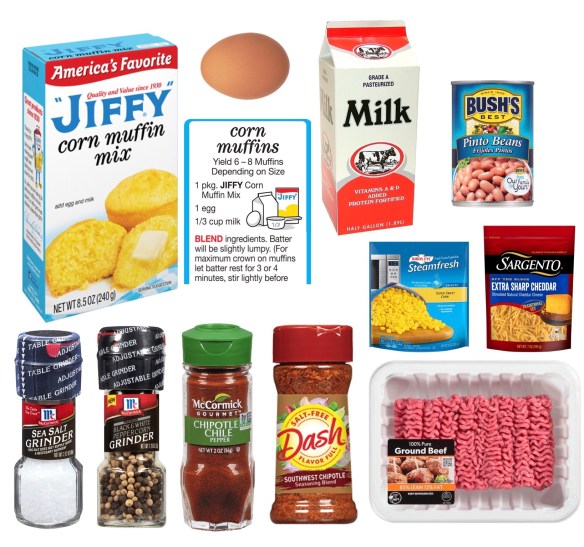
  • 1-1.5 lb ground beef (85/15)
  • sea salt (finely ground)
  • black and white pepper (finely ground)
  • McCormick Gourmet Organic Chipotle Chile Pepper seasoning
  • Mrs. Dash Dash Southwest Chipotle Seasoning Blend
  • 1 cup frozen extra sweet corn
  • 1 can (15 oz.) pinto beans, rinsed and drained
  • 1 cup shredded cheddar cheese
  • 1 package Jiffy Corn Muffin Mix
  • 1 egg
  • 1/3 cup milk
  • butter or bacon grease to grease the pan

Directions:

  • Preheat oven to 375°F.
  • Lightly grease a 9 x 13 inch pan and set aside. For added flavor, I used bacon grease to grease the pan.
  • In a large skillet, brown the ground beef. Add the salt, pepper and other seasonings (vary amounts based on taste). Brown over medium-high heat until the beef is well browned. Drain excess grease from the pan. Stir in the frozen corn and pinto beans. Pour the mixture into the greased baking pan and set aside.
  • Prepare one box of Jiffy Corn Muffin Mix according to the directions on the side of the box. Let batter rest for a couple of minutes.
  • Sprinkle the shredded cheese over the beef mixture.
  • Spoon the prepared Jiffy Corn Muffin batter on top of the cheese.
  • Gently spread the cornbread to the edges of the pan, evening it out over the top of the casserole.
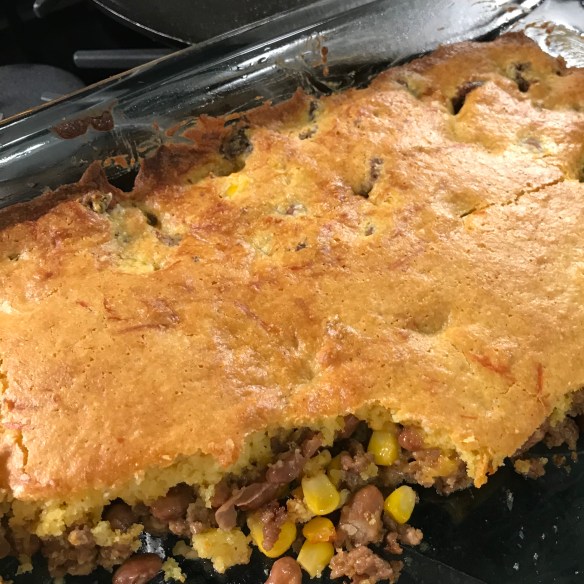
  • Bake for 30-35 minutes until the edges are bubbly and the cornbread is golden brown.
  • Let the casserole stand for a few minutes before serving.


Angela Moorad, MS, CCC-SLP, Founder of OMazing Kids, LLC

Retired Pediatric Speech-Language Pathologist with 28 years experience …. posting frequently again on social media about resources, apps & AAC stuff. And occasionally a recipe or two 😉

Facebook: http://www.facebook.com/OMazingKidsYoga

AppPeeps Facebook Group: https://www.facebook.com/groups/OMazingKidsAppPeeps/
 (I am only approving those who answer the two questions to help keep spammers out of the group. Please let folks know if you invite them to join)

Instagram: http://instagram.com/amoorad1

Twitter:
 https://twitter.com/amoorad

Blog: http://omazingkidsllc.com
{Please ignore any ads that may appear below. This is a free blog and I don’t have any control over ads nor do I profit from them}


Who Do I Want to Be During COVID-19? Helpful and encouraging….. so OMazing Kids is posting again frequently during the COVID-19 / Coronavirus pandemic

You may have noticed that I have been posting on social media frequently during the COVID-19 / Coronavirus pandemic. I’m SO incredibly grateful to be retired and have the time to help others through the sharing of resources, prayers, helping elderly relatives get groceries/supplies, etc… I have all my fellow SLPs in my prayers for God’s safety and provision. I also have all the families of kids with special needs in my prayers that God would give you the wisdom and peace needed to help you help your child/children during this incredibly stressful time.

.

Here’s my most recent post about apps that were currently free. I primarily post about iOS apps but am also sharing the Android version of apps if available and free. I typically cross post in my AppPeeps Facebook Group and sometimes on Instagram and Twitter to spread the word.

.
The whole world is currently frustrated with last minute routine change … Not so fun is it? 
 

I have especially had all the individuals with Autism (and their families) in my thoughts and prayers. 🙏🏼

I know how incredibly stressful any change in routine can be and this is a bunch all at once.

.

I’ve been sharing this with family and friends during the COVID-19 / Coronavirus pandemic to provide encouragement and hope.

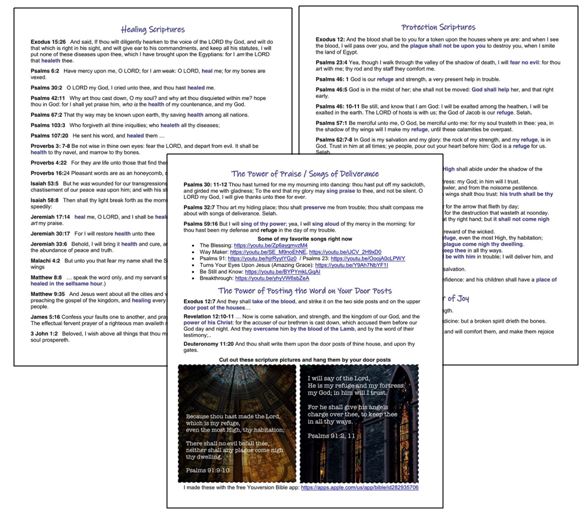
Scriptures for Healing, Protection and Joy; Songs of Deliverance; Posting the Word of God on Your Door Posts (4-6-20) – 3 page PDF: https://omazingkidsllc.com/wp-content/uploads/2020/04/scriptures-for-healing-protection-and-joy-songs-of-deliverance-posting-the-word-of-god-on-your-door-posts-4-6-20-3-page-pdf.pdf

I just downloaded it from there into iBooks on my iPad and iPhone and was pleased to see that all the links work.

https://www.facebook.com/174264525957894/posts/3027568450627473/

.

Who Do I Want To Be During COVID-19?

.

Angela Moorad, MS, CCC-SLP, Founder of OMazing Kids, LLC
Retired Pediatric Speech-Language Pathologist with 28 years experience …. posting frequently again on social media about resources, apps & AAC stuff.
————————————-
Facebook: http://www.facebook.com/OMazingKidsYoga
————————————-
AppPeeps Facebook Group: https://www.facebook.com/groups/OMazingKidsAppPeeps/
(I am only approving those who answer the two questions to help keep spammers out of the group. Please let folks know if you invite them to join)
————————————-
Instagram: http://instagram.com/amoorad1
————————————-
Twitter:
https://twitter.com/amoorad
————————————-
Blog: http://omazingkidsllc.com

.
{please ignore any ads that may appear below. This is a free blog and I don’t have any control over ads nor do I profit from them}

Making Informed AAC Purchasing Decisions

Making Informed AAC Purchasing Decisions

Thinking about getting an AAC app? Many AAC apps typically go on sale for a few days in April (or May) and October. You can see the pricing history for any app on the AppSliced website (https://appsliced.co/apps) and watch Lauren Enders’ page for her round up posts of AAC app sale dates/details (https://www.facebook.com/LaurenSEndersMaCccSlp/).

.

Looking for a way to try out AAC apps before making a purchasing decision? If you are in the USA, all states are supposed to have an Assistive Technology Lending Library program where you can borrow AAC devices, iPads with AAC apps & other AT for short-term trial. It’s a great way to try various options out before making purchasing decisions. How to find the AT Lending Library in your state: https://www.at3center.net/stateprogram

.

If you are a Speech-Language Pathologist, then see this post for tips on how you can get access to AAC apps: https://omazingkidsllc.com/2021/02/16/how-to-get-access-to-the-top-10-ios-symbol-based-aac-apps-2-16-21-compiled-by-angela-moorad-ms-ccc-slp-omazing-kids-aac-consulting-part-of-a-larger-feature-matching-chart/

—————————-

Angela Moorad, MS, CCC-SLP, Founder of OMazing Kids, LLC OMazing Kids AAC Consulting

Ko-fi: https://ko-fi.com/omazingkidsaac

Personal Professional Facebook Page (linked to OMazing Kids): https://www.facebook.com/angela.moorad– adding “friends” who have a direct role in AAC or Assistive Technology – AAC / AT app or product developers, AAC / AT consultants, SLPs who specialize in AAC, other professionals who specialize in AAC or AT, etc.)

OMazing Kids AAC Consulting Facebook Page: https://www.facebook.com/OMazingKidsAAC/

AppPeeps Facebook Group: https://www.facebook.com/groups/OMazingKidsAppPeeps/

Instagram: https://www.instagram.com/omazingkidsaac/

Twitter: https://www.twitter.com/amoorad

Pinterest: http://pinterest.com/OMazingKids/

Linktree: https://linktr.ee/amoorad1

Blog: http://omazingkidsllc.com

Free printable AAC core board with alphabet, numbers, shapes & colors

Free printable AAC core board with alphabet, numbers, shapes & colors (4 page PDF that you can print, assemble and laminate). It was recently shared in the AAC for the SLP Facebook group (original source seen on Pinterest from the Angelman Syndrome Foundation but the link is broken… appears to be no longer available on their website). I saved it to my blog:

https://omazingkidsllc.com/wp-content/uploads/2019/10/150-location-core-board-with-alphabet.pdf

*
I found this one on Boardmaker Share that is very similar and could be edited if you have the Boardmaker software or online subscription: https://www.boardmakeronline.com/Activity/8583743
Other similar options:
*

Angela Moorad, MS, CCC-SLP

Founder of OMazing Kids, LLC

Retired Pediatric Speech-Language Pathologist with 28 years experience …. still posting occasionally about apps & AAC stuff. 

Facebook: http://www.facebook.com/OMazingKidsYoga

AppPeeps Facebook Group: https://www.facebook.com/groups/OMazingKidsAppPeeps/

App Review: Thinkrolls Space by Avokiddo

.

App Review: Thinkrolls Space by Avokiddo

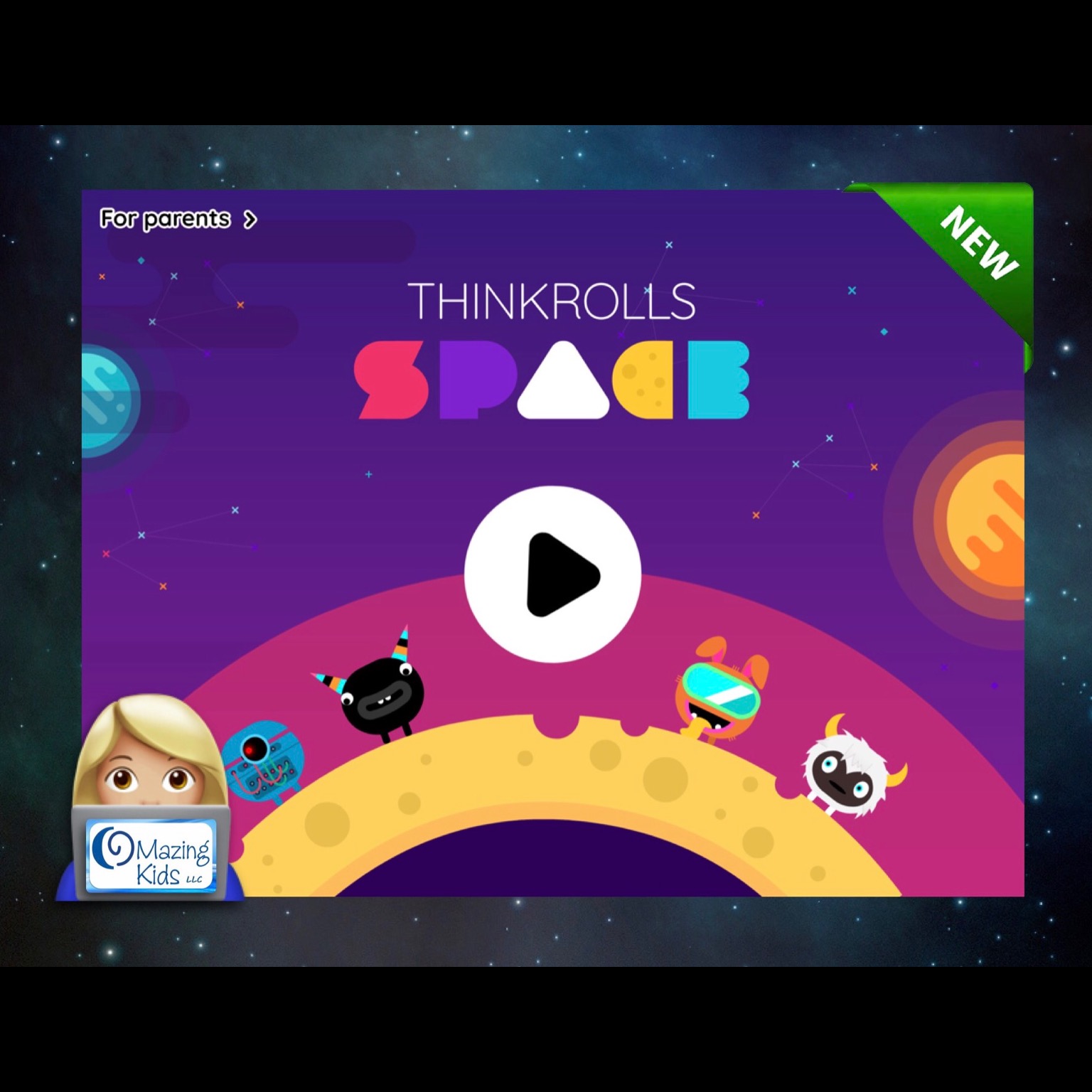
Avokiddo has just released Thinkrolls Space, a new app in their “Thinkrolls” collection, and it’s awesome! Highly recommended 😊
.


.
I previously used Thinkrolls apps extensively in my work as a SLP to work on problem solving, sequencing, logic, etc… and like to play the games myself as well. This newest one has a fun space theme, extra characters that can be unlocked by collecting stars and hearts along the journey (adding another opportunity to strategize the best route to collect the most), has an “easy” level with 110 puzzle paths on 7 planets and a “hard” level with 108 puzzle paths on 7 planets, high quality graphics and sound effects and is a blast to play.
.
Navigate through seven unique-themed planets, each focusing on a different set of skills and puzzle elements. Throughout, you’re encouraged to experiment. You’ll learn through trial and error to combine elements, as well as how to build on successive lessons to strengthen creative thinking, logic, problem solving, spatial cognition, and memory. Look for the key and exit gate. Try to visualize your route. Use and combine objects to clear a path, get the key, and move to the exit. Trapped? No problem. Just tap the reset button at the top right of the screen and try again. The app offers unlimited, penalty-free retries, and no time limits. This along with the option to toggle off the background music contribute to it being special needs friendly.
.
Since the puzzles are designed to be solved in order, levels are greyed out at the beginning and become available as you go along. To facilitate the app review process, the app developer provided me with a code to unlock all levels. This way I could visit any planet without having to complete all previous levels. Based on my experience working with numerous kids with special needs who became very frustrated when they couldn’t finish a game it would be nice if the app developer could add this “unlock all levels” in the settings area in a future update.
.
Progress is saved automatically so you can pick up where you’ve left off. Puzzles become increasingly harder combining skills learned earlier in the game.
.
The easy level is recommended for younger kids (5+). As I tested the app I found the “easy” level of Thinkrolls Space to be a bit harder than the “easy” levels in the Thinkrolls 1 & Thinkrolls 2 apps with Planet 7 in the “easy” level requiring the most thinking ahead several steps to formulate a plan. The hard level is more challenging (targeted for older kids (8+) and even adults). This new app is definitely easier than the Thinkrolls Kings and Queens app but there were several puzzles in the “hard” level that I found to be very challenging and a few that I ended up skipping after several attempts. But I may come back and solve those later 😊
.
The app allows you to create up to six separate player profiles, which is useful if multiple users share the same device. The selected difficulty mode is player-specific and can be changed at any time. Progress, collected hearts and stars, as well as won characters are also player-specific.
.
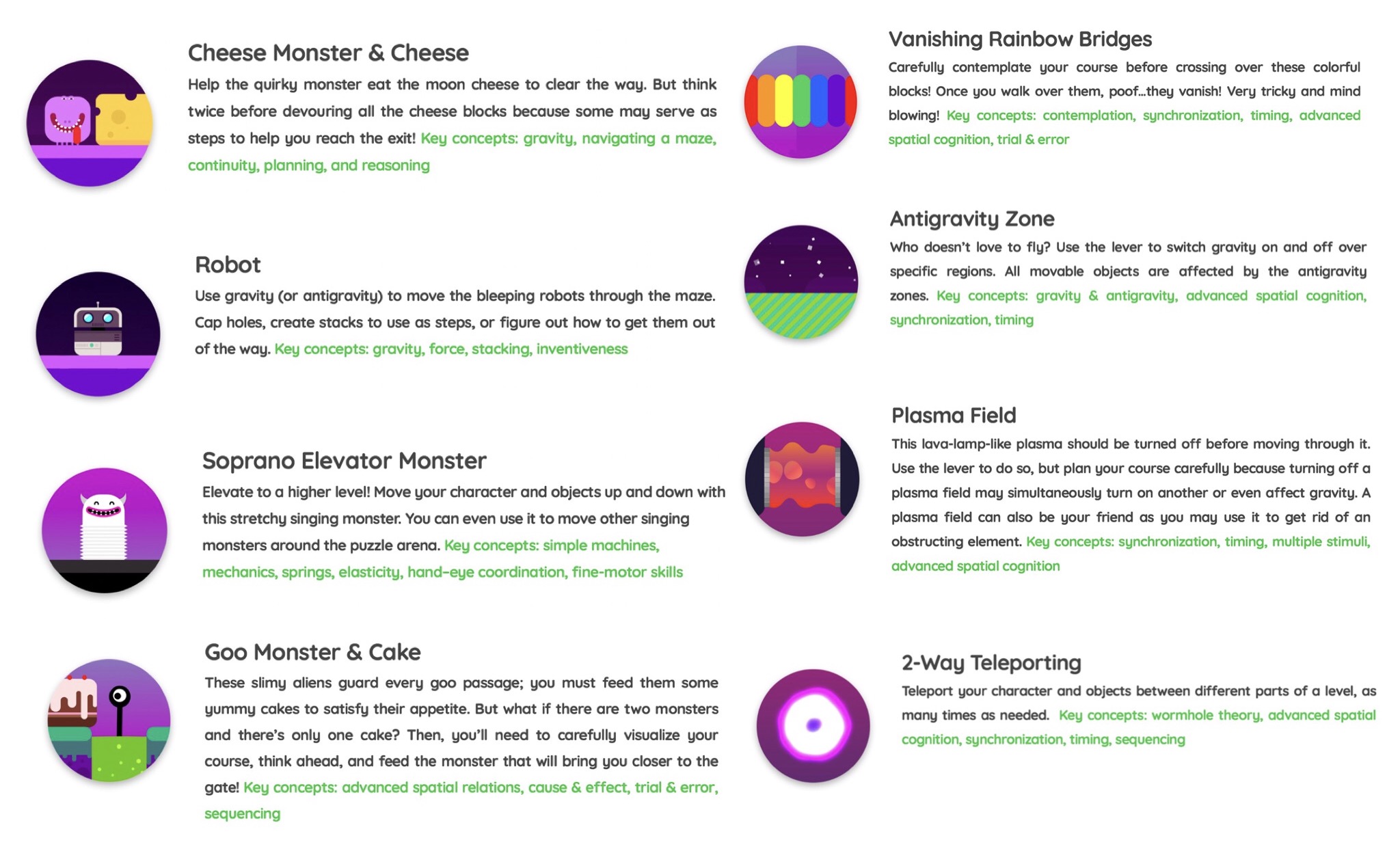
The elements: In Thinkrolls Space, you’ll meet goo monsters, bleeping robots, spring-like soprano aliens, and cheese monsters who love munching moon cheese. You’ll face vanishing rainbow bridges, plasma fields, teleporters, and more. Each of these can help or hinder.
.

.
Helpful info and tips on how to play can be found in a “for parents” section that is secured behind a parental gate in the top left corner of the home screen.
.
There are no third-party ads or in-app purchases in this app. But there is a link to other apps by this developer in the bottom left corner of the home screen. It would be nice if that area could be toggled off and/or add a much more difficult parental gate since it contains links to purchasing other apps. The current parental gate could be easily hacked by older children who can read. In the meantime I will secure this area with Guided Access. Of course it is always wise to have a strong password set for purchasing apps and to toggle off app purchasing in the settings area on any iPad that a child is using.

.

I highly recommend this new app and hope the developer continues to release more Thinkrolls in the future.

——-
App Store info:
iOS 8.0 or later
Universal app that works on an iPad, iPhone or iPod Touch
https://apps.apple.com/us/app/thinkrolls-space/id1458751834
$3.99 – prices will vary outside of the USA based on the exchange rate
——-

Developer’s website: https://avokiddo.com/thinkrolls-space/

——-
Angela Moorad, MS, CCC-SLP
Retired Pediatric Speech-Language Pathologist with 28 years experience …. still figuring out what I want to “do” in this next phase of life. 😎
Founder of OMazing Kids, LLC

Tips on where to find info now that I’m retiring

.

Yup…. I’m really retiring in 1 week. I’ve been doing this for 28 years and am very excited to “despeechify” my life and start a whole new adventure. Info about my retirement sale can be found on this post: https://omazingkidsllc.com/2018/04/14/omazing-kids-slp-retirement-sale-what-i-have-where-i-will-be-selling-it/.
.
I have received numerous messages asking “What will happen to your blog?” & “Where can we find info about apps that are free or on sale for a great deal?”. So I wrote this post to pass along info.
.
What will happen to my blog and social media sites:

I am planning on leaving my blog and social media sites up for 12 months after I retire to allow folks plenty of time to save any free printables, workshop presentation handouts, the big post listing apps for SLPs by goal areas, the big blog post with tips about how SLPs can get FREE access to AAC apps, AAC app user groups, funding options & more, AAC core vocabulary ideas, kids yoga lesson plans and other info that I have shared over the years. I’ll decide later what to do with my blog and social media sites beyond that.
.
Reviews:

I am not accepting any requests to do any new reviews for products, books or apps. I have a couple of reviews that are currently in process but those will be the last ones that I do.
.

Blog:

I will be doing very few new blog posts or updates to previous posts since I will be focused on selling off my stash of materials and getting our house sold so my husband and I can move to the mountains in Colorado and do some traveling.
.
If you run into dead links on old blog posts please keep in mind that all links were active at the time that blog post was done. Please use Google to look for whatever that resource might have been.
.
If you are looking for something on my blog, please use the “search” feature.
.
How to find info about app deals:
If you still have an iPad running something prior to iOS 11, then these are the two ways that I use to find apps that are either free or on sale for a great deal that day:

* AppZapp HD Pro – daily new Apps, best hot deals & free Apps by ConIT AG, https://itunes.apple.com/us/app/appzapp-hd-pro-daily-new-apps-best-hot-deals-free-apps/id428248004?mt=8 (free app, iPad only, will not work with iOS 11)
* The AppShopper website: http://appshopper.com/all/prices/free

I’ve also gotten a couple of good apps for free by checking this app: Apps Gone Free & Daily Tips by AppAdvice.com, https://itunes.apple.com/us/app/apps-gone-free-daily-tips/id470693788?mt=8.

Unfortunately most of the large app review sites have either disappeared, post very infrequently or have moved on to focusing on reviews for products. To be honest by the time some sites post about an app being free I have already found it myself using the methods listed above.

.

AAC App Sales:

Be sure to follow Lauren Enders’ Facebook page for the most reliable info about upcoming AAC app sales:

https://www.facebook.com/LaurenSEndersMaCccSlp

.
Questions about specific AAC apps, recommendations for type of iPad, types of cases, other apps, etc.:

* Join the Facebook users group specific to that app. Folks are quick to provide support and most groups have an Admin (or several Admins) that works for that company. See links on this post: https://omazingkidsllc.com/2016/06/11/aac-tips-how-slps-can-get-free-access-to-aac-apps-aac-app-user-groups-funding-options-more/

* If you are a SLP, join the AAC for the SLP Facebook group: https://www.facebook.com/groups/1539830846285663/

* Looking for iPad case options? Check out Lauren Enders Pinterest boards. She has a separate board for every model of iPad:

https://www.pinterest.com/lasenders/

The AAC for the SLP is also a helpful group to brainstorm case options.

* Looking for non-AAC apps with certain features or to target specific goals? Since I will no longer be doing therapy I won’t be keeping up on these details. Unfortunately I don’t have a specific place to refer you to for this.
.
I rarely check the e-mail that I have associated with this blog since it is flooded with spam mail and after retirement will only occasionally respond to questions on Facebook unless they are specifically related to my retirement sale. It is hard for me to walk away from something that I spent so much time on but need to do so to focus on the future.
.
Thanks to everyone who has left kind comments or messages. I’m glad that you have found my posts helpful over the years 😃.
.

Angela Moorad, MS, CCC-SLP
Speech-Language Pathologist
Founder of OMazing Kids, LLC

**ARCHIVED** 70+ Kids Picture Books to Target Core Vocabulary for AAC

5/14/21 – This old blog post from April 2018 has been archived. This resource started as a blog post where I documented core words in picture books that I was selling when I retired from clinical practice. I remember sitting in my living room surrounded by piles of over 1,200 kids picture books and Post It notes. Later I expanded it to include more books that I had used digitally and offered it on TPT after I had received numerous requests for it.

An updated and expanded list is available in this download over on my new Teachers Pay Teachers store. Be sure to click “Follow” on my store to get notifications when new items are added and updates are made.

100 great kids picture books to target Core Vocabulary for AAC users - cover image

https://www.teacherspayteachers.com/Product/100-Great-Kids-Picture-Books-to-Target-Core-Vocabulary-for-AAC-Users-6836821

.

Angela Moorad, MS, CCC-SLP, Founder of OMazing Kids, LLC OMazing Kids AAC Consulting

Ko-Fi: https://ko-fi.com/omazingkidsaac

Personal Professional Facebook Page (linked to OMazing Kids): https://www.facebook.com/angela.moorad (adding “friends” who have a direct role in AAC or Assistive Technology – AAC / AT app or product developers, AAC / AT consultants, SLPs who specialize in AAC, other professionals who specialize in AAC or AT, etc.)

OMazing Kids Business Facebook Page: https://www.facebook.com/OMazingKidsAAC/

AppPeeps Facebook Group: https://www.facebook.com/groups/OMazingKidsAppPeeps/

Instagram: https://www.instagram.com/omazingkidsaac/

Twitter: https://www.twitter.com/amoorad

Pinterest: http://pinterest.com/OMazingKids/

Linktree: https://linktr.ee/amoorad1

Blog: http://omazingkidsllc.com

OMazing Kids SLP Retirement Sale: What I Have & Where I Will Be Selling It

.

OMazing Kids SLP Retirement Sale

There have been LOTS of folks interested in what is happening to my stash of materials, books, games, toys, etc. when I retire. I have been flooded with Facebook messages on my personal account and on OMazing Kids. So much so that I realized that I need to write this blog post with details to make it easier to share.
.
First off here’s what I DON’T have: no tests, no test protocols, no Kaufman apraxia kits, no decks of articulation cards, no materials for feeding & swallowing. The hospital where I work has those. Plus I typically use my iPad with high quality apps to work on articulation. I am not selling my Boardmaker CD.
.
Here’s what I DO have and where I will be selling those items. I am only shipping items within the USA:

  • Books (regular kids picture books that I have organized by themes): I have LOTS of these books. All are in great condition (may have name on cover). A few are board books, a few are paperback and most are hardcover. These can be shipped inexpensively via media mail shipping. I am selling these books  in my own OMazing Kids SLP Retirement Sale group since the group has gained quite a few members and things are now selling pretty quickly there 😃.
    .
  • Plush Book Buddies: I have a few that I will be selling as a Book + Book Buddy set and several plush Book Buddies that I will be selling separately. Prices will vary and will be included in that post in my own OMazing Kids SLP Retirement Sale group. Plush Book Buddies cannot be shipped via media mail. The shipping costs will be based on the weight, size of box, how many zones it crosses in shipping, etc.
    .
  • Books for targeting Core Vocabulary for AAC users: I will be selling these in my own OMazing Kids SLP Retirement Sale group. These are priced a little higher than my regular book bundles due to their unique usefulness in targeting specific goals.
    .
  • Specialty books (books for kids yoga, books to target specific speech & language goals, etc.) – I will be selling these in my own OMazing Kids SLP Retirement Sale group. These are priced a little higher than my regular book bundles due to their unique usefulness in targeting specific goals.

.

  • Kids music CDs – I have a lot of great kids music that I used when teaching a variety of groups and during therapy sessions. I also have kids yoga CDs. I will be selling all of them either in my own OMazing Kids SLP Retirement Sale group or my garage sale. Prices vary. See list on each post. All in very good condition. May have name on cover and/or on the CD. These can be shipped inexpensively via media mail shipping.
    .
  • Kids DVDs – I have several kids yoga and mindfulness DVDs and a few other kids DVDs. All are in good condition (may have name on cover). Prices vary. They will be sold in the CD post described above. These can be shipped inexpensively via media mail shipping.
    .
  • Therapy books – including several books from Hanen, books for teaching social skills, books for teaching self regulation skills, books with strategies for stuttering, language, Autism, early literacy, AAC manuals, etc…. Prices will vary. all are in good condition (may have name on cover) and can be shipped inexpensively via media mail. These will be sold in my own OMazing Kids SLP Retirement group. Some may be sold as part of “Build your own specialty book bundles” (see info above).
    .
  • Therapy card decks & materials: I have a few Super Duper fun decks (Function Match Up, Yes/No, Multiple Meaning Words, Syllable Drilling, What Does Miss Bee See, Rebus Infer a Word, Auditory Memory for WH questions fun deck, Phonemic Awareness). Also have from Super Duper: Anytime Go Togethers, Webber Inferencing Big Deck, Sequencing Verb Tenses. Lots of other language stuff from various companies. All are in good condition (may have name on box). Several are hard to find since they are no longer available from that company. These items cannot be shipped via media mail. The shipping costs will be based on the weight, size of box, how many zones it crosses in shipping, etc. (I’ve seen conflicting info about whether “flash cards” are considered eligible for media mail. I asked in person at my local post office and even they did not have a definitive answer…. so it’s not worth risking especially since many are in metal storage tins.). Given the shipping costs I anticipate selling most of these items at my in home garage sale (see details below).
    .
  • Therapy games: I have a few games specifically designed for language, spatial concepts, storytelling, categories, colors, shapes, articulation, early literacy, etc…. These items cannot be shipped via media mail. The shipping costs will be based on the weight, size of box, how many zones it crosses in shipping, etc. Given the shipping costs I anticipate selling most of my therapy games at my in home garage sale (see details below).
    .
  • Games: I have lots of games. All are in good condition. I even have the much sought after Cranium Cariboo (in pristine condition – Update: SOLD) and also much sought after Candyland Castle (also in pristine condition). Due to the demand for those two games I will be selling them on my own OMazing Kids page or my OMazing Kids SLP Retirement Sale group. Games cannot be shipped via media mail. The shipping costs will be based on the weight, size of box, how many zones it crosses in shipping, etc. Given the shipping costs I anticipate selling most of my games at my in home garage sale (see details below).
    .
  • Toys: I have a ton of toys. All are in good working condition. I have several items by Melissa & Doug, Fisher Price, Playskool, etc. Also have several sensory items. Toys cannot be shipped via media mail. The shipping costs will be based on the weight, size of box, how many zones it crosses in shipping, etc. Given the shipping costs I anticipate selling most of my toys at my in home garage sale (see details below).

.

Other stuff:

  • Materials for making communication books & visual schedules
  • Storage containers, work bins, finished bins
  • AAC stuff
  • Visual supports & Time Timers
  • Things that have been symbol adapted
  • Symbol-supported teaching materials
  • a Sensory Storytime kit for “Dog’s Colorful Day”
  • an Owl Bumpidoodle cushion & things for a “calm down” kit
  • Tiggly stylus sets
  • Kids styluses
  • Props used in kids yoga classes
  • Kids yoga card decks
  • iON Clipster Bluetooth speakers (used to amplify iPad for AAC)
  • Bluebee Pals Bluetooth plush animal speakers
  • Posters
  • Clipboards
  • Award certificates (what I used when kids “graduated” from therapy)
  • Other random stuff….. etc….
    .

Tips for Facebook buy-sell-trade groups:

  • join my OMazing Kids SLP Retirement Sale group:  (group set to inactive now)
  • be sure to change the settings for “notifications” to “all posts”.
  • Payment is made via PayPal. If purchasing a bundle you must have the minimum number of items or $ amount for that bundle. Then I will send an invoice via PayPal. Please make sure your mailing address is correct in the PayPal system. After you pay your invoice that is the address that I will use to ship items to you.

*** UPDATE: I will no longer be selling things in any BST group other than my own OMazing Kids SLP Retirement Sale group. Too many fishy shenanigans going on in other groups. ****

.
In Home Garage Sale: For those of you who live in Oklahoma (or want to make a road trip here) here are details about my in home garage sale. I have my living room set up with shelving, bookcases & tables full of all the stuff listed above. I’m trying to sell off most of the stuff that can be shipped via media mail before then…. ’cause right now there is barely a path. I knew I had a lot of stuff but the sheer magnitude of my speechie hoarding is now very apparent that I have it all in my living room (and have totally taken over the tables in my kitchen and dining room as I sort, weigh and prep for mailing items. You should have seen the looks that I got lugging my huge tub filled with boxes into the Post Office to ship earlier this week 👀 Yup. I was “that” person we all hate being behind 😂🤣). I’ll post a pic on my page and group once I get everything organized and priced so you can see what I mean by a “SLP hoarders stash”.

When: Saturday, May 19, 2018 at 9:00am-1:00pm CST

Where: in the living room of my home in Norman, Oklahoma. Please send me a private Facebook message for my address. Please only message me if you will be coming and please don’t pass my address along to anyone else. I don’t want the general public showing up. This is a specialty sale geared towards therapists (SLP, OT, PT) and teachers.

Payment Options: Cash only at the in home garage sale.

Note: I picked the date & time to avoid conflicts with most graduation ceremonies. Since severe weather can be possible here in May please check my OMazing Kids page (https://www.facebook.com/OMazingKidsYoga/) or OMazing Kids SLP Retirement Sale Group (https://www.facebook.com/groups/121442208430173/) for announcements regarding weather related changes.

Items will be for sale first come-first served.

I cannot hold items since I need to get everything sold and paid for quickly to be able to prepare for selling our home.

Also there are no returns or exchanges for this same reason.
.
Feel free to message me on Facebook with any questions.
.
Angela Moorad, MS, CCC-SLP
Speech-Language Pathologist
Founder of OMazing Kids, LLC
Facebook Messaging for OMazing Kids: http://m.me/OMazingKidsYoga (note: Facebook frequently changes the link to messaging so if this one doesn’t work head over to my page and click on the “Send Message” button)
Facebook: http://www.facebook.com/OMazingKidsYoga

Spanish AAC Apps, Devices & Resources (Hablo con CAA)

Spanish AAC Apps, Devices & Resources (Hablo con CAA)

It can be challenging to find information about and resources for AAC in languages other than English. Since Spanish is the most common language after English in my state I have compiled a list to make it easier to share with parents:
.

Added 5/8/23: Bilingüe AAC

https://padlet.com/bilingueaac/bilingueaac-resources-gmw3qsxcg0xo3zaz

https://www.bilingueaac.com


Hablo con CAA is a great website in Spanish: https://habloconcaa.wordpress.com. They also have a Facebook page & Facebook group. Most posts are in Spanish.

https://www.facebook.com/habloconcaa/
https://www.facebook.com/groups/habloconcaa

Prompting hierarchy: https://habloconcaa.wordpress.com/2017/10/01/repensar-la-jerarquia-de-peticiones-en-la-caa-aac-prompting-hierarchy/
.
Video about Aided Language Stimulation – in Spanish:

.
The Communication Matrix assessment is available online in Spanish: https://communicationmatrix.org. See this post in Spanish explaining the website: https://habloconcaa.wordpress.com/2017/05/04/evaluando-la-caa-la-matriz-de-comunicacion/
.
Saltillo webinars in Spanish: https://saltillo.com/videos/x/webinar/es
Saltillo Core Vocabulary handout: https://saltillo.com/downloads/chat/escogiendo-el-vocabulario-clave-el-acercamiento-de-actividad-primero-choosing-core-vocabulary-act/Escogiendo%20el%20vocabulario%20clave%20El%20acercamiento%20de%20actividad%20primero.pdf
.
PRC Spanish info: https://www.prentrom.com/prc_advantage/unidad-espanol-language-system
LAMP Words for Life Quick Reference Guide in Spanish: 

http://file.prentrom.com/2097/17908v1_1-LAMP%20WFL%20SE%20Vocab%20Quick%20Reference-Español.pdf
.
Assistiveware’s resources for Proloquo2Go in Spanish: http://www.assistiveware.com/es/producto/proloquo2go/recursos
Core Word Board: front: http://coreword.assistiveware.com/uploads/db6476/original/1X/1f0f35191fd7c602c2016dfec3f5f3980d4255f2.pdf, back: http://coreword.assistiveware.com/uploads/db6476/original/1X/8ffa70e175c74006c2b60b7d0a229ff1ab8f7d2d.pdf
Core Word Poster: http://download.assistiveware.com/assistiveware/files/A0-840×1189-CoreWord-Poster-es-ES.pdf

AssistiveWare’s Spanish user group on Facebook: https://www.facebook.com/groups/2123537574601002/

.

More printable options:

* AAC Core Words to Go in Spanish Picture Communication (available for purchase on Teachers Pay Teachers: https://www.teacherspayteachers.com/Product/AAC-Core-Words-to-Go-in-Spanish-Picture-Communication-1829593)

* Spanish Communication Flip Board (FREE on Teachers Pay Teachers: https://www.teacherspayteachers.com/Product/Spanish-Communication-Flip-Board-2838262)

* Graduated Core Word Photo Boards with Flip Fringe Vocab & Spanish Version (FREE on TPT: https://www.teacherspayteachers.com/Product/Graduated-Core-Word-Photo-Boards-with-Flip-Fringe-Vocab-Spanish-Version-3127128)

* 72 Spanish Graduated Core Board (FREE on TPT: https://www.teacherspayteachers.com/Product/72-Spanish-Graduated-Core-Board-2865788)

.

More materials:

* http://aulaabierta.arasaac.org
* http://aulaabierta.arasaac.org/materiales-caa
* http://aulaabierta.arasaac.org/materiales-caa-recetas-de-cocina
.
Adapted books: http://chapelhillsnippets.blogspot.com/p/spanish.html
.
High Tech AAC for Spanish Speakers – in the ASHA Leader 3/18/16: http://blog.asha.org/2016/03/08/high-tech-aac-for-spanish-speakers/ (note: The AAC app world is constantly changing. Even though that article is less than 2 years old it is already outdated. LAMP Words for Life now has a bilingual Spanish/English option & Snap + Core First has been released and then updated to add a bilingual Spanish/English option).
.
PrAACtical AAC: http://praacticalaac.org/?s=Spanish & https://praacticalaac.org/?s=CAA
.
Boardmaker boards in Spanish: http://prekese.dadeschools.net/Resources/BMDSpanish.html
https://www.boardmakeronline.com/Activities/Search#?page=1&text=Spanish
.
Dedicated Speech Generating Devices:

* PRC’s Accent series of devices with UNIDAD bilingual English – Spanish language system.
* Saltillo’s NovaChat series of devices. Several Spanish pageset options.
* Tobii Dynavox offers Snap + Core First in several dedicated devices. This vocabulary has a bilingual Spanish/English option.
.
Robust AAC apps:

* CoughDrop by CoughDrop, Inc., https://itunes.apple.com/us/app/coughdrop/id1021384570?mt=8

How to translate a board in CoughDrop: https://coughdrop.zendesk.com/hc/en-us/articles/115001290091-How-can-I-translate-a-speech-board-into-a-different-language-

* Proloquo2Go by AssistiveWare
https://itunes.apple.com/us/app/proloquo2go/id308368164?mt=8, has a bilingual Spanish/English option

* Proloquo4Text by AssistiveWare, https://itunes.apple.com/us/app/proloquo4text/id751646884?mt=8 (has Spanish option)

* LAMP Words For Life by Prentke Romich Company
https://itunes.apple.com/us/app/lamp-words-for-life/id551215116?mt=8, has a bilingual Spanish/English option

* Snap + Core First by Tobii Dynavox LLC
https://itunes.apple.com/us/app/snap-core-first/id1072799231?mt=8, has a bilingual Spanish/English option

* TouchChat HD – AAC with WordPower by Silver Kite
https://itunes.apple.com/us/app/touchchat-hd-aac-with-wordpower/id412351574?mt=8, has 10 different Spanish pagesets options within the app

* Avaz Español – AAC App para el autismo (Software de comunicación aumentativa Imagen para Niños con Necesidades Especiales) by Avaz, Inc.
https://itunes.apple.com/us/app/avaz-espa%C3%B1ol-aac-app-para-autismo-software-comunicaci%C3%B3n/id923997149?mt=8 – Spanish only

* BRIDGE Communication by Bioprism, Inc.
https://itunes.apple.com/us/app/bridge-communication/id983660714?mt=8 (has Spanish & English options in the settings area)
https://www.youtube.com/channel/UCVIr5fmx0b2WTA1yluY-MkQ
.

Other AAC apps (not robust but can be helpful to meet specific needs):

* LetMeTalk by AppNotize UG (haftungsbeschraenkt), https://itunes.apple.com/us/app/letmetalk/id919990138?mt=8 (Android version: https://play.google.com/store/apps/details?id=de.appnotize.letmetalk&hl=en)

* Verbal Me Español by fishdog.net, https://itunes.apple.com/us/app/verbal-me-espa%C3%B1ol/id747621945?mt=8

.

3/15/20: Check out the updated Pinterest boards by Lauren Enders. Nicely organized by sections within the board to help you find what you’re looking for: https://www.pinterest.com/lasenders/aac-caa-spanish-implementation-supports/

.

5/1/20: Spanish translations of the great handouts from The AAC Coach – in this album on Facebook: 

https://www.facebook.com/pg/theaaccoach/photos/?tab=album&album_id=142370680583444&__tn__=-UC-R

.

5/1/20: Spanish versions of Users Guides for GoTalk products & GoTalk apps from Attainment Company

GoTalk 4+ User Guide – Spanish Version

https://www.attainmentcompany.com/mwdownloads/download/link/id/1528/

(For this product: https://www.attainmentcompany.com/gotalk-4)

.

GoTalk 9+ User Guide – Spanish Version

https://www.attainmentcompany.com/mwdownloads/download/link/id/1529/

(For this product: https://www.attainmentcompany.com/gotalk-9)

.

GoTalk 20+ User Guide – Spanish Version

https://www.attainmentcompany.com/mwdownloads/download/link/id/1533/

(For this product: https://www.attainmentcompany.com/gotalk-20)

.

GoTalk Express 32 User Guide – Spanish Version

https://www.attainmentcompany.com/mwdownloads/download/link/id/1530/

(For this product: https://www.attainmentcompany.com/gotalk-express-32)

.

GoTalk Now AAC app Users Guide

https://www.attainmentcompany.com/mwdownloads/download/link/id/1527/?fbclid=IwAR0YdHLBZGK7JPBjaO-JD2oi4kLuGIb1SBc-9Oz0LXvP5err1kAztq6YVho

(For this app: https://www.attainmentcompany.com/gotalk-now. The same guide should be applicable to the other versions of the app. I use this version: https://www.attainmentcompany.com/gotalk-now-plus). The Users Guide is also available within the help section in the apps. The Spanish version will only appear if the iPad’s language is set to Spanish (Settings > General > iPad Language & Regions). Then, when in the app, if you go to the Help section it will display the Spanish guide. 

More info: As you adjust the language on that iPad (Settings > General > iPad Language & Regions) the buttons in the app are translated and the user guide has been translated for Chinese, Czech, English, Finnish, German, Italian, Polish, Portuguese, Spanish, Swedish, Turkish, and Ukrainian. Then, for Danish and Greek, the app is translated into the language, but the user guide remains English. 

It is also worth noting that the app can be programmed to speak any language supported by the iPad. For instance, someone who speaks French and has a French keyboard downloaded on their iPad, when they use the text-to-speech within the app, it will speak in French.

.

Update 8/15/20:

A Facebook page in Spanish with frequent AAC posts: https://m.facebook.com/patriciagutierrez.es/

.

Update 8/22/20:

Spanish translation of Lauren Enders’ brand new AAC Boot Camp Infographic (CAMPAMENTO DE CAA (en Español)): http://bit.ly/CampamentodeCAA2020

(English version: http://bit.ly/AACBootCamp2020PDF)

.

Update 11/6/22:

Culturally Responsive AAC, https://aac.sfsu.edu/content/multicultural-aac
Protocol for the Analysis of Aided Language Samples in Spanish (PAALSS): https://doi.org/10.23641/asha.19233237 (Supplemental material)

———————–
If you know of other good Spanish AAC resources, feel free to let me know over on Facebook messaging on my OMazing Kids page.
.
Angela Moorad, MS, CCC-SLP
Speech-Language Pathologist
Founder of OMazing Kids, LLC – inclusive wellness & educational activities for kids of all abilities
Facebook Messaging for OMazing Kids: http://m.me/OMazingKidsYoga (note: Facebook frequently changes the link to messaging so if this one doesn’t work head over to my page and click on the “Send Message” button)
Facebook: http://www.facebook.com/OMazingKidsYoga
AppPeeps Facebook Group: https://www.facebook.com/groups/OMazingKidsAppPeeps/
Twitter: http://twitter.com/#!/amoorad
Instagram: https://www.instagram.com/omazingkids
YouTube: http://www.youtube.com/user/amoorad1
Pinterest: http://pinterest.com/OMazingKids/
Google+: https://plus.google.com/u/0/110305433538768736741
Boardmaker Share: http://www.boardmakershare.com/Community/FriendsProfile/10916/Angela-Moorad
Blog: http://omazingkidsllc.com
.
Angela Moorad is the founder of OMazing Kids, LLC and is an ASHA certified & licensed pediatric Speech-Language Pathologist and Kids Yoga Teacher with 28 years experience working in a variety of settings (early intervention, schools, teletherapy & a nonprofit pediatric rehab hospital for children with developmental disabilities). She is an app beta tester for educational & therapeutic app developers and loves sharing info about great apps, products, books & toys to use with kids of all abilities.