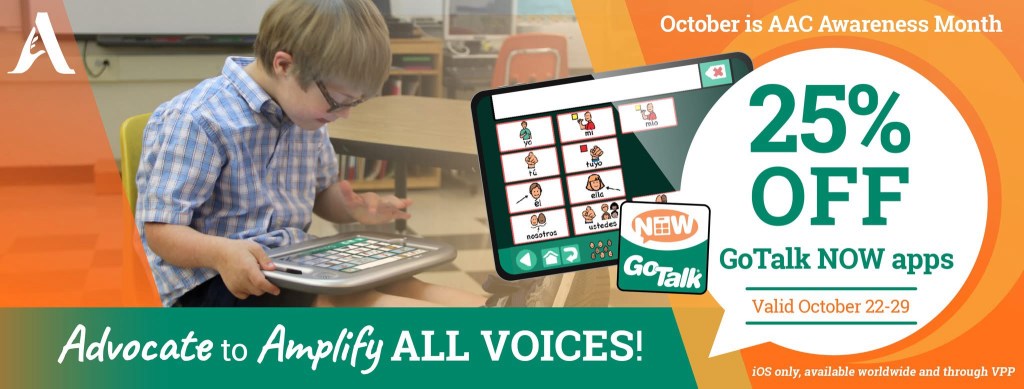
GoTalk Now: An AAC option that will reliably and easily include embedded video and music files when backing up and sharing a Communication Book. Rare sale on this app starts October 22, 2025.

If you are looking for an AAC option that will reliably and easily include videos and music files stored on that iPad that have been linked to play on a button then GoTalk Now is a tool that you should consider adding to your AAC toolkit.

Mark your calendar so you don’t miss their upcoming sale on October 22-29, 2025. It’s very rare for Attainment Company, Inc. to offer a sale. See the pricing history on AppRaven for GoTalk Now (https://appraven.net/app/1040142) & GoTalk Now Plus (https://appraven.net/app/4293360).

When you export a Communication Book from GoTalk Now (or GoTalk Now Plus) using the “Share Compressed Book” option it fully embeds and includes all videos, music files, recorded audio, photos, etc.. and reliably includes those when backing up and sharing.

That’s why I recommend GoTalk Now (or GoTalk Now Plus) as a supplemental tool in the AAC toolbox for those who will be using lots of video clips or music.

Note: The free GoTalk Now Lite and inexpensive GoTalk Start versions of this app do not have a way to backup or share.


Feel free to join my GoTalk Now AAC & GoVisual Visual Scene Apps – Ideas and Sharing Facebook Group: https://bit.ly/GoTalkNowAACappGroup. There are now two staff from Attainment Company, Inc. in the group.

Be sure to answer the questions when requesting to join and if you invite folks to join be sure they answer the questions. That’s how I keep the group secure from spammers.


Looking for in-depth AAC feature matching resources? See this blog post: https://bit.ly/5aacFeatureMatchingResources. That post also includes videos comparing the best AAC apps on various devices on various platforms.


Looking for more AAC resources? Check out the Resource Links page here on my blog: https://omazingkidsllc.com/omazing-kids-aac-resource-links


Have a question? The best way to reach me is via Facebook messaging over on my OMazing Kids page: https://www.facebook.com/OMazingKidsAAC/


Angela Moorad, MS, CCC-SLP, Founder of OMazing Kids, LLC, OMazing Kids AAC Consulting

• Teachers Pay Teachers Store: https://www.teacherspayteachers.com/Store/Omazing-Kids-Aac-Consulting

• YouTube: https://youtube.com/user/amoorad1

• Ko-Fi: https://ko-fi.com/omazingkidsaac

• OMazing Kids AAC Consulting Facebook Page: https://www.facebook.com/OMazingKidsAAC/

• AppPeeps Facebook Group: https://www.facebook.com/groups/OMazingKidsAppPeeps/

• GoTalk Now AAC & GoVisual Visual Scene Apps – Ideas and Sharing Facebook Group: https://bit.ly/GoTalkNowAACappGroup

• Instagram: https://www.instagram.com/omazingkidsaac

• X (formerly Twitter): https://www.x.com/amoorad

• Pinterest: http://pinterest.com/OMazingKids/

• Linktree: https://linktr.ee/amoorad1

• LinkedIn: https://www.linkedin.com/in/angelamooradomazingkidsaac

• AppRaven AAC App Collections: https://bit.ly/AAConAppRaven

• Blog: https://omazingkidsllc.com / Resource Links page: https://omazingkidsllc.com/omazing-kids-aac-resource-links

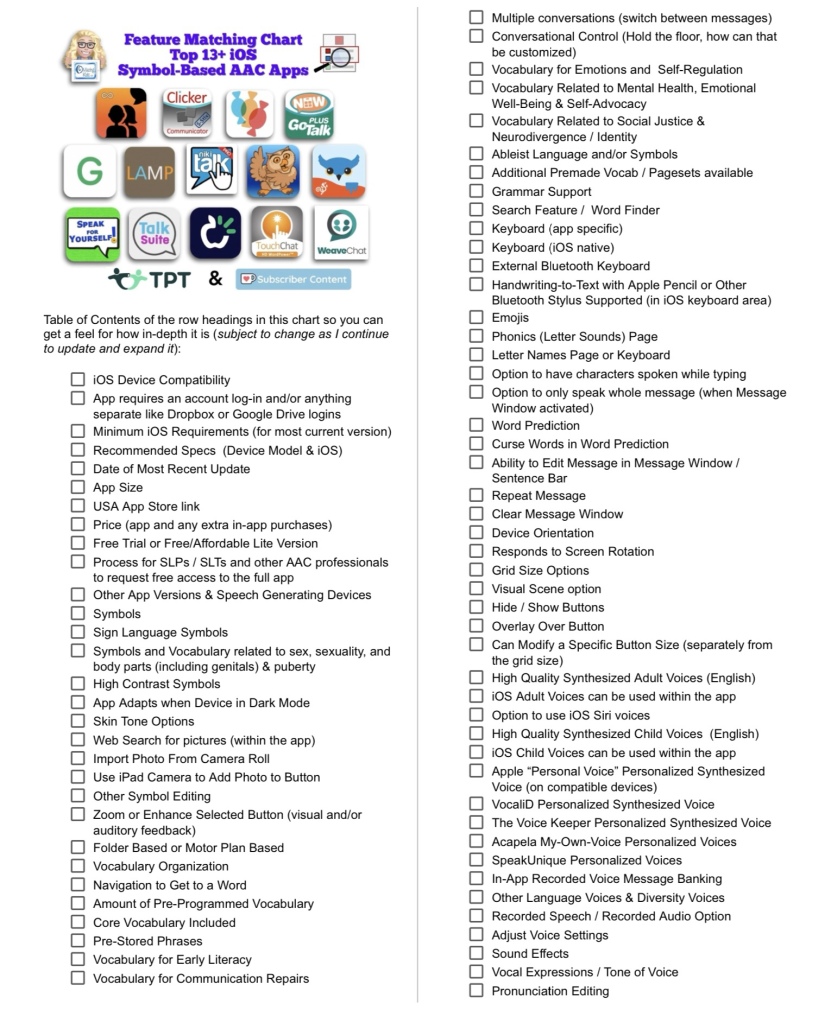
Resource Updated: The Feature Matching Chart for the Top 13+ iOS Symbol Based AAC Apps (5/17/25). Major Update: added Flexspeak VPP. CoughDrop will be removed in the next update.

Resource Updated: The Feature Matching Chart for the Top 13+ iOS Symbol Based AAC Apps (5/17/25). This resource is available on TPT: https://bit.ly/SymbolBasedAACapps. Ko-fi subscribers will be able to access a copy on the pinned resource post: https://ko-fi.com/Post/Links-to-posts-about-most-current-feature-matching-F1F5C9DMD.

This is a major update. Be sure to download the new PDF for the most current information.

  • Flexspeak VPP has been added.
  • This is the final time that Coughdrop will be included in this feature matching resource (it hasn’t been updated in over a year and has no signs of the increasing glitchiness being resolved. I no longer recommend this app. It will be removed from this resource in the next update.).
  • The “Unique Features in Symbol-Based AAC Apps to Support Gestalt Language Processors” supplemental handout linked within it has also been updated.

Looking for other in-depth AAC feature matching resources? See this blog post: https://bit.ly/5aacFeatureMatchingResources. That post also includes videos comparing the best AAC apps on various devices on various platforms.


Looking for more AAC resources? Check out the Resource Links page here on my blog: https://omazingkidsllc.com/omazing-kids-aac-resource-links


Have a question? The best way to reach me is via Facebook messaging over on my OMazing Kids page: https://www.facebook.com/OMazingKidsAAC/


Angela Moorad, MS, CCC-SLP, Founder of OMazing Kids, LLC, OMazing Kids AAC Consulting

• Teachers Pay Teachers Store: https://www.teacherspayteachers.com/Store/Omazing-Kids-Aac-Consulting

• YouTube: https://youtube.com/user/amoorad1

• Ko-Fi: https://ko-fi.com/omazingkidsaac

• OMazing Kids AAC Consulting Facebook Page: https://www.facebook.com/OMazingKidsAAC/

• AppPeeps Facebook Group: https://www.facebook.com/groups/OMazingKidsAppPeeps/

• GoTalk Now AAC & GoVisual Visual Scene Apps – Ideas and Sharing Facebook Group: https://bit.ly/GoTalkNowAACappGroup

• Instagram: https://www.instagram.com/omazingkidsaac

• X (formerly Twitter): https://www.x.com/amoorad

• Pinterest: http://pinterest.com/OMazingKids/

• Linktree: https://linktr.ee/amoorad1

• LinkedIn: https://www.linkedin.com/in/angelamooradomazingkidsaac

• AppRaven AAC App Collections: https://bit.ly/AAConAppRaven

• Blog: https://omazingkidsllc.com / Resource Links page: https://omazingkidsllc.com/omazing-kids-aac-resource-links

Updated 11/27/24: Feature Matching Chart for the Top 13+ iOS Symbol-Based AAC Apps

Resource Updated: The Feature Matching Chart for the Top 13+ iOS Symbol Based AAC Apps (11/27/24).


This resource is available on TPT: https://bit.ly/SymbolBasedAACapps.


Updated Table of Contents: https://bit.ly/TOC-iOSaacSBfmc-11-27-24.


The “Unique Features in Symbol-Based AAC Apps to Support Gestalt Language Processors” supplemental handout linked within it has also been updated.


Those who have previously purchased this resource on TPT can download the newest version for no additional cost: https://bit.ly/SymbolBasedAACapps. Ko-fi subscribers will be able to access a copy on the pinned resource post: https://ko-fi.com/Post/Links-to-posts-about-most-current-feature-matching-F1F5C9DMD.


Looking for other in-depth AAC feature matching resources? See this blog post: https://bit.ly/5aacFeatureMatchingResources. That post also includes videos comparing the best AAC apps on various devices on various platforms.


Looking for more AAC resources? Check out the Resource Links page here on my blog: https://omazingkidsllc.com/omazing-kids-aac-resource-links


Have a question? The best way to reach me is via Facebook messaging over on my OMazing Kids page: https://www.facebook.com/OMazingKidsAAC/


Angela Moorad, MS, CCC-SLP, Founder of OMazing Kids, LLC, OMazing Kids AAC Consulting

• Teachers Pay Teachers Store: https://www.teacherspayteachers.com/Store/Omazing-Kids-Aac-Consulting

• YouTube: https://youtube.com/user/amoorad1

• Ko-Fi: https://ko-fi.com/omazingkidsaac

• OMazing Kids AAC Consulting Facebook Page: https://www.facebook.com/OMazingKidsAAC/

• AppPeeps Facebook Group: https://www.facebook.com/groups/OMazingKidsAppPeeps/

• GoTalk Now AAC & GoVisual Visual Scene Apps – Ideas and Sharing Facebook Group: https://bit.ly/GoTalkNowAACappGroup

• Instagram: https://www.instagram.com/omazingkidsaac

• X (formerly Twitter): https://www.x.com/amoorad

• Pinterest: http://pinterest.com/OMazingKids/

• Linktree: https://linktr.ee/amoorad1

• LinkedIn: https://www.linkedin.com/in/angelamooradomazingkidsaac

• AppRaven AAC App Collections: https://bit.ly/AAConAppRaven

• Blog: https://omazingkidsllc.com / Resource Links page: https://omazingkidsllc.com/omazing-kids-aac-resource-links

Resource Updated: The Feature Matching Chart for the Top 13+ iOS Symbol Based AAC Apps (6/12/24)

Resource Updated: The Feature Matching Chart for the Top 13+ iOS Symbol Based AAC Apps (6/12/24).


It includes information about new features in several apps + info related to the changes in TD Snap becoming a subscription-based app.


The “Unique Features in Symbol-Based AAC Apps to Support Gestalt Language Processors” supplemental handout linked within it has also been updated.


I also updated the Table of Contents in the TPT resource description for those who want more info about the types of things covered: https://bit.ly/TOC-iOSaacSBfmc-06-12-24.


Those who have previously purchased this resource on TPT can download the newest version for no additional cost: https://bit.ly/SymbolBasedAACapps.


Ko-fi subscribers will be able to access a copy on the pinned resource post: https://ko-fi.com/Post/Links-to-posts-about-most-current-feature-matching-F1F5C9DMD.


Looking for other in-depth AAC feature matching resources? See this blog post: https://bit.ly/5aacFeatureMatchingResources. That post also includes videos comparing the best AAC apps on various devices on various platforms.


Looking for more AAC resources? Check out the Resource Links page here on my blog: https://omazingkidsllc.com/omazing-kids-aac-resource-links


Have a question? The best way to reach me is via Facebook messaging over on my OMazing Kids page: https://www.facebook.com/OMazingKidsAAC/


Angela Moorad, MS, CCC-SLP, Founder of OMazing Kids, LLC, OMazing Kids AAC Consulting

• Teachers Pay Teachers Store: https://www.teacherspayteachers.com/Store/Omazing-Kids-Aac-Consulting

• YouTube: https://youtube.com/user/amoorad1

• Ko-Fi: https://ko-fi.com/omazingkidsaac

• OMazing Kids AAC Consulting Facebook Page: https://www.facebook.com/OMazingKidsAAC/

• AppPeeps Facebook Group: https://www.facebook.com/groups/OMazingKidsAppPeeps/

• GoTalk Now AAC & GoVisual Visual Scene Apps – Ideas and Sharing Facebook Group: https://bit.ly/GoTalkNowAACappGroup

• Instagram: https://www.instagram.com/omazingkidsaac

• Twitter: https://www.twitter.com/amoorad

• Pinterest: http://pinterest.com/OMazingKids/

• Linktree: https://linktr.ee/amoorad1

• LinkedIn: https://www.linkedin.com/in/angelamooradomazingkidsaac

• Blog: https://omazingkidsllc.com / Resource Links page: https://omazingkidsllc.com/omazing-kids-aac-resource-links

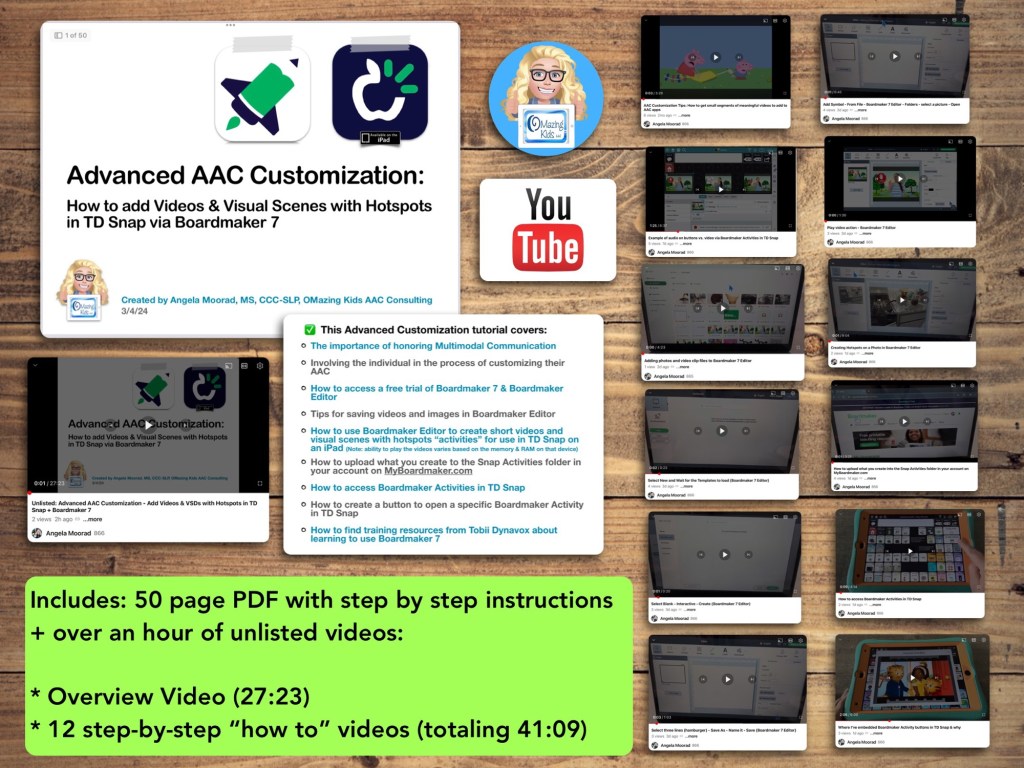
New Resource: How to add Videos & Visual Scenes with Hotspots in TD Snap via Boardmaker 7

Are you looking for a way to add short videos and visual scenes with hotspots to TD Snap? Come learn how to use Boardmaker 7 to create these and then use them in the integrated Boardmaker Activities. Don’t have a Boardmaker 7 subscription? No worries… you’ll also learn how to sign up for a free trial to create what you want.

Available on TPT: https://www.teacherspayteachers.com/Product/How-to-add-Videos-Visual-Scenes-with-Hotspots-in-TD-Snap-via-Boardmaker-7-11196195


Preview

Included in this resource

This resource includes a 50 page PDF of my slides with step by step instructions + over an hour of unlisted videos:

• Overview Video (27:23)

• 12 step-by-step “how to” videos (totaling 41:09)


What you’ll learn in this resource:

• The importance of honoring Multimodal Communication

• Involving the individual in the process of customizing their AAC

• How to access a free trial of Boardmaker 7 / Boardmaker 7 Editor

• Tips for saving videos and images in Boardmaker 7 Editor

• How to use Boardmaker 7 Editor to create short videos and visual scenes with hotspots “activities” for use in TD Snap on an iPad

• How to upload what you create to the Snap Activities folder in your account on myBoardmaker

• How to access Boardmaker Activities in TD Snap

• How to create a button to open a specific Boardmaker Activity in TD Snap

• How to find training resources from Tobii Dynavox about learning to use Boardmaker 7

Note: This resource was updated on 5/29/24 to reflect changes that Tobii Dynavox made to TD Snap. As of 5/21/24, they no longer offer the general public the option to do a 1x app-only purchase of this app. It switched to a subscription-based model. The 1.35.1 app update for TD Snap on 12/4/24 added an integrated YouTube player. This is a nice option for teens and adults who need the alternative access of their Speech Generating Device to play YouTube videos for leisure. Playing YouTube videos requires an internet connection and that player is not secured. This is very different from those who want to use short video clips for communication and/or self regulation and need a way to play them reliably offline in a secure way. For those purposes creating Boardmaker Activities will continue to be the best solution at this point in time


Notes:

  • Boardmaker 7 Editor can only be used to create these Boardmaker Activities on a Chromebook, Windows computer or tablet, or a Mac. Unfortunately there is NOT a way to use Boardmaker 7 Editor to create activities on an iPad (there’s no Boardmaker 7 Editor iOS app and it won’t work in a browser on an iPad). See this website for device compatibility: https://goboardmaker.com/pages/boardmaker-7-help?tab=1.
  • You must be connected to WiFi in order to initially load a Boardmaker Activity in TD Snap. Then you’ll have the option to toggle on Offline Use for each activity. Offline activities are downloaded per device. If the Page Set is synced or shared to a different device, the download process must be repeated on that device to make the activities available offline.
  • My demo shows these being added in the Motor Plan 66 pageset in TD Snap. You can add buttons to open a Boardmaker Activity in any of the pagesets within that app.
  • My demo videos are Boardmaker 7 Editor on my Pixelbook Chromebook and TD Snap on my iPad 9th gen. If you are using a Mac or Windows device what you see on your screen may be a bit different than mine.
  • The ability to play the videos may vary based on the available memory & RAM on that device.

Read in-depth info about using Boardmaker Activities in TD Snap starting on page 53 in the TD Snap User’s Manual: https://download.mytobiidynavox.com/Snap/documents/TD_Snap_UsersManual_en-US.pdf#page53


This research article has helpful considerations for selecting media for use in Visual Scenes and Video Visual Scenes: “Visual Scene Displays for Children and Adults: Using Case Studies to Bridge Research and Clinical Practice”, https://pubs.asha.org/doi/10.1044/2022_PERSP-22-00162

And an older research article: “Using Visual Scene Displays as Communication Support Options
Using Visual Scene Displays as Communication Support Options
for People with Chronic, Severe Aphasia
”: https://digitalcommons.unl.edu/cgi/viewcontent.cgi?article=1153&context=specedfacpub


Looking for in-depth AAC feature matching resources? See this blog post: https://bit.ly/5aacFeatureMatchingResources. That post also includes videos comparing AAC apps on various devices on various platforms.


Looking for more AAC resources? Check out the Resource Links page my blog: https://omazingkidsllc.com/omazing-kids-aac-resource-links 


Angela Moorad, MS, CCC-SLP, Founder of OMazing Kids, LLC, OMazing Kids AAC Consulting

• Teachers Pay Teachers Store: https://www.teacherspayteachers.com/Store/Omazing-Kids-Aac-Consulting 

• YouTube: https://youtube.com/user/amoorad1 

• Ko-Fi: https://ko-fi.com/omazingkidsaac 

• OMazing Kids AAC Consulting Facebook Page: https://www.facebook.com/OMazingKidsAAC/ 

• AppPeeps Facebook Group: https://www.facebook.com/groups/OMazingKidsAppPeeps/ 

• GoTalk Now AAC & GoVisual Visual Scene Apps – Ideas and Sharing Facebook Group: https://bit.ly/GoTalkNowAACappGroup 

• Instagram: https://www.instagram.com/omazingkidsaac 

• Instagram Threads: https://www.threads.net/@omazingkidsaac 

• Twitter: https://www.twitter.com/amoorad 

• Pinterest: http://pinterest.com/OMazingKids/ 

• Linktree: https://linktr.ee/amoorad1 

• LinkedIn: https://www.linkedin.com/in/angelamooradomazingkidsaac 

• Blog: https://omazingkidsllc.com  / Resource Links page: https://omazingkidsllc.com/omazing-kids-aac-resource-links 

Adding video clips and VSDs with hotspots to TD Snap AAC on iPad

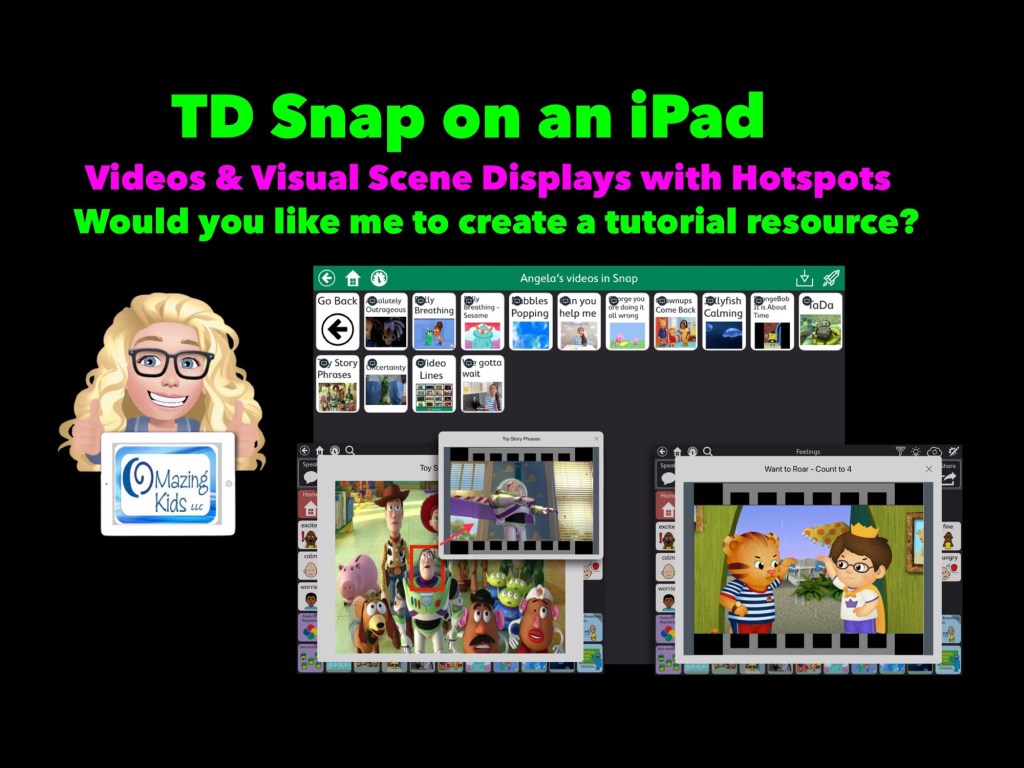
Let me know if you would like me to create a tutorial resource showing the exact steps for creating these using Boardmaker Editor in Boardmaker 7 for use in the TD Snap AAC app by Tobii Dynavox on an iPad.


Here’s a new video with a look at short video clips and visual scenes with hotspots that I’ve added in TD Snap on my iPad via the Boardmaker Activities integration: https://youtu.be/j192ff2f00M?si=h0u45-2HLhAiqs4A 

I’ll be leaving the comments open on my video for a few weeks so folks can comment there.

For those who want just a quick peek at two of the examples of a Visual Scene + Video & a video, check out this very short video:


Or feel free to send me a message on my OMazing Kids AAC Consulting Facebook page (https://www.facebook.com/OMazingKidsAAC/) or on Instagram (https://www.instagram.com/omazingkidsaac)


Notes:

  • Being able to create these Boardmaker Activities with video clips or visual scene displays with hotspots requires access to Boardmaker Editor in Boardmaker 7. 
  • I wasn’t able to figure out a way to do this with my Boardmaker v6 CD. I’m on my personal iPad that’s not on any type of device management system. If you are using a managed/locked iPad or SGD this may not work.
  • This works reliably in TD Snap AAC on my iPad. It was unreliable in TD Snap AAC on my Windows tablet (a Microsoft Surface Go 2). My best guess is it *might* work on a more expensive Microsoft Surface Pro with at least 8GB of RAM and larger storage. I have no way to know if this will work in TD Snap on one of the SGDs from Tobii Dynavox (it might require unlocking the device?)

Looking for in-depth AAC feature matching resources? See this blog post: https://bit.ly/5aacFeatureMatchingResources. That post also includes videos comparing AAC apps on various devices on various platforms.


Looking for more AAC resources? Check out the Resource Links page my blog: https://omazingkidsllc.com/omazing-kids-aac-resource-links 


Angela Moorad, MS, CCC-SLP, Founder of OMazing Kids, LLC, OMazing Kids AAC Consulting

• Teachers Pay Teachers Store: https://www.teacherspayteachers.com/Store/Omazing-Kids-Aac-Consulting 

• YouTube: https://youtube.com/user/amoorad1 

• Ko-Fi: https://ko-fi.com/omazingkidsaac 

• OMazing Kids AAC Consulting Facebook Page: https://www.facebook.com/OMazingKidsAAC/ 

• AppPeeps Facebook Group: https://www.facebook.com/groups/OMazingKidsAppPeeps/ 

• GoTalk Now AAC & GoVisual Visual Scene Apps – Ideas and Sharing Facebook Group: https://bit.ly/GoTalkNowAACappGroup 

• Instagram: https://www.instagram.com/omazingkidsaac 

• Instagram Threads: https://www.threads.net/@omazingkidsaac 

• Twitter: https://www.twitter.com/amoorad 

• Pinterest: http://pinterest.com/OMazingKids/ 

• Linktree: https://linktr.ee/amoorad1 

• LinkedIn: https://www.linkedin.com/in/angelamooradomazingkidsaac 

• Blog: https://omazingkidsllc.com  / Resource Links page: https://omazingkidsllc.com/omazing-kids-aac-resource-links 

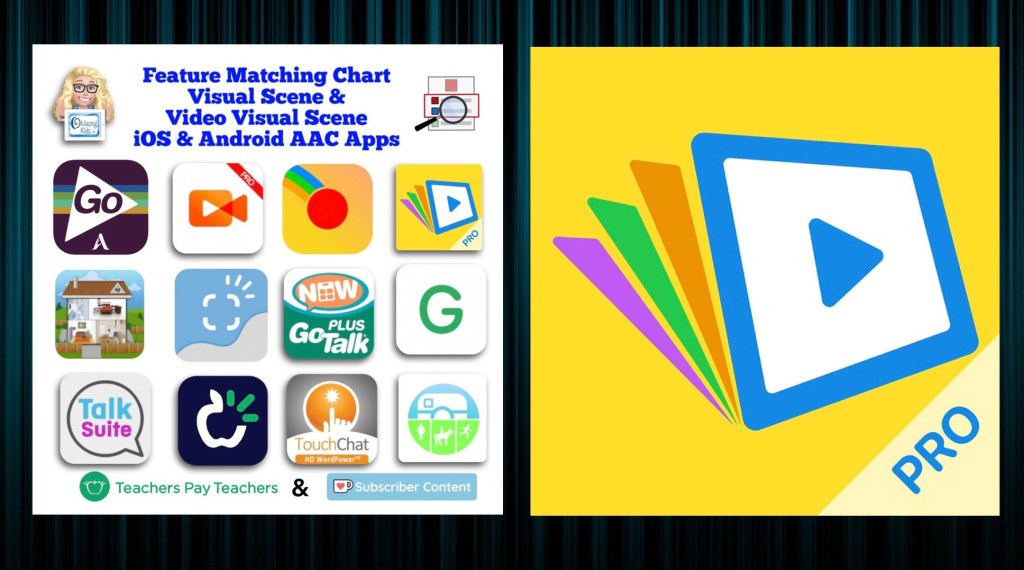
Resource Update: Feature Matching Chart for Visual Scene and Video Visual Scene Display iOS & Android AAC Apps was updated on 7/27/23

Resource Update: Feature Matching Chart for Visual Scene and Video Visual Scene Display iOS & Android AAC Apps was updated on 7/27/23. I added Scene & Heard Pro by Therapy Box and added the newer version of EasyVSD. Those who have previously purchased this resource on TPT can download the most current version for no additional cost: https://bit.ly/AACvsd . Ko-fi subscribers will be able to access a copy on the pinned resource post: https://ko-fi.com/Post/Links-to-posts-about-most-current-feature-matching-F1F5C9DMD.


A FREE handout for SLPs/SLTs and other AAC professionals has also been updated: How to Get Access to Visual Scene & Video Visual Scene AAC Apps (TPT Freebie), https://bit.ly/SLP-SLT-Access-VSDapps.


Looking for more in-depth up to date AAC feature matching resources? See this blog post: https://bit.ly/5aacFeatureMatchingResources. The most current info about AAC apps can be found in my feature matching resources. The blog post also includes videos comparing AAC apps on various devices on various platforms.


Want to learn more? Check out this recorded webinar and interactive handouthttps://bit.ly/NavigatingThruAACapps


The perfect companion to supplement these in-depth resources are the “AAC Apps and Features At-a-Glance (Single Page Handouts)”: https://bit.ly/AAC-At-a-Glance


Looking for basic info about AAC apps that are always affordable or free? See the Basic Feature Chart for Affordable and Free AAC apps & AAC-Related Apps (iOS, Android Google Play, Amazon Fire, Windows + a few Web-Based options): https://bit.ly/BasicAffordableAACchart.


Have a question? The best way to reach me is via Facebook messaging over on my OMazing Kids page: https://www.facebook.com/OMazingKidsAAC/


Angela Moorad, MS, CCC-SLP, Founder of OMazing Kids, LLC, OMazing Kids AAC Consulting

• Teachers Pay Teachers Store: https://www.teacherspayteachers.com/Store/Omazing-Kids-Aac-Consulting

• YouTube: https://youtube.com/user/amoorad1

• Ko-Fi: https://ko-fi.com/omazingkidsaac

• OMazing Kids AAC Consulting Facebook Page: https://www.facebook.com/OMazingKidsAAC/

• AppPeeps Facebook Group: https://www.facebook.com/groups/OMazingKidsAppPeeps/

• GoTalk Now AAC & GoVisual Visual Scene Apps – Ideas and Sharing Facebook Group: https://bit.ly/GoTalkNowAACappGroup

• Instagram: https://www.instagram.com/omazingkidsaac

• Instagram Threads: https://www.threads.net/@omazingkidsaac

• Twitter: https://www.twitter.com/amoorad

• Pinterest: http://pinterest.com/OMazingKids/

• Linktree: https://linktr.ee/amoorad1

• LinkedIn: https://www.linkedin.com/in/angelamooradomazingkidsaac

• Blog: https://omazingkidsllc.com / Resource Links page: https://omazingkidsllc.com/omazing-kids-aac-resource-links

Updated Resource Roundup: Gestalt Language Processing & AAC (updated 6/30/23)

This FREE handout has been updated: Resource Roundup: Gestalt Language Processing & AAC (updated 6/30/23), https://bit.ly/GLPandAAC


Looking for in-depth up to date AAC feature matching resources? See this blog post: https://bit.ly/5aacFeatureMatchingResources. The most current info about AAC apps can be found in my feature matching resources. The blog post also includes videos comparing AAC apps on various devices on various platforms.


Want to learn more? Check out this recorded webinar and interactive handout: https://bit.ly/NavigatingThruAACapps


The perfect companion to supplement these in-depth resources are the “AAC Apps and Features At-a-Glance (Single Page Handouts)”: https://bit.ly/AAC-At-a-Glance


Looking for basic info about AAC apps that are always affordable or free? See the Basic Feature Chart for Affordable and Free AAC apps & AAC-Related Apps (iOS, Android Google Play, Amazon Fire, Windows + a few Web-Based options): https://bit.ly/BasicAffordableAACchart.


Have a question? The best way to reach me is via Facebook messaging over on my OMazing Kids page: https://www.facebook.com/OMazingKidsAAC/


Angela Moorad, MS, CCC-SLP, Founder of OMazing Kids, LLC, OMazing Kids AAC Consulting

• Teachers Pay Teachers Store: https://www.teacherspayteachers.com/Store/Omazing-Kids-Aac-Consulting

• YouTube: https://youtube.com/user/amoorad1

• Ko-Fi: https://ko-fi.com/omazingkidsaac

• OMazing Kids AAC Consulting Facebook Page: https://www.facebook.com/OMazingKidsAAC/

• AppPeeps Facebook Group: https://www.facebook.com/groups/OMazingKidsAppPeeps/

• GoTalk Now AAC & GoVisual Visual Scene Apps – Ideas and Sharing Facebook Group: https://bit.ly/GoTalkNowAACappGroup

• Instagram: https://www.instagram.com/omazingkidsaac

• Twitter: https://www.twitter.com/amoorad

• Pinterest: http://pinterest.com/OMazingKids/

• Linktree: https://linktr.ee/amoorad1

• LinkedIn: https://www.linkedin.com/in/angelamooradomazingkidsaac

• Blog: https://omazingkidsllc.com / Resource Links page: https://omazingkidsllc.com/omazing-kids-aac-resource-links

TD Snap: Phonics Keyboards for the Motor Plan 66, Motor Plan 40, and Motor Plan 30 pagesets (free to import from MyTobiiDynavox Pageset Central) – updated 12/5/25

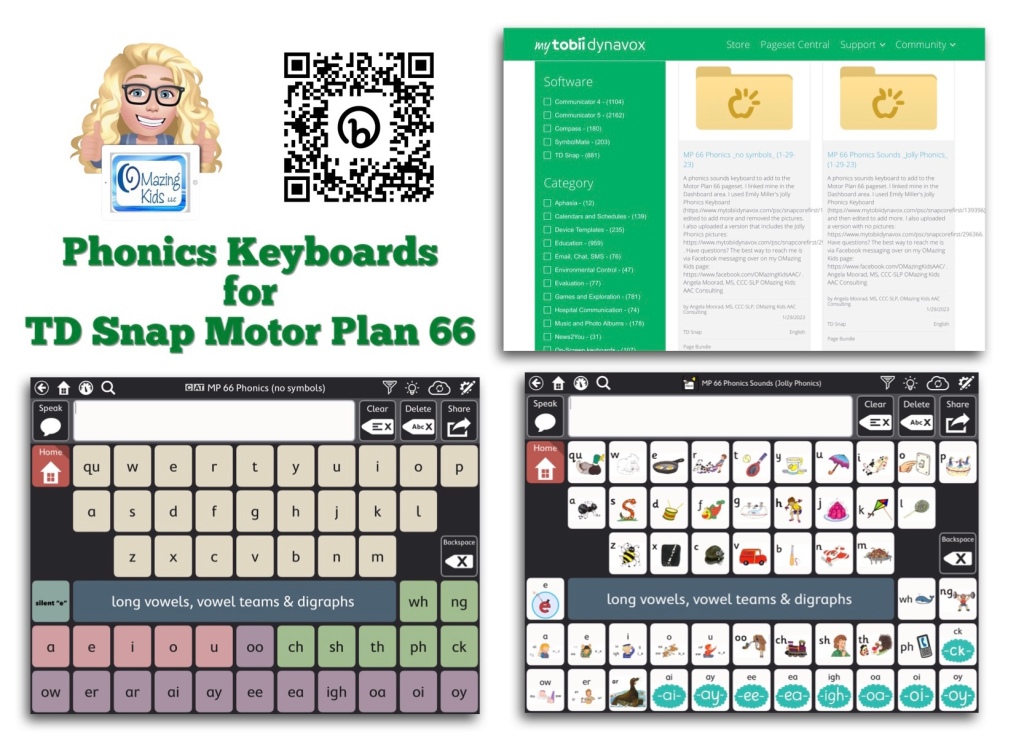
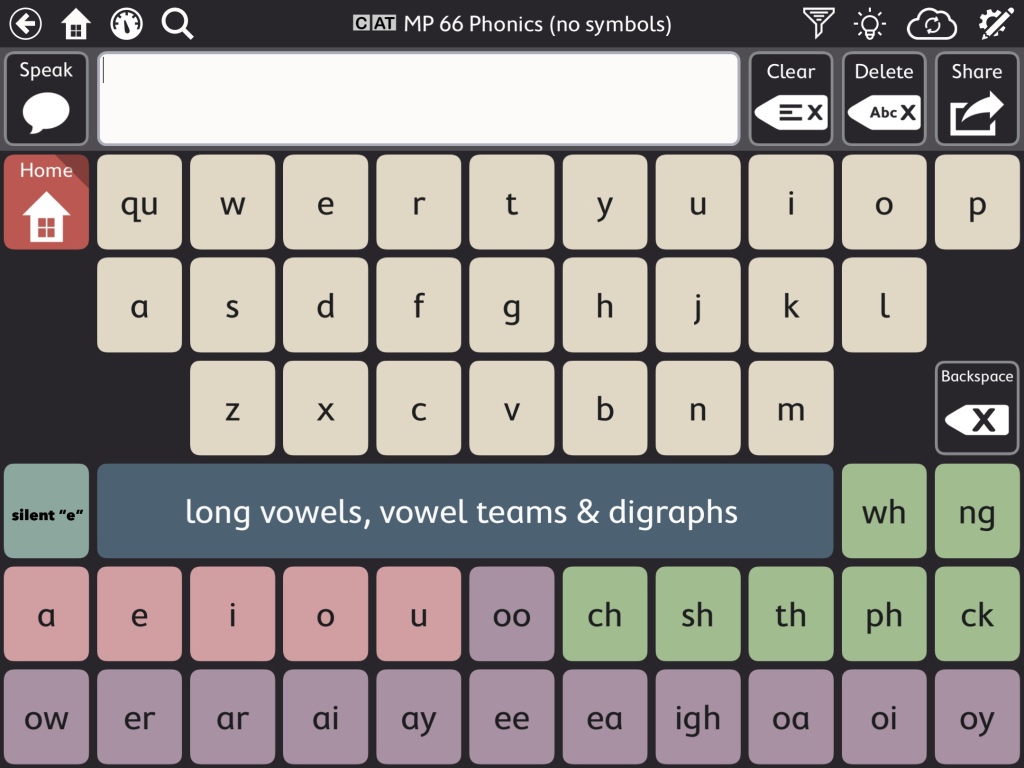
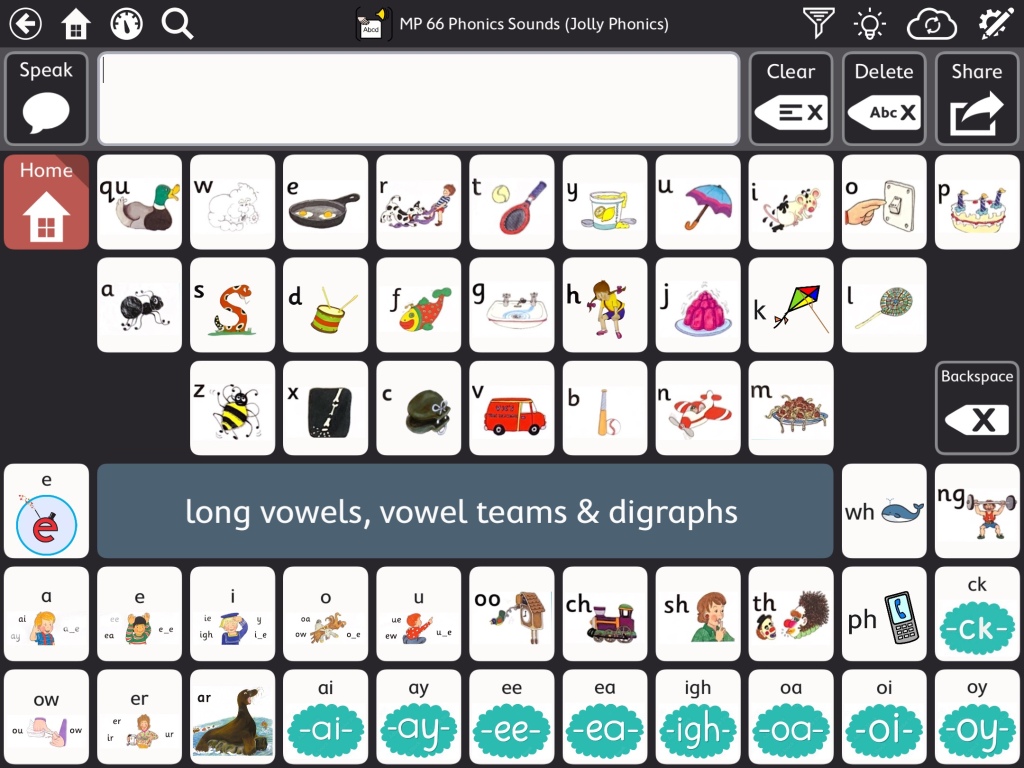
This video shows two phonics sounds keyboards that I added to my Motor Plan 66 pageset in the TD Snap AAC app:

As you’ll see in my video, the Motor Plan 66 pageset already includes a regular QWERTY style keyboard where you can hear letter names as you type. Toggle that on under Edit – User – Preferences – Speak Characters. If you don’t want letters spoken as you type that’s where you can toggle that off.


Note: I am well aware that some folks have a very rigid “anti-phonics keyboard” stance. If this is you then don’t add this to your pageset and scroll on by. I am well aware that there are lots of other strategies needed to teach literacy skills to individuals with complex communication needs. If you need more info about that I suggest reading “Comprehensive Literacy for All” and joining the “Comprehensive Literacy for All BookStudy” group on Facebook: https://www.facebook.com/groups/cl4all. I am sharing these Phonics keyboards as a tool since I personally had LOTS of students/patients/clients who had a high interest in letters, letter names, letter sounds, playing with rhyming, etc. Many of them were likely hyperlexic. I also had several who were Autistic and had a passion for anything letter related. Some were likely Gestalt Language Processors and seemed to really enjoy the playing with letter sounds related to their gestalts/scripts. Having this type of keyboard in an app resonated with them and sparked interest in using their AAC system. Providing this type of option also gave school staff something that helped them include these students in phonics activities and sparked them becoming more comfortable using an AAC app. A win-win in my book. So now that the “why” is made clear onto the “how”…


I’m on my iPad in the video but also have this synced with this app on my Windows tablet. I show how to find these on Pageset Central, where I linked mine in the TD Snap Motor Plan 66 Dashboard area, how to import a page to link it to a button, etc… I used Emily Miller’s Jolly Phonics Keyboard (https://www.mytobiidynavox.com/psc/snapcorefirst/139396) as a starting point, edited to add more and did additional voice recordings.

I uploaded a text only version & a version that includes the Jolly Phonics pictures (but could easily be edited to use pictures associated with whatever phonics program your school uses).

These are both FREE via Pageset Central on MyTobiiDynavox:

* Important * These are Page Bundles. You IMPORT them (not download) ***

text only version (can easily edit to change the button colors, font color, font size & style of font)

Text only version of the TD Snap Motor Plan 66 phonics keyboard : https://www.mytobiidynavox.com/psc/TDSnap/771137


version with Jolly Phonics pictures (can easily edit to change the pictures) 12/5/25 This version is no longer available

Version with Jolly Phonics pictures: https://www.mytobiidynavox.com/psc/TDSnap/771138 (note: I show in the video how you can delete those pictures and add you own pics to correspond with whatever phonics program is being used. Some kids liked having phonics pictures. Some didn’t. Choose the option that resonates with them) *** Update 12/5/25: I removed my Jolly Phonics version due to an issue on Pageset Central where it had replicated and was on there numerous times and I had received messages about a problem in it. You should still find other Jolly Phonics keyboards out on Pageset Central ***


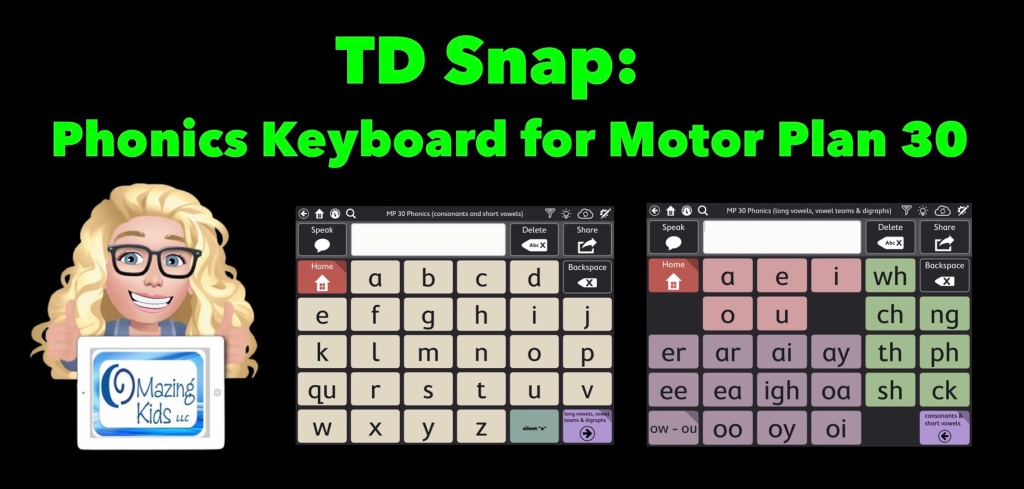
Update 12/8/23: I created a Phonics Keyboard for Motor Plan 30 and uploaded it to Pageset Central: https://www.mytobiidynavox.com/psc/TDSnap/771139


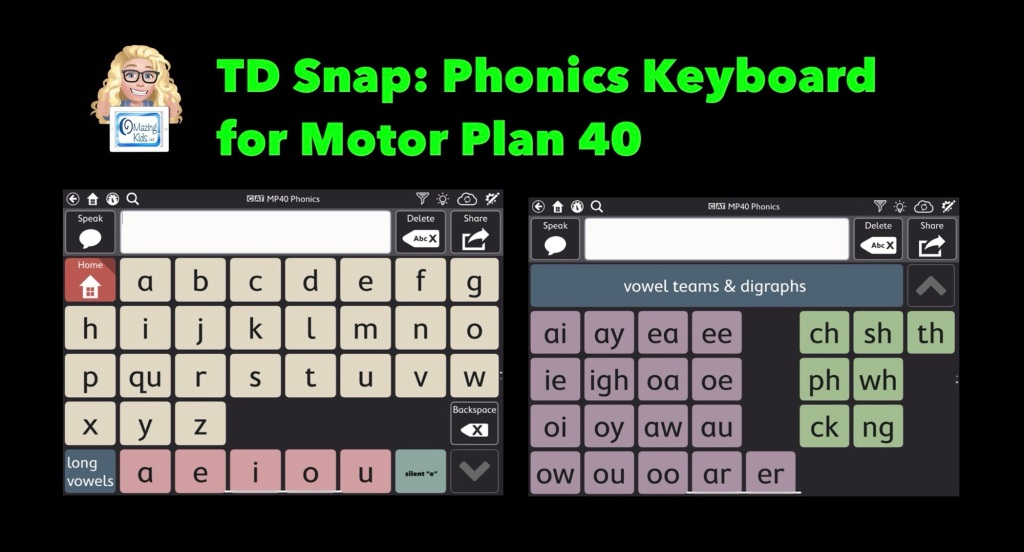
Update 8/28/25: I created a Phonics Keyboard for Motor Plan 40 and uploaded it to Pageset Central: https://www.mytobiidynavox.com/psc/TDSnap/876992


Two helpful resources from Tobii Dynavox about how to import page bundles and pagesets that have been shared on Pageset Central into the TD Snap AAC app:  

* Quick Guide: https://tobiidynavox.app.box.com/s/2x9cw9yhk14ttyprnk2ol7ya14qervv9 

* Video Tutorial: https://tobiidynavox-2.wistia.com/medias/e97t4pb8jt


How to find and add the Motor Plan Pagesets in TD Snap. These are a new option in addition to the other pagesets (not replacing anything). These are included with TD Snap (no additional cost). Make sure you have updated TD Snap to version 1.25. These are currently available for USA English & UK English. They indicated that they are working on prioritizing development for other languages and a Spanish/English bilingual version but no specific details are known yet on the timeframes.


The 1.36.1 update on 6/12/25 fixed the issue with the Phonics keyboards. See this post for important info: https://www.facebook.com/story.php?story_fbid=1237229701522847&id=100057074875694

.

4/11/25 – The 1.36 update for TD Snap broke the option to have a Phonics keyboard.

Previously we could have Keyboard buttons with recorded audio that could speak the letter sound when Speak Characters was toggled on and then a TTS voice spoke the whole word. Now the recorded sound is only heard for the first letter. Subsequently it is speaking the letter NAME vs. playing the recorded sound. I made a comment about this on their post announcing the 1.36 update over in the Tobii Dynavox Community group: https://www.facebook.com/groups/tobiidynavoxcommunity/posts/10013517212013904/ & posted a video: https://youtu.be/8nn9B1vJ65k?si=E1fFqbTJoVIOM7Is. The company is aware and has indicated they will work on fixing it but it may be a few months. See this post in their group: https://www.facebook.com/groups/tobiidynavoxcommunity/permalink/10069333036432321/?mibextid=wwXIfr&rdid=QCNfLme9Lfqp

If you are looking for another alternative, take a look at the Word Wizard app: https://apps.apple.com/us/app/word-wizard-for-kids-school-ed/id447312716. More info: https://lescapadou.com/wp/en/word-wizard-app/


TD Snap AAC app (iOS version is iPad-only): https://apps.apple.com/us/app/td-snap-aac/id1257753762

TD Snap AAC app (Windows version): purchase directly from Tobii Dynavox: https://www.mytobiidynavox.com/Store/Snap). Also available on their line of SGDs: https://us.tobiidynavox.com/collections/devices/+td-snap?sort_by=manual (filter search further by access method to find what you might need).

More info about the TD Snap Motor Plan pagesets: https://us.tobiidynavox.com/pages/td-snap-motor-plan.

TD Snap Motor Plan Page Set Training Cards: https://bit.ly/TDsnapMotorPlan-TrainingCards

Want in-depth info about how these pagesets are designed and the research behind them? Read the whitepaper: https://bit.ly/TDsnapMotorPlanWhitePaper

Tobii Dynavox has been offering free live webinars specifically about this new pageset option. See their website for more info: https://us.tobiidynavox.com/blogs/live-training. During the one that I attended on Friday (1/27/23) they mentioned that the recording of it would be uploaded to their Learning Hub. I’ll add the link here when it’s available: <link to be added>


My TD Snap related resources:


Have a question? The best way to reach me is via Facebook messaging over on my OMazing Kids page: https://www.facebook.com/OMazingKidsAAC/


Angela Moorad, MS, CCC-SLP, Founder of OMazing Kids, LLC, OMazing Kids AAC Consulting

• Teachers Pay Teachers Store: https://www.teacherspayteachers.com/Store/Omazing-Kids-Aac-Consulting

• YouTube: https://youtube.com/user/amoorad1

• Ko-Fi: https://ko-fi.com/omazingkidsaac

• OMazing Kids AAC Consulting Facebook Page: https://www.facebook.com/OMazingKidsAAC/

• AppPeeps Facebook Group: https://www.facebook.com/groups/OMazingKidsAppPeeps/

• GoTalk Now AAC & GoVisual Visual Scene Apps – Ideas and Sharing Facebook Group: https://bit.ly/GoTalkNowAACappGroup

• Instagram: https://www.instagram.com/omazingkidsaac

• Twitter: https://www.twitter.com/amoorad

• Pinterest: http://pinterest.com/OMazingKids/

• Linktree: https://linktr.ee/amoorad1

• LinkedIn: https://www.linkedin.com/in/angelamooradomazingkidsaac

• Blog: https://omazingkidsllc.com

FREE Handout updated – Resource Roundup: Gestalt Language Processing & AAC (updated 1/14/23)

This FREE resource has been updated: Resource Roundup: Gestalt Language Processing & AAC (updated 1/14/23), https://bit.ly/GLPandAAC


Looking for in-depth up to date info to compare features in AAC apps for iOS, Android, Amazon Fire and Windows? Check out my 5 AAC Feature Matching resources: https://bit.ly/5aacFeatureMatchingResources


Have questions? The best way to reach me is via Facebook messaging over on my OMazing Kids page: https://www.facebook.com/OMazingKidsAAC/


Angela Moorad, MS, CCC-SLP, Founder of OMazing Kids, LLC, OMazing Kids AAC Consulting

• Teachers Pay Teachers Store: https://www.teacherspayteachers.com/Store/Omazing-Kids-Aac-Consulting

• YouTube: https://youtube.com/user/amoorad1

• Ko-Fi: https://ko-fi.com/omazingkidsaac

• OMazing Kids AAC Consulting Facebook Page: https://www.facebook.com/OMazingKidsAAC/

• AppPeeps Facebook Group: https://www.facebook.com/groups/OMazingKidsAppPeeps/

• GoTalk Now AAC & GoVisual Visual Scene Apps – Ideas and Sharing Facebook Group: https://bit.ly/GoTalkNowAACappGroup

• Instagram: https://www.instagram.com/omazingkidsaac

• Twitter: https://www.twitter.com/amoorad

• Pinterest: http://pinterest.com/OMazingKids/

• Linktree: https://linktr.ee/amoorad1

• LinkedIn: https://www.linkedin.com/in/angelamooradomazingkidsaac

• Blog: https://omazingkidsllc.com