iOS apps for Early Exploration of Typing & Specialized Keyboards – compiled by Angela Moorad, MS, CCC-SLP, Founder of OMazing Kids

iOS apps for Early Exploration of Typing & Specialized Keyboards

Here is a list of over 50 iOS apps for early exploration of typing and specialized keyboards. For kids who are just beginning to show an interest and are easily frustrated it’s important to keep it as motivating and as fun as possible. An iPad full of well designed apps can be an amazing tool in your educational & therapeutic toolbox.

In this post I am sharing a mix of paid and free apps that I have used and found helpful.

  • Free: 23 apps
  • Affordable ($.99 – $4.99 – what you might pay for an item from the Target Dollar Spot, a latte from Starbucks, an item on Teachers Pay Teachers or a Boom Card deck): 22 apps
  • Mid-priced ($5.99 -$15.99 – what you might pay for a new toy, game or picture book): 7 apps
  • Expensive ($16.99 – $24.99 – what you might pay for therapy materials or bundles of items on TPT, both are specifically designed for individuals with special needs): 2 apps
  • Very expensive (over $24.99 – is specifically designed for individuals with special needs and has lots of customization features): 1 app

Of course every app that I share will not be a good fit for every child so it’s up to you to determine the ones to use with your child or patient.

I had several patients over my career whose interest in typing and AAC was initially sparked by their high interest in letters and the predictable order of the alphabet (similar to kids with a high interest in numbers, dates, etc…). Typing can also become an important part of writing and access to the curriculum.

You can save the PDF of this post in the iBooks app on your iPad and then tap on each link to go to that app in the App Store (it’s a 5-page PDF).

App prices & availability was verified in the USA App Store at the time of this post at 3:00pm CST on 5/17/20. Prices may vary in other countries based on the exchange rate. I only have access to the USA App Store so be sure to check prices before downloading in other countries.

General App Tips:

  • Some apps have IAPs (in-app purchases) to add extra features or have unsecured links so make sure the iPad is in “airplane mode” and toggle off the ability to download IAPs in the Settings area BEFORE opening the app. Even apps with “secured links” could be hacked by some kids so it’s always wise to go ahead do these two things before using apps with kids. I avoid apps with ads (some can be blocked via “airplane mode” but others cannot). It’s also wise to use Guided Access to prevent exiting the app you are using.
  • If you like a “lite” version of an app, it is always a good idea to see if there is a full paid version of the app to purchase vs. using an IAP to upgrade within a free lite app. I’ve had enough problems with IAPs and trying to restore IAPs to avoid them as much as possible. Also most schools & public agencies have purchasing regulations that make it difficult or impossible to purchase items via IAP but can purchase a full paid app. This is the same reason that I typically avoid apps that require a subscription.
  • If you are looking for Android apps, the quickest way to see if an app has an Android version is to copy the name of an app and then paste into the search area on the Google Play app store or Amazon app store. If the app is available it may not be free on those platforms and/or may contain ads so look closely at each app description. Also look at reviews to see how well apps function since Android versions of apps may not be updated as frequently as iOS apps.

Apps that use their own in-app keyboard (instead of the iOS iPad keyboard):

  1. Tapkins by Island Pte Ltd, https://apps.apple.com/us/app/tapkins/id1317210444, FREE (The errorless learning style in this app would be a really good match for most kids with Autism.)
  2. Baby Keyboard by Ruiyi Chen, https://apps.apple.com/us/app/baby-keyboard/id1448361670, FREE (Ignore the word “baby” in the app name. It’s a fun free app, has color cue for the correct key and several categories of typing cards to choose from in the settings.)
  3. Interactive Alphabet ABC’s by Piikea St. LLC, https://apps.apple.com/us/app/interactive-alphabet-abcs/id383967580, $2.99 (The typing activity within this app is fun and there is a subtle cue for the correct letter keys.)
  4. The Writing Machine by Hump Software, https://apps.apple.com/us/app/the-writing-machine/id438108325, $.99 (Explore and tap to match initial letter in a word. Has options for switches and scanning is needed.)
  5. i Can Type – Sight Words by Michael Harvey, https://apps.apple.com/us/app/i-can-type-sight-words/id1292509602 $.99 (Nice cueing for correct keys and easy sight words presented in context of color photo and word narrated in a simple sentence.)
  6. Clever Keyboard: ABC Learning Game For Kids by Absolutist Ltd, https://apps.apple.com/us/app/clever-keyboard-abc-learning-game-for-kids/id576724288, $.99
  7. Verbal Me Sampler by fishdog, https://apps.apple.com/us/app/verbal-me-sampler/id504978876, FREE (has a typing page with voice output)
  8. Lexi’s World by Pop Pop Pop LLC
    https://apps.apple.com/us/app/lexis-world/id1434971401, $2.99 (errorless typing with cues, can use upper or lowercase QWERTY keyboard, what you type is added to the screen then tap on animals to see what they want you to add)
  9. VideoTyper – Typing video by Yvz Digital Lab
    https://apps.apple.com/us/app/videotyper-typing-video/id1372070930, FREE with IAPs for additional features (lots of customization options and can make a video of the typing)

Apps that use the iOS iPad keyboard (this means you can combine it with one of the keyboard extension apps. How to install a Keyboard after you download that keyboard extension app: https://support.apple.com/guide/ipad/add-or-change-keyboards-ipad1aa5a19a/ipados):

  1. Type Letters by Tin Whistle, LLC, https://apps.apple.com/us/app/type-letters/id1498328032, iOS 13.2 or later, FREE (no frills, just types big letters on white background, nice to use for a no distraction exploring typing background)
  2. Audivision by ATeamer, https://apps.apple.com/us/app/audivision/id1141299943, iOS 8.0 or later, FREE (no frills, just types big letters on white background, can slide to adjust font size in the iPad Settings area for this app, nice to use for a no distraction exploring typing background)
  3. Statement – visual communication and large text by Todd Anderson, https://apps.apple.com/us/app/statement-visual-communication-and-large-text/id1018664801, FREE (no frills, just types big letters on dark background, nice to use for a no distraction exploring typing background)
  4. Keyboard Explore by Susan Hossack, https://apps.apple.com/us/app/keyboard-explore/id608928363, FREE (may not work for iOS 11 or beyond, has option for external Bluetooth keyboard)
  5. Type and Learn HD-S by Jetmobile, https://apps.apple.com/us/app/type-and-learn-hd-s/id846561699, $.99 (uses iOS iPad keyboard but keyboard extension apps only work in the open ended typing area, has open ended typing with text to speech, option to toggle on red outline around keys as hint in the spelling activity)
  6. Dic-Dic. Multilingual dictation to practice spelling, writing and sound-letter matching by Perception Technologies, S.L., https://apps.apple.com/us/app/dic-dic-multilingual-dictation-to-practise-spelling/id643656920, FREE
  7. Animal Typing – Lite by Corentin Faucher, https://apps.apple.com/us/app/animal-typing-lite/id925341131, FREE lite app. (Has options for external Bluetooth keyboards. I don’t have the full paid version so don’t know if it’s worth $14.99 or not.)
  8. SnapType by SnapType, https://apps.apple.com/us/app/snaptype/id1124115982 , FREE with IAP to upgrade to the Pro version (a “must have” app that allows you to import any worksheet to type onto it; if you want more features look at the full paid version of the app: SnapType Pro by SnapType, https://apps.apple.com/us/app/snaptype-pro/id1124123246, $4.99.)
  9. Adobe Scan Digital PDF Scanner by Adobe Inc., https://apps.apple.com/us/app/adobe-scan-digital-pdf-scanner/id1199564834, FREE with IAPs
  10. Adobe Acrobat Reader for PDF by Adobe Inc., https://apps.apple.com/us/app/adobe-acrobat-reader-for-pdf/id469337564, FREE with IAPs (these two Adobe apps can be used together to scan a worksheet to turn it into a PDF and then annotate it with typing text. I find SnapType a much easier to use but sharing this as another option.)
  11. ClaroPDF – Image to PDF Reader by Claro Software Limited, https://apps.apple.com/us/app/claropdf-image-to-pdf-reader/id666770153, FREE with IAPs (can also be used to import a picture of a worksheet and then annotate it with typing text. I find SnapType a much easier to use but sharing this as another option.)

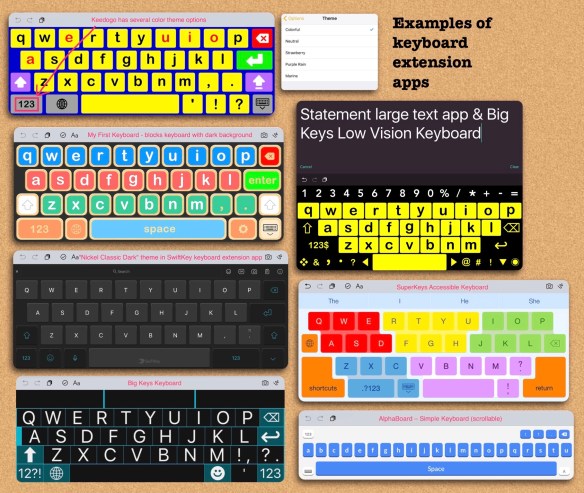
Keyboard Extension Apps: It may be helpful to consider using a keyboard extension app that would make the iOS iPad Keyboard easier to use with features that are kid and special needs friendly.

  1. Keedogo by AssistiveWare, https://apps.apple.com/us/app/keedogo/id915829477, $.99 (My favorite keyboard extension app with lots of customization options. Good for beginning typists since it doesn’t have word prediction or auto correction. If you want additional features the look at
  2. Keedogo Plus by AssistiveWare, https://apps.apple.com/us/app/keedogo-plus/id918496636, $2.99 (has more features)
  3. Keeble by AssistiveWare, https://apps.apple.com/us/app/keeble/id918497054, $24.99 quite a bit more expensive due to all of the customization and accessibility features)
  4. Big Keys Low Vision Keyboard by N Thorn, https://apps.apple.com/us/app/big-keys-low-vision-keyboard/id1139220959, $2.99 (specifically designed for unique needs)
  5. IssieBoard by Beit Issie Shapiro, https://apps.apple.com/us/app/issieboard/id1074352181, FREE (several customization options for color (background, keys & font), ability to color specific sections or rows of keys, define “special” keys, etc.)
  6. My First Keyboard by aacorn, https://apps.apple.com/us/app/my-first-keyboard/id924324310, $1.99 (I like the blocks keyboard with dark background, word prediction can be toggled on/off)
  7. Big Keys Keyboard by Hassan Hattab, https://apps.apple.com/us/app/big-keys-keyboard/id1187555128, $3.99 (several color and font size customization options)
  8. SuperKeys Accessible Keyboard by Crick Software, https://apps.apple.com/us/app/superkeys-accessible-keyboard/id917216287, $12.99 (A very unique keyboard that enlarges quadrants and then you select a large key within it. Nice for those with vision or fine motor needs but can also be helpful for those overwhelmed by looking through the entire field of keys. The SuperKeys keyboard is built in as an option in all of the Clicker Communicator AAC apps.
  9. Phonics Keyboard by Therapy Box Limited, https://apps.apple.com/us/app/phonics-keyboard/id1031514501, $2.99 (There are also some fun activities within the app)
  10. Type Suite by Ellenson Integration Enterprises, Inc.
    https://apps.apple.com/us/app/type-suite/id1498609903, $3.99

Other unique keyboard extension apps (not necessarily for kids or beginning typists…. but sharing just so folks will be inspired to think outside the box and search the App Store. Apps are often updated with new features and new apps are released frequently:

  1. AlphaBoard – Simple Keyboard by QZero Labs, https://apps.apple.com/us/app/alphaboard-simple-keyboard/id1199298996, FREE (super simple scrollable alphabetic keyboard, keys are very small)
  2. HERO One-handed Keyboard by Corey Stone LLC, https://apps.apple.com/us/app/hero-one-handed-keyboard/id921879642, FREE with IAPs
  3. Fleksy- GIF, Web & Yelp Search by Fleksy, Inc., https://apps.apple.com/us/app/fleksy-gif-web-yelp-search/id520337246, FREE with IAPs
  4. Pro Keyboard with PC Layout by Raul Monterroso Cabello, https://apps.apple.com/us/app/pro-keyboard-with-pc-layout/id1106280090, $5.99 (for more advanced typists who want a full PC style keyboard with the ability to customize the color for sensory needs)
  5. Microsoft SwiftKey Keyboard by SwiftKey, https://apps.apple.com/us/app/swiftkey-keyboard/id911813648, FREE (for more advanced typists who want a full PC style keyboard with the ability to customize the color for sensory needs, customization options, ability to swipe to type, has a nice “real keyboard” feel, the description shows IAPs for additional keyboard styles but as far as I can tell everything is included now. I’m currently using the “Nickel Classic Dark” theme as a nice alternative to the iOS iPad keyboard.)
  6. WordBoard – Phrase Keyboard by Bytesize, https://apps.apple.com/us/app/wordboard-phrase-keyboard/id960167417, FREE with IAPs (would use as a secondary keyboard, allows you to make and use customized phrase buttons)

FYI… There are a few AAC apps that use the iOS iPad Keyboard and therefore would allow for a keyboard extension app to be used. Examples include: Speak for Yourself, Proloquo2Go, Mighty AAC, ChatAble, Proloquo4Text, Predictable, Voice4u TTS, QuickType, Flip Writer, HandySpeech and several other text-to-speech (TTS) AAC apps. Exploring alternative keyboards can be a game changer for making typing as a means of AAC accessible. You may also want to explore accessibility features in the iPad settings (https://support.apple.com/guide/ipad/get-started-with-accessibility-features-ipad9a2465f9/ipados), styluses, adapted styluses, keyguards, external Bluetooth keyboards, etc. Take a look at Lauren S. Enders’ well organized Pinterest boards for ideas: https://pin.it/TWn9w6P (styluses: https://pin.it/t4cy8XV; keyboards & keyboard cases: https://pin.it/NydPTE8). I highly encourage you to collaborate with an Occupational Therapist and/or Assistive Technology Specialist when exploring AT options for the iPad. Some of that equipment is pricey so you want to make good decisions that fit that individual child’s needs. You may want to try things out in order to make those decisions. How to find the AT Lending Library in your state: https://www.at3center.net/stateprogram. Many have iPads, specialized apps and AT equipment available for short term loan to try out before making purchasing recommendations.

Other specialized apps to consider:

  1. Ghost Type – a typing tutor to master your iPad typing skills by demografix pty ltd, https://apps.apple.com/us/app/ghost-type-a-typing-tutor-to-master-your-ipad-typing-skills/id495081717, $4.99
  2. inku – tool for dyslexia by Therapy Box Limited, https://apps.apple.com/us/app/inku-tool-for-dyslexia/id1042258087, $14.99
  3. Abilipad by Cheryl Bregman, https://apps.apple.com/us/app/abilipad/id435865000, $9.99
  4. Clicker Sentences by Crick Software, https://apps.apple.com/us/app/clicker-sentences/id575603433, $64.99 (I love the Clicker apps but the description in the App Store mentions they are being replaced by the Clicker Writer system. See their website for information: https://www.cricksoft.com/us/clicker/apps)
  5. Pictello by AssistiveWare, https://apps.apple.com/us/app/pictello/id397858008, $18.99 (uses the iOS iPad keyboard, many kids are motivated to type as they create their own books)
  6. Easy Dyslexia Aid: Dyslexic & Dysgraphia Support by Nuapp Productions Pty Ltd, https://apps.apple.com/us/app/easy-dyslexia-aid-dyslexic-dysgraphia-support/id1088194043, $2.99
  7. Word Wizard for Kids School Ed by L’Escapadou, https://apps.apple.com/us/app/word-wizard-for-kids-school-ed/id447312716, $7.99 (Not a “typing” app but a really fun way to introduce kids to letter exploration and putting together letters to make words.). Their letter tracing app is also great: Writing Wizard for Kids by L’Escapadou, https://apps.apple.com/us/app/writing-wizard-for-kids/id631446426, $4.99
  8. Endless Alphabet by Originator Inc., https://apps.apple.com/us/app/endless-alphabet/id591626572, $8.99 (Not a “typing” app but a really fun way to introduce kids to letter sounds as you drag letters back in place to make words to match funny illustrated animations.)

Double the fun: If you have access to two iPads it is fun to have these apps on one iPad and then have the keyboard based apps (or AAC app with a keyboard) on a separate iPad. After the child types the letter they get to complete the activity for that letter on the other iPad as a reward/reinforcer for typing. And of course all of these apps are fun for early literacy play & exploration.

  1. Alpha Fun by KrakenEight LLC, https://apps.apple.com/us/app/alpha-fun/id1071728452, FREE
  2. Avokiddo ABC Ride by AVOKIDDO, https://apps.apple.com/us/app/avokiddo-abc-ride/id827657068, $2.99
  3. Seuss’s ABC – Read & Learn by Oceanhouse Media, https://apps.apple.com/us/app/dr-seusss-abc-read-learn/id1011479119, $5.99 (It’s so much more than just the book. This app is full of lots of fun letter activities.)
  4. Elastic Alphabets® for kids : Educator recommended learning game for preschoolers by VYAAP TECHNOLOGIES PRIVATE LIMITED, https://apps.apple.com/us/app/elastic-alphabets-for-kids-educator-recommended-learning/id977077498, $3.99
  5. Goodnight ABC by Quasar Alliance, Inc, https://apps.apple.com/us/app/goodnight-abc/id539568451, $1.99 (includes a fun interactive scene for each letter and a swipe to add color area)
  6. My ABC Train HD by LoeschWare, https://apps.apple.com/us/app/my-abc-train-hd/id707630889, $1.99 (can be customized with your own pics, labels & voice recordings so it can be adapted to specific high interest areas)
  7. Starfall ABCs by Starfall Education, https://apps.apple.com/us/app/starfall-abcs/id395623983, FREE
  8. Khan Academy Kids by Khan Academy, https://apps.apple.com/us/app/khan-academy-kids/id1378467217, FREE (lots of great activities organized by type of activity and age/grade)
  9. ABC Actions by Peapod Labs LLC, https://apps.apple.com/us/app/abc-actions/id715396289, $2.99
  10. abc WOW! Alphabet Letters Full by Bologna Games, https://apps.apple.com/us/app/abc-wow-alphabet-letters-full/id533054130, FREE

Want to suggest an iOS iPad app to be added to this list? The best way to reach me is via Facebook messaging over on my OMazing Kids page. I’m pretty picky so they need to be well designed apps and be transparent/honest about any IAPs or subscriptions. If it’s a free app, please send the link from the USA App Store so I can download and try it out. If it’s a paid app and you are the app developer, please send the link from the USA App Store so I can look at the info before you send a promo code. I want to make sure that one of my iPads is compatible in order to try it out. I only post about apps that I own and have tried out.


It took me quite a bit of time to compile this list so please “tag” OMazing Kids when sharing it on social media and do not copy/paste it onto other blogs or documents or upload it to servers. I have it available here on my blog and plan on keeping my blog up for the foreseeable future.

Thanks,

Angela Moorad, MS, CCC-SLP, Founder of OMazing Kids, LLC

Facebook: https://bit.ly/2Si6k7Y

AppPeeps Facebook Group: https://www.facebook.com/groups/OMazingKidsAppPeeps/

Instagram: https://www.instagram.com/amoorad1/

Twitter: https://www.twitter.com/amoorad

Blog: http://omazingkidsllc.com


Please ignore any ads that may appear. I have no control over them since this is a free blog and I don’t make anything off it.
170 Free iOS Apps for Occupational Therapists – list compiled by Angela Moorad, MS, CCC-SLP, Founder of OMazing Kids

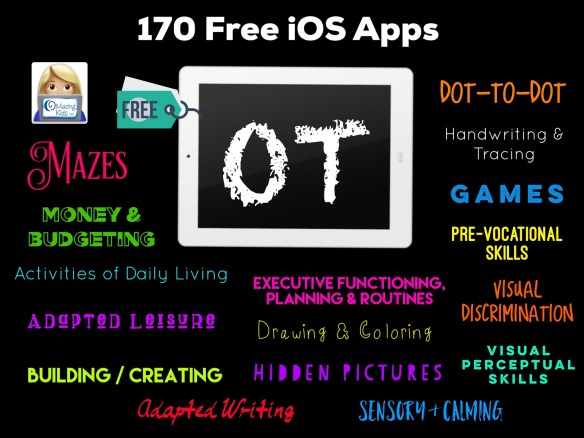
Here is a list of 170 iOS apps that are currently FREE that pediatric Occupational Therapists may find helpful to use in therapy or as carryover activities to share with families. Some of the apps could target multiple goals but I’ve tried to generally organize them in the list. Most of these apps are not just for use by OTs. I used most of these apps but for different therapeutic reasons as a SLP. And many of them can just be used for fun. I downloaded and tried out all apps before adding them to the list. All apps prices and availability were verified in the USA App Store at the time I wrote this post at 6:00pm CST on 5/13/20. You can save the PDF of this post in the iBooks app on your iPad and then tap on each link to go to that app in the App Store (it’s an 8-page PDF).  I only have access to the USA App Store so be sure to check prices before downloading in other countries.

Tips:

  1. Many of the apps have IAPs (in-app purchases) to add extra features or have unsecured links so make sure the iPad is in “airplane mode” and toggle off the ability to download IAPs in the Settings area BEFORE opening the app. Even apps with “secured links” could be hacked by some kids so it’s always wise to go ahead do these two things before using apps with kids. I typically avoid apps with ads (some can be blocked via “airplane mode” but others cannot).  It’s also wise to use Guided Access to prevent exiting the app you are using.
  2. If you like a “lite” version of an app, it is always a good idea to see if there is a full paid version of the app to purchase vs. using an IAP to upgrade within a free lite app. I’ve had enough problems with IAPs and trying to restore IAPs to avoid them as much as possible. Also most schools & public agencies have purchasing regulations that make it difficult or impossible to purchase items via IAP but can purchase a full paid app. This is the same reason that I typically avoid apps that require a subscription.
  3. If you are looking for Android apps, the quickest way to see if an app has an Android version is to copy the name of an app and then paste into the search area on the Google Play app store or Amazon app store. If the app is available it may not be free on those platforms and/or may contain ads so look closely at each app description. Also look at reviews to see how well apps function since Android versions of apps may not be updated as frequently as iOS apps.

Disclaimers: I’m an SLP not an OT. But I worked with enough fabulous OTs and COTAs over my career and connected virtually with a few others to have a general idea of the types of apps that may be helpful to them. Of course every app that I share will not be a good fit for every child so it’s up to you to determine the ones to use with your particular patients. The purpose of this list is to share free resources but I also want folks to know there are hundreds of fabulous apps that are often very affordably priced or may even be free on a particular day. Please see this blog post and follow OMazing Kids on social media: https://omazingkidsllc.com/2016/12/31/the-ipad-the-slp-in-2017-app-list-for-slps-sorted-by-goal-area/. I plan on updating that huge post soon. 

Activities of Daily Living:

  1. iDo Hygiene –Daily life skills activities, for individuals with special needs (full version) by C.E.T – THE CENTER FOR EDUCATIONAL TECHNOLOGY, https://apps.apple.com/us/app/ido-hygiene-daily-life-skills-activities-for-individuals/id994899641
  2. iDo Community – kids with special needs learn to act independently in the community by C.E.T – THE CENTER FOR EDUCATIONAL TECHNOLOGY, https://apps.apple.com/us/app/ido-community-kids-special-needs-learn-to-act-independently/id931891099
  3. iDo Food – Kids with special needs learn dining skills (Full version) by C.E.T – THE CENTER FOR EDUCATIONAL TECHNOLOGY, https://apps.apple.com/us/app/ido-food-kids-special-needs-learn-dining-skills-full/id931891855
  4. iDo Chores – Daily activities and routine tasks for kids with special needs (Full version) by C.E.T – THE CENTER FOR EDUCATIONAL TECHNOLOGY, https://apps.apple.com/us/app/ido-chores-daily-activities-routine-tasks-for-kids/id931894090 (all IAPs are free)
  5. iDo Getting Dressed – Learn the Routine of wearing clothes, for individuals with special needs. (Full version) by C.E.T – THE CENTER FOR EDUCATIONAL TECHNOLOGY, https://apps.apple.com/us/app/ido-getting-dressed-learn-routine-wearing-clothes-for/id994900654
  6. Sequence it! – Create and arrange sequences, for kids with autism and other special needs by C.E.T – THE CENTER FOR EDUCATIONAL TECHNOLOGY, https://apps.apple.com/us/app/sequence-it-create-arrange-sequences-for-kids-autism/id1054793304
  7. Sago Mini Babies Dress Up by Sago Mini, https://apps.apple.com/us/app/sago-mini-babies-dress-up/id1132213599
  8. WoodieHoo Dress Up: Animal Fun by RTL DISNEY Fernsehen GmbH & Co. KG, https://apps.apple.com/us/app/woodiehoo-dress-up-animal-fun/id1450403346
  9. WoodieHoo Brushing Teeth by RTL DISNEY Fernsehen GmbH & Co. KG, https://apps.apple.com/us/app/woodiehoo-brushing-teeth/id1436715435
  10. Philips Sonicare For Kids by Philips, https://apps.apple.com/us/app/philips-sonicare-for-kids/id1002285219
  11. Brush Teeth with The Wiggles by The Wiggles International Pty Limited, https://apps.apple.com/us/app/brush-teeth-with-the-wiggles/id1113805211
  12. Toothbrush Games by Ogilvy & Mather Deutschland GmbH, https://apps.apple.com/us/app/toothbrush-games/id641153644
  13. TVOKids Tooth Time by TVO Apps, https://apps.apple.com/us/app/tvokids-tooth-time/id628201571
  14. 32teeth by appomart.com, https://apps.apple.com/us/app/32teeth/id1440048812
  15. Harry’s Healthy Garden by BabyFirst, https://apps.apple.com/us/app/harrys-healthy-garden/id944767396
  16. Feed Twip – Kids learn how to cook healthy food by GAMABILIS, https://apps.apple.com/us/app/feed-twip-kids-learn-how-to-cook-healthy-food/id1173483671
  17. Kid Eats by Learning Games Lab, NM State University, https://apps.apple.com/us/app/kid-eats/id1164545702
  18. Foodsburg by BubbleBud Kids by Dweek Studios, https://apps.apple.com/us/app/foodsburg-by-bubblebud-kids/id1445107729
  19. Veggie Bottoms HD Healthy Eating Made Fun for Kids by Red Card Studios, https://apps.apple.com/us/app/veggie-bottoms-hd-healthy-eating-made-fun-for-kids/id626569693
  20. Veggie Bottoms Kitchen Helper – Timer & Converter by Red Card Studios, https://apps.apple.com/us/app/veggie-bottoms-kitchen-helper-timer-converter/id1120279485 (I liked the content enough to share it but be sure iPad is in “airplane mode” to block ads. Also has links to other apps in App Store so be sure to toggle off ability to purchase apps or IAPs)
  21. Pick Your Plate! by Smithsonian Institution, https://apps.apple.com/us/app/pick-your-plate/id1471647935
  22. HEALTHY HAROLD, HEALTHY ME by Life Education Australia, https://apps.apple.com/us/app/healthy-harold-healthy-me/id983491310
  23. Bento Box Shapes by Two Bulls, https://apps.apple.com/us/app/bento-box-shapes/id665768495
  24. Space Chef by The Lawrence Hall of Science, https://apps.apple.com/us/app/space-chef/id1024085303
  25. Laugh & Learn™ Puppy’s Nose by Fisher-Price, https://apps.apple.com/us/app/laugh-learn-puppys-nose/id415895632

Adapted Leisure:

  1. CanTunes by University of Victoria, https://apps.apple.com/us/app/cantunes/id670015849 (adapted access to music)
  2. YouTube Kids by Google LLC, https://apps.apple.com/us/app/youtube-kids/id936971630
  3. Just Dice by Code Redman Ltd, https://apps.apple.com/us/app/just-dice/id470876937
  4. Miney Mo by One to Zero, https://apps.apple.com/us/app/miney-mo/id1242461053
  5. Chwazi Finger Chooser by Tenda Digital, https://apps.apple.com/us/app/chwazi-finger-chooser/id689674978
  6. Picture Dots by New York Hall of Science, https://apps.apple.com/us/app/picture-dots/id1225538365

Adapted Writing:

  1. SnapType by SnapType, https://apps.apple.com/us/app/snaptype/id1124115982 (free lite version)

Building / Creating:

  1. Build A Truck by Duck Duck Moose LLC, https://apps.apple.com/us/app/build-a-truck/id734640915
  2. Labo Train (4+) by Labo Lado Inc., https://apps.apple.com/us/app/labo-train-4/id914323527 (free with IAP for more content. I always just use the easiest level)
  3. Labo Brick Car (6+) by Labo Lado Inc., https://apps.apple.com/us/app/labo-brick-car-6/id1139669780 (free with IAP for more content)
  4. Brick Train Build Game 4 Kids by Labo Lado Inc., https://apps.apple.com/us/app/brick-train-build-game-4-kids/id1481293079 (free with IAP for more content)
  5. Paper Plate Art Game for Kids by Labo Lado Inc., https://apps.apple.com/us/app/paper-plate-art-game-for-kids/id1460529275 (lite version – get the full paid version if you want all the activities)
  6. KOMA KOMA for iPad by TriggerDevice Co.,Ltd, https://apps.apple.com/us/app/koma-koma-for-ipad/id635794784 (Super easy to make stop motion videos. Fun to pair with off-iPad building activities)

Dot-to-Dot:

  1. DotToDot numbers &letters lite by Apps in My Pocket Ltd, https://apps.apple.com/us/app/dottodot-numbers-letters-lite/id333210438 (lite version – get the full paid version if you want all the activities)
  2. Dot-to-Dot Adventure Lite by GiggleUp Kids Apps And Educational Games Pty Ltd, https://apps.apple.com/us/app/dot-to-dot-adventure-lite/id623673590 (lite version – get the full paid version if you want all the activities)
  3. Connect the Dots and Count by Whisper Arts, https://apps.apple.com/us/app/connect-the-dots-and-count/id896144409 (use in “airplane mode” to block ads, has IAPs for additional content)
  4. Dots n’ Draw by Prabhjeet Singh
    https://apps.apple.com/us/app/dots-n-draw/id1070460975 (can toggle off grid and toggle on dark mode for High Contrast; can move the dots to create your own dot to dot activity)

(I didn’t find any other free dot-to-dot apps that have enough useable content, are well designed, didn’t have ads and/or are still available in the App store. I’d love to add to this section if anyone knows of any. But there are several good affordably priced dot-to-dot apps in the App Store.)

Drawing & Coloring (may want to consider using a stylus or adapted stylus as the writing tool):

  1. Simple Whiteboard by Qrayon by Qrayon, LLC, https://apps.apple.com/us/app/simple-whiteboard-by-qrayon/id1327954704
  2. Tayasui Sketches School by Tayasui. Can import own picture. Has unsecured links when exporting creation. https://apps.apple.com/us/app/tayasui-sketches-school/id1354087061
  3. Hello Crayons. Can import own picture. https://apps.apple.com/us/app/hello-crayons/id440149103, iOS (has IAPs for additional features)
  4. Brushes Redux. Can import own picture. Lots of cool features for textures of painting. https://apps.apple.com/us/app/brushes-redux/id932089074
  5. Autodesk SketchBook. Can import own picture. Incredible amount of features, https://apps.apple.com/us/app/autodesk-sketchbook/id883738213
  6. SketchBook Motion. Can import own picture. Has a limit of 3 scenes without a subscription. Similar to #5 but allows adding animation: https://apps.apple.com/us/app/sketchbook-motion/id1061224933
  7. Scribbaloo Paint. A nice super simple kids painting app. Can take a picture of the finished creation. https://apps.apple.com/us/app/scribbaloo-paint-simple-easy-to-use-painting-app-for/id959974785
  8. Coloring Games: Painting, Glow by RV AppStudios LLC. Includes fun paint, color fill, drawing, glow pen, number paint & water art (a swipe to uncover watercolor) activities. Completed art is saved to an art gallery within the app. Nice settings options to toggle off background music, select language, choose which activities you want visible as options, toggle off the “show more apps button”, etc. Has links behind parental gate. They have free printable coloring pages on their website, https://apps.apple.com/us/app/coloring-games-painting-glow/id1480696573
  9. Zen Studio meditation for kids by EDOKI ACADEMY, A unique geometric finger painting app designed to help children relax and focus. Calming instrumentals play as you tap or swipe. Nice Parent and Teacher Guide in the app, https://apps.apple.com/us/app/zen-studio-meditation-for-kids/id1051358262 (be sure to get the in-app purchase to upgrade to the full app while it is free).
  10. Crayola Color Camera by Crayola, https://apps.apple.com/us/app/crayola-color-camera/id1481094201 (turn any picture into a coloring page that can then be saved to the Camera Roll for importing into a coloring app or printed for coloring with real crayons)
  11. Crayola Scribble Scrubbie Pets by Crayola, https://apps.apple.com/us/app/crayola-scribble-scrubbie-pets/id1475682282
  12. Draw and Tell HD by Duck Duck Moose LLC, https://apps.apple.com/us/app/draw-and-tell-hd/id504752087
  13. DRAWING FOR KIDS Games! Apps 2 by Bini Bambini Academy, https://apps.apple.com/us/app/drawing-for-kids-games-apps-2/id908698556 (Love how it guides you through the tracing and then your drawing is animated. Lite app with IAPs for additional content. You’ll have to be very careful to avoid accidentally tapping on the IAPs or subscription. An adult will need to get it to the screen you want and then lock it in via Guided Access. Also be sure to use in “airplane mode and toggle off the ability to purchase apps or IAPs in your iPad settings. The full paid version is only $4.99: https://apps.apple.com/us/app/drawing-for-kids-learning-apps/id908695341)
  14. Drawing Educational Kids Games by Bini Bambini Academy, https://apps.apple.com/us/app/drawing-educational-kids-games/id1225122654 (Love how it guides you through the tracing and then your drawing is animated and dances. Lite app with IAPs for additional content. You’ll have to be very careful to avoid accidentally tapping on the IAPs. So be sure to use in “airplane mode and toggle off the ability to purchase apps or IAPs in your iPad settings)
  15. Happy Panda – Color by Numbers by Roman Timurson, https://apps.apple.com/us/app/happy-panda-color-by-numbers/id1467662535 (lite with IAP for additional content)
  16. Finger Paint with Sounds. Fun immediate cause/effect while painting with music. https://apps.apple.com/us/app/finger-paint-with-sounds/id586598528
  17. A new free cause-effect drawing app that plays classical music as soon as you start drawing and stops as soon as your finger is off the screen. Plain black background & rainbow colored drawing. If you don’t want it to save the drawings to your camera roll be sure to tap “no” when camera permissions pops up (or toggle off saving in the app settings (in iPad Settings area, scroll down to app name). You can also pick a different background color, etc. I played with the app for awhile and did not see any ads. https://apps.apple.com/us/app/rainbowy/id1467288651
  18. Oh ! The magic drawing app. Fun creating with shapes. https://apps.apple.com/us/app/oh-the-magic-drawing-app/id977170314 (IAPs to “tip” the developer)
  19. Monster Coloring Book. Includes “tap to fill” option, stickers, paint with patterns, etc.. There are four options for classical background music and options to adjust the levels of music and sound effects in the settings area. Includes an in app art gallery to edit, save and share the creations. https://apps.apple.com/us/app/monster-coloring-book/id435676573
  20. Inspirit – the art of mandala. https://apps.apple.com/us/app/inspirit-the-art-of-mandala/id1262728983
  21. Woolizoo’s Art & Craft Creator by Nick Fettke, https://apps.apple.com/us/app/woolizoos-art-craft-creator/id900329038

Executive Functioning / Planning / Routines:

  1. Time In Kid by Moving Graphics, https://apps.apple.com/us/app/time-in-kid/id1283205523
  2. Little Timer Hatch Countdown by Bitscuit Games, https://apps.apple.com/us/app/little-timer-hatch-countdown/id1496908204 (IAP for additional features)
  3. Time Timer: iPad Edition by Time Timer LLC, https://apps.apple.com/us/app/time-timer-ipad-edition/id434081367
  4. Time Timer by Time Timer LLC (iPhone version), https://apps.apple.com/us/app/time-timer/id332520417
  5. My Own Interactions by Hiffa Oy Ab, https://apps.apple.com/us/app/my-own-interactions/id1069032256, iPad only (A visual schedule app to keep track of your daily life with text, pictures, photos, video and sound, in a way that makes sense for you.)
  6. Kids ToDo List by LITALICO Inc., https://apps.apple.com/us/app/kids-todo-list/id1250309171
  7. myHomework Student Planner by Rodrigo Neri, https://apps.apple.com/us/app/myhomework-student-planner/id303490844 (IAPs for additional features)
  8. Google Calendar: Time Planner by Google LLC, https://apps.apple.com/us/app/google-calendar-time-planner/id909319292
  9. Reminder with Voice Reminders by Sergio Licea. https://apps.apple.com/us/app/reminder-with-voice-reminders/id469454389 (IAP for additional features)
  10. Google Keep – Notes and lists by Google LLC, https://apps.apple.com/us/app/google-keep-notes-and-lists/id1029207872
  11. Google Assistant by Google LLC, https://apps.apple.com/us/app/google-assistant/id1220976145
  12. SuperNote Notes Recorder&Photo by FITNESS22 LTD, https://apps.apple.com/us/app/supernote-notes-recorder-photo/id484001731 (IAPs for additional features)
  13. Mind Magnets Info Organizer—Visual Grid Checklists by Adams Immersive, https://apps.apple.com/us/app/mind-magnets-info-organizer-visual-grid-checklists/id1000970772
  14. Popplet by Notion, https://apps.apple.com/us/app/popplet/id374151636 (full version currently free, there is a free lite version to try out when this goes back up to full price)
  15. iMindMap Kids by OpenGenius Limited, https://apps.apple.com/us/app/imindmap-kids/id1296769948
  16. Buncee by Buncee LLC, https://apps.apple.com/us/app/buncee/id1093956684
  17. Post-it® by 3M Company, https://apps.apple.com/us/app/post-it/id920127738
  18. nemonic – Sticky Notes App by MANGOSLAB Co.,Ltd., https://apps.apple.com/us/app/nemonic-sticky-notes-app/id1241934178
  19. Toodledo by Pink Java Media, LLC, https://apps.apple.com/us/app/toodledo/id292755387 (IAP for additional features)
  20. Focus Matrix – Task Manager by Denys Yevenko, https://apps.apple.com/us/app/focus-matrix-task-manager/id1107872631 (IAP for additional features)
  21. CanPlan by University of Victoria, https://apps.apple.com/us/app/canplan/id598687543
  22. What2Expect by University of Victoria, https://apps.apple.com/us/app/what2expect/id1234304140
  23. Notepad+: Note Taking App by Apalon Apps, https://apps.apple.com/us/app/notepad-note-taking-app/id920402079 (free lite version)

Games:

  1. Whale Trail Junior by ustwo games, https://apps.apple.com/us/app/whale-trail-junior/id569862218
  2. Square-Off – An Educational Game from School Zone by School Zone Publishing, https://apps.apple.com/us/app/square-off-an-educational-game-from-school-zone/id369230474
  3. Pig Pens by James Durie, https://apps.apple.com/us/app/pig-pens/id1448367077
  4. Sound Memo – game for autism by Likomp, https://apps.apple.com/us/app/sound-memo-game-for-autism/id763446082

Handwriting & Tracing:

  1. LetterWorks by Alphabet Galleries, LLC, https://apps.apple.com/us/app/letterworks/id735255024
  2. Handwriting Heroes by Cheryl Bregman, https://apps.apple.com/us/app/handwriting-heroes/id1057029973
  3. Writing Wizard – Handwriting by L’Escapadou, https://apps.apple.com/us/app/writing-wizard-handwriting/id1305242235 (free lite version, has IAPs. If you want all the content, get the full paid app instead)

Hidden Pictures:

  1. Hidden Pictures Puzzle Play by Highlights for Children, Inc., https://apps.apple.com/us/app/hidden-pictures-puzzle-play/id1462177299 (Has one free hidden pictures puzzle every day. You’ll have to be very careful to avoid accidentally subscribing. I’d suggest the adult navigate to a free puzzle and then use Guided Access to block exiting that area.)

(I didn’t find any free hidden picture apps that have enough useable content, are appropriate for kids, are well designed, didn’t have ads and/or are still available in the App store. I’d love to add to this section if anyone knows of any.)

Home Activities:

  1. OT at Home by Augusta University, https://apps.apple.com/us/app/ot-at-home/id1194078736

Mazes:

  1. Maze Jam by Unusually Brilliant Educational Resources LLC, https://apps.apple.com/us/app/maze-jam/id1458832763
  2. Animal Maze by Busy Things Limited, https://apps.apple.com/us/app/animal-maze/id1256364055
  3. Roly And The Leafy Lair by Play9 Studios, https://apps.apple.com/us/app/roly-and-the-leafy-lair/id1478368388
  4. BeeAmazed! Full by Geo Tots, https://apps.apple.com/us/app/beeamazed-full/id1025619742 (full version currently free, there is a free lite version to try out when this goes back up to full price)
  5. Vehicle Maze – Find a route through the maze by STEP BY STEP, https://apps.apple.com/us/app/vehicle-maze-find-a-route-through-the-maze/id1186201607
  6. Animal Maze – Find a route through the maze by STEP BY STEP, https://apps.apple.com/us/app/animal-maze-find-a-route-through-the-maze/id1186203082
  7. Monster Maze – Find a route through the maze by STEP BY STEP, https://apps.apple.com/us/app/monster-maze-find-a-route-through-the-maze/id1186203975

Money & Budgeting:

  1. The Candy and the Coinbot by Applause Learning, Inc., https://apps.apple.com/us/app/the-candy-and-the-coinbot/id1058915119
  2. Envelope+ Kid by Robert E Carr Jr, https://apps.apple.com/us/app/envelope-kid/id949620009
  3. Mind Your Own Budget by K20 Center – University of Oklahoma, https://apps.apple.com/us/app/mind-your-own-budget/id721772106
  4. Money Mammals Needs vs Wants by Lanza Entertainment Company, LLC, https://apps.apple.com/us/app/money-mammals-needs-vs-wants/id910712865
  5. Currency Challenge by Lanza Entertainment Company, LLC, https://apps.apple.com/us/app/currency-challenge/id1025252708
  6. Money Mammals Save for a Goal by Lanza Entertainment Company, LLC, https://apps.apple.com/us/app/money-mammals-save-for-a-goal/id1128245668
  7. Dollars & Cents Lite by Attainment Company, https://apps.apple.com/us/app/dollars-cents-lite/id738508003 (free lite version, has IAPs. If you want all the content, get the full paid app instead)

Movement:

  1. Spin-n-Move by Learning Games Lab, NM State University, https://apps.apple.com/us/app/spin-n-move/id1470631675
  2. Jungle Gym 1 by Learning Games Lab, NM State University, https://apps.apple.com/us/app/jungle-gym-1/id1245786895
  3. Jungle Gym 2 by Learning Games Lab, NM State University, https://apps.apple.com/us/app/jungle-gym-2/id1470677918
  4. GoNoodle Games by GoNoodle, Inc., https://apps.apple.com/us/app/gonoodle-games/id1497169748

 Multiple Goals:

  1. Khan Academy Kids by Khan Academy, https://apps.apple.com/us/app/khan-academy-kids/id1378467217 (organized by grade level and activity type)
  2. Daniel Tiger for Parents by PBS KIDS, https://apps.apple.com/us/app/daniel-tiger-for-parents/id1185651115

 Play:

  1. WoodieHoo Animal Friends World by RTL DISNEY Fernsehen GmbH & Co. KG, https://apps.apple.com/us/app/woodiehoo-animal-friends-world/id1354902296
  2. WoodieHoo Birthday Party by RTL DISNEY Fernsehen GmbH & Co. KG, https://apps.apple.com/us/app/woodiehoo-birthday-party/id1475606131

Pre-Vocational Skills:

  1. Community Success Lite by Attainment Company, https://apps.apple.com/us/app/community-success-lite/id739174434 (free lite version, has IAPs. If you want all the content, get the full paid app instead)
  2. Computers at Work Lite by Attainment Company, https://apps.apple.com/us/app/computers-at-work-lite/id833882884 (free lite version, has IAPs. If you want all the content, get the full paid app instead)
  3. MatchTime Lite by Attainment Company, https://apps.apple.com/us/app/matchtime-lite/id987945960 (free lite version, has IAPs. If you want all the content, get the full paid app instead)
  4. Personal Success Lite by Attainment Company, https://apps.apple.com/us/app/personal-success-lite/id985701251 (free lite version, has IAPs. If you want all the content, get the full paid app instead)
  5. JobPro: Get Hired! by Etcetera Edutainment, Inc., https://apps.apple.com/us/app/jobpro-get-hired/id1036998640
  6. JobPro: My Life by Etcetera Edutainment, Inc., https://apps.apple.com/us/app/jobpro-my-life/id1326276174

Safety: 

  1. Ready Set Dial by Little Bit Studio, LLC, https://apps.apple.com/us/app/ready-set-dial/id1435714699
  2. Little Bird by AVG Technologies, https://apps.apple.com/us/app/little-bird/id448923255 (Internet safety)
  3. RED CROSS – Accident prevention and first aid for children by Cruz Roja Española, https://apps.apple.com/us/app/red-cross-accident-prevention-and-first-aid-for-children/id1032660603
  4. Stewie the Duck Learns to Swim by Stew Leonard’s, https://apps.apple.com/us/app/stewie-the-duck-learns-to-swim/id514573567
  5. Sign Bingo by Timothy McLenegan, https://apps.apple.com/us/app/sign-bingo/id656984122

Sensory & Calming:

  1. Magic Fluids Lite by Mad Scientist, https://apps.apple.com/us/app/magic-fluids-lite/id1437514764 (lite version with IAPs for additional features)
  2. fluidity HD by nebulus design, https://apps.apple.com/us/app/fluidity-hd/id399403909 (free with IAPs to add more features)
  3. Fluid 2 by Fabien Sanglard, https://apps.apple.com/us/app/fluid-2/id317959717
  4. Classical Music Shapes Colors by Bret Lester, https://apps.apple.com/us/app/classical-music-shapes-colors/id963541488 (IAP to add more features)
  5. Super Stretch Yoga HD by The Adventures of Super Stretch, LLC, https://apps.apple.com/us/app/super-stretch-yoga-hd/id456108738
  6. Breathe, Think, Do with Sesame by Sesame Street, https://apps.apple.com/us/app/breathe-think-do-with-sesame/id721853597
  7. Autism 5-Point Scale EP by Minnesota Governor’s Council on Developmental Disabilities, https://apps.apple.com/us/app/autism-5-point-scale-ep/id467303313
  8. Focus 1-2-3 by Oranda, https://apps.apple.com/us/app/focus-1-2-3/id954506517
  9. Kids Mindfulness Meditations by Wellbeyond Inc., https://apps.apple.com/us/app/kids-mindfulness-meditations/id1082891966 (usually has IAP for additional content but currently all free until 6/30/20)
  10. The Breathing Butterfly by Elfenworks Productions LLC, https://apps.apple.com/us/app/the-breathing-butterfly/id975817441
  11. 1-Min Calm by For Jack and Jill, LLC, https://apps.apple.com/us/app/1-min-calm/id997960262
  12. Calming Bottle by eSolution, https://apps.apple.com/us/app/calming-bottle/id1029767551
  13. MindShift CBT – Anxiety Canada by Anxiety Canada Association, https://apps.apple.com/us/app/mindshift-cbt-anxiety-canada/id634684825

Visual Discrimination Skills:

  1. Maxilotto Animals by SEJER, https://apps.apple.com/us/app/maxilotto-animals/id1275102102
  2. Everyday Life Lotto by SEJER, https://apps.apple.com/us/app/everyday-life-lotto/id1275102326
  3. Maxilotto Food by SEJER, https://apps.apple.com/us/app/maxilotto-food/id1275102313
  4. TVOKids Match-a Match-a Island by TVO Apps, https://apps.apple.com/us/app/tvokids-match-a-match-a-island/id751595890
  5. Princess Match: Learning Game Kids & Toddlers Free by wonderkind GmbH, https://apps.apple.com/us/app/princess-match-learning-game-kids-toddlers-free/id508464233
  6. PopPet Pop with Bato by OTATAA, https://apps.apple.com/us/app/poppet-pop-with-bato/id1064503211
  7. What´s missing here? by appp media UG, https://apps.apple.com/us/app/what-s-missing-here/id549919603
  8. Little Finder – The Hidden Object Game for Kids by Innovative Mobile Apps, https://apps.apple.com/us/app/little-finder-the-hidden-object-game-for-kids/id491990709
  9. My Little Suitcase – The Memory Board Game by Innovative Mobile Apps, https://apps.apple.com/us/app/my-little-suitcase-the-memory-board-game/id527319993 (may not work on iOS 11.0 or later)

Visual Perceptual Skills:

  1. Fill the Matrix – Place items in the correct cells by STEP BY STEP, https://apps.apple.com/us/app/fill-the-matrix-place-items-in-the-correct-cells/id1135867233
  2. Mosaics – Arrange colorful pieces to form a mosaic by STEP BY STEP, https://apps.apple.com/us/app/mosaics-arrange-colorful-pieces-to-form-a-mosaic/id1186205878
  3. Pair By Kind – Match visually related items by STEP BY STEP, https://apps.apple.com/us/app/pair-by-kind-match-visually-related-items/id1135858883
  4. LudiTab Spatial Recognition by SEJER, https://apps.apple.com/us/app/luditab-spatial-recognition/id1275104117
  5. LudiTab Geometric Shapes by SEJER, https://apps.apple.com/us/app/luditab-geometric-shapes/id1275102336
  6. LudiTab Sizes by SEJER, https://apps.apple.com/us/app/luditab-sizes/id1275104569
  7. LudiTab Numeration by SEJER, https://apps.apple.com/us/app/luditab-numeration/id1275103847
  8. Large Puzzle Firefighters by SEJER, https://apps.apple.com/us/app/large-puzzle-firefighters/id1275101358
  9. Large Puzzle Pirates by SEJER, https://apps.apple.com/us/app/large-puzzle-pirates/id1275101758
  10. Puzzle Pop HD by Duck Duck Moose LLC, https://apps.apple.com/us/app/puzzle-pop-hd/id479407696
  11. Comomola Planets Puzzle by Comomola Studios S.L., https://apps.apple.com/us/app/comomola-planets-puzzle/id1315036689 (IAP also free)
  12. Shapes Builder – Educational tangram puzzle game for preschool children by Play Toddlers (Free Version) by PlayToddlers, https://apps.apple.com/us/app/shapes-builder-educational-tangram-puzzle-game-for/id1084234490 (free lite version, has IAPs. If you want all the content, get the full paid app instead)
  13. Very Hungry Caterpillar Shapes by StoryToys Entertainment Limited, https://apps.apple.com/us/app/very-hungry-caterpillar-shapes/id1042298797
  14. Laugh & Learn™ Shapes & Colors by Fisher-Price, https://apps.apple.com/us/app/laugh-learn-shapes-colors/id490650819
  15. RelationShapes by Vizuvizu LLC, https://apps.apple.com/us/app/relationshapes/id1143015542
  16. Piko’s Blocks – Spatial Lite by Creetah Ltd., https://apps.apple.com/us/app/pikos-blocks-spatial-lite/id1131697579 (get full paid version if you want more content)
  17. Letter Cross Tracking by Visual learning for Life, https://apps.apple.com/us/app/letter-cross-tracking/id971121786 (free with IAP for more content)
  18. Spatial Line Puzzles by Visual learning for Life, https://apps.apple.com/us/app/spatial-line-puzzles/id917127352 (free with IAP for more content)
  19. Slice & Splice Lite by Roman Timurson, https://apps.apple.com/us/app/slice-splice-lite/id590307847

Looking for apps to make your own jigsaw puzzles for specific high interest areas? Here are three apps that allow you to import pics to create your own puzzles:

  1. Puzzlfy app is my favorite for making simple puzzles: Puzzlfy – Jigsaw Puzzles by Radius60 Studios, https://apps.apple.com/us/app/puzzlfy-jigsaw-puzzles/id880679870 (may not work on iOS 11 or later).
  2. Jigsaw Puzzle Collection HD by Veraxen Ltd, https://apps.apple.com/us/app/jigsaw-puzzle-collection-hd/id642831690
  3. Jigsaw Box Puzzles by Sparkle Apps, https://apps.apple.com/us/app/jigsaw-box-puzzles/id374251470

For all of three you’ll need to save pics that you want to use to create puzzles to the Camera Roll on your iPad. The downside of these apps are the ads & IAPs but you can block them by putting the iPad into “airplane mode” after you are done downloading pics & before you open the app. It can be expensive to buy the in-app purchases to remove the ads. You’ll also want to toggle off the ability to purchase IAPs as an extra safeguard in the Settings area on your iPad.

————————————————————————————————————————–

Want to suggest a free iOS app to be added to this list? The best way to reach me is via Facebook messaging over on my OMazing Kids page. I’m pretty picky so they need to be well designed apps and be transparent/honest about any IAPs or subscriptions. Please send the link from the USA App Store so I can download and try it out.

It took me quite a bit of time to compile this list so please “tag” OMazing Kids when sharing it on social media and do not copy/paste it onto other blogs or documents or upload it to servers. I have it available here on my blog and plan on keeping my blog up for the foreseable future.

Thanks,

Angela Moorad, MS, CCC-SLP, Founder of OMazing Kids, LLC

Facebook: https://bit.ly/2Si6k7Y

AppPeeps Facebook Group: https://www.facebook.com/groups/OMazingKidsAppPeeps/

Instagram: https://www.instagram.com/amoorad1/

Twitter: https://www.twitter.com/amoorad

Blog: http://omazingkidsllc.com


Please ignore any ads that may appear. I have no control over them since this is a free blog and I don’t make anything off it.
Who Do I Want to Be During COVID-19? Helpful and encouraging….. so OMazing Kids is posting again frequently during the COVID-19 / Coronavirus pandemic

You may have noticed that I have been posting on social media frequently during the COVID-19 / Coronavirus pandemic. I’m SO incredibly grateful to be retired and have the time to help others through the sharing of resources, prayers, helping elderly relatives get groceries/supplies, etc… I have all my fellow SLPs in my prayers for God’s safety and provision. I also have all the families of kids with special needs in my prayers that God would give you the wisdom and peace needed to help you help your child/children during this incredibly stressful time.

.

Here’s my most recent post about apps that were currently free. I primarily post about iOS apps but am also sharing the Android version of apps if available and free. I typically cross post in my AppPeeps Facebook Group and sometimes on Instagram and Twitter to spread the word.

.
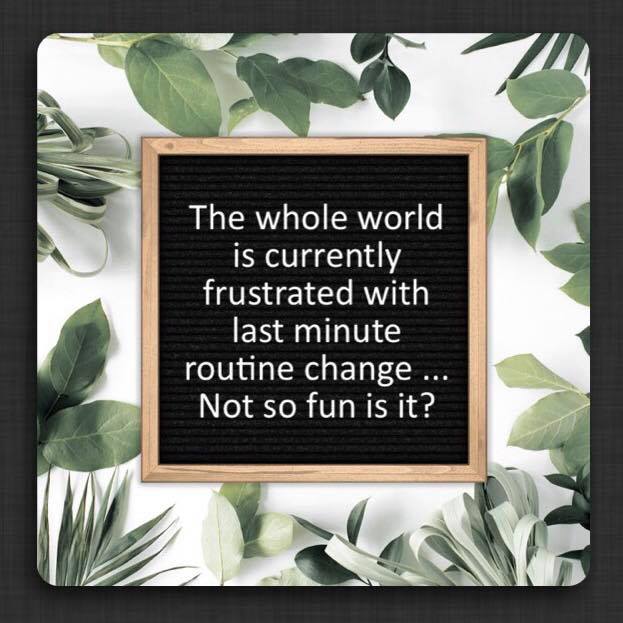
The whole world is currently frustrated with last minute routine change … Not so fun is it? 
 

I have especially had all the individuals with Autism (and their families) in my thoughts and prayers. 🙏🏼

I know how incredibly stressful any change in routine can be and this is a bunch all at once.

.

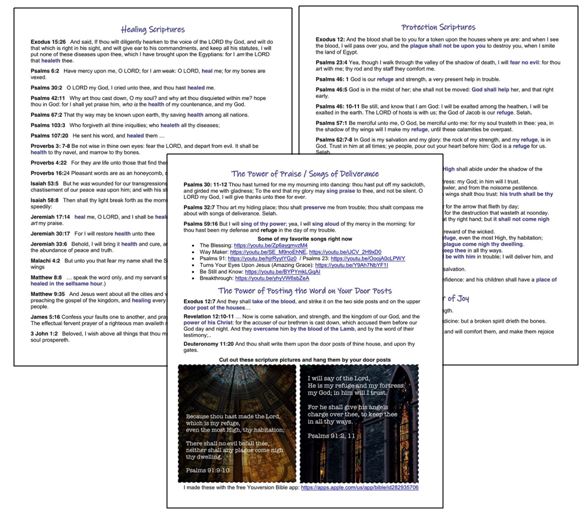
I’ve been sharing this with family and friends during the COVID-19 / Coronavirus pandemic to provide encouragement and hope.

Scriptures for Healing, Protection and Joy; Songs of Deliverance; Posting the Word of God on Your Door Posts (4-6-20) – 3 page PDF: https://omazingkidsllc.com/wp-content/uploads/2020/04/scriptures-for-healing-protection-and-joy-songs-of-deliverance-posting-the-word-of-god-on-your-door-posts-4-6-20-3-page-pdf.pdf

I just downloaded it from there into iBooks on my iPad and iPhone and was pleased to see that all the links work.

https://www.facebook.com/174264525957894/posts/3027568450627473/

.

Who Do I Want To Be During COVID-19?

.

Angela Moorad, MS, CCC-SLP, Founder of OMazing Kids, LLC
Retired Pediatric Speech-Language Pathologist with 28 years experience …. posting frequently again on social media about resources, apps & AAC stuff.
————————————-
Facebook: http://www.facebook.com/OMazingKidsYoga
————————————-
AppPeeps Facebook Group: https://www.facebook.com/groups/OMazingKidsAppPeeps/
(I am only approving those who answer the two questions to help keep spammers out of the group. Please let folks know if you invite them to join)
————————————-
Instagram: http://instagram.com/amoorad1
————————————-
Twitter:
https://twitter.com/amoorad
————————————-
Blog: http://omazingkidsllc.com

.
{please ignore any ads that may appear below. This is a free blog and I don’t have any control over ads nor do I profit from them}

Making Informed AAC Purchasing Decisions

Making Informed AAC Purchasing Decisions

Thinking about getting an AAC app? Many AAC apps typically go on sale for a few days in April (or May) and October. You can see the pricing history for any app on the AppSliced website (https://appsliced.co/apps) and watch Lauren Enders’ page for her round up posts of AAC app sale dates/details (https://www.facebook.com/LaurenSEndersMaCccSlp/).

.

Looking for a way to try out AAC apps before making a purchasing decision? If you are in the USA, all states are supposed to have an Assistive Technology Lending Library program where you can borrow AAC devices, iPads with AAC apps & other AT for short-term trial. It’s a great way to try various options out before making purchasing decisions. How to find the AT Lending Library in your state: https://www.at3center.net/stateprogram

.

If you are a Speech-Language Pathologist, then see this post for tips on how you can get access to AAC apps: https://omazingkidsllc.com/2021/02/16/how-to-get-access-to-the-top-10-ios-symbol-based-aac-apps-2-16-21-compiled-by-angela-moorad-ms-ccc-slp-omazing-kids-aac-consulting-part-of-a-larger-feature-matching-chart/

—————————-

Angela Moorad, MS, CCC-SLP, Founder of OMazing Kids, LLC OMazing Kids AAC Consulting

Ko-fi: https://ko-fi.com/omazingkidsaac

Personal Professional Facebook Page (linked to OMazing Kids): https://www.facebook.com/angela.moorad– adding “friends” who have a direct role in AAC or Assistive Technology – AAC / AT app or product developers, AAC / AT consultants, SLPs who specialize in AAC, other professionals who specialize in AAC or AT, etc.)

OMazing Kids AAC Consulting Facebook Page: https://www.facebook.com/OMazingKidsAAC/

AppPeeps Facebook Group: https://www.facebook.com/groups/OMazingKidsAppPeeps/

Instagram: https://www.instagram.com/omazingkidsaac/

Twitter: https://www.twitter.com/amoorad

Pinterest: http://pinterest.com/OMazingKids/

Linktree: https://linktr.ee/amoorad1

Blog: http://omazingkidsllc.com

App Review: Thinkrolls Space by Avokiddo

.

App Review: Thinkrolls Space by Avokiddo

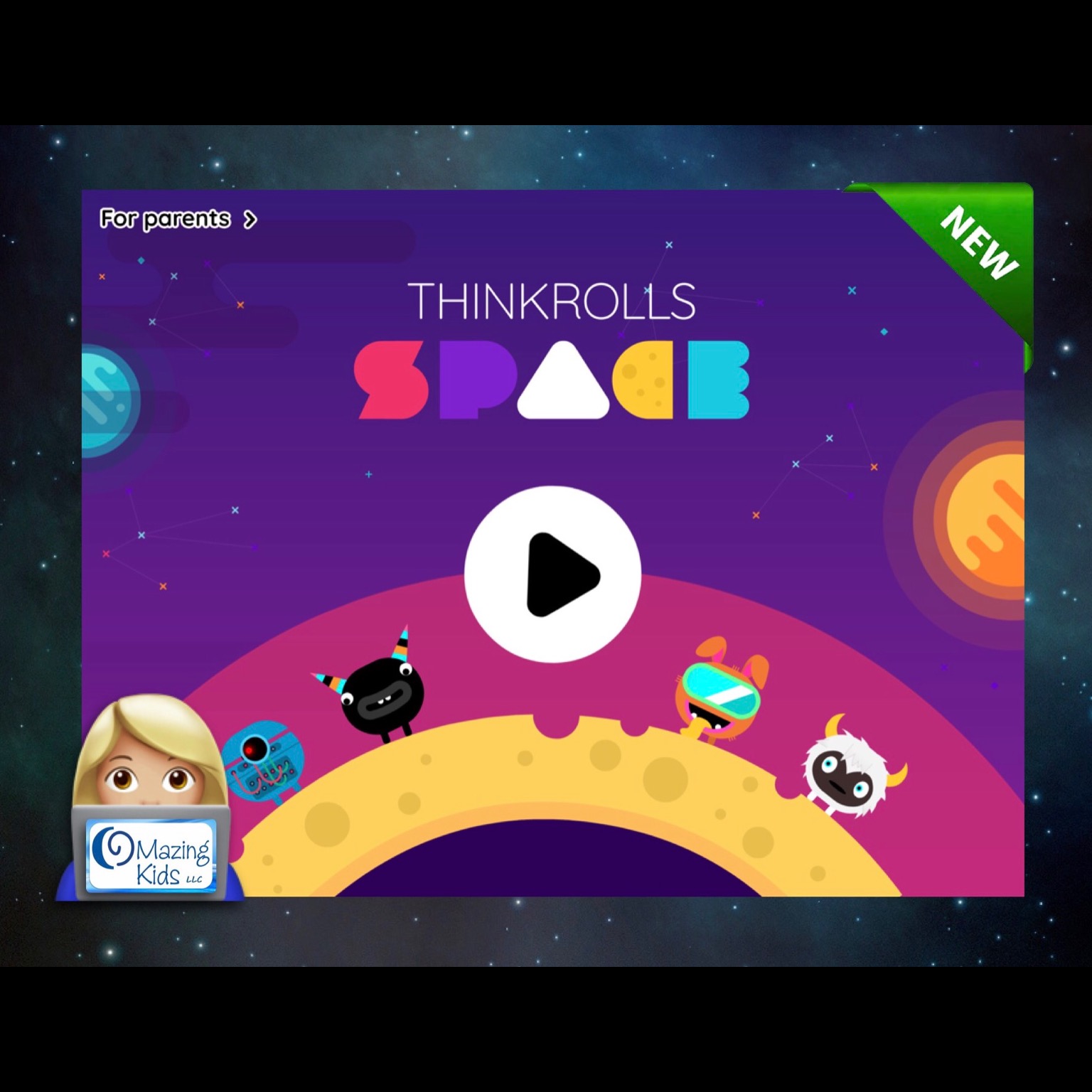
Avokiddo has just released Thinkrolls Space, a new app in their “Thinkrolls” collection, and it’s awesome! Highly recommended 😊
.


.
I previously used Thinkrolls apps extensively in my work as a SLP to work on problem solving, sequencing, logic, etc… and like to play the games myself as well. This newest one has a fun space theme, extra characters that can be unlocked by collecting stars and hearts along the journey (adding another opportunity to strategize the best route to collect the most), has an “easy” level with 110 puzzle paths on 7 planets and a “hard” level with 108 puzzle paths on 7 planets, high quality graphics and sound effects and is a blast to play.
.
Navigate through seven unique-themed planets, each focusing on a different set of skills and puzzle elements. Throughout, you’re encouraged to experiment. You’ll learn through trial and error to combine elements, as well as how to build on successive lessons to strengthen creative thinking, logic, problem solving, spatial cognition, and memory. Look for the key and exit gate. Try to visualize your route. Use and combine objects to clear a path, get the key, and move to the exit. Trapped? No problem. Just tap the reset button at the top right of the screen and try again. The app offers unlimited, penalty-free retries, and no time limits. This along with the option to toggle off the background music contribute to it being special needs friendly.
.
Since the puzzles are designed to be solved in order, levels are greyed out at the beginning and become available as you go along. To facilitate the app review process, the app developer provided me with a code to unlock all levels. This way I could visit any planet without having to complete all previous levels. Based on my experience working with numerous kids with special needs who became very frustrated when they couldn’t finish a game it would be nice if the app developer could add this “unlock all levels” in the settings area in a future update.
.
Progress is saved automatically so you can pick up where you’ve left off. Puzzles become increasingly harder combining skills learned earlier in the game.
.
The easy level is recommended for younger kids (5+). As I tested the app I found the “easy” level of Thinkrolls Space to be a bit harder than the “easy” levels in the Thinkrolls 1 & Thinkrolls 2 apps with Planet 7 in the “easy” level requiring the most thinking ahead several steps to formulate a plan. The hard level is more challenging (targeted for older kids (8+) and even adults). This new app is definitely easier than the Thinkrolls Kings and Queens app but there were several puzzles in the “hard” level that I found to be very challenging and a few that I ended up skipping after several attempts. But I may come back and solve those later 😊
.
The app allows you to create up to six separate player profiles, which is useful if multiple users share the same device. The selected difficulty mode is player-specific and can be changed at any time. Progress, collected hearts and stars, as well as won characters are also player-specific.
.
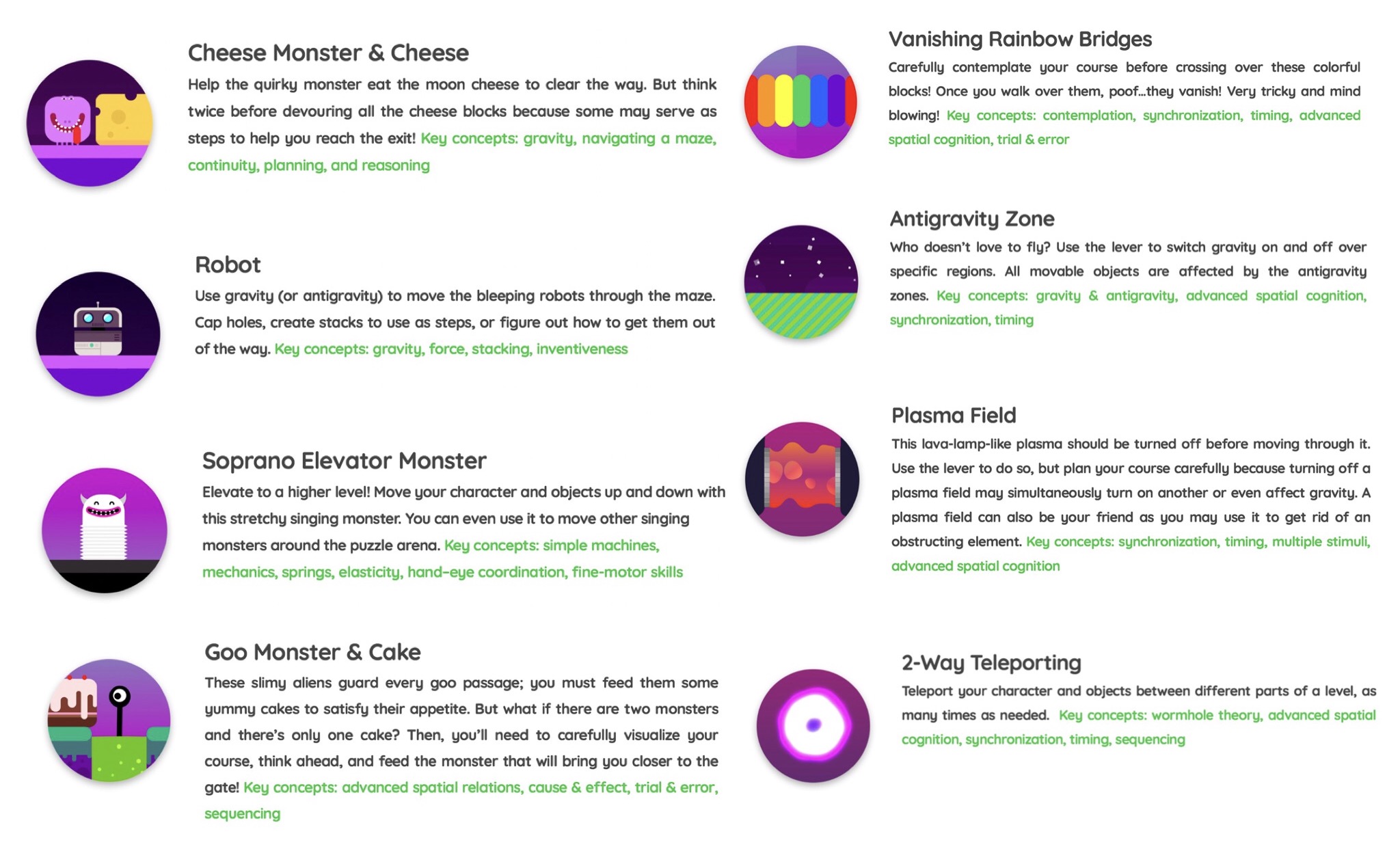
The elements: In Thinkrolls Space, you’ll meet goo monsters, bleeping robots, spring-like soprano aliens, and cheese monsters who love munching moon cheese. You’ll face vanishing rainbow bridges, plasma fields, teleporters, and more. Each of these can help or hinder.
.

.
Helpful info and tips on how to play can be found in a “for parents” section that is secured behind a parental gate in the top left corner of the home screen.
.
There are no third-party ads or in-app purchases in this app. But there is a link to other apps by this developer in the bottom left corner of the home screen. It would be nice if that area could be toggled off and/or add a much more difficult parental gate since it contains links to purchasing other apps. The current parental gate could be easily hacked by older children who can read. In the meantime I will secure this area with Guided Access. Of course it is always wise to have a strong password set for purchasing apps and to toggle off app purchasing in the settings area on any iPad that a child is using.

.

I highly recommend this new app and hope the developer continues to release more Thinkrolls in the future.

——-
App Store info:
iOS 8.0 or later
Universal app that works on an iPad, iPhone or iPod Touch
https://apps.apple.com/us/app/thinkrolls-space/id1458751834
$3.99 – prices will vary outside of the USA based on the exchange rate
——-

Developer’s website: https://avokiddo.com/thinkrolls-space/

——-
Angela Moorad, MS, CCC-SLP
Retired Pediatric Speech-Language Pathologist with 28 years experience …. still figuring out what I want to “do” in this next phase of life. 😎
Founder of OMazing Kids, LLC

{New App Review} Sticker Picture Articulation by Erik X. Raj

{New App Review} My patients LOVE the newest app from Erik X. Raj! I love how you can move, rotate, resize and layer the articulation stickers and then save your creation to the Camera Roll to send home for practice. The app can be used with either the forward facing or rear camera. Kids love seeing themselves in the picture. 😂

Sticker Picture Articulation by Erik X. Raj, https://itunes.apple.com/us/app/sticker-picture-articulation/id1330416177?mt=8, iOS Universal (works on iPad, iPhone or iPod Touch running iOS 9.0 or later), $4.99

More about the app: http://erikxraj.com/blog/create-hilarious-speech-therapy-pictures-with-sticker-picture-articulation/
.
Angela Moorad, MS, CCC-SLP
Speech-Language Pathologist
Founder of OMazing Kids, LLC – inclusive wellness & educational activities for kids of all abilities
Facebook Messaging for OMazing Kids: http://m.me/OMazingKidsYoga (note: Facebook frequently changes the link to messaging so if this one doesn’t work head over to my page and click on the “Send Message” button)
Facebook: http://www.facebook.com/OMazingKidsYoga
AppPeeps Facebook Group: https://www.facebook.com/groups/OMazingKidsAppPeeps/
Twitter: http://twitter.com/#!/amoorad
Instagram: https://www.instagram.com/omazingkids
YouTube: http://www.youtube.com/user/amoorad1
Pinterest: http://pinterest.com/OMazingKids/
YappGuru: http://yappguru.com/user/omazing-kids/
Google+: https://plus.google.com/u/0/110305433538768736741
Boardmaker Share: http://www.boardmakershare.com/Community/FriendsProfile/10916/Angela-Moorad
Blog: http://omazingkidsllc.com
.
Angela Moorad is the founder of OMazing Kids, LLC and is an ASHA certified & licensed pediatric Speech-Language Pathologist and Kids Yoga Teacher with 28 years experience working in a variety of settings (early intervention, schools, teletherapy & a nonprofit pediatric rehab hospital for children with developmental disabilities). She is an app beta tester for educational & therapeutic app developers and loves sharing info about great apps, products, books & toys to use with kids of all abilities.

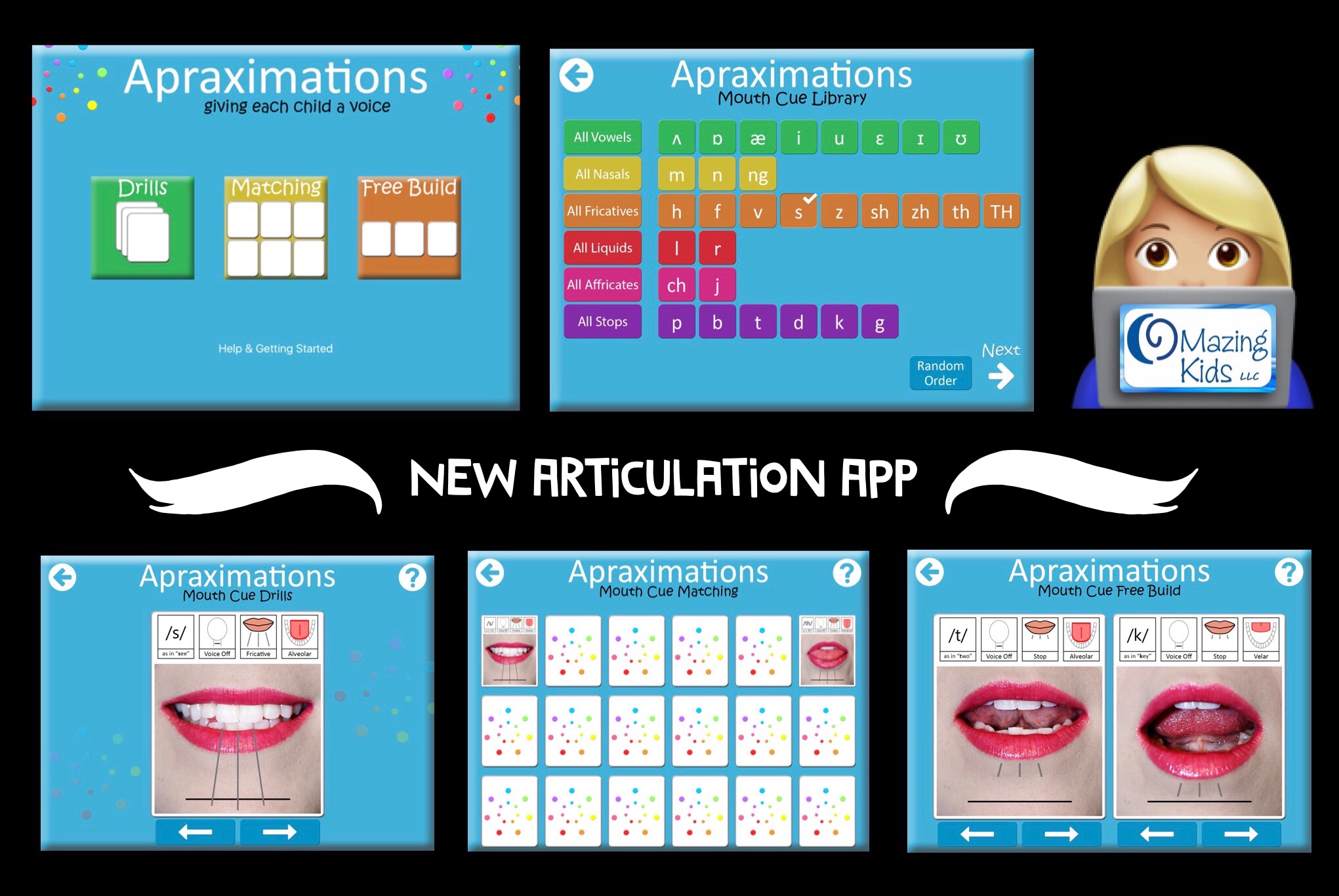
New Articulation App: Apraximations – Mouth Cues by Alissa Holloway

.

New Articulation App: Apraximations – Mouth Cues by Alissa Holloway

I was thrilled to see that the full version of this app was finally released! I especially like the matching game and the free build option. It’s great to have another tool in my speechie toolkit to help kids who are at the very early stage of learning about production of speech sounds. I used the “free build” screen to show a patient side by side differences between his target sound vs. error sound. I saw him have an “ah ha” moment and get a couple of correct productions in imitation. Having the voice output paired with each visual was what helped. He kept tapping, looking and listening and then on his own imitated the target sound. He sustained attention much longer than I’ve ever gotten him to look at my mouth.

.

Wishes for a future app update: It would be cool to have short video clips of each sound in addition to the pictures and then be able to select which you want to use on each activity screen.

.

App Store: iPad only, iOS 10.2 or later, $14.99, https://itunes.apple.com/us/app/apraximations-mouth-cues/id1310186235?mt=8
.
Angela Moorad, MS, CCC-SLP
Speech-Language Pathologist
Founder of OMazing Kids, LLC – inclusive wellness & educational activities for kids of all abilities
Facebook Messaging for OMazing Kids: http://m.me/OMazingKidsYoga (note: Facebook frequently changes the link to messaging so if this one doesn’t work head over to my page and click on the “Send Message” button)
Facebook: http://www.facebook.com/OMazingKidsYoga
AppPeeps Facebook Group: https://www.facebook.com/groups/OMazingKidsAppPeeps/
Twitter: http://twitter.com/#!/amoorad
Instagram: https://www.instagram.com/omazingkids
YouTube: http://www.youtube.com/user/amoorad1
Pinterest: http://pinterest.com/OMazingKids/
YappGuru: http://yappguru.com/user/omazing-kids/
Google+: https://plus.google.com/u/0/110305433538768736741
Boardmaker Share: http://www.boardmakershare.com/Community/FriendsProfile/10916/Angela-Moorad
Blog: http://omazingkidsllc.com
.
Angela Moorad is the founder of OMazing Kids, LLC and is an ASHA certified & licensed pediatric Speech-Language Pathologist and Kids Yoga Teacher with 28 years experience working in a variety of settings (early intervention, schools, teletherapy & a nonprofit pediatric rehab hospital for children with developmental disabilities). She is an app beta tester for educational & therapeutic app developers and loves sharing info about great apps, products, books & toys to use with kids of all abilities.

Top 7 SLP Therapy App Updates in 2017

.

Many app developers spent 2017 focused on updating their apps to be compatible with iOS 11. Some updated their entire line of apps, some only updated a few apps and a few totally abandoned their apps. It’s always sad to see good apps disappear from the App Store. It’s why I have not updated most of my iPads to iOS 11. But there are a few bright spots to share where app developers actually added some exciting new features to apps in 2017. Here are seven of my favorite updates (listed in alphabetical order):
.
Articulate It! Pro by Smarty Ears: added several fun new themes & improved existing themes, added the option for manual turn taking, added the option to switch the activity without having to start over, etc.

https://itunes.apple.com/us/app/articulate-it-pro/id391296844?mt=8
.
Articulation Scenes by Smarty Ears: added /sk/ scene & on “Find the Hidden Items” activities the pics disappear when tapped.

https://itunes.apple.com/us/app/articulation-scenes/id498857302?mt=8
.
Articulation Test Center Pro by Little Bee Speech: added automatic marking of phonological processes, option to add your own customized norms & option for continuous recording.

https://itunes.apple.com/us/app/articulation-test-center-pro/id700440156?mt=8
.
Avaz FreeSpeech: added Spanish language option, support for multiple phrases, improved vocabulary organization and the ability to bypass prediction to create a wider variety of sentences

https://itunes.apple.com/us/app/avaz-freespeech/id1047763490?mt=8
.
Boo Articulation Helper by Bildligt talat AB: at my request they added the option for VC combinations to this new app.

https://itunes.apple.com/us/app/boo-articulation-helper/id1216642311?mt=8
.
Feed Maxi Pro by Speak Eazy Apps: added new food items, optional hints, home button & two speed options (regular & double).

https://itunes.apple.com/us/app/feed-maxi-pro/id706581884?mt=8
.
Language Therapy 4-in-1 by Tactus Therapy Solutions Ltd.: has a fresh new look with more built-in supports for using the app.

https://itunes.apple.com/us/app/language-therapy-4-in-1/id525278822?mt=8
.
Hoping to see a few more apps updated to be compatible with iOS 11 in 2018 and that app developers can then focus on creating more new apps for SLPs to use in therapy 😊
.

Angela Moorad, MS, CCC-SLP
Speech-Language Pathologist
Founder of OMazing Kids, LLC – inclusive wellness & educational activities for kids of all abilities
Facebook Messaging for OMazing Kids: http://m.me/OMazingKidsYoga (note: Facebook frequently changes the link to messaging so if this one doesn’t work head over to my page and click on the “Send Message” button)
Facebook: http://www.facebook.com/OMazingKidsYoga
AppPeeps Facebook Group: https://www.facebook.com/groups/OMazingKidsAppPeeps/
Twitter: http://twitter.com/#!/amoorad
Instagram: https://www.instagram.com/omazingkids
YouTube: http://www.youtube.com/user/amoorad1
Pinterest: http://pinterest.com/OMazingKids/
YappGuru: http://yappguru.com/user/omazing-kids/
Google+: https://plus.google.com/u/0/110305433538768736741
Boardmaker Share: http://www.boardmakershare.com/Community/FriendsProfile/10916/Angela-Moorad
Blog: http://omazingkidsllc.com
.
Angela Moorad is the founder of OMazing Kids, LLC and is an ASHA certified & licensed pediatric Speech-Language Pathologist and Kids Yoga Teacher with 28 years experience working in a variety of settings (early intervention, schools, teletherapy & a nonprofit pediatric rehab hospital for children with developmental disabilities). She is an app beta tester for educational & therapeutic app developers and loves sharing info about great apps, products, books & toys to use with kids of all abilities.

Top 10 AAC App Updates in 2017

.

It’s amazing to see how much the field of AAC has changed over the course of my 28 year career as a SLP. Long gone are the old days of it taking years to see any major changes or improvements in AAC options. We are living in an era of rapid advancement thanks largely to social media that provides the opportunity for AAC users, therapists, teachers & parents to provide direct input to app and technology developers regarding what features we need. Most good AAC apps are now updated several times a year. Here is my list of top 10 updates that occurred for AAC apps in 2017:

.

#1: Proloquo2Go – in March 2017 version 5.0 added an amazing Search feature & Progressive Language. If you haven’t checked out this AAC app in awhile, I invite you to take a look at it again. These new features are a game changer. It also now includes English, Spanish, French & Dutch languages.

https://itunes.apple.com/us/app/proloquo2go/id308368164?mt=8

.

#2: Speak For Yourself – in January 2017 version 2.6 made this a Universal iOS app that can be used on an iPhone, iPod Touch & iPad. It also includes room for up to 40 different users (a great feature for SLPs trialing AAC with several different patients). Other updates this year added options to share vocabulary via AirDrop, more buttons became editable, the sentence bar background color can be changed & a “Manual Whisper Mode” was added to allow users to create a whole sentence prior to speaking.

https://itunes.apple.com/us/app/speak-for-yourself/id482508198?mt=8

.

#3: LAMP Words for Life – in July 2017 version 1.6.0 added a bilingual Spanish/English pageset, Word Finder updated to show and take you through the path to a word and added the option to backup to DropBox.

https://itunes.apple.com/us/app/lamp-words-for-life/id551215116?mt=8

.

#4: TouchChat with WordPower HD – several updates added new pageset options, Arabic language added through an in-app purchase, Canadian French vocabulary files available as free upgrade and vocabulary files can now be backed up to DropBox and can be shared via E-mail and iMessaging.

https://itunes.apple.com/us/app/touchchat-hd-aac-w-wordpower/id412351574?mt=8

.

#5: GoTalk Now Plus – in March 2017 version 4.11.6 added PCS Thinline symbols as an option through in-app purchase. In September 2017 version 4.11.11 added the option for Hybrid Scene pages (visual scene + up to 4 buttons) & the option to share messages from the Express Bar to Facebook, e-mail and text messaging.

https://itunes.apple.com/us/app/gotalk-now-plus/id742150885?mt=8

.

#6: Snap + Core First – this new app was just released in June 2017 and in December 2017 already had a major update to add a bilingual Spanish/English pageset option & Spanish voices. At the end of October 2017 they added access to voice output in the free version of this app for ASHA certified SLPs as part of your MyTobiiDynavox account.

https://itunes.apple.com/us/app/snap-core-first/id1072799231?mt=8

.

#7: Avaz Pro – in May 2017 version 4.2.6 added the option of having up to 77 buttons per screen. In September 2017 version 4.3 added the option to share via AirDrop and the Search now takes you through the path to a word.

https://itunes.apple.com/us/app/avaz-pro-aac-app-for-autism/id558161781?mt=8

.

#8: ChatAble & Predictable apps by TherapyBox both had major overhauls in 2017.

https://itunes.apple.com/us/app/chatable-symbol-based-app/id803004748?mt=8

& https://itunes.apple.com/us/app/predictable/id404445007?mt=8

.

#9: BRIDGE Communication – in January 2017 version 1.17 added the option to add video clips to buttons. The price was lowered to 99 cents.

https://itunes.apple.com/us/app/bridge-communication/id983660714?mt=8

.

#10: Custom Boards Premium by Smarty Ears had a major overhaul. New templates and updated Smarty Symbols were added. A great affordable option for making printable choice boards and visual supports.

https://itunes.apple.com/us/app/custom-boards-premium/id463344117?mt=8
.
See this updated post for info about how SLPs can get free access to several AAC apps, funding tips & links to AAC user Facebook groups: https://omazingkidsllc.com/2016/06/11/aac-tips-how-slps-can-get-free-access-to-aac-apps-aac-app-user-groups-funding-options-more/.
.
2017 was a years of ups & downs in the world of AAC apps. It was exciting to see so many great improvements in apps and a couple of new apps released but at the same time very sad to see a few AAC apps either disappear or no longer function properly after the release of iOS 11. I’ve received numerous messages on my OMazing Kids page from parents and therapists with very heartbreaking stories of AAC users losing their voice when iOS 11 came out. Several small AAC app developers had not updated those apps in almost 5 years. It’s one thing to lose a favorite game or therapy app but a whole different thing to lose an AAC app. It’s a cautionary tale to anyone who has thoughts of developing a new AAC app. Beyond the initial costs of developing the app, it is imperative that you also have a very well thought out long term plan and finances for supporting and keeping an AAC app updated.
.

Angela Moorad, MS, CCC-SLP
Speech-Language Pathologist
Founder of OMazing Kids, LLC – inclusive wellness & educational activities for kids of all abilities
Facebook Messaging for OMazing Kids: http://m.me/OMazingKidsYoga (note: Facebook frequently changes the link to messaging so if this one doesn’t work head over to my page and click on the “Send Message” button)
Facebook: http://www.facebook.com/OMazingKidsYoga
AppPeeps Facebook Group: https://www.facebook.com/groups/OMazingKidsAppPeeps/
Twitter: http://twitter.com/#!/amoorad
Instagram: https://www.instagram.com/omazingkids
YouTube: http://www.youtube.com/user/amoorad1
Pinterest: http://pinterest.com/OMazingKids/
YappGuru: http://yappguru.com/user/omazing-kids/
Google+: https://plus.google.com/u/0/110305433538768736741
Boardmaker Share: http://www.boardmakershare.com/Community/FriendsProfile/10916/Angela-Moorad
Blog: http://omazingkidsllc.com
.
Angela Moorad is the founder of OMazing Kids, LLC and is an ASHA certified & licensed pediatric Speech-Language Pathologist and Kids Yoga Teacher with 28 years experience working in a variety of settings (early intervention, schools, teletherapy & a nonprofit pediatric rehab hospital for children with developmental disabilities). She is an app beta tester for educational & therapeutic app developers and loves sharing info about great apps, products, books & toys to use with kids of all abilities.

{Best 17 in ’17} Top 17 new apps for SLPs released in 2017

.

{Best 17 in ’17} Top 17 new apps for SLPs released in 2017:

Here is a list of my top 17 favorite new apps released in 2017. Ranked based on being helpful with the most patients seen in OMazing Kids speech therapy this year. Prices are in the USA App Store (will vary elsewhere based on the exchange rate):

#1: Boo Articulation Helper by Bildligt talat AB, https://itunes.apple.com/us/app/boo-articulation-helper/id1216642311?mt=8, $9.99. This app has motivated countless kids to imitate vowels, consonants, CV & VC combinations. Kids absolutely LOVE the Boo character. This app is worth it’s weight in speechie gold. Excited to hear they have more features being added in 2018. They offer a free lite version for those who want to try before you buy.

#2: Snap + Core First by Tobii Dynavox LLC, https://itunes.apple.com/us/app/snap-core-first/id1072799231?mt=8, FREE – has no voice output but ASHA certified SLPs can now get free access to the voice output. See these posts for info about how to activate the free voice output in the free version of the app:

They also have this free companion app filled with videos, tutorials and tips. It’s a very large app so make sure you have plenty of free space and a strong WiFi connection before downloading: Pathways for Core First by Tobii Dynavox LLC, https://itunes.apple.com/us/app/pathways-for-core-first/id1187433636?mt=8

Tobii Dynavox has finally started an official Facebook group for users and several of their staff are quick to answer questions & troubleshoot issues: https://www.facebook.com/groups/tobiidynavoxcommunity

#3: Speech Tutor Educational by Synapse Apps, LLC, https://itunes.apple.com/us/app/speech-tutor-educational/id1323272450?mt=8, $39.99. So many fantastic features packed into this new app (including their unique placement videos, minimal pairs, etc.). Includes kid-friendly & clean modes which makes the app suitable for any age patient. They also offer a subscription-based version of the app.

#4: Inference Pics by APTUS SPEECH & LANGUAGE THERAPY LTD, https://itunes.apple.com/us/app/inference-pics/id1270407967?mt=8, $12.99. Includes the option to show or hide possible answers. When choices are shown there is a button on each choice that can be tapped to have it read aloud before selecting an answer. I love this feature! This makes the app customizable to a patient’s specific needs and accessible to those who may not be able to read. They offer a free lite version for those who want to try before you buy.

#5: Social Detective Intermediate by Social Skill Builder, Inc., https://itunes.apple.com/us/app/social-detective-intermediate/id1079442478?mt=8, $22.99. This app picks up where the Beginner leaves off and focuses on decoding the thoughts and emotions of people students interact with. Using this information, students will make smart guesses to predict what those people might do or say next.

#6: Conversation Starters: Social Skills for ASD Kids by Janine Toole, https://itunes.apple.com/us/app/conversation-starters-social-skills-for-asd-kids/id1238325614?mt=8, $7.99. This app provides over 200 conversation-starting questions on a variety of topics. They offer a free lite version for those who want to try before you buy.

#7: Say It.. Or Not? Social Filter Skills: School Ed. by Janine Toole, https://itunes.apple.com/us/app/say-it-or-not-social-filter-skills-school-ed/id1177251535?mt=8, $14.99. I am loving the content in this app! The scenarios provided are diverse and relatable. Although it takes a little longer for the app to load if you toggle on the “voice on” option, I highly suggest doing so. It will add the option for you to tap a speaker button on each item which then reads it to you. The voiceovers are very well done with great tones of voice. I appreciate that the developer included a way for the SLP to unlock all the content and go directly to an area they want to target. They offer a free lite version for those who want to try before you buy.

#8: Minimal Pairs for Speech Therapy by Innovative Investments Limited, https://itunes.apple.com/us/app/minimal-pairs-for-speech-therapy/id1207483809?mt=8, 99 cents. ‘Cause a speechie can never have too many options for minimal contrast pairs. Love the large pics & it’s only 99 cents so great when parents ask for recommendations for apps for carryover at home.

#9: Sounds Essentials by Nabeel Ahmed Khan, https://itunes.apple.com/us/app/sounds-essentials/id1264473472?mt=8, FREE with $1.99 in-app purchase to unlock all the content. Fun app for auditory discrimination.

#10: Lively Letters – Phonemic Awareness & Phonics by Telian-Cas Learning Concepts Inc, https://itunes.apple.com/us/app/lively-letters-phonemic-awareness-phonics/id1217971701?mt=8, $24.99. A unique app that targets phonemic awareness, phonics, and speech production.

#11: aacorn Plus – Advanced AAC by aacorn, https://itunes.apple.com/us/app/aacorn-plus-advanced-aac/id1167373769?mt=8, $119.99. This version of the app includes over 7,000 SymbolStix symbols. I love that they are high contrast against a black background. I’ve found this app helpful for modeling sentence creation as well as for AAC.

#12: Make a Choice – AAC Buttons by pkclSoft, https://itunes.apple.com/us/app/make-a-choice-aac-buttons/id1295966224?mt=8, $4.99. I enjoyed helping to beta-test this new simple AAC app. Very simple to use and affordable.

#13: Past Tenses With Splingo by The Speech And Language Store LLP, https://itunes.apple.com/us/app/past-tenses-with-splingo/id969065228?mt=8, $2.99. Kids love learning regular & irregular past tense verbs with the Splingo character.

#14: Animal Fun Park Family Version by Filimundus AB, https://itunes.apple.com/us/app/animal-fun-park-family-version/id1218307760?mt=8, $1.99. This app includes 15 fun mini games that are nice to use as short reinforcers during therapy. They offer a free lite version for those who want to try before you buy.

#15: Care for Our World by Sunbreak Games, LLC, https://itunes.apple.com/us/app/care-for-our-world/id1097364668?mt=8, $2.99 -> currently on sale for 99 cents. The beautiful rhyming words flow easily as you read or listen to it being read to you & inspire kids to think about all the gifts of nature and living creatures from forest, jungle, or sea that live in our world and a plea to take care of them. The illustrations are breathtaking! Really more works of art than just illustrations. This app brings them alive in an amazing way. I love the gentleness of both the words & illustrations. Both evoke feelings of calmness & kindness. I love that the message of caring for the earth is done in a kid-friendly way.

#16: Apraximations – Mouth Cues by Alissa Holloway, https://itunes.apple.com/us/app/apraximations-mouth-cues/id1310186235?mt=8, $14.99. This is the long awaited full version of this app. It just came out but I’ve already found it helpful with several patients.

#17: LudiTab Spatial Recognition by SEJER, https://itunes.apple.com/us/app/luditab-spatial-recognition/id1275104117?mt=8, FREE. One in a series of eight new free apps that are well designed and have lots of great opportunities for targeting vocabulary, spatial concepts, sizes, colors, shapes, identifying sounds, following directions, etc. See this post: http://bit.ly/2CuTgD9.
.
Honorable Mentions: Seventeen more apps released in 2017 that I loved using in OMazing Kids speech therapy (listed in alphabetical order):

* Alphabet Essentials – ABC App by Nabeel Ahmed Khan, https://itunes.apple.com/us/app/alphabet-essentials-abc-app/id1227619439?mt=8
* AR Talking Cards 4D by Nabeel Ahmed Khan, https://itunes.apple.com/us/app/ar-talking-cards-4d/id1287378112?mt=8
* Articulation Cards by Innovative Investments Limited, https://itunes.apple.com/us/app/articulation-cards/id1242446215?mt=8
* Balloon Pop for Toddlers and Kids by Ozgur Erdem Cinar, https://itunes.apple.com/us/app/balloon-pop-for-toddlers-and-kids/id1232794567?mt=8
* Big Break: The Acting Game by Emote Play Apps Inc., https://itunes.apple.com/us/app/big-break-the-acting-game/id987251778?mt=8
* Daniel Tiger for Parents by PBS KIDS, https://itunes.apple.com/us/app/daniel-tiger-for-parents/id1185651115?mt=8
* First Words Checklist: Teacher Edition by Cognitive ToyBox, Inc., https://itunes.apple.com/us/app/first-words-checklist-teacher-edition/id1142675436?mt=8
* Five Big Dinosaurs by Inclusive Technology Ltd, https://itunes.apple.com/us/app/five-big-dinosaurs/id1116604087?mt=8
* Good Night, Little Foresters by Fox and Sheep GmbH, https://itunes.apple.com/us/app/good-night-little-foresters/id1300717402?mt=8
* Kuca Senses by Kuca Boom, https://itunes.apple.com/us/app/kuca-senses/id1258342667?mt=8
* Max & Meredith: The Search for Percival by Move On Pluto LLC, https://itunes.apple.com/us/app/max-meredith-the-search-for-percival/id1135323982?mt=8
* Mighty AAC by DANIEL M DUARTE JR, https://itunes.apple.com/us/app/mighty-aac/id1210591921?mt=8
* Outloud Citymals by Outloud, https://itunes.apple.com/us/app/outloud-citymals/id1202245004?mt=8
* Reading Train – My First Books by The Learning Station, LLC, https://itunes.apple.com/us/app/reading-train-my-first-books/id1201673979?mt=8
* Sago Mini Friends – Go on a playdate! by Sago Mini, https://itunes.apple.com/us/app/sago-mini-friends-go-on-a-playdate/id1245748156?mt=8
* Sweet Home Stories (Full) by PlayToddlers, https://itunes.apple.com/us/app/sweet-home-stories-full/id1201347351?mt=8
* Toontastic 3D by Google, Inc., https://itunes.apple.com/us/app/toontastic-3d/id1145104532?mt=8

.
Angela Moorad, MS, CCC-SLP
Speech-Language Pathologist
Founder of OMazing Kids, LLC – inclusive wellness & educational activities for kids of all abilities
Facebook Messaging for OMazing Kids: http://m.me/OMazingKidsYoga (note: Facebook frequently changes the link to messaging so if this one doesn’t work head over to my page and click on the “Send Message” button)
Facebook: http://www.facebook.com/OMazingKidsYoga
AppPeeps Facebook Group: https://www.facebook.com/groups/OMazingKidsAppPeeps/
Twitter: http://twitter.com/#!/amoorad
Instagram: https://www.instagram.com/omazingkids
YouTube: http://www.youtube.com/user/amoorad1
Pinterest: http://pinterest.com/OMazingKids/
YappGuru: http://yappguru.com/user/omazing-kids/
Google+: https://plus.google.com/u/0/110305433538768736741
Boardmaker Share: http://www.boardmakershare.com/Community/FriendsProfile/10916/Angela-Moorad
Blog: http://omazingkidsllc.com
.
Angela Moorad is the founder of OMazing Kids, LLC and is an ASHA certified & licensed pediatric Speech-Language Pathologist and Kids Yoga Teacher with 28 years experience working in a variety of settings (early intervention, schools, teletherapy & a nonprofit pediatric rehab hospital for children with developmental disabilities). She is an app beta tester for educational & therapeutic app developers and loves sharing info about great apps, products, books & toys to use with kids of all abilities.