Angela Moorad, MS, CCC-SLP. Over 36 years experience in AAC. OMazing Kids AAC and app consulting. Creator of several AAC Feature Matching resources (https://omazingkidsllc.com/omazing-kids-aac-resource-links/). Includes info about unique features to support Gestalt Language Processors
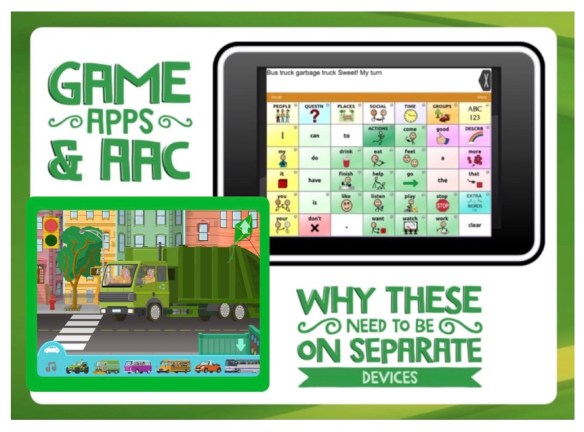
{Game Apps & AAC} Here is a perfect example of why an AAC app needs to be on a separate iPad from the “fun stuff”. Last week one of my patients earned 5 minutes of play time at the end of a session. We had already done a full session of aided language input and practice in using the TouchChat with WordPower AAC app. But I did not turn that off when I got out my secondary iPad with all the fun game apps… I always leave a “talker” out and available. This patient chose a basketball game and was having a blast shooting virtual hoops. But the true magic happened next. The game app has a variety of vehicles that go by on the street in the background. To be honest I hadn’t even noticed that they were there. He got so excited and spontaneously activated “groups” -> “vehicles” -> and then found the button for the vehicle that had just gone by in the app. It was fun to watch him go back and forth between shooting hoops and commenting on vehicles. I modeled use of social comments “sweet” & “awesome” when he made a great shot. If I only had one iPad, he would not have had the opportunity for this spontaneous language experience.
I just checked and the game app that we used is still currently FREE:
Streetball Game by Rodrigo Schmitt de Andrade https://appsto.re/us/Vv80bb.i
(Updated 7/26/22: Unfortunately that particular Streetball basketball app has disappeared from the App Store. But it was just an example. There are lots of apps that a child would enjoy talking about on their AAC device while playing)
{FYI… yes this patient has his own NovaChat AAC device. Unfortunately the charging port is damaged so it has been shipped back for repairs. Glad I have TouchChat set up with the same pageset so we can continue to practice AAC use while his talker is being fixed during his inpatient admission at the hospital where I work as a SLP}
Important Note:Decisions about whether or not an iPad or tablet should ONLY be used for AAC need to be made based on individual needs, age of the user, how long they have been using AAC, etc… The needs of a young child first learning how to use AAC are very different than the needs of an older teen or adult who uses tech to multitask.
I was excited to have the opportunity to test the upgraded version of the Bluebee Pals. I’ve been using them since April 2015 (see this post: http://bit.ly/2aAAsqO). Always fun to watch products evolve over time. Here’s what I love about the new Bluebee Pals Pros:
They are slightly larger, slightly heavier & fluffier
The sound output is louder with more noticeable mouth movement
The Bluebee Pal Pro tells you to connect it via Bluetooth, provides verbal feedback when it is connected and tells you when it needs to be charged
The process of connecting it to a device via Bluetooth is easier than before
The only slight glitch I noticed is that part of the word was left off when using it with an AAC app but this appeared to resolve after the first couple of activations. When doing a side-by-side comparison of the original and new Bluebee Pals, this was less noticeable with the new version.
.
The company continues to be dedicated to getting Bluebee Pals into the hands of professionals working with kids with special needs. They have generously donated numerous Bluebee Pals to teachers, SLPs, OTs, etc… Check out their Bluebee Pals Ambassador program:
*** 3/15/23: This old blog post from 2016 and updates from 2021 are being archived. Please see the new AAC Resources Link Page here on my blog for links to the most current info: https://omazingkidsllc.com/omazing-kids-aac-resource-links/ ***
{AAC Tips} How SLPs can get FREE access to AAC apps, AAC app user groups, funding options & more!
I have seen no less than 10 posts in a variety of Facebook groups this week from SLPs asking about free lite versions of AAC apps worded in a way that it was clear that the person who posted it thought that was their only option for getting access to AAC apps to trial with patients / students. Of course any good AAC eval would also include consideration and trials of traditional SGDs. Most folks know to contact their local vendor rep to borrow a SGD (the info to find out who to contact is readily available on those companies websites) so that’s not really where the problem is. A good AAC eval should also include consideration of features uniquely available in AAC apps but folks don’t often know how to get access to those. So I felt a need to share info here to help my fellow speechies build a better equipped AAC toolbox. I guess the closer I get to retirement the more I feel compelled to share knowledge accumulated over my 28 year career.
The problem is even if there is a free or low cost lite version of a particular AAC app, it is not the same as trialing the full featured app. How can you do a true feature-match when you don’t have all the features? Many SLPs see the prices in the App Store and assume they would have to personally purchase apps or try to get their facility or school to do so. Well unless you work in some mythical setting with unlimited funds or have a well established booming private practice, it’s unlikely that you would be able to afford very many AAC apps. Not saying they are overpriced. App developers have significant costs related to keeping robust AAC apps updated and paying licensing fees for high quality symbol sets and voices. So we shouldn’t expect these apps to be priced at the same level as other speech therapy apps or kids educational apps.
But I have good news!There is a way to get FREE access to the full version of many AAC apps but it will “cost” you some time and effort. If you’re willing to work a little, continue reading (I hope you are for the sake of the patient / students you serve).
Update 8/24/20: Set up a free MyTobiiDynavox account and go through the steps to verify your status: https://www.mytobiidynavox.com/#/morestuff/professionals. Look on their website and Facebook group for current resources. Their website changes frequently so if any links are not working do a search on their website or ask in their group.
See these posts for info about how to activate the free voice output in the free version of the app:
1/13/21: See this video on the Tobii Dynavox Technical Support YouTube channel regarding how to fix the voice output if it’s not speaking: https://youtu.be/dE4Zkr6ev5w
11/22/20 Updated post about how SLPs can activate voice output in the free version of the Snap Core First AAC app
Update 11/10/20: Snap PODD & Snap Gateway have been added and SLP’s with a verified MyTobiiDynavox for Professionals account can access both for free within the Snap Core First app. See step by step tips on how to access these on this post: https://www.facebook.com/174264525957894/posts/3622621321122180/
.
They also have this free companion app filled with videos, tutorials and tips. It’s a very large app so make sure you have plenty of free space and a strong WiFi connection before downloading: Pathways for Core First by Tobii Dynavox LLC, https://itunes.apple.com/us/app/pathways-for-core-first/id1187433636?mt=8
But don’t stop there. You need more than 1 tool in your AAC toolbox. If you are a SLP that frequently does AAC evals and makes purchasing recommendations, then many other AAC app developers will provide you with a free promo code for their app so you would be able to trial it with patients.
How to get codes for AAC apps: The process for doing this is a little different for each app. I always start by contacting that developer via Facebook messaging on their FB page for that app. If I don’t get a response there, then I look on their website for an e-mail address or to see if they have a formal process for requesting a copy of the app. This info can be difficult to find so dig a little. It takes some time but is well worth it. I am a SLP at a non-profit facility that does tons of AAC evals and purchasing recommendations. I have been able to get most of the main AAC apps and therefore have lots of options to trial during AAC evals. Feel pretty tech-geeky spending evenings and weekends doing this but it’s worth it to have access to lots of AAC options that then result in good AAC matches for the kids I serve.
Update 8/24/20: I am now retired but am staying up to date on features in AAC apps in case I decide to do some consulting work and so I’ll be equipped in case any family members ever need AAC.
. Here is an alphabetical list of AAC apps that I have gotten by going through this process and the way(s) I contacted those app developers. I hope I haven’t left anyone off the list. If I have, feel free to send me a message. There is not room to keep all the AAC apps loaded on my iPad at the same time so I rotate them on/off based on my patient’s needs. Most AAC apps are very large so I always suggest that SLPs get an iPad with the largest memory you can afford. Even with two 128GB iPad Airs, I am still constantly playing the “app shuffle” where I delete apps to make room to install others. I will be updating this list as I get new AAC apps:
aacorn & aacorn+ (Facebook messaging)
AAC Genie (Facebook messaging)
AlphaTopics (Facebook messaging)
Avatalker (Facebook messaging)
Avaz Pro (combo of Facebook messaging & e-mail)
BridgeBuilderAAC (Facebook messaging)
Click ‘n Talk & Talk’n Photos (Facebook messaging)
Clicker Communicator with SymbolStix & Clicker Communicator with PCS (Facebook messaging)
CoughDrop (the app developer contacted me)
Custom Boards (Facebook messaging)
GoTalk Now Plus by Attainment Company (combo of Facebook messaging & e-mail)
GoVisual Scene Maker by Attainment Company (e-mail)
Grace – Picture Exchange for Non-Verbal People (the app developer contacted me)
Grid for iPad by Smartbox Assistive Technology (combo of Facebook messaging & e-mail)
iESLp (combo of Facebook messaging & e-mail)
image2talk (Facebook messaging)
InnerVoice (Facebook messaging)
LAMP Words for Life (combo of Facebook messaging & e-mail. The key was to reach out to the app developers John & Cindy Holloran directly. I spent over a year with no success contacting PRC. You have to go through LAMP trainings prior to getting a code. Updated 8/24/20: new link to application: https://aacapps.com/partners/apply)
Make a Choice – AAC Buttons by pkclSoft (received a promo code after helping to beta-test this new app)
Mighty AAC (got it while it was free)
My First AAC (e-mail)
Niki Talk, Niki Talk + Tweet, Niki Music (adapted way to play music) & Niki Video (adapted way to play videos) (Facebook messaging)
PECS Phase III & PECS IV+ (e-mail – I had helped coordinate bringing a PECS workshop to our facility so that definitely helped)
Picture AAC (Facebook messaging)
Predictable, Scene & Heard & ChatAble (combo of Facebook messaging & e-mail)
Proloquo2Go & Proloquo4Text (AssistiveWare provides a free copy of the iOS and Mac versions of their AAC apps to Speech-Language Pathologists who conduct AAC evaluations on a case-by-case basis. Because they get a limited number of codes, they typically have a waiting list and prioritize requests based on caseload and geographic location. To request getting on that waiting list, SLPs can e-mail support@assistiveware.com. This same process applies to their simPODD app but it provides SLPs with a 1-year subscription (doesn’t include printing) and they will need to request access to simPODD each year).
Say Some More AAC Plus (combo of Facebook messaging & e-mail)
SayIt! (text to speech) (Facebook messaging)
See Me Talk (combo of Facebook messaging & e-mail)
simPODD (e-mailed AssistiveWare at support@assistiveware.com – received a free One Year Digital subscription – cannot print)
Snap Scene (it took multiple attempts to finally get connected with the right person at Tobii Dynavox to get a code for the full version)
So Much 2 Say (Facebook messaging)
Speak For Yourself (Facebook messaging)
Talk Tablet US (contacted this e-mail address: gusinc@me.com. Updated 8/24/20: That version of the app is no longer available for purchase. Instead they have a TalkTablet LITE – Eval Version for $1.99 and a Pro paid version. I don’t have either of those)
Tools2Talk+ (combo of Facebook messaging & e-mail)
Total Talk (e-mail) (Update 8/24/20: the app disappeared for several months from the App Store and then a revamped version relaunched as Talk Suite Pro)
TouchChat HD with WordPower (contacted my local Saltillo rep via e-mail. Find your rep: https://saltillo.com/reps. A word of advice… You really need the version that includes WordPower)
Verbal Me & Verbal Me Español (website contact form)
The key is being persistent. If one contact method doesn’t work, then try another. Another key is building relationships on social media. I put quite a bit of time and effort into liking and sharing posts from app developers pages, announcing when they have app sales and even doing reviews and hosting giveaways for them on my blog and social media sites. Some app developers may require proof of you being a SLP (keep in mind that they may have received numerous requests for a free app from parents or AAC users). The other thing to keep in mind is that app developers only get a certain number of promo codes when they release an app or an update to that app. So if they currently don’t have codes, check back again later. Often good to ask right after an app has been released or it has been updated when they would have a fresh batch of codes.
. Despite numerous attempts, I have not yet been successful in getting access to the full version of following AAC app. Which means I can’t recommend it since I have no way to trial the full featured version during an AAC eval nor do I recommend it when therapists or parents ask about AAC options in the numerous Facebook groups that I participate in since I haven’t used it:
Sono Flex (the free lite version has some interesting features but can’t make purchasing recommendations off that for the full app. The app has not been updated since 2014 so it will be interesting to see if still exists after iOS 11 is released. Updated 8/24/20: they finally updated that app in March 2018 but have made it clear that their focus is on updates and support for their Snap Core First app)
.
Other AAC apps that I have and use:
2Talk – AAC (got it while it was free)
AAC Expression Toolkit
Alexicom AAC (free. They also have several different paid apps. The app developer has indicated that they have purposefully released several apps specific to certain ages, genders & symbol types to keep the app sizes small and affordable. They will be adding info to their website to help SLPs and parents figure out which app might be best suited to a particular user. Update 8/24/20: This app developer also has several apps specifically designed for adults in medical situations.)
BRIDGE Communication – both the Lite and Pro versions (bought both when it they were on sale, it has some cool articulation pages built into it, can add video clips to buttons, several other unique features, has a Spanish option in the settings, has SymbolStix symbols, has a history of being updated frequently, price is very affordable for an app with this many features)
CanTunes (free, music choice boards, adapted means of accessing music on your iPad)
CardTalk (free & got the IAP to unlock all functions while it was free)
ChatterBoards AAC
ChoiceBoard – Creator
Choice Board Maker
Choice Boards
CommBoards
Communicate Easy
Communication Adventure – An app for communication training for caregivers of children with complex communication needs
CoreVoice – AAC Core Board
EESpeech Basic
Emergency Chat
Flip Writer AAC (and the Flip Writer Pocket iPhone version)
FreeVOCA
GoTalk Now Lite (free, has good features for a lite app. Often recommend it as an option while we are working on getting other options in place)
Grid Player
iHear PECS: Animals (bought it, a bargain for $1.99)
iSpeak Button Collection (bought it, $5.99, large full screen round button (looks similar to a BigMack), swipe screen to see the next button, up to 15 buttons)
Leeloo AAC – Autism Speech App
LetMeTalk
MenuAssist (free)
MyTalkTools Mobile Lite
PAROL (Has several additional features that are cool: an interactive pain scale (same content as the Doloris app that disappeared from the App Store several years ago), a visual timer, a visual sequence page, the ability to print a PDF of picture symbols, etc.)
PAROL Mini
PhotoVOCA (had gotten an older version while it was free… then was able to udate to the new version for free)
PictoMaker
Picture Card Maker PLUS (got it while it was free. The app developer is in the process of releasing a major update for it)
PlayButton (free, https://appsto.re/us/WZ2lC.i. This FREE app is one of my faves for use as a single message VOCA. The activation area is very large (almost the entire screen). I use Guided Access to lock the “record” button to prevent accidental activations during use. Update 8/24/20: They added a place in the iPad Settings for this app to toggle off the recording button)
Posco AAC
Quick Type AAC (bought it, a bargain for $1.99)
Smooth Talker AAC
Sono Flex Lite
SoundingBoard (free)
Sorenson BuzzCards (type and show, no voice output, designed for hearing impaired to use to quickly communicate with those who don’t know sign)
Speak – Text to Speech
Spell Better – Literacy Support (includes text to speech)
Spuble – creating live speech bubbles (very unique voice to text app that transcribes what a person says so another person can read it on the screen)
SymboTalk – AAC Talker
TalkBoard Free
Talk For Me – Text to Speech
Talking Button by Masanori Kubota (got while it was free)
Tap Chat
TapSpeak Button Plus (won it in a giveaway on PrAACtical AAC)
Tom Taps Speak – AAC for Kids
Touch Switch (bought it, $4.99, play any music downloaded onto your iPad with full screen round button. Also plays eye catching animations. Really more for “cause & effect” but thought it was worth mentioning)
Verbally (free)
Voice4u TTS
Whiteboard – nothing more, nothing less
Widgit Go Basic
YesNo – questions made simple
Yes or No Communication
Yes/No
Yes / No Button Free
There are several other AAC apps that I have gotten when they were free for a day or two. When I see one, I download it to try out before deciding if it is worth sharing on social media. There are some apps in the App Store that claim to be AAC but are so poorly designed that I chose not to post about them.
Updated 8/24/20 – AAC apps for communicating about pain & medical situations:
PAROL by Les Applications C, Inc https://apps.apple.com/us/app/parol/id1472197509 (has an interactive pain scale with same content as the Doloris app that disappeared from the App Store several years ago)
Updated 8/24/20: Keyboard Extension Apps: It may be helpful to consider using a keyboard extension app that would make the iOS iPad Keyboard easier to use with features that are special needs friendly.
Keedogo by AssistiveWare, https://apps.apple.com/us/app/keedogo/id915829477, $.99 (My favorite keyboard extension app with lots of customization options. Good for beginning typists since it doesn’t have word prediction or auto correction. If you want additional features the look at the next two apps….
SuperKeys Accessible Keyboard by Crick Software, https://apps.apple.com/us/app/superkeys-accessible-keyboard/id917216287, $12.99 (A very unique keyboard that enlarges quadrants and then you select a large key within it. Nice for those with vision or fine motor needs but can also be helpful for those overwhelmed by looking through the entire field of keys. The SuperKeys keyboard is built in as an option in all of the Clicker Communicator AAC apps.
Phonics Keyboard by Therapy Box Limited, https://apps.apple.com/us/app/phonics-keyboard/id1031514501, $2.99 (There are also some fun activities within the app)
SwiftKey Keyboard by SwiftKey, https://apps.apple.com/us/app/swiftkey-keyboard/id911813648, FREE (for more advanced typists who want a full PC style keyboard with the ability to customize the color for sensory needs, customization options, ability to swipe to type, has a nice “real keyboard” feel, the description shows IAPs for additional keyboard styles but as far as I can tell everything is included now. I’m currently using the “Nickel Classic Dark” theme as a nice alternative to the iOS iPad keyboard.)
FYI… There are a few AAC apps that use the iOS iPad Keyboard and therefore would allow for a keyboard extension app to be used. Examples include: Speak for Yourself, Proloquo2Go, Mighty AAC, ChatAble, Proloquo4Text, Predictable, Voice4u TTS, QuickType, Flip Writer, HandySpeech and several other text-to-speech (TTS) AAC apps. Exploring alternative keyboards can be a game changer for making typing as a means of AAC accessible. You may also want to explore accessibility features in the iPad settings (https://support.apple.com/guide/ipad/get-started-with-accessibility-features-ipad9a2465f9/ipados), styluses, adapted styluses, keyguards, external Bluetooth keyboards, etc. Take a look at Lauren S. Enders’ well organized Pinterest boards for ideas: https://pin.it/TWn9w6P (styluses: https://pin.it/t4cy8XV; keyboards & keyboard cases: https://pin.it/NydPTE8). I highly encourage you to collaborate with an Occupational Therapist and/or Assistive Technology Specialist when exploring AT options for the iPad. Some of that equipment is pricey so you want to make good decisions that fit that individual child’s needs. You may want to try things out in order to make those decisions. Check with the AT Lending Library in your state: https://www.at3center.net/stateprogram. Many have iPads, specialized apps and AT equipment available for short term loan to try out before making purchasing recommendations.
Free web-based AAC open source options (can be used online and some offer an offline option, may work across platforms):
* AsTeRICS Grid – open source web-based AAC: https://grid.asterics.eu/#welcome. Has the option to set up offline users. Uses voices available on that device or platform. On my iPad the iOS voices showed up as options. The editing is different from what I’m used to so there is a learning curve to get up to speed. Just beginning to explore this option.
* CBoard – open source web-based AAC: https://www.cboard.io. Cboard works on modern browsers and is available on a wide variety of platforms, including desktops, tablets and mobile phones. Offline support is available on Google Chrome (desktop & Android). There is an Android app (see above). Support for up to 33 languages (vary by operating system). Uses open source Mulberry Symbols. More info about features (vary by operating system): https://www.cboard.io/help/#Features & info about how to program and use it: https://www.cboard.io/help/. FYI…. you’ll want to do some editing if you are in the USA. Several of the items are named differently here (ex: biscuit -> cookie, ice lolly -> popsicle, chips -> fries, crisps -> chips, etc.).
* OptiKey – open source Windows eye-tracking and communication tool: http://www.optikey.org, https://github.com/Optikey/Optikey/wiki. Optikey is an assistive on-screen keyboard which runs on Windows. It is designed to be used with a low cost eye-tracking device to bring keyboard control, mouse control and speech to people with motor and speech limitations, such as people living with Amyotrophic Lateral Sclerosis (ALS) / Motor Neuron Disease (MND). Includes support for the CommuniKate symbol communication boards. More info: https://github.com/Optikey/Optikey/wiki/Support-for-CommuniKate-boards & http://communikate.equalitytime.co.uk. CommuniKate is designed for people who rely heavily on the environment or context in order to communicate effectively but understand concepts and language used in conversation and during everyday activities.
Affordable web-based AAC open source option (can be used in a web browser online and works in apps across multiple platforms – iOS, Android, Amazon Kindle, Windows):
CoughDrop – open source cloud-based AAC: https://www.mycoughdrop.com. They offer a free 2-month trial. After that it’s either a monthly subscription (currently $6.00 per month). Info about other pricing options: https://www.mycoughdrop.com/pricing. They often offer a 50% off discount on the Lifetime Subscription fee in April (Autism Acceptance month) & October (AAC Awareness month). They frequently add new board options and do a good job of keeping the app updated. This is the only affordable AAC option that I’ve seen that can send the text and symbols together in a cohesive message via iMessaging and e-mail. Other higher priced AAC options that can send both symbols & text as a cohesive message: Avaz (in iMessaging and e-mail) and the Clicker Communicator apps (as a PDF either by AirDrop or e-mail. MyTalkTools is the only AAC app that I’ve seen that actually has an iMessaging app component where the app works within iMessaging… but each symbol is messaged separately.)
Windows: You can install CoughDrop as a Windows desktop app on your computer or Windows device. CoughDrop on Windows has some eye-tracking integrations that will help it work better with more devices. Please make sure to download the right version for your operating system. https://www.mycoughdrop.com/download
Web Browser: CoughDrop is a web-first application, and should work with many modern web browsers.
What are my “favorite” AAC apps? I have several based on the features available in them. I know the list above looks overwhelming and I did not get these apps all at the same time. So here is some advice as to where to start in your quest to acquire AAC apps. If I had to narrow down the list to the top 10 robust AAC apps that stay loaded on my iPad all the time and have been a good match for several patients that I serve… they are (list updated 8/24/20 – subject to change as apps are updated with new features and other apps are released):
Avaz Pro
Clicker Communicator with PCS (and the version with SymbolStix)
CoughDrop
GoTalk Now Plus
Grid for iPad
LAMP Words for Life
Proloquo2Go
Snap Core First
Speak for Yourself
TouchChat HD with WordPower
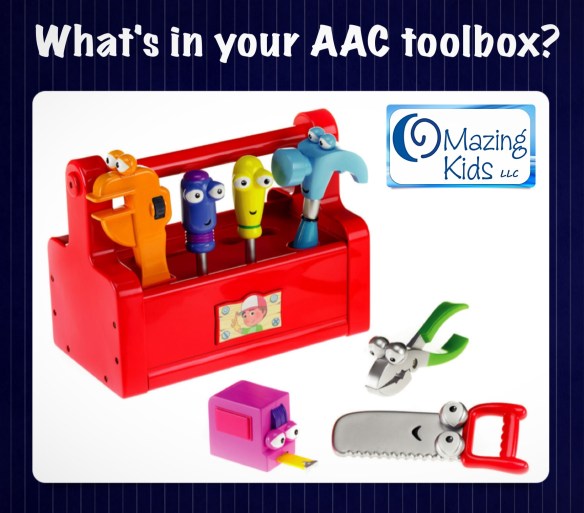
I think of these as the most common tools in my AAC toolbox (like a hammer, pliers, saw, tape measure, drill, level, screwdriver & wrench are common tools at home). The rest are still very important “specialty” tools in my toolbox. They are fabulous for meeting less common and very specific needs. Think of an Alan Wrench. Not something you use very often but when you need one it is the only tool that will meet that need. And sometimes the best solution is a combination of several tools. Remember…. Good builders pick tools based on the task.
Feature Matching:
So I bet you are thinking “oh my goodness… how on earth can I learn about all the features to do a feature-match with so many options?”. The apps I have listed above are just the tip of the iceberg. There are hundreds.
Updated 8/24/20:
The best way to keep up to date on the features in AAC apps is to have access to them and use them frequently. You can also gain helpful info in the user groups for apps on Facebook, videos released by the app developer and several resources listed below:
SET BC Supported AAC Device Comparison Chart April 2019 (their documents only include info on the apps and devices that they use but is still a helpful example and fairly recent): https://bit.ly/31qPo42. They also have a Feature Matching: Linear and Auditory Scanning (February 2019): https://bit.ly/32nIP1E & SET BC AAC Software/Apps with Visual Scenes: Comparison Chart (February 2019): https://bit.ly/3jcykF1
FYI…. features change rapidly as apps are updated or companies release new devices. So as soon as any resource list like these are published it likely already has something outdated in it.
But finding fairly recent documents like these at least gives a good starting point when comparing options in a feature match process. Tip: If a document you find online isn’t dated be sure to look at the iOS requirements listed in the features. There are VERY old charts that date back to iOS 4 that I saw that are totally outdated and are not an accurate or fair depiction of those apps.
FYI 2: I haven’t found any document that contains info on every AAC app or device so it’s important to research and consider ones that may not be on a particular list.
This Feature Match Comparison Chart from the Oklahoma Assistive Technology Center is helpful: https://bit.ly/3hs27cl
http://bit.ly/EndersAACAppsPart1
. AAC APPS: Considerations for Selecting, Customizing, & Getting Started – Part 2 – Lauren Enders (May 15, 2019) – includes 2 robust motor-plan based AAC apps (LAMP Words for Life & Speak for Yourself), 1 robust cloud-based app that’s a mix of folder-based with influences of motor-planning (CoughDrop), plus info about other types of AAC apps (including a nice overview of unique ways to use the GoTalk Now app)
http://bit.ly/EndersAACAppsPart2
.
Also this archived presentation by Christine Baudin: Comparing & Contrasting 5 Common Robust AAC apps – TouchChat with WordPower (focusing on 108 & 20 location page sets), Proloquo2Go (focusing on 7×11 grid), Snap Core First (focusing on 8×10 grid), LAMP Words for Life (84 location) & Speak for Yourself (120 location) – 2018 AAC in the Cloud
Unfortunately the AAC Ferret app that had been so helpful in searching for apps by specific features no longer exists. Word is the app developer ran into funding issues. Even if you still have that app loaded on your iPad, it no longer works. That app truly was a fabulous tool. My hope is that maybe it will reappear one day or that someone else will develop a tool like that.
My next “go to” resource used to be Jane Farrall’s website with her AAC app lists (http://www.janefarrall.com/aac-apps-lists/). Unfortunately she took that part of her website down since she no longer had time to keep updating it and the lists were outdated. It used to have several amazing lists:
Symbol/Picture apps – These are apps that have symbol based pages but don’t make text-to-speech available to the person who uses AAC.
Symbol & Text Based apps – These are apps that have symbol pages and make text-to-speech available to the person who uses AAC.
Text Based apps – These are apps that make text-to-speech available to the person who uses AAC or that have text only communication pages.
.
Funding:
Wanting to get a bundled iPad with an AAC app in a durable case funded as a “dedicated” SGD through Medicaid or insurance? Your best bet is to check with the funding departments at these companies. They all offer iOS based devices with a variety of AAC apps as an option:
We are fortunate in Oklahoma that Medicaid will consider funding an iPad with a robust AAC app in a durable case as a SGD / DME but they require us to try the full version of the app in order to do a complete feature-match, submit a video of the patient using it and extensive justification as to why that particular option us being recommended. Here in Oklahoma, we can only get funding once every 5 years for AAC (with very rare exceptions) so it’s very important to be able to get a good match for that individual’s needs. See details here: https://www.okabletech.org/community/soonercare-provider-for-speech-generating-devices/
Another source that I’ve had good success with for funding an iPad with a robust AAC app in a durable case here in Oklahoma is the New Voices grant through Ability Connections Oklahoma: https://www.acok.org (the funding comes and goes on this grant. See their Facebook page for updates: https://www.facebook.com/abilityconnectionoklahoma/).
There are key times of the year that AAC apps tend to go on sale and I always share that info on my OMazing Kids Facebook page and in the AppPeeps group. Some app developers choose to do sales and others do not. When I have inquired about that, they reply that they feel their app is fairly priced given the ongoing costs related to keeping it updated and licensing fees for symbol sets and voices.
Why do many AAC apps cost so much? Drives me a little nuts when I see unkind comments regarding pricing of well designed AAC apps. Where else would we demand that something be put on sale or even worse demand that it should be free? Really?! The well designed robust AAC apps are a bargain even at full price if you stop to really think about being able to get a “voice” for a patient for a tiny fraction of the cost of traditional SGDs. It has been a game-changer and allowed many parents to be able to no longer have to wait on a SLP to be the decision maker / gatekeeper. Many parents post about “going rogue” in buying an iPad, AAC app & durable case for their child after being told they weren’t “ready” for that. News alert…. the old school mentality of there being a “hierarchy” that a child has to go through to “prove” they are “ready” for robust AAC is antiquated. Not saying that every AAC app or SGD is a good match for every child but I am saying that the days of kids with very complex needs being stuck with just a single message VOCA or a few PECS symbols have to end. See this presentation from Jane Farrall: http://www.janefarrall.com/lets-communicate-plenary-presentation-at-qaselcon16/ , this post about “What is “Beginning” AAC?“: http://www.janefarrall.com/what-is-beginning-aac/, and this powerful post on the Uncommon Sense Blog’s Facebook page: http://bit.ly/230RT5r.
.
What about parents who want to try out AAC options? I highly recommend that you pursue an AAC eval with a SLP who has expertise in this area. Many larger school districts have an AAC team. But don’t feel that you have to wait if you are a parent who has been told “no” and want to proceed on your own. It may just be a little trickier to determine what the best AAC option will be for your child since most parents don’t have unlimited resources to buy several AAC apps to try. All states in the USA are supposed to have an Assistive Technology Lending Library program where parents & professionals can borrow AAC devices, iPads with AAC apps & other AT for short-term trial. It’s a great way to try various options out before making purchasing decisions. There are lots of great AAC devices and apps. It’s important to do a good feature-match and trial of options. Find the AT Lending Library in your state: https://www.at3center.net/stateprogram
The AT Program in your state may also know of SLPs who do AAC evals and funding resources specific to your area.
Need support with using an AAC app? Most app developers have a Facebook group for that app. I highly suggest joining these groups for an incredible amount of support from the app developers as well as other parents, therapists & teachers. Every group has it’s own “culture”. Some are very open to discussing any topic. Others are pretty strict about only posting info or questions directly related to that particular app. Here is a list of the Facebook app user groups (updated to include support groups for traditional SGDs & PODD):
I have suggested to the developers of the GoTalk Now app that a group be started but so far I’ve only seen a parent led one in Swedish. I have also suggested to the developer of the new Total Talk AAC app that they start a group. He was very open to the idea so I hope to see that soon.
There are also numerous other AAC-related Facebook groups. Again each having it’s own culture and dynamic. I’m not going to list all of those here…. but if you are a SLP, I definitely suggest joining the AAC for the SLP group: https://www.facebook.com/groups/1539830846285663/. Also take a look at the 21st Century AAC Practitioners group: https://www.facebook.com/groups/475548015977014/. If you see me “tag” Lauren Enders in a post or comment, it’s because I know that she has a wealth on knowledge about AAC apps, cases, mounting options, etc. You should seriously follow her on Pinterest: https://www.pinterest.com/lasenders/. I also know that she will provide an unbiased opinion and always comments in a very supportive way.
You may also see me “tag” Carole Zangari from PrAACtical AAC for the same reasons. http://praacticalaac.org/
.
{AAC Assessment} “Just like driving a car, when you’ve been doing AAC assessments for a long time, you almost don’t have to think about the details of what you are doing. I automatically pull out the devices and apps, YouTube, iPad, snack, bubbles and wind-ups, and start playing. Unfortunately, it is less than helpful to tell people new to AAC to just play with students and watch what they do. In an effort to describe our process, I created a data sheet to break down the steps, and typed up the procedures and suggested apps.” This post by Vicki Clarke from Dynamic Therapy Associates Inc on PrAACtical AAC is full of awesome tips for AAC assessment! I was excited to get new ideas for several apps that I already had and was inspired to buy an app that’s been on my “wish list” for awhile. I will also confess to buying the hippo toy pictured. It’s been on my “wish list” for awhile too (gotta love shopping on Amazon with free shipping). 😉
What’s the best AAC approach?What’s the best dedicated speech generating device? What’s the best case? What’s the best ______….. Several times a week I am either asked this question or I see it posted in one of the many AAC Facebook groups I follow. Occasionally it seems to end up in a rather heated debate of ______ vs. ________. Even arguments over core vs. fringe vocabulary. For a balanced approach in use of core & fringe vocabulary, check out this fabulous post on PrAACtically AAC: http://praacticalaac.org/praactical/the-baby-the-bathwater-and-core-vocabulary/. This is counterproductive. Although there are key best practices when considering AAC options, there is not any one best AAC option (or one best therapy approach, or one best anything) when it comes to best meeting individual needs. I have added a lot of tools to my toolbox over my 26+ year career as a speech-language pathologist. There have been pivotal moments where new tools were added that forever changed my perspective. Although shiny new tools may be exciting they did not replace the old tried & true tools. The exciting thing about tools is that you can use them together to build & repair. Would it make sense to ask “What’s better…. a hammer or a drill? a saw or a tape measure? a wrench or a flashlight? Of course not. Each tool has it’s specific purpose. You select the tool based on what job you need to accomplish.
. Have questions? The quickest and most reliable way to reach me is via Facebook messaging on my OMazing Kids page. Thank goodness it seems to be immune from spammers unlike my e-mail.
. Are you an AAC app developer? I’d be more than glad to help beta test your app and then post about it when it is released for sale. I don’t charge a fee. Just would need a free promo code for the full version of that AAC app so I can add it to my toolbox. I never post about apps that I haven’t tried out first. Oh and a word of advice to app developers… state run facilities and schools have difficulty with in-app purchases or subscription-based apps as do potential funding sources such as Medicaid or insurance companies. So you will have a wider audience if you also offer a full paid version of your AAC app.
.
I am asked pretty frequently for my thoughts on AAC app development. Here is my advice:
Any new AAC app needs to support robust communication for a wide variety of functions. There are already lots of simple choice making apps on the market.
Take a good look at the major AAC apps on the market and determine what specific features your new app would offer that are not already available.
Do lots of beta testing to insure the app is intuitive / easy to use. Even with the best intentions some AAC apps never take off. An example is Total Talk. It has several unique features but is not very intuitive to use and they initially only let you pick one voice (that has since changed but they lost the initial momentum that comes with a new app release). (Update: 8/24/20 – It was nice to see the Total Talk app revamped and relaunched as “Talk Suite Pro”. The app has some unique features so hopefully it will make it this time)
You only should offer an AAC app that is truly worth having and meets needs. There are several free or very cheap AAC apps on the market. But you rarely see them mentioned or recommended because they are so poorly designed.
Determine what platform you will develop the app for (iOS or Android). It’s very rare for app developers to be able to tackle both platforms and do it well. Most AAC app developers stick with the iOS platform because it is uniform and thus easier and less costly to develop apps for.
Beyond the initial costs of developing the app, make sure that you also have a very well thought out long term plan and finances for supporting and keeping an AAC app updated. I’ve received numerous messages on my OMazing Kids page from parents and therapist with very heartbreaking stories of AAC users losing their voice when iOS 11 came out. Several small AAC app developers had not updated those apps in almost 5 years. It’s one thing to lose a favorite game or therapy app but a whole different thing to lose an AAC app.
📥 Want to suggest iOS AAC apps to be added to this post? The best way to reach me is via Facebook messaging over on my OMazing Kids page.
If it’s a free app, please send the link from the USA App Store so I can download and try it out. If it’s a paid app and you are the app developer, please send the link from the USA App Store so I can look at the info before you send a promo code. I want to make sure that one of my iPads or iPhone is compatible in order to try it out.
If you see info or links that need to be updated on this post, feel free to send me a Facebook message on my OMazing Kids page.
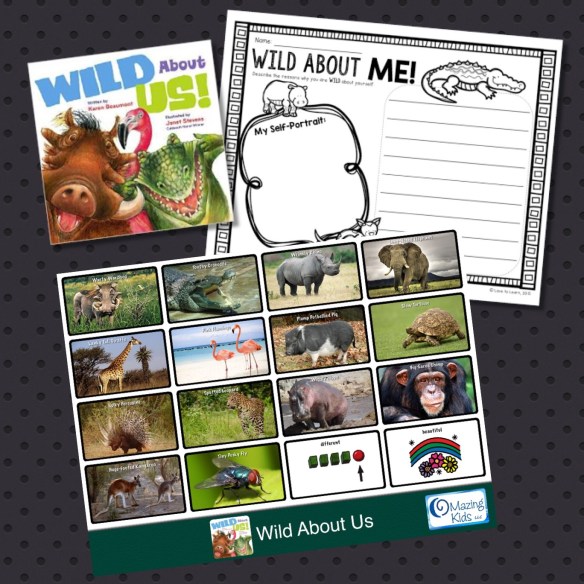
Excited to have a fun activity prepared for OMazing Kids speech therapy this week! Wild About Us! by Karen Beaumont has a wonderful message of diversity and loving who you are plus it’s full of lots of great descriptive language and animal vocabulary:
Warty Warthog
Toothy Crocodile
Wrinkly Rhino
Long-Nosed Elephant
Lanky Tall Giraffe
Pink Flamingo
Plump Potbellied Pig
Slow Tortoise
Spiky Porcupine
Spotted Leopard
Wiggly Hippo
Big-Eared Chimp
Huge-Footed Kangaroo
Tiny Pesky Fly
.
I bought my new hardcover copy of the book on Amazon for less than $5.00: http://www.amazon.com/Wild-About-Us-Karen-Beaumont/dp/0152062947
{Update: It finally uploaded to the Online Gallery. Search for “wild” and you’ll find it}
Love using the GoTalk Now Plus AAC app to make communication pages to use with books! It’s amazing to have access to the PCS Boardmaker symbols, SymbolStix symbols, GoTalk symbols and easily search online for pictures all within one app. Plus it’s easy to export the whole page as a PDF to then print and cut apart the symbols to add to kids communication books. Thanks Attainment Company, Inc.! The kids I serve at our non-profit hospital and I greatly appreciate it 🙂
. GoTalk Now Plus AAC app: GoTalk NOW PLUS by Attainment Company https://appsto.re/us/LlfpS.i
This app is super easy to program and is full of other great features such as being able to link buttons to music or videos on your iPad, link to YouTube videos, transmit pages over WiFi to another device, scanning, backup/restore with DropBox, upload/download pages via the GoTalk Now Online Gallery, each page can have a different grid size (choices of 1, 2, 4, 9, 16 or 25 buttons per page), and more.
.
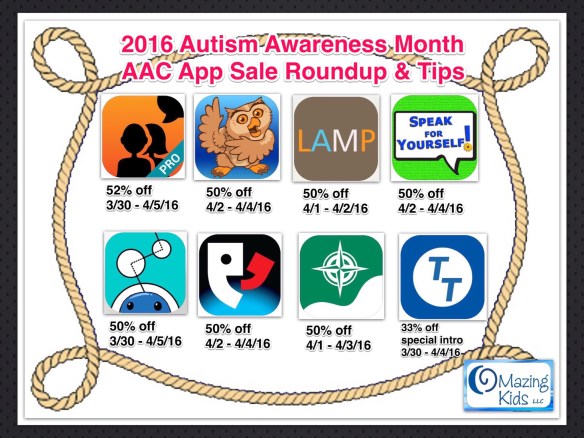
Here is a round up of the AAC app sales that have been announced so far for Autism Awareness Month. I have been announcing them in individual posts on my OMazing Kids Facebook page but thought a post listing them all might be helpful. AAC app sales are pretty rare. So this is a great opportunity to get an app that you have been considering:
Avaz Pro – AAC App for Autism (Augmentative Picture Communication Software for Children with Special Needs) by Avaz, Inc.: https://appsto.re/us/19nrH.i, 52% off, 3/30-4/5/16
ChatAble – symbol and scene based communication app by Therapy Box Limited, https://appsto.re/us/mfo3V.i (50% off, 4/1-4/5/16)
Tobii Dynavox Compass by Tobii Dynavox LLC, https://appsto.re/us/y-lf2.i (According to the the company’s press release, the Compass with PODD, Compass with Gateway, and Compass with Eyetracking are NOT included in the sale), 50% off 4/1-4/3/16
FYI…
* Always verify an app price BEFORE purchasing it. App prices often change at 10:00pm CST (adjust for your time zone) but can change at any time without any notice.
* These app sales and prices will be in the USA App Store. Some apps may be on sale in other countries but I have no means of verifying that since I only have access to the USA App Store.
* If you plan on purchasing an app during a sale, it is wise to get it early in the sale to insure you don’t miss the sale pricing.
* Occasionally app developers decide to start a sale early or extend a sale but you can’t count on that happening.
Additional important info:
* Most app developers have a Facebook group for that app. I highly suggest joining these groups for an incredible amount of support from the app developers as well as other parents, therapists & teachers. Every group has it’s own “culture”. Some are very open to discussing any topic. Others are pretty strict about only posting info or questions directly related to that particular app. Here is a list of the FB groups:
I have suggested to the developers of the GoTalk Now app that a group be started but so far I’ve only seen a parent led one in Swedish. I have also suggested to the developer of the new Total Talk AAC app that they start a group. He was very open to the idea so I hope to see that soon.
There are also numerous other AAC-related Facebook groups. Again each having it’s own culture and dynamic. I’m not going to list all of those here…. but if you are a SLP, I definitely suggest joining the AAC for the SLP group: https://www.facebook.com/groups/1539830846285663/.
* All states in the USA are supposed to have an Assistive Technology Lending Library program where parents & professionals can borrow AAC devices, iPads with AAC apps & other AT for short-term trial. It’s a great way to try various options out before making purchasing decisions. There are lots of great AAC apps…. but like anything there is no magical solution that meets every child’s specific needs. That’s why doing a good feature-match and trial of options is critical. I highly suggest an AAC eval with a SLP. The AT Lending Library in your area should know of folks in your area who do them.
* If you are a parent of a child with special needs and you are either tired of waiting on professionals being the gatekeepers for your child’s AAC options or have decided that don’t want to wait on an AAC evaluation, I still highly suggest doing a little “homework” to help you consider whether or not a particular AAC is a good match for your child before purchasing it. You can make informed purchasing decisions by watching videos of that app in use, reading parent blogs, joining the Facebook groups I listed above, find someone in your area who has the app, etc.
* Before commenting that these AAC apps are “so expensive” even on sale, please consider that “expensive” is a relative term. Compared to traditional AAC devices that cost thousands of dollars, these apps even at full price are a bargain and many parents end up purchasing an app themselves rather than continuing to wait for someone else to meet their child’s needs. The developers of these AAC apps have continued to invest their time and $$$ to add improvements to the app and pay licensing fees for high quality voices and symbol sets so we should not ever expect one of these apps to be free or cheaper than these sale prices. That being said, if the sale price is still out of reach for your budget then you may want to look for funding assistance. The AT lending programs I mentioned above are typically good resources for info about grant options for AT / AAC in that state.
* To find the pricing history of any app in the USA App Store, search for that app on this website, tap on the name of the app and then scroll down to the bottom of the page: http://appshopper.com
* Disclaimer: I do not have a financial relationship with any app developer or AAC company. I am only sharing this info to help spread the word to get more AAC options into the lives of kids who need it. My “favorite” AAC app is the one that has the features that best match that individual child’s needs at that particular point in time.
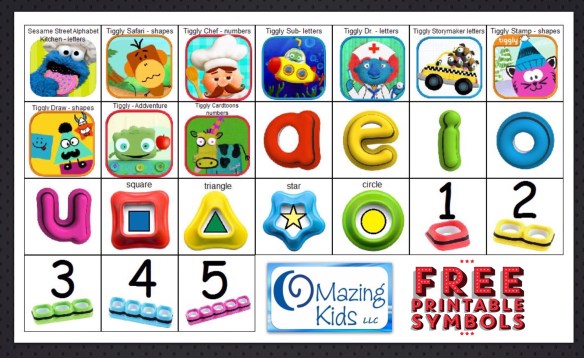
My favorite therapy activity today was using the Tiggly Safari app with the shape styluses on my iPad to create lots of opportunities for language, listening, matching, sustained attention, joint attention and tons of fun! This particular patient is a preschooler with Autism and newly emerging verbal skills. I use symbols with him in a combo of PECS communication, as a visual support for choices and as aided language input. His smiles & giggles were the highlight of my day. 🙂
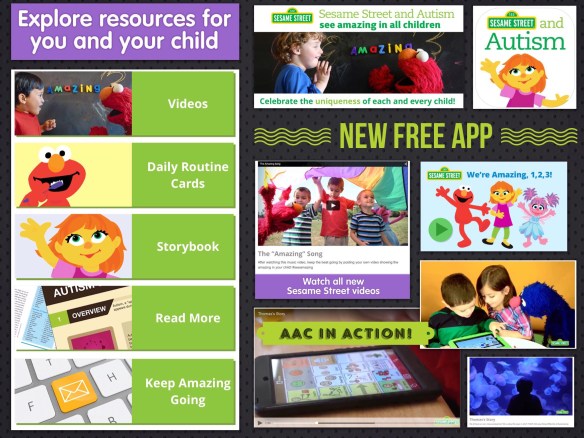
Wow! I’m very impressed with this! Get amazing resources for kids & parents in this new FREE app: Sesame Street and Autism https://appsto.re/us/MCg48.i
Also available online at: http://autism.sesamestreet.org. I didn’t see an Android version of the app yet but my guess is that it will be released soon.
I love that they have presented a well-balanced view of Autism…. both the positives & the challenges. Also love seeing several real life examples of AAC use. Excited to see AAC use out in the mainstream media 🙂
The story behind why this new Sesame Street Autism initiative is so awesome… they took the time to include Autism self-advocates in the process of developing it!
The Autistic Self Advocacy Network, ASAN, is proud to be a partner in Sesame Workshop’s “Sesame Street and Autism: See Amazing in All Children” initiative. Over the past year, ASAN has worked closely with Sesame Workshop to ensure that the initiative and its materials are positive, respectful, and promote real understanding and acceptance of autistic people. The See Amazing initiative represents an important step forward in public conversations aimed at autism, one focused on celebrating all kinds of minds.”
Why is the new Sesame Street character is a girl? How did they choose the traits she would have?
“Children with autism vary in their traits significantly: some can talk, while others can’t. Many of them are sensitive to noise. Some have trouble keeping eye contact, and many of them experience the world differently, so they’ll touch different objects to explore the sensation of texture. Perhaps because of this range, autism is also extremely controversial. While some organizations, such as Autism Speaks, consider autism a syndrome that calls for research to help mitigate its effects, others, such as the Autism Self-Advocacy Network, simply view autism as an alternative way of expressing oneself….”
Angela Moorad is the founder of OMazing Kids, LLC and is an ASHA certified & licensed pediatric Speech-Language Pathologist and Kids Yoga Teacher with over 25 years experience working in a variety of settings (early intervention, schools, teletherapy & a nonprofit pediatric rehab hospital for children with developmental disabilities). She is an app beta tester for educational & therapeutic app developers and loves sharing info about great apps and tech products to use with kids of all abilities.
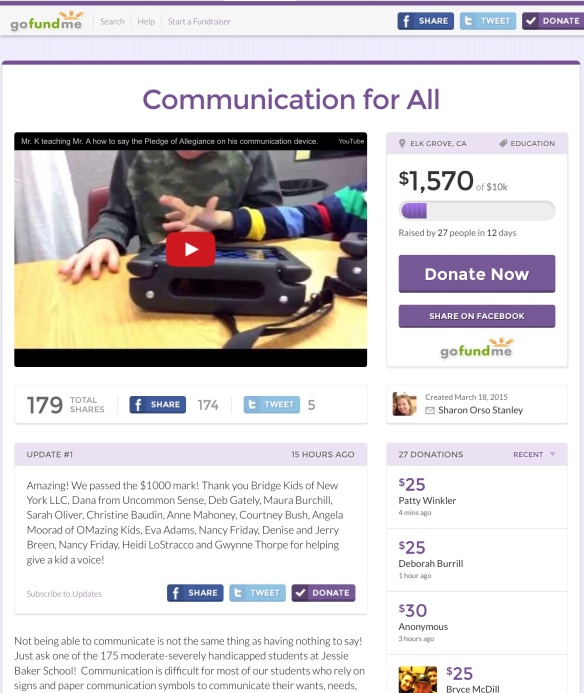
A very dedicated SLP is raising funds to provide AAC for students in need. I invite everyone to take a look and to help if you are able. Here are more details:
.
“Friends and Family- Please donate $5, $10 or $20 to my GoFundMe Campaign to raise money for iPads and apps for my students. The apps are usually $200 each but will be half price on Thursday for Autism Awareness Day. Apple will give me a half price discount if I raise enough money to buy 20 applications. My goal is to raise $4000 by next Thursday April 2nd, so I can buy 20 apps and 6 iPads. Give the gift of communication to a student for the price of a box of Girl Scout cookies. I’ll give a shout out to everyone who donates, and we’ll share pictures of the kids who are helped (with parent permission). Who will be first? Who would stand up for you if you had no voice?”
OMazing Kids LLC is an organization that promotes inclusive wellness activities for kids of all abilities. The blog and social media pages share information about books, DVD’s, CD’s, games and other products specifically designed for kids wellness, mindfulness and relaxation, product reviews & giveaways, lesson plan & activity ideas, research, kids wellness in the news and a connection corner with listings of individuals doing adapted yoga and those offering trainings.
NOTE: Please ignore any ads that appear below the crayons divider bar or any ads or unusual hyperlinks that may appear above. This is a free blog site & I have no control over ads appearing here.
What’s the best AAC app? What’s the best dedicated speech generating device? What’s the best case? What’s the best ______…..
Several times a week I am either asked this question or I see it posted in one of the many AAC Facebook groups I follow.
Occasionally it seems to end up in a rather heated debate of ______ vs. ________.
This is counterproductive. Although there are key best practices when considering AAC options, there is not any one best AAC option (or one best therapy approach, or one best anything) when it comes to best meeting individual needs.
I have added a lot of tools to my toolbox over my 25+ year career as a speech-language pathologist. There have been pivotal moments where new tools were added that forever changed my perspective. Although shiny new tools may be exciting they did not replace the old tried & true tools. The exciting thing about tools is that you can use them together to build & repair. Would it make sense to ask “What’s better…. a hammer or a drill? a saw or a tape measure? a wrench or a flashlight? Of course not. Each tool has it’s specific purpose. You select the tool based on what job you need to accomplish.
The show Handy Manny comes to mind. The tools don’t compete with each other. They work together.
Handy Manny: We Work Together
Okay Tools we’ve got a job to do
Let’s get going and fix it right
Twist and turn, make it tight
Trabajamos juntos
We work together now
Cut it
Measure it
Tap it flat
Bend and twist
Just like that
Each of us has a special job
We work together
Todos juntos
We can fix it right
All states in the USA are supposed to have an Assistive Technology Lending Library program where parents & professionals can borrow AAC devices, iPads with AAC apps & other AT for short-term trial. It’s a great way to try various options out before making purchasing decisions. There are lots of great AAC devices & lots of great AAC apps…. but like anything there is no magical solution that meets every child’s specific needs. That’s why doing a good feature-match and trial of options is critical.
Below the green divider is an update on 11/15/25: I wrote this blog post over a decade ago and it still rings true. I’ve added even more tools (many creative and unconventional) to my AAC Toolbox and continue to embrace using a variety of creative combinations of them to meet individual needs. And some of the best “tools” are taking time to “just be with” the individuals you are supporting, getting to know and honoring all the ways they communicate, and presuming that everyone communicates in some way and has the potential to learn to use additional options that are meaningful to them.
Looking for in-depth AAC feature matching resources? See this blog post: https://bit.ly/5aacFeatureMatchingResources. That post also includes videos comparing the best AAC apps on various devices on various platforms.











 OMazing Kids AAC Consulting