Unknown's avatar

About OMazing Kids

Angela Moorad, MS, CCC-SLP. Over 36 years experience in AAC. Experience using almost every AAC app on iOS, Android, Amazon Fire, Chromebook and Windows devices + traditional Speech Generating Devices (SGDs). Creator of AAC-Related Resources & App-Related Resources. AAC Consulting & App Consulting.

{AAC App Review} Grace – Picture Exchange for Non-Verbal People

image


.

{AAC App Review} Grace – Picture Exchange for Non-Verbal People


Info from Lisa Domican, co-creator of the Grace App and mother of Liam and Gracie Domican who both have autism, about how it was developed:

“Many children with autism or speech delay use pictures attached to a board to ask for what they need or say how they feel. These boards are stored in a book which the user carries around with them. Even when they begin to speak, they may be difficult to understand, so they rely on a growing picture vocabulary which can become very unwieldy.

As a mother of a little girl with autism with few words but a lot of pictures, I wanted to keep encouraging her speech development, but I wanted to be sure we always had the pictures we needed, wherever we went. This is why I created Grace App for Autism.

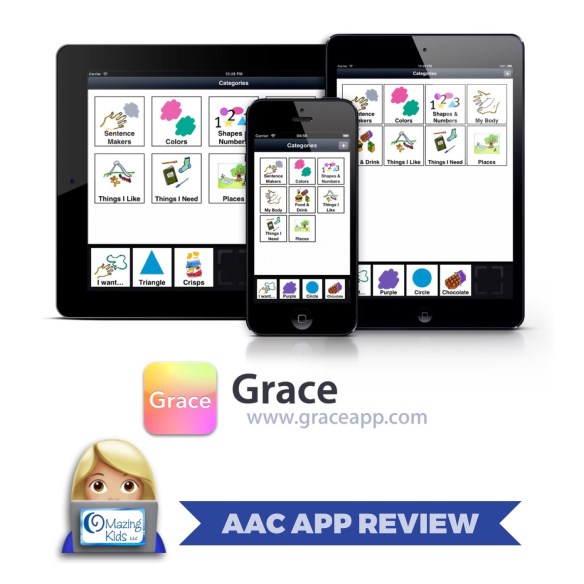
The Grace App stores a basic picture vocabulary of Sentence Makers, Colors, Shapes & Numbers, My Body, Food & Drink, Things I Like, Things I Need and Places on an iPad, iPhone or iPod Touch with a function for creating a sentence that can be read together. There is also an option for finding and taking photographs of all the other things that each individual user may need.

It is a portable means of supporting the communication development of the user, wherever they go and is proving invaluable in improving vocalizations through consistency of use over time. Grace and the other children have also learned to share what they see and photograph independently, as a result of using the App.

The app is simple as we want the user rather than the carer to take control of choosing and saving pictures, creating sentences and presenting the sentence to a Carer, Teacher, Tutor or Peer in order to have their needs met. I felt that the Grace App was filling a different niche – a much simpler App that could be owned and updated by the user, themselves. It was intended as a follow on from pecs books, with the capacity to add as many photos as you needed.”

See more of her story in her TEDxDublin presentation: https://youtu.be/vYe2Vp6YxK4

.

.

Additional info and my thoughts about the app:

  •  The app description indicates that the app takes 18.1 MB of memory before any customization is done and will run on an iPad, iPhone or iPod Touch running iOS 8.0 or higher. I tested the app on an iPad Air running iOS 10.1.1 and an iPhone 7 running iOS 10.2 and it showed up as taking a tiny 20 MB of memory out of the box on my iPad and 19.8 MB on my iPhone.


  •  The default setting is for this app is to not have voice output when pictures are tapped (see their website for info about why this was designed this way) but you can toggle on basic iOS voice output in the “Settings” area for the app on your device. Scroll down until you see the pink Grace App logo and click on that. Then look all the way down through the settings until you see “Tap to Speak” and select it.  This is also where you will find options to toggle on/off editing & choosing the card size (normal, large & extra large). The app supports 7 iOS languages: English, Arabic, Danish, French, German, Portuguese and Spanish. It took quite a bit of searching online to figure out how to do this (https://support.apple.com/en-us/HT204031; later received: http://www.graceapp.com/blog/grace-app-on-holiday/). Keep in mind that adjusting those settings changes the language for the entire device not just this app. The upside of this is that it also automatically translates the text that you have entered for symbols on the Grace App. I don’t know any foreign languages well enough to know how accurate that translation is but still could be helpful for an adult to program in their native language and then convert it to one of the other 6 languages. The English (U.S.) language option only results in an adult female voice. I could not find options for a male voice or kids voices. This is the downside of relying on the iOS voice options but since this app was not designed to be a voice output AAC option it’s just something potential users need to be aware of if they intend to toggle on the “tap to speak” feature.


  •  This app will be a useful tool as a specialty niche app as the app developer has designed it to be. The possibility of teaching an individual with Autism or other special needs to add pictures to customize the app to best suit their interest and needs is empowering.


  •  The app was not designed to be a large robust AAC app so it does not come preloaded with thousands of words. It includes 140 pictures divided into 8 categories.


  •  In doing a comparison to other AAC apps in my vast collection, I have 5 other AAC apps that have a “PECS-like” feel to them. I looked at the current features & pricing for those apps. I also looked at the pricing history for the Grace App on AppShopper.com and found that the price has ranged from $37.99 to $9.99 (with an exception of being free twice way back in 2011). Based on the features in the Grace App compared to my other similar apps (see list at the end of this post), the current price of $29.99 seems slightly high. In my opinion, a price of $19.99 would be more in line with the features currently offered in this app.

.

Bottom Line: The Grace App is a specialty niche AAC app that could be helpful for parents or therapists wanting to transition a child from use of PECS to an iPad-based communication option. I am glad to have the app in my AAC toolbox of options to consider during the feature match process in an AAC eval. I liked that the app can be used on an iPad, iPhone or iPod Touch, the high contrast between the black background and white symbols, that there are three options for symbol sizes, that editing can be toggled off in a secure area and especially liked how easy it would be for the AAC user to take their own pictures within the app as a way to participate in what they want added to it. The ability for an AAC user to do this was a feature unique to this app. It would be nice to have a different way to remove a symbol from the sentence strip since the current method of double tapping caused the symbol to be spoken again. An upward flicking/swiping motion might be more intuitive. The current price of $29.99 would be more fitting if the app contained at least a male and female voice within the app rather than relying on the one native iOS voice for a language. Given the current features and a comparison to other PECS-like AAC apps, a price of $19.99 would seem more fitting.

.

App Store: https://appsto.re/us/G7EFv.i, iOS Universal, $29.99

Website: http://www.graceapp.com

App Guide: http://www.graceapp.com/guide-to-grace-app/

Video Tutorials: http://www.graceapp.com/media-press/videos/. If needed, a much more in-depth paid webinar “Six Steps to Success with Grace App” is also available: http://www.bigbraindrain.com/six-steps-success-graceapp/.

Facebook: http://www.facebook.com/GraceApp

Twitter: http://twitter.com/graceapp

.

List of other AAC apps that I have with a “PECS-like” feel (listed by current price):

  • PECS Phase III: $5.99 (has ranged from $3.99 to $9.99; not intended to be used as an AAC system but I have had one patient who used PECS at a single symbol level and had a limited number of symbols in her book that transitioned to this app. There is no way to backup customizations in this app; http://www.pecsusa.com/apps.php)
  • See Me Talk: $9.99 since January 2016 (has ranged from $9.99 to $59.99; https://www.seemetalkapp.com/features)
  • So Much 2 Say: $18.99 since April 2016 (has ranged from $7.99 to $24.99; https://close2homeapps.com/?q=our_apps)
  • Niki Talk: app is free but costs ~ $42.00 to get access to the full version http://www.nikitalk.com/Talk.aspx)
  • PECS IV+: $84.99 (has ranged from $69.99 to $99.99; obviously the most robust option in this category would also be the most expensive. It includes 1,000 Pics for PECS pictures, has the option to include up to 20 tabbed pages and visually looks the most like a real PECS book. There is no way to backup customizations in this app: http://www.pecsusa.com/apps.php). If you are looking for resources about how to use or program the PECS IV+ app see:

https://pecsusa.com/download/PECS%20IV+%20Quick%20Guide%202022-Updated%20July%202022.pdf

& this video: https://youtu.be/uUkcQvIm9C0


I will be adding this app to my larger post about AAC apps: https://omazingkidsllc.com/2016/06/11/aac-tips-how-slps-can-get-free-access-to-aac-apps-aac-app-user-groups-funding-options-more/

.

Angela Moorad, MS, CCC-SLP

Speech-Language Pathologist

Founder of OMazing Kids, LLC – inclusive wellness & educational activities for kids of all abilities

Facebook Messaging for OMazing Kids: http://m.me/OMazingKidsYoga

Facebook: http://www.facebook.com/OMazingKidsYoga

AppPeeps Facebook Group: https://www.facebook.com/groups/OMazingKidsAppPeeps/

Twitter: http://twitter.com/#!/amoorad

Instagram: https://www.instagram.com/omazingkids

YouTube: http://www.youtube.com/user/amoorad1

Pinterest: http://pinterest.com/OMazingKids/

YappGuru: http://yappguru.com/user/omazing-kids/

Google+: https://plus.google.com/u/0/110305433538768736741

Boardmaker Share:http://www.boardmakershare.com/Community/FriendsProfile/10916/Angela-Moorad

Blog: http://omazingkidsllc.com

.

Angela Moorad is the founder of OMazing Kids, LLC and is an ASHA certified & licensed pediatric Speech-Language Pathologist and Kids Yoga Teacher with 27 years experience working in a variety of settings (early intervention, schools, teletherapy & a nonprofit pediatric rehab hospital for children with developmental disabilities). She is an app beta tester for educational & therapeutic app developers and loves sharing info about great apps, products, books & toys to use with kids of all abilities

.

[ Please ignore any ads that may appear below. This is a free blog so I don’t have any control over ads nor do I profit from them ]
65 Free Apps for SLPs: a list of apps that have a history of always being free

image

.

65 Free Apps for SLPs: a list of apps that have a history of always being free

.
Scroll past the listings of apps broken out by goal area to find a list of 65 apps that are always free: https://omazingkidsllc.com/2016/12/31/the-ipad-the-slp-in-2017-app-list-for-slps-sorted-by-goal-area/
.

.
Angela Moorad, MS, CCC-SLP
Speech-Language Pathologist
Founder of OMazing Kids, LLC – inclusive wellness & educational activities for kids of all abilities
Facebook Messaging for OMazing Kids:
http://m.me/OMazingKidsYoga
Facebook: http://www.facebook.com/OMazingKidsYoga
AppPeeps Facebook Group: https://www.facebook.com/groups/OMazingKidsAppPeeps/
Twitter: http://twitter.com/#!/amoorad
Instagram: https://www.instagram.com/omazingkids
YouTube: http://www.youtube.com/user/amoorad1
Pinterest: http://pinterest.com/OMazingKids/
YappGuru: http://yappguru.com/user/omazing-kids/
Google+: https://plus.google.com/u/0/110305433538768736741
Boardmaker Share: http://www.boardmakershare.com/Community/FriendsProfile/10916/Angela-Moorad
Blog: http://omazingkidsllc.com
.
Angela Moorad is the founder of OMazing Kids, LLC and is an ASHA certified & licensed pediatric Speech-Language Pathologist and Kids Yoga Teacher with 27 years experience working in a variety of settings (early intervention, schools, teletherapy & a nonprofit pediatric rehab hospital for children with developmental disabilities). She is an app beta tester for educational & therapeutic app developers and loves sharing info about great apps, products, books & toys to use with kids of all abilities.

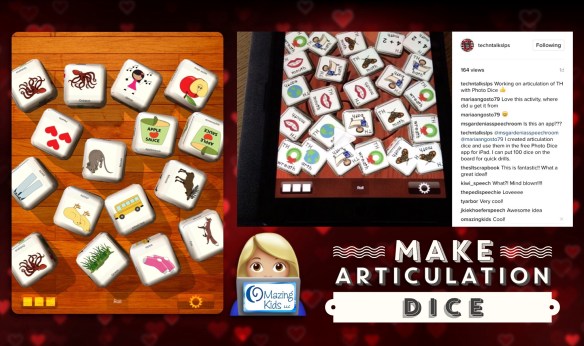
{Make Articulation Dice} SLP Hack for the Photo Dice app

image

.

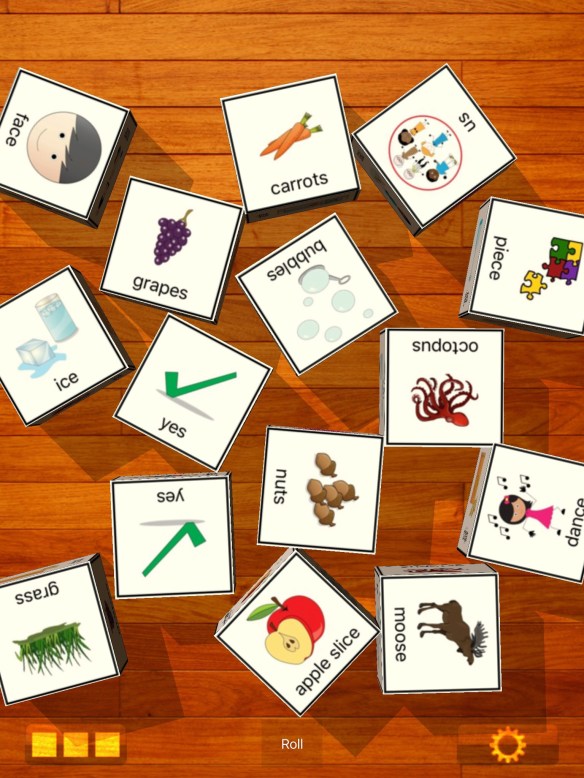
{Make Articulation Dice} Wanna shake up those articulation drills to make them more fun? Check out this FREE app. Because ads are distracting to my patients, I purchased the .99 IAP to remove the ads, uploaded a plain wooden background and then made customized articulation dice using pics from the Smarty Symbols Image Club  (https://smartysymbols.com). You can import any pictures you want from the Camera Roll into the app or take pictures with the iPad or iPhone camera. You can either use the app in “rolling” mode or leave them wiggling so dice can be flicked or tapped off the screen as the child says the target words. Even saw the option to e-mail your dice creations (that person will need an iOS device (iPhone, iPad, or iPod Touch) running iOS 3.2 or later and a copy of the Photo Dice app installed to open the file).

.

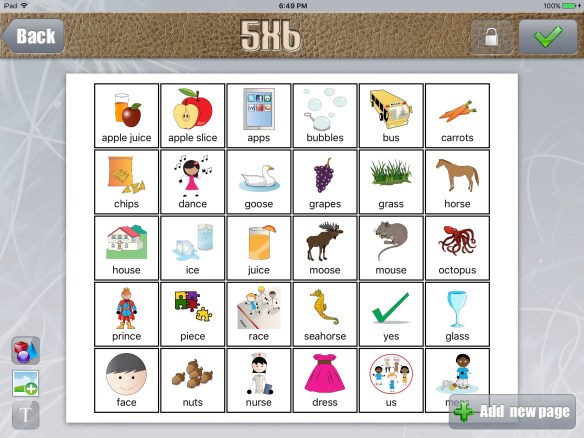
Update: I realized that it was even easier to use the Custom Boards- Premium app by Smarty Ears (https://appsto.re/us/1hHNB.i) to make pics for the dice. I used the 5 x 6 template, saved it as a picture in my Camera Roll and then cropped out each pic to upload into the dice.

image image

.

Thanks Tech ‘n Talk SLPs for sharing this fun idea in this video over on Instagram:

.

App Store: Photo Dice by MachWerx, https://appsto.re/us/kgwUC.i (free, .99 in app purchase to remove the ads)
.
Angela Moorad, MS, CCC-SLP
Speech-Language Pathologist
Founder of OMazing Kids, LLC – inclusive wellness & educational activities for kids of all abilities
Facebook Messaging for OMazing Kids:
http://m.me/OMazingKidsYoga
Facebook: http://www.facebook.com/OMazingKidsYoga
AppPeeps Facebook Group: https://www.facebook.com/groups/OMazingKidsAppPeeps/
Twitter: http://twitter.com/#!/amoorad
Instagram: https://www.instagram.com/omazingkids
YouTube: http://www.youtube.com/user/amoorad1
Pinterest: http://pinterest.com/OMazingKids/
YappGuru: http://yappguru.com/user/omazing-kids/
Google+: https://plus.google.com/u/0/110305433538768736741
Boardmaker Share: http://www.boardmakershare.com/Community/FriendsProfile/10916/Angela-Moorad
Blog: http://omazingkidsllc.com
.
Angela Moorad is the founder of OMazing Kids, LLC and is an ASHA certified & licensed pediatric Speech-Language Pathologist and Kids Yoga Teacher with 27 years experience working in a variety of settings (early intervention, schools, teletherapy & a nonprofit pediatric rehab hospital for children with developmental disabilities). She is an app beta tester for educational & therapeutic app developers and loves sharing info about great apps, products, books & toys to use with kids of all abilities.

{App Reviews} The Zones of Regulation & The Zones of Regulation : Exploring Emotions apps

image

.

{App Reviews} The Zones of Regulation & The Zones of Regulation : Exploring Emotions apps

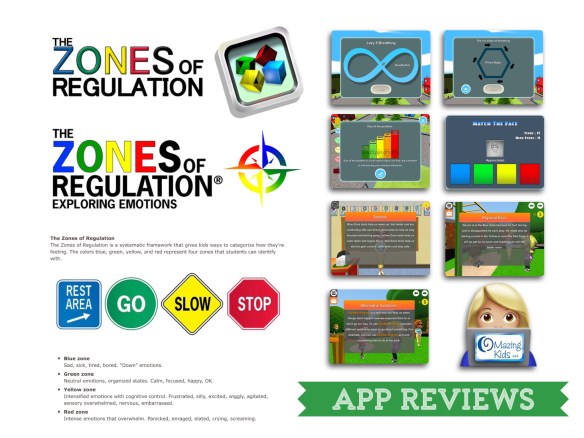
Most of the patients that I see have Autism or other special needs that make emotional self regulation challenging for them. It’s the main reason that I sought out training in kids yoga several years ago and why I am always looking for additional tools in this area. When kids are experiencing either extreme of the zones, it is very unlikely that they will learn or gain much benefit from anything I may have planned for that session. Here are two new tools that I’ve recently added:

The Zones of Regulation by Selosoft, Inc.
https://appsto.re/us/GzayK.i, $5.99

This older app is a nice overview of the types of emotions, situations, triggers & tools associated with each of the four zones of regulation. I love the inclusion of self regulation breathing techniques (lazy 8 breathing & six sides of breathing) and that you can go directly to each of them. I also like picture studio and the game-like feel to the app. The match the face activity was helpful but also a little frustrating at times since it seemed a bit too rigid on emotions that could really fit in more than one zone. I was excited to see wording about expected vs. unexpected responses and info about “size of the problem” but then was disappointed that there was no way to directly to the “size of the problem” illustration and explanation later. It would be very helpful for this to be added either to this app or to their more recent app since that is a very frequent issue that I have to address with patients. It should also be noted that this original app doesn’t have any voiceovers so a child either needs to be able to read or have an adult read the content to them.

More info about the app: http://www.thezonesofregulation.com/the-zones-of-regulation.html

————-

The Zones of Regulation : Exploring Emotions by Selosoft, Inc.
https://appsto.re/us/l0CN9.i, $9.99

I really liked this second app as an extension of the concepts introduced in the original app. This newer app has bright graphics, high quality voiceovers, explanations of all aspects of the app, a less rigid interpretation of where certain situations might fit within the zones and often gives examples of how they would fit in multiple zones, the ability to set up multiple users, the option to add or delete tools to fit individual needs, a fun basketball game that can be easily unlocked by playing through other areas of the app, and is full of common situations that kids may encounter and several convey the importance of helping others and feeling empathy. I also liked that you can tap a star in the corner of many scenarios for a reference of where to look for additional information and the ability to graph zones across the day. I especially liked the repeated message that all zones are a natural part of life. A wish for a future app update would be the ability to toggle off the food fight scenario, skip past it or to have it replaced with something else. I also hope they add content regarding “size of the problem” since it was briefly mentioned in the original app and this is a very common issue that I deal with in sessions.

More about the app: http://www.thezonesofregulation.com/the-zones-of-regulation-exploring-emotions—available-now.html
.
Since the majority of the patients on my caseload have Autism, the combination of these two apps will be very useful tools in my SLP toolbox. I will be watching closely for future app updates to continue to make these tools even better.

FYI… at the time of this post you can get both apps in a bundle for $12.99: The Zones of Regulation : Complete Bundle by Selosoft, Inc., https://appsto.re/us/YVxaab.i

Learn more about The Zones of Regulation: http://www.thezonesofregulation.com/index.html

Follow them on social media: https://www.facebook.com/pg/zonesofregulation

Teaching tools: http://www.thezonesofregulation.com/teaching-tools.html

I love this post “All the Zones are OK! Tips for Managing the Zones You’re In”: https://www.socialthinking.com/Articles?name=all-the-zones-are-ok

And this one: https://www.crisisprevention.com/Blog/October-2016/emotional-self-regulation
.
Angela Moorad, MS, CCC-SLP
Speech-Language Pathologist
Founder of OMazing Kids, LLC – inclusive wellness & educational activities for kids of all abilities
Facebook Messaging for OMazing Kids:
http://m.me/OMazingKidsYoga
Facebook: http://www.facebook.com/OMazingKidsYoga
AppPeeps Facebook Group: https://www.facebook.com/groups/OMazingKidsAppPeeps/
Twitter: http://twitter.com/#!/amoorad
Instagram: https://www.instagram.com/omazingkids
YouTube: http://www.youtube.com/user/amoorad1
Pinterest: http://pinterest.com/OMazingKids/
YappGuru: http://yappguru.com/user/omazing-kids/
Google+: https://plus.google.com/u/0/110305433538768736741
Boardmaker Share: http://www.boardmakershare.com/Community/FriendsProfile/10916/Angela-Moorad
Blog: http://omazingkidsllc.com
.
Angela Moorad is the founder of OMazing Kids, LLC and is an ASHA certified & licensed pediatric Speech-Language Pathologist and Kids Yoga Teacher with 27 years experience working in a variety of settings (early intervention, schools, teletherapy & a nonprofit pediatric rehab hospital for children with developmental disabilities). She is an app beta tester for educational & therapeutic app developers and loves sharing info about great apps, products, books & toys to use with kids of all abilities.

{App Reviews} Whose Tail, Whose Eyes & Whose Feet – three fun apps for inferencing & part-to-whole

image

.

{App Reviews} Whose Tail, Whose Eyes & Whose Feet – three fun apps for inferencing & part-to-whole

* Whose Tail by Kenneth Walter King, https://appsto.re/us/HDureb.i
* Whose Eyes by Kenneth Walter King, https://appsto.re/us/6UY-eb.i
* Whose Feet by Kenneth Walter King, https://appsto.re/us/PTzSeb.i

Each app includes 18 animals, is $1.99 and is a universal iOS app.

Get the best deal by getting all 3 apps in a bundle: Peekaboo Suite by Kenneth Walter King, https://appsto.re/us/hmakfb.i, $4.99

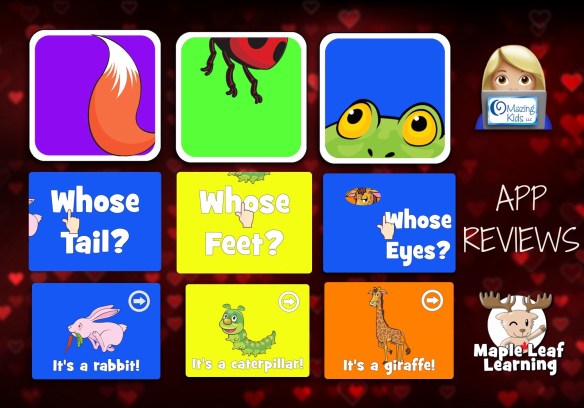
I love the catchy intro song in each app, the bright colors and cute large illustrations, that it provides a visual cue on the first animal screen, the ability to reveal the animal a little at a time, that you have to tap an arrow to go on to the next hidden animal (this allow time to talk about the parts of that animal or other things related to it), that it randomizes the order each time you open the app and has an intuitive interface. These are three apps that will be fun to use as tools to target goals on inferencing, part-to-whole & vocabulary.

My only wishes for future updates for all three apps would be to add an option to toggle off the background music after the intro song has played but still allow the voiceovers. Many of my patients become overstimulated by constant background music no matter how subtle it may seem. It would also be fun to have all 18 animals appear together on a closing screen at the end of each app. I noticed that the app developer has free printables on their website so it would be super cool if they created some free printables to go along with each of these apps!

Here are the animals included in each app:

Tail: 18 animals (my patients found this app to be the easiest of the three)
Squirrel
Owl
Snake
Deer
Kangaroo
Rabbit
Mouse
Duck
Fox
Horse
Pig
Cow
Hippo
Fish
Elephant
Lobster
Monkey
Goat

Eyes: 18 animals
Penguin
Chameleon
Zebra
Raccoon
Giraffe
Alligator
Praying Mantis
Fly
Orca
Panda
Gorilla
Tiger
Crab
Lion
Koala
Snail
Cat
Frog

Feet: 18 animals
Pelican
Flamingo
Caterpillar
Starfish
Seal
Mosquito
Sheep
Ostrich
Rooster
Spider
Octopus
Ladybug
Jellyfish
Beetle
Rhino
Turtle
Bear
Cockroach

See more about the apps: http://mapleleaflearning.com/apps/

https://www.facebook.com/maplemarty
https://twitter.com/maplemarty
.
Angela Moorad, MS, CCC-SLP
Speech-Language Pathologist
Founder of OMazing Kids, LLC – inclusive wellness & educational activities for kids of all abilities
Facebook Messaging for OMazing Kids:
http://m.me/OMazingKidsYoga
Facebook: http://www.facebook.com/OMazingKidsYoga
AppPeeps Facebook Group: https://www.facebook.com/groups/OMazingKidsAppPeeps/
Twitter: http://twitter.com/#!/amoorad
Instagram: https://www.instagram.com/omazingkids
YouTube: http://www.youtube.com/user/amoorad1
Pinterest: http://pinterest.com/OMazingKids/
YappGuru: http://yappguru.com/user/omazing-kids/
Google+: https://plus.google.com/u/0/110305433538768736741
Boardmaker Share: http://www.boardmakershare.com/Community/FriendsProfile/10916/Angela-Moorad
Blog: http://omazingkidsllc.com
.
Angela Moorad is the founder of OMazing Kids, LLC and is an ASHA certified & licensed pediatric Speech-Language Pathologist and Kids Yoga Teacher with 27 years experience working in a variety of settings (early intervention, schools, teletherapy & a nonprofit pediatric rehab hospital for children with developmental disabilities). She is an app beta tester for educational & therapeutic app developers and loves sharing info about great apps, products, books & toys to use with kids of all abilities.

{Wordless & Minimally Worded Books} Fabulous for SLPs targeting multiple goals! (updated 8/14/22)

image

.

{Wordless & Minimally Worded Books} Fabulous for SLPs targeting multiple goals!

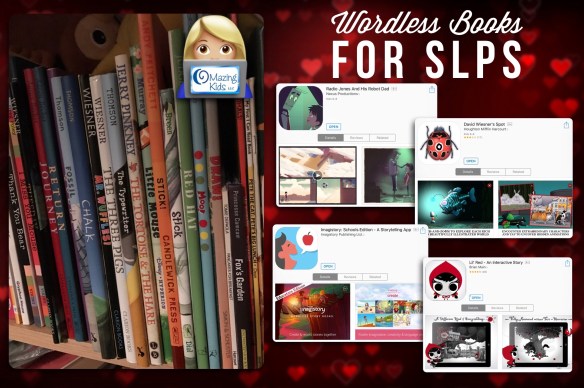
I love wordless & minimally worded books! Most have amazing illustrations and are fabulous for targeting goals on inferencing, storytelling, descriptive language, social skills & more.

Here are a few of my faves:

– Carl’s Summer Vacation (there are numerous books in this series)
– Chalk
– Draw!
– Flotsam
– Fossil
– Fox’s Garden
– Good Night, Gorilla
– Journey
– Little Mouse
– Moo!
– Mr. Wuffles
– Pancakes for Breakfast
– Quest
– Red Hat
– Red Sled
– Return
– Snowman’s Story
– Stick
– Stick!
– The Three Pigs
– The Tortoise & The Hare
– The Treasure Bath
– The Typewriter
– Tuesday
– Wave

And a few wordless book apps:
– David Wiesner’s Spot by Houghton Mifflin Harcourt, https://appsto.re/us/BRzC5.i (8/14/22: no longer available)
– Imagistory: Schools Edition – A Storytelling App by Imagistory Publishing Ltd., https://appsto.re/us/r3Z_2.i (8/14/22: no longer available)
– Lil’ Red – An Interactive Story by Brian Main, https://appsto.re/us/swTDH.i (8/14/22: no longer available)

– Pango Comics, https://apps.apple.com/us/app/pango-comics/id1099753733
– Radio Jones And His Robot Dad by Nexus Productions, https://appsto.re/us/IiDW5.i (fabulous FREE wordless book app with a few interactive elements)

– The Surprise, https://apps.apple.com/us/app/the-surprise-home/id527223436

.

Updated 10/28/20:

Book Dash has lots of FREE online books + you can filter the results by language. Very cool that “wordless” is an option: https://bookdash.org/books?s=&languages%5B%5D=wordless

.

I’ve added a few more wordless & minimally worded books to my collection on Epic for Kids: https://www.getepic.com/collection/19641601/minimally-worded-and-wordless-omazing-kids

.

Not sure how to use wordless or minimally worded books? See these resources:

http://www.whatdowedoallday.com/tips-for-reading-wordless-picture-books/
http://brainpowerboy.com/books-boys-benefits-wordless-picture-books/

https://www.familieslearning.org/uploads/blog/2010/08/talking-about-wordless-picture-books.pdf (123 page PDF)

.

Research Shows that Books without Text Can Increase Literacy, Vocabulary Skills in Children with Developmental Disabilities: http://www.businesswire.com/news/home/20110607005242/en/Research-Shows-Books-Text-Increase-Literacy-Vocabulary, http://citeseerx.ist.psu.edu/viewdoc/download?doi=10.1.1.849.9826&rep=rep1&type=pdf


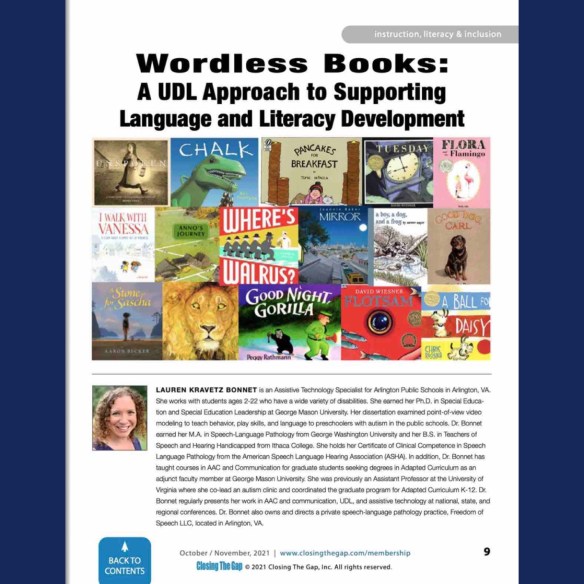
Updated 12/17/22: Great article “Wordless Books:
A UDL Approach to Supporting Language and Literacy Development” in Close the Gap: https://online.fliphtml5.com/yciqt/ioxx/#p=1

8/14/22 Updated contact info:

Have a question? The best way to reach me is via Facebook messaging over on my OMazing Kids page: https://www.facebook.com/OMazingKidsAAC/

Angela Moorad, MS, CCC-SLP, Founder of OMazing Kids, LLC, OMazing Kids AAC Consulting

• Teachers Pay Teachers Store: https://www.teacherspayteachers.com/Store/Omazing-Kids-Aac-Consulting

• YouTube: https://youtube.com/user/amoorad1

• Ko-Fi: https://ko-fi.com/omazingkidsaac

• OMazing Kids AAC Consulting Facebook Page: https://www.facebook.com/OMazingKidsAAC/

• AppPeeps Facebook Group: https://www.facebook.com/groups/OMazingKidsAppPeeps/

• GoTalk Now AAC & GoVisual Visual Scene Apps – Ideas and Sharing Facebook Group: https://bit.ly/GoTalkNowAACappGroup

• Instagram: https://www.instagram.com/omazingkidsaac

• Twitter: https://www.twitter.com/amoorad

• Pinterest: http://pinterest.com/OMazingKids/

• Linktree: https://linktr.ee/amoorad1

• LinkedIn: https://www.linkedin.com/in/angelamooradomazingkidsaac

• Blog: https://omazingkidsllc.com

{App Reviews} Twinnery & Sound Salad apps by Funny Yummy Studio

image

.

{App Reviews} Twinnery & Sound Salad apps by Funny Yummy Studio

Both of these apps are fun and unique new tools to add to my SLP toolbox! 😊

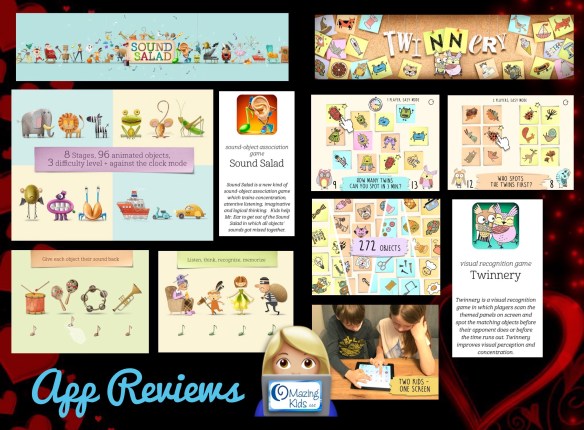
Twinnery – Spot the Twins, https://appsto.re/us/DToPfb.i, $1.99 {but currently FREE for a couple of days so get it quickly)

I love the cute illustrations and owl avatars, that the matching is “face up”, options for single or two player mode, options for easy level (fields of 12 in single player mode or fields of 6 on each side in 2 player mode) and difficult level (fields of 18 in single player mode or fields of 9 on each side in 2 player mode), options to win at finding 10 matches or for whoever finds the most matches in a specified timeframe (3 minutes for single player, 5 minutes for 2 player). This game is more challenging than it first appears since the “twin” pictures often vary slightly in size and in orientation.

Wishes for a future update:
– to be able to toggle off the background music but leave the sound effects on. Many of my patients become overstimulated by constant background music no matter how nice it may seem to the adult. The ability to toggle this music off is a key feature in making an app special needs friendly.
– add an even easier “super simple” level (field of 8 in single player mode and field of 4 on each side in 2 player mode and for the pictures to be presented in identical orientation). The current “easy” level was a bit too hard for many of my patients.

http://www.funnyyummystudio.com/presstwinnery.html
……

Sound Salad – Help Mr. Ear by sorting sounds, https://appsto.re/us/KjFcab.i, $2.99

I love the introduction and the concept of needing to help Mr. Ear unmix the sound salad, the handcrafted look of the illustrations, the options for fields of 2, 3 or 4, the option for a timed mode, easy mode (tap each note and then drag to the item that makes that sound) and advanced mode (all of the sounds are presented and the you have to remember the sound each note made and drag it to the correct picture) and the way that Mr. Ear goes up the contraptions as you complete each level. I will likely be using the easier options in this app with my patients but it’s cool to have the more challenging options when needed.

Wishes for a future update:
– to be able to tap a note again to hear the sound replayed on the easy level. Many of my patients have attention and processing problems so having the option to replay a sound would make this app more accessible to them.
– option to toggle off the back arrow (I used Guided Access to prevent kids from tapping there. It takes you back to the beginning and you have to start all over again)
– option to save where you are and resume the game later.

http://www.funnyyummystudio.com/presssoundsalad.html
.
Website: http://www.funnyyummystudio.com

.
Angela Moorad, MS, CCC-SLP
Speech-Language Pathologist
Founder of OMazing Kids, LLC – inclusive wellness & educational activities for kids of all abilities
Facebook Messaging for OMazing Kids:
http://m.me/OMazingKidsYoga
Facebook: http://www.facebook.com/OMazingKidsYoga
AppPeeps Facebook Group: https://www.facebook.com/groups/OMazingKidsAppPeeps/
Twitter: http://twitter.com/#!/amoorad
Instagram: https://www.instagram.com/omazingkids
YouTube: http://www.youtube.com/user/amoorad1
Pinterest: http://pinterest.com/OMazingKids/
YappGuru: http://yappguru.com/user/omazing-kids/
Google+: https://plus.google.com/u/0/110305433538768736741
Boardmaker Share: http://www.boardmakershare.com/Community/FriendsProfile/10916/Angela-Moorad
Blog: http://omazingkidsllc.com
.
Angela Moorad is the founder of OMazing Kids, LLC and is an ASHA certified & licensed pediatric Speech-Language Pathologist and Kids Yoga Teacher with 27 years experience working in a variety of settings (early intervention, schools, teletherapy & a nonprofit pediatric rehab hospital for children with developmental disabilities). She is an app beta tester for educational & therapeutic app developers and loves sharing info about great apps, products, books & toys to use with kids of all abilities.

{App Review + Giveaway} LetterSchool app (full version, worth $4.99)

image

.

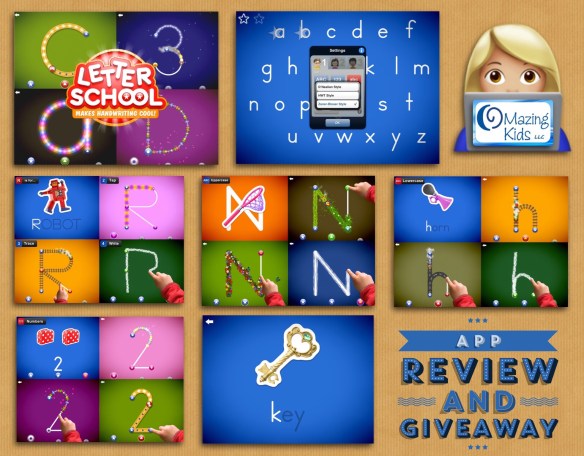
{App Review & Giveaway} I have 1 iOS promo code to giveaway for the full version of the LetterSchool – learn to write letters and numbers app by Letterschool Enabling Learning B.V., https://appsto.re/us/oBn9z.i, $4.99, iOS Universal

The full version of this app had been on my wish list for quite awhile so I was thrilled to finally have the opportunity to try it out. A couple of you had recommended that it be added to my blog post about apps for SLPs. I love the large size of the letters, the voiceovers for the letter name and sound, sound word association, the progression in tracing the letters, cool animations, options for setting up three users, choices of upper and lowercase & choices of three common fonts. This app would be fun to work on early literacy skills. It could also be used in articulation therapy as a fun way to introduce a sound.

My only suggestions for improvements in a future app update are to have the words associated with each letter be a single sound rather than a blend. Also the lowercase letter g is currently associated with “giraffe”… would be better as a /g/ sound (ex: game, go, goat) and the lowercase w is currently associated with “whale”…. would be better associated with a true /w/ sound (ex: water, win).

I tested the app on an iPad Air running iOS 10.1.1 and did not have any problems with glitches or crashing but I saw a few reviews on the App Store mentioning crashes. Although the last update is shown as October 2014 there is a comment in the app description from September 2016 indicating the bug causing the crashes had been fixed.

They also have a free lite version of the app: LetterSchool Free – Learn to Write the ABC Alphabet, Letters & Numbers by Letterschool Enabling Learning B.V.
https://appsto.re/us/CkiRC.i (but be aware that it has an IAP. If you like the app it would be better and cheaper to purchase the full version rather than upgrading via the IAP in the lite app).

Enter on the OMazing Kids Facebook page by 1-2-3:
1) “liking” the original post on the OMazing Kids Facebook page:

2) “commenting” on that Facebook post about how you would use this app.
3) sending a private message to the OMazing Kids Facebook page mentioning “LetterSchool”

Entry Deadline: Today, Saturday, 1/21/17 at 7:00pm CST. Depending on the number of entries received, it may take a day or so to verify them and to announce the winner/distribute the code to the winner.

#AppGiveaway

Tips:

* First tap this picture to go to the post directly on OMazing Kids and then like/comment there. I often share posts in groups to spread the word about giveaways but comments posted in a group or likes on those posts do not show up on the original pic and do not count for the giveaway.

* Facebook Messaging for OMazing Kids: http://m.me/OMazingKidsYoga
* Note: If you encounter any difficulty in sending a private FB message, please try another means of getting on Facebook (FB app, getting on FB via Safari on an iPad or getting on Facebook via a computer.)

App Trailer Video:

More info about the app: http://www.letterschool.com.
.
Angela Moorad, MS, CCC-SLP
Speech-Language Pathologist
Founder of OMazing Kids, LLC – inclusive wellness & educational activities for kids of all abilities
Facebook Messaging for OMazing Kids:
http://m.me/OMazingKidsYoga
Facebook: http://www.facebook.com/OMazingKidsYoga
AppPeeps Facebook Group: https://www.facebook.com/groups/OMazingKidsAppPeeps/
Twitter: http://twitter.com/#!/amoorad
Instagram: https://www.instagram.com/omazingkids
YouTube: http://www.youtube.com/user/amoorad1
Pinterest: http://pinterest.com/OMazingKids/
YappGuru: http://yappguru.com/user/omazing-kids/
Google+: https://plus.google.com/u/0/110305433538768736741
Boardmaker Share: http://www.boardmakershare.com/Community/FriendsProfile/10916/Angela-Moorad
Blog: http://omazingkidsllc.com
.
Angela Moorad is the founder of OMazing Kids, LLC and is an ASHA certified & licensed pediatric Speech-Language Pathologist and Kids Yoga Teacher with 27 years experience working in a variety of settings (early intervention, schools, teletherapy & a nonprofit pediatric rehab hospital for children with developmental disabilities). She is an app beta tester for educational & therapeutic app developers and loves sharing info about great apps, products, books & toys to use with kids of all abilities.

{App Review} Busy Water by EDOKI ACADEMY

image

.

{App Review} Busy Water by EDOKI ACADEMY

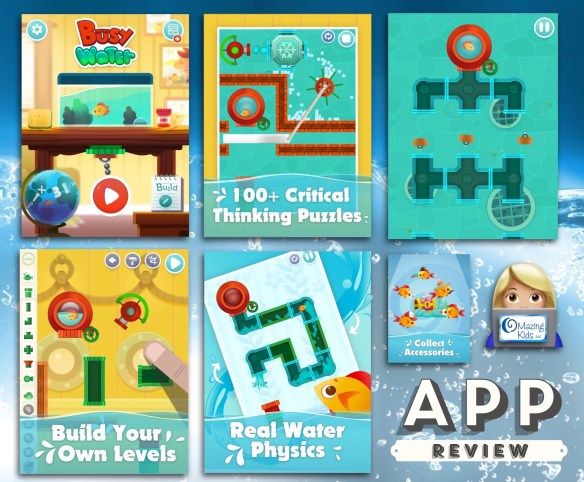
I’m loving the progression from very simple to very challenging problem solving, the realistic graphics and sound effects, the ability to easily go directly to any level & especially the option to build your own levels. This app will be a fun way to target goals for problem solving and the social skills of working together.

App Store: https://appsto.re/us/uQXxab.i, $3.99
.
Angela Moorad, MS, CCC-SLP
Speech-Language Pathologist
Founder of OMazing Kids, LLC – inclusive wellness & educational activities for kids of all abilities
Facebook Messaging for OMazing Kids:
http://m.me/OMazingKidsYoga
Facebook: http://www.facebook.com/OMazingKidsYoga
AppPeeps Facebook Group: https://www.facebook.com/groups/OMazingKidsAppPeeps/
Twitter: http://twitter.com/#!/amoorad
Instagram: https://www.instagram.com/omazingkids
YouTube: http://www.youtube.com/user/amoorad1
Pinterest: http://pinterest.com/OMazingKids/
YappGuru: http://yappguru.com/user/omazing-kids/
Google+: https://plus.google.com/u/0/110305433538768736741
Boardmaker Share: http://www.boardmakershare.com/Community/FriendsProfile/10916/Angela-Moorad
Blog: http://omazingkidsllc.com
.
Angela Moorad is the founder of OMazing Kids, LLC and is an ASHA certified & licensed pediatric Speech-Language Pathologist and Kids Yoga Teacher with 27 years experience working in a variety of settings (early intervention, schools, teletherapy & a nonprofit pediatric rehab hospital for children with developmental disabilities). She is an app beta tester for educational & therapeutic app developers and loves sharing info about great apps, products, books & toys to use with kids of all abilities.

{One Book: Target Several Goals} The First Day of Winter by Denise Fleming

image

.

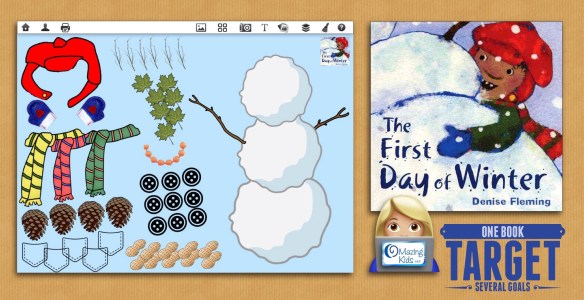
{One Book + Interactive iPad Activity: Target Several Goals} I’m loving the newest book in my Winter collection… The First Day of Winter by Denise Fleming! It’s a fun twist on the familiar tune The 12 Days of Christmas. I made an interactive activity to use on my iPad (iESLp app for the win…. zero printing, cutting or laminating). I used the book & activity in several sessions this week to target goals for plurals, possessive ‘s endings, colors, following directions, sequencing, quantity concepts, /s/- blends & more. Too hilarious that one of my patients figured out why the snowgirl was getting all dressed up….. to go on a date with her boyfriend Frosty. Ummm I hadn’t even noticed the tiny detail in the background on the last page… lol!

Free printable activity sheets: http://www.denisefleming.com/pages/book-activities/first-day-of-winter/activities.html#gsc.tab=0

Freebie on TPT: https://www.teacherspayteachers.com/Product/The-First-Day-of-Winter-A-Literature-Unit-2950985

Poster:

Ideas to go with the book:

I used an app to create .png images of the red cap with a gold snap and the orange berries mouth by erasing the background from some orange beads. Glad I grabbed the app when it was free awhile back: Aftercut : Background Eraser & Easy Photo Editor, https://appsto.re/us/FeIt4.i.

iESLp by Irmgard Raubenheimer, https://appsto.re/us/NiPA2.i
.
Angela Moorad, MS, CCC-SLP
Speech-Language Pathologist
Founder of OMazing Kids, LLC – inclusive wellness & educational activities for kids of all abilities
Facebook Messaging for OMazing Kids:
http://m.me/OMazingKidsYoga
Facebook: http://www.facebook.com/OMazingKidsYoga
AppPeeps Facebook Group: https://www.facebook.com/groups/OMazingKidsAppPeeps/
Twitter: http://twitter.com/#!/amoorad
Instagram: https://www.instagram.com/omazingkids
YouTube: http://www.youtube.com/user/amoorad1
Pinterest: http://pinterest.com/OMazingKids/
YappGuru: http://yappguru.com/user/omazing-kids/
Google+: https://plus.google.com/u/0/110305433538768736741
Boardmaker Share: http://www.boardmakershare.com/Community/FriendsProfile/10916/Angela-Moorad
Blog: http://omazingkidsllc.com
.
Angela Moorad is the founder of OMazing Kids, LLC and is an ASHA certified & licensed pediatric Speech-Language Pathologist and Kids Yoga Teacher with 27 years experience working in a variety of settings (early intervention, schools, teletherapy & a nonprofit pediatric rehab hospital for children with developmental disabilities). She is an app beta tester for educational & therapeutic app developers and loves sharing info about great apps, products, books & toys to use with kids of all abilities.