Unknown's avatar

About OMazing Kids

Angela Moorad, MS, CCC-SLP. Over 36 years experience in AAC. Experience using almost every AAC app on iOS, Android, Amazon Fire, Chromebook and Windows devices + traditional Speech Generating Devices (SGDs). Creator of AAC-Related Resources & App-Related Resources. AAC Consulting & App Consulting.

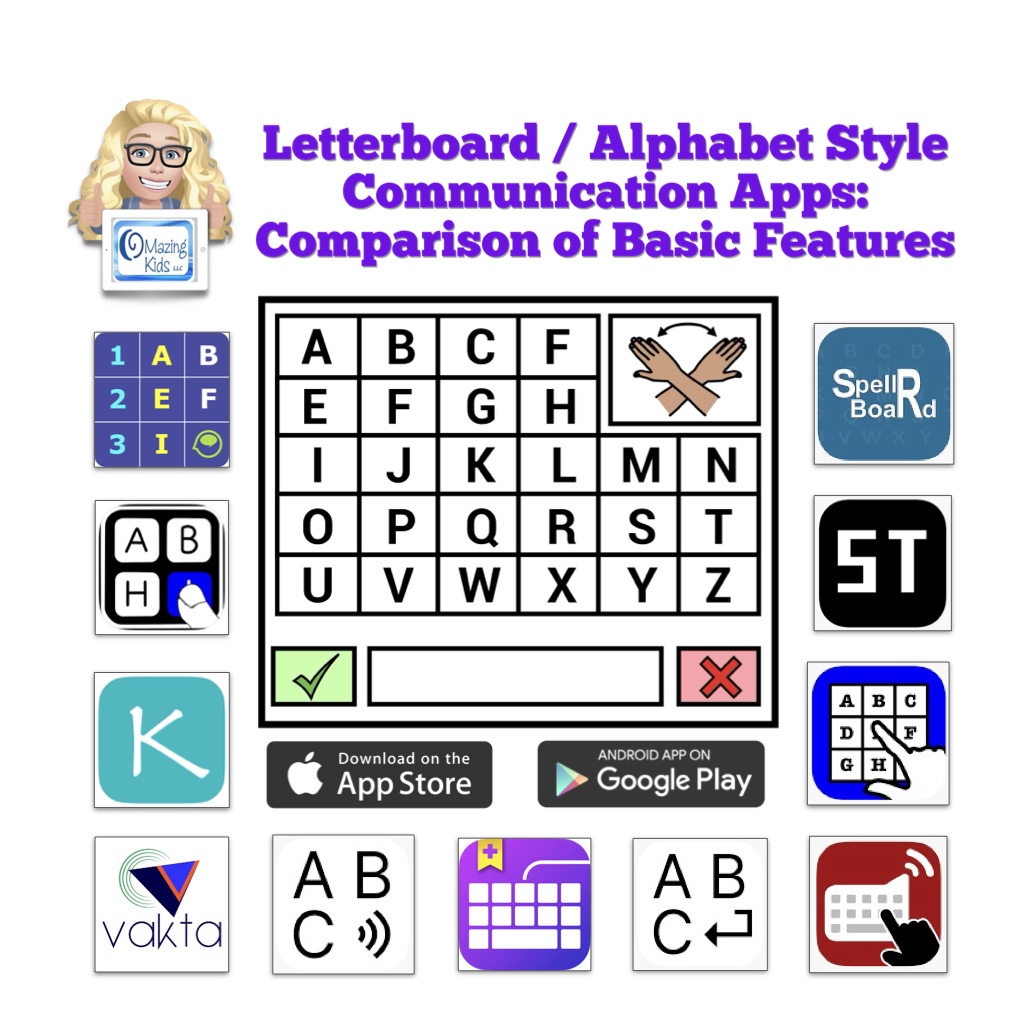
New Resource: Letterboard / Alphabet Style Communication Apps: Comparison of Basic Features

New resource available on TPT: https://www.teacherspayteachers.com/Product/Letterboard-Alphabet-Style-AAC-Apps-Comparison-of-Basic-Features-12930717

This resource provides a comparison of basic features in several Letterboard / Alphabet style communication apps. All are available for iOS and some are also available for Android.

Apps specifically designed as a Letterboard / Alphabet board:

  • AlphaTopics – AAC
  • iMean 
  • Kirsty Types
  • MyABCboard
  • Spell 2 Speak
  • Spell Tap
  • SpellRBoard
  • Vakta
  • Vani Letterboard

The following info is provided for each app:

  • App Store link(s)
  • Device Compatibility 
  • Website
  • Price
  • Cost over Time (1 year, 3 years, 5 years)
  • Board Types
  • Message Window 
  • Letter Case on Buttons
  • Letter Case in Message Window
  • Spelling Correction
  • Word Prediction 
  • Design
  • Languages
  • Voice Options
  • Additional Features 
  • Additional Info

This info is based on my personal use of each app on my devices (iPad, iPhone, Android tablet, Android phone, Chromebook, Amazon Fire tablet)

This resource also includes:

  • A list of 4 robust AAC apps that have a premade Letterboard style board (different than an ABC alphabetical keyboard)
  • A list of 14 AAC apps that offer an in-app ABC (alphabetical) keyboard or letters area option within the app and those letters can be combined and spoken as words in the Message Window
  • A list of 12 symbol-based AAC Apps that allow use of iOS Keyboard extension apps and which text-based apps don’t.
  • A list of 6 iOS & 1 Android Keyboard Apps that offer an ABC (alphabetical) option
  • Additional Info About Using Letter / Alphabet Boards for Communication. Includes links to information and demo videos about Partner Assisted Scanning, Partner Assisted Spelling, PODD as an Alternative Pencil, and other means of spelling for communication, free printable non-tech Letterboards, Alphabet boards, Eye Gaze Boards and Flip Books that I found online, commercially available non-tech physical keyboards with an alphabetical layout option, links to research related to spelling for communication, etc…

Important Information:

The PDF is not intended to be printed. It one very long page that’s interactive so you can scroll, zoom in to see content and tap on links. It’s best viewed in the free Xodo PDF reader that can be used on almost any platform. See this blog post for new info about Xodo: https://omazingkidsllc.com/2021/11/06/free-xodo-pdf-reader-app/. It can also be viewed in the Books app on your iPad.

Important info for those wanting to view the PDF on a Mac computer: Save the PDF to your computer and then open the PDF online in Xodo: https://www.xodo.com/app/#/


A link to the Alternative Printable Version can be found at the very bottom left corner within this PDF. That version includes a link to the alternative printable version of the supplemental handout. That will allow you access to a separate PDF that can be downloaded and is formatted for printing. The link to that will change when I update this resource.


This resource is NOT promoting any particular approach/method/intervention/program. It is intended to be an AAC feature matching tool to help folks make informed decisions when choosing iOS and Android Letterboard / Alphabet style AAC apps for potential purchase and to provide additional information related to these unique types of AAC. The information in this chart was compiled based on my personal use of each app using the most current version on devices running the most current iOS/OS, reading through app user guides, watching recent recorded webinars, etc.. This is intended to be an unbiased view of the features. I do not have a financial affiliation with any company. Apps included in this resource are subject to change as features and app availability changes over time. The apps in this resource are uniquely designed tools in an AAC toolbox that are designed in very specific ways to meet unique needs.


If you are looking for in-depth information about more commonly used AAC apps please see my other AAC feature matching resources:  


Have a question? The best way to reach me is via Facebook messaging over on my OMazing Kids page: https://www.facebook.com/OMazingKidsAAC/


Looking for more AAC resources? Check out the Resource Links page my blog: https://omazingkidsllc.com/omazing-kids-aac-resource-links


Angela Moorad, MS, CCC-SLP, Founder of OMazing Kids, LLC, OMazing Kids AAC Consulting

• Teachers Pay Teachers Store: https://www.teacherspayteachers.com/Store/Omazing-Kids-Aac-Consulting

• YouTube: https://youtube.com/user/amoorad1

• Ko-Fi: https://ko-fi.com/omazingkidsaac

• OMazing Kids AAC Consulting Facebook Page: https://www.facebook.com/OMazingKidsAAC/

• AppPeeps Facebook Group: https://www.facebook.com/groups/OMazingKidsAppPeeps/

• GoTalk Now AAC & GoVisual Visual Scene Apps – Ideas and Sharing Facebook Group: https://bit.ly/GoTalkNowAACappGroup

• Instagram: https://www.instagram.com/omazingkidsaac

• Instagram Threads: https://www.threads.net/@omazingkidsaac

• X (formerly Twitter): https://www.x.com/amoorad

• Pinterest: http://pinterest.com/OMazingKids/

• Linktree: https://linktr.ee/amoorad1

• LinkedIn: https://www.linkedin.com/in/angelamooradomazingkidsaac

• Reddit: https://www.reddit.com/u/VintageVeraBradley/s/w3L1d8H5rk

• AppRaven AAC App Collections: https://bit.ly/AAConAppRaven

• Blog: https://omazingkidsllc.com / Resource Links page: https://omazingkidsllc.com/omazing-kids-aac-resource-links

Languages in Weave Chat AAC as of 1/10/25

I updated my FREE handout “Voices Available for Different Languages in Weave Chat AAC on iOS, Android and Amazon Fire”: https://bit.ly/LanguagesAndVoices-WeaveChatAAC

As you will see the availability of voices varies greatly depending on the specific language and the platform (iOS, Android & Amazon Fire)

Weave Chat AAC is a totally FREE robust AAC app. https://www.weavechat.com

As of 1/10/25 Weave Chat AAC has the following languages:

  • English USA
  • English UK
  • English Australia
  • Azerbaijani
  • Dutch
  • German
  • Greek
  • Icelandic
  • Italian
  • Macedonian
  • Norwegian
  • Polish
  • Spanish (Spain)
  • Spanish (Latin American)
  • Tagalog (Filipino)
  • Vietnamese

Important Note: English has full grammar support. The remaining languages are initially released in “Alpha” phase (lacks grammar rules and language specific words). Weave Chat uses a group of native and fluent speakers of each language who volunteer to do the translation and localization to insure accuracy and cultural relevance. Each language will eventually have grammar support and language specific vocabulary added with Spanish being the first focus for completion.


If you are reading this post and are fluent in Haitian Creole please consider volunteering to help bring that language to Weave Chat AAC. The work is about 50% completed. There are currently no AAC options on any platform for Haitian Creole. I get pretty frequent messages from folks asking about options for that language and I done exhaustive searches several times and haven’t found anything.

Weave Chat’s Volunteer Form: https://docs.google.com/forms/d/e/1FAIpQLSf2Ku87qAQ7ie97B10lmOVAlwRkxQFRZGw4lNX-tmp0f56Pig/viewform


Disclaimer: I’m not affiliated with the app developer. I just help spread the word about this app and help provide info about how to get voices on the various platforms to use in it. And I have in-depth info about the app in my various AAC feature matching resources.


Have a question? The best way to reach me is via Facebook messaging over on my OMazing Kids page: https://www.facebook.com/OMazingKidsAAC/


Looking for in-depth AAC feature matching resources? See this blog post: https://bit.ly/5aacFeatureMatchingResources. That post also includes videos comparing AAC apps on various devices on various platforms.


Looking for more AAC resources? Check out the Resource Links page my blog: https://omazingkidsllc.com/omazing-kids-aac-resource-links


Angela Moorad, MS, CCC-SLP, Founder of OMazing Kids, LLC, OMazing Kids AAC Consulting

• Teachers Pay Teachers Store: https://www.teacherspayteachers.com/Store/Omazing-Kids-Aac-Consulting

• YouTube: https://youtube.com/user/amoorad1

• Ko-Fi: https://ko-fi.com/omazingkidsaac

• OMazing Kids AAC Consulting Facebook Page: https://www.facebook.com/OMazingKidsAAC/

• AppPeeps Facebook Group: https://www.facebook.com/groups/OMazingKidsAppPeeps/

• GoTalk Now AAC & GoVisual Visual Scene Apps – Ideas and Sharing Facebook Group: https://bit.ly/GoTalkNowAACappGroup

• Instagram: https://www.instagram.com/omazingkidsaac

• Instagram Threads: https://www.threads.net/@omazingkidsaac

• X (formerly Twitter): https://www.x.com/amoorad

• Pinterest: http://pinterest.com/OMazingKids/

• Linktree: https://linktr.ee/amoorad1

• LinkedIn: https://www.linkedin.com/in/angelamooradomazingkidsaac

• Reddit: https://www.reddit.com/u/VintageVeraBradley/s/w3L1d8H5rk

• AppRaven AAC App Collections: https://bit.ly/AAConAppRaven

• Blog: https://omazingkidsllc.com / Resource Links page: https://omazingkidsllc.com/omazing-kids-aac-resource-links

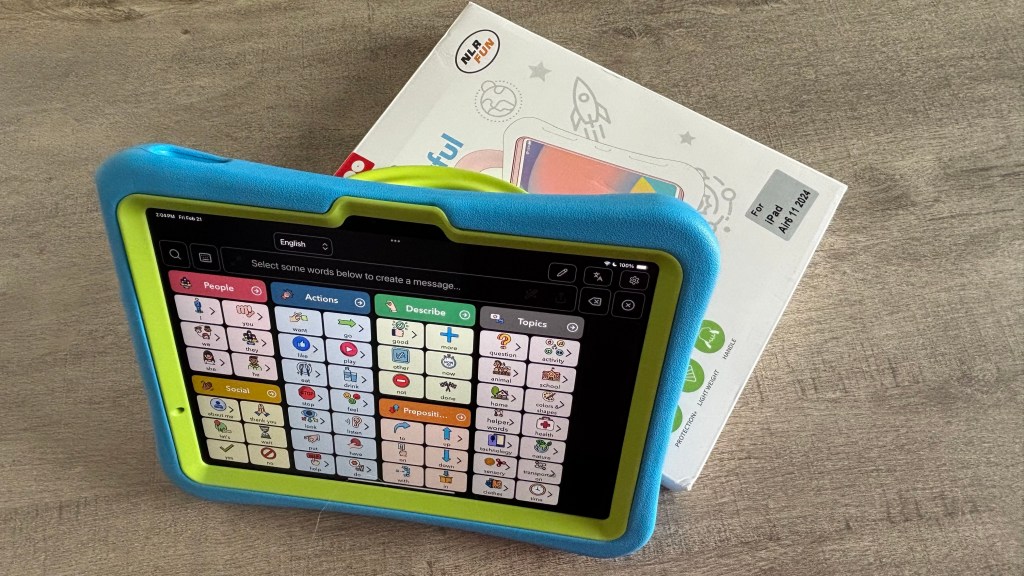
How I hacked a NLR Fun Pepkoo 10.9” iPad 10th Generation (2022) case to work with an iPad Air 11” (M2) 2024 – updated 2/21/25

I bought an iPad Air 11” (M2) 2024 specifically to be able to use any Apple Intelligence AI features that Apple rolls out and to be ready in case any AAC app developers find ways to incorporate it into their apps. 

The downside of getting a brand new model of iPad is it is often awhile before there are lots of case options to choose from. See this blog post for more info about the Pepkoo case: https://bit.ly/iPadCasesPepkooAndMore

I hope that NLR Fun eventually offers a Pepkoo case specifically for the iPad Air 11” (M2) 2024. 

Until then I was glad to be able to hack their Pepkoo case for the iPad 10th gen well enough to meet my needs. 


Updated 2/21/25: Great news! NLR Fun finally released a Pepkoo case specifically for the iPad Air 11” (M2) 2024. I bought it on Amazon and am glad that I did. It fits perfectly and allows the fingerprint ID button to work since it’s not as thick as the case that I had hacked.

https://a.co/d/fQ7saSF ($22.99, I got it on sale for $20.99)


Disclaimer: Use caution when using any tools. I knew I might run the risk of damaging the case when modifying it and worked on it very slowly and carefully. Obviously the iPad was removed from the case and placed in a safe location far away from where I was using tools. I am not liable for any outcomes that folks might have. Just sharing how I did this for my own personal use. 


Links to items seen in my video (all items were available when I uploaded this on 12/8/24. I have no way to know about future availability and pricing or availability and pricing outside of the USA):

  • NLR Fun Pepkoo Kids Case for iPad, Shockproof Cover for 10.9” iPad 10th Generation (2022), Lightweight Full Body Protective Case with Foldable Handle/Stand (Blue+Green): https://a.co/d/ge5Jc99
  • HARDELL Mini Cordless Rotary Tool Kit, 5-Speed and USB Charging with 61 Accessories, Multi-Purpose 3.7V Power Rotary Tool for Sanding, Polishing, Drilling, Etching, Engraving, DIY Crafts: https://a.co/d/fniTASR (I bought it on sale for $19.82)
  • Exacto knife (I’ve had a very long time)
  • anezus Self Healing Sewing Mat, Rotary Cutting Mat Double Sided 5-Ply Craft Cutting Board for Sewing Crafts Hobby Fabric Precision Scrapbooking Project 9inch x 12inch(A4), https://a.co/d/dDtpWg5
  • Plastic (I used a piece of a painting drop cloth but you could easily use a small plastic sack to make cleanup easier)

Note: I don’t have any affiliate stuff set up on Amazon. These are just regular Amazon links. 


Looking for in-depth AAC feature matching resources? See this blog post: https://bit.ly/5aacFeatureMatchingResources. That post also includes videos comparing AAC apps on various devices on various platforms.


Looking for more AAC resources? Check out the Resource Links page my blog: https://omazingkidsllc.com/omazing-kids-aac-resource-links


Angela Moorad, MS, CCC-SLP, Founder of OMazing Kids, LLC, OMazing Kids AAC Consulting

• Teachers Pay Teachers Store: https://www.teacherspayteachers.com/Store/Omazing-Kids-Aac-Consulting

• YouTube: https://youtube.com/user/amoorad1

• Ko-Fi: https://ko-fi.com/omazingkidsaac

• OMazing Kids AAC Consulting Facebook Page: https://www.facebook.com/OMazingKidsAAC/

• AppPeeps Facebook Group: https://www.facebook.com/groups/OMazingKidsAppPeeps/

• GoTalk Now AAC & GoVisual Visual Scene Apps – Ideas and Sharing Facebook Group: https://bit.ly/GoTalkNowAACappGroup

• Instagram: https://www.instagram.com/omazingkidsaac

• Instagram Threads: https://www.threads.net/@omazingkidsaac

• X (formerly Twitter): https://www.x.com/amoorad

• Pinterest: http://pinterest.com/OMazingKids/

• Linktree: https://linktr.ee/amoorad1

• LinkedIn: https://www.linkedin.com/in/angelamooradomazingkidsaac

• AppRaven AAC App Collections: https://bit.ly/AAConAppRaven

• Blog: https://omazingkidsllc.com / Resource Links page: https://omazingkidsllc.com/omazing-kids-aac-resource-links

Updated 11/27/24: Feature Matching Chart for the Top 13+ iOS Symbol-Based AAC Apps

Resource Updated: The Feature Matching Chart for the Top 13+ iOS Symbol Based AAC Apps (11/27/24).


This resource is available on TPT: https://bit.ly/SymbolBasedAACapps.


Updated Table of Contents: https://bit.ly/TOC-iOSaacSBfmc-11-27-24.


The “Unique Features in Symbol-Based AAC Apps to Support Gestalt Language Processors” supplemental handout linked within it has also been updated.


Those who have previously purchased this resource on TPT can download the newest version for no additional cost: https://bit.ly/SymbolBasedAACapps. Ko-fi subscribers will be able to access a copy on the pinned resource post: https://ko-fi.com/Post/Links-to-posts-about-most-current-feature-matching-F1F5C9DMD.


Looking for other in-depth AAC feature matching resources? See this blog post: https://bit.ly/5aacFeatureMatchingResources. That post also includes videos comparing the best AAC apps on various devices on various platforms.


Looking for more AAC resources? Check out the Resource Links page here on my blog: https://omazingkidsllc.com/omazing-kids-aac-resource-links


Have a question? The best way to reach me is via Facebook messaging over on my OMazing Kids page: https://www.facebook.com/OMazingKidsAAC/


Angela Moorad, MS, CCC-SLP, Founder of OMazing Kids, LLC, OMazing Kids AAC Consulting

• Teachers Pay Teachers Store: https://www.teacherspayteachers.com/Store/Omazing-Kids-Aac-Consulting

• YouTube: https://youtube.com/user/amoorad1

• Ko-Fi: https://ko-fi.com/omazingkidsaac

• OMazing Kids AAC Consulting Facebook Page: https://www.facebook.com/OMazingKidsAAC/

• AppPeeps Facebook Group: https://www.facebook.com/groups/OMazingKidsAppPeeps/

• GoTalk Now AAC & GoVisual Visual Scene Apps – Ideas and Sharing Facebook Group: https://bit.ly/GoTalkNowAACappGroup

• Instagram: https://www.instagram.com/omazingkidsaac

• X (formerly Twitter): https://www.x.com/amoorad

• Pinterest: http://pinterest.com/OMazingKids/

• Linktree: https://linktr.ee/amoorad1

• LinkedIn: https://www.linkedin.com/in/angelamooradomazingkidsaac

• AppRaven AAC App Collections: https://bit.ly/AAConAppRaven

• Blog: https://omazingkidsllc.com / Resource Links page: https://omazingkidsllc.com/omazing-kids-aac-resource-links

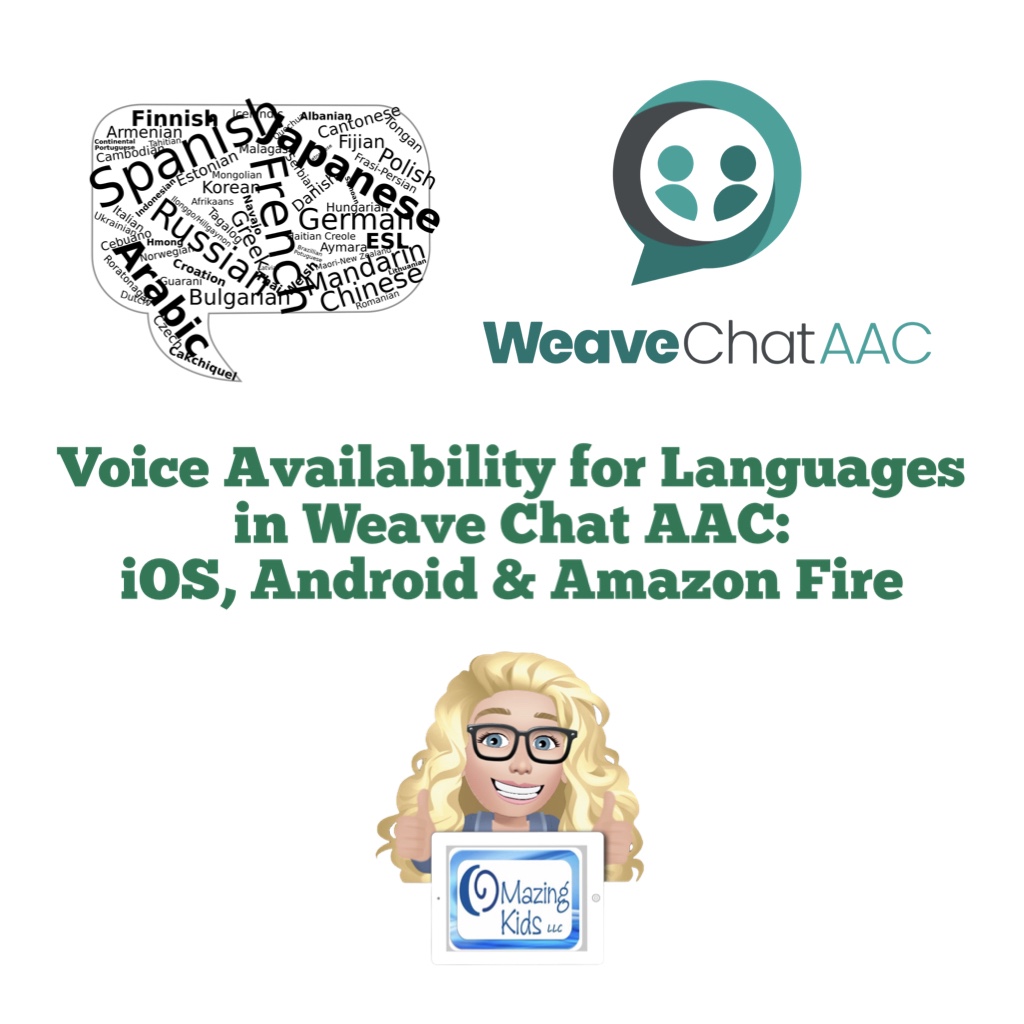
Voice Availability for Languages in Weave Chat AAC: iOS, Android & Amazon Fire (new FREE handout)

New FREE handout: Voice Availability for Different Languages in Weave Chat AAC on iOS, Android and Amazon Fire. https://bit.ly/LanguagesAndVoices-WeaveChatAAC.


Weave Chat AAC is a totally FREE robust AAC app available for iOS, Android and Amazon Fire: https://www.weavechat.com


It relies solely on system voices.


Text to speech voice options vary greatly across these platforms.


This free handout shows voice availability for each language across the platforms.


Weave Chat AAC is rapidly adding more languages. These were the ones available as of 10/26/24. I will be updating this chart as they add more languages.


Looking for in-depth AAC feature matching resources? See this blog post: https://bit.ly/5aacFeatureMatchingResources. That post also includes videos comparing the best AAC apps on various devices on various platforms.

Looking for more AAC resources? Check out the Resource Links page here on my blog: https://omazingkidsllc.com/omazing-kids-aac-resource-links


Have a question? The best way to reach me is via Facebook messaging over on my OMazing Kids page: https://www.facebook.com/OMazingKidsAAC/


Angela Moorad, MS, CCC-SLP, Founder of OMazing Kids, LLC, OMazing Kids AAC Consulting

• Teachers Pay Teachers Store: https://www.teacherspayteachers.com/Store/Omazing-Kids-Aac-Consulting

• YouTube: https://youtube.com/user/amoorad1

• Ko-Fi: https://ko-fi.com/omazingkidsaac

• OMazing Kids AAC Consulting Facebook Page: https://www.facebook.com/OMazingKidsAAC/

• AppPeeps Facebook Group: https://www.facebook.com/groups/OMazingKidsAppPeeps/

• GoTalk Now AAC & GoVisual Visual Scene Apps – Ideas and Sharing Facebook Group: https://bit.ly/GoTalkNowAACappGroup

• Instagram: https://www.instagram.com/omazingkidsaac

• X (formerly Twitter): https://www.x.com/amoorad

• Pinterest: http://pinterest.com/OMazingKids/

• Linktree: https://linktr.ee/amoorad1

• LinkedIn: https://www.linkedin.com/in/angelamooradomazingkidsaac

• AppRaven AAC App Collections: https://bit.ly/AAConAppRaven

• Blog: https://omazingkidsllc.com / Resource Links page: https://omazingkidsllc.com/omazing-kids-aac-resource-links

How to Use AAC Apps in Split View on an iPad – see me on the Autism Little Learners Podcast (updated 8/18/25)

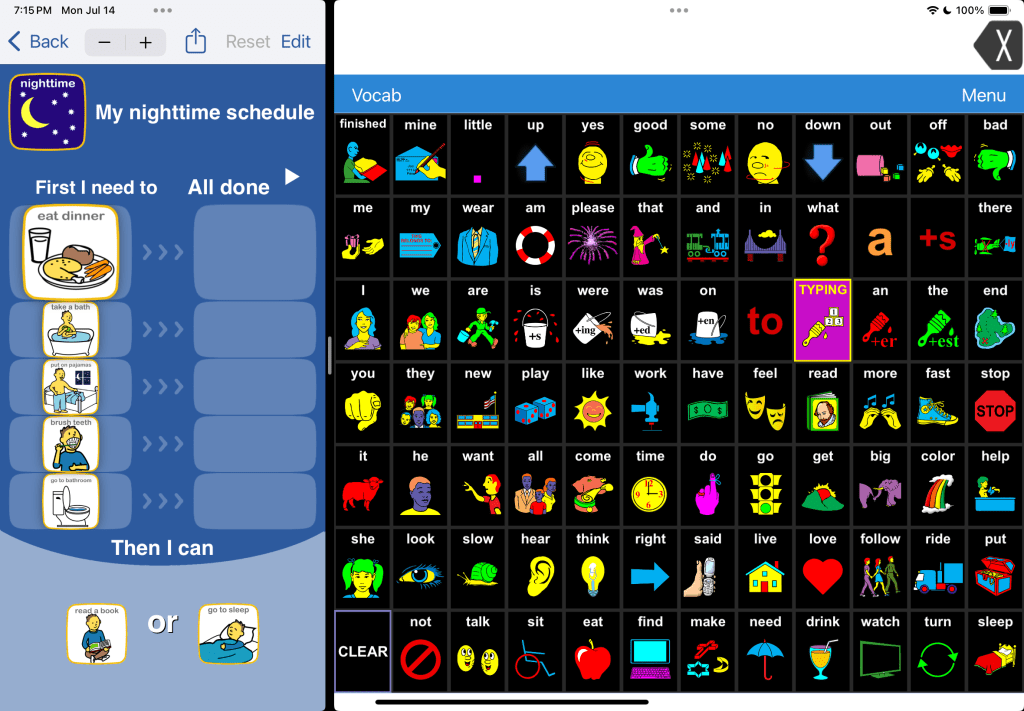
Check out this episode on the Autism Little Learners podcast where we chat about AAC and I demo how to set up and use a variety of AAC apps in Split View alongside other apps and how that can spark interest in using AAC.

Video of the Podcast:


Audio Podcast: https://podcasts.apple.com/us/podcast/the-autism-little-learners-podcast/id1665404820?i=1000673152876


At the time of this blog post update on 8/18/25 the following robust iOS symbol-based AAC apps fully support use of Split View on an iPad:


Here are few iOS text-based AAC apps that fully support use of Split View on an iPad. There may be others but these are the ones that I use the most:

Proloquo4Text can but that causes the two side Quick Block areas to be hidden. Have to tap the small downward facing arrow to toggle between those areas.


Choiceworks alongside LAMP Words for Life in Split View on my iPad

Choiceworks also now fully supports Split View. The app developer has indicated that will also be coming soon for their Choiceworks Calendar app.


Notes:

  • Split View cannot be used in Guided Access since that locks the iPad into a single app.
  • You can try Assistive Access to offer a secure way to use more than one app on an iPad but the apps aren’t shown side by side and there’s a large “back” button that takes up room at the bottom of the screen. That causes the apps to shown in reduced size at the top of the screen.

Info from Apple: https://support.apple.com/guide/ipad/open-two-apps-in-split-view-ipad08c9970c/ipados


Looking for in-depth AAC feature matching resources? See this blog post: https://bit.ly/5aacFeatureMatchingResources. That post also includes videos comparing the best AAC apps on various devices on various platforms.

Looking for more AAC resources? Check out the Resource Links page here on my blog: https://omazingkidsllc.com/omazing-kids-aac-resource-links


Have a question? The best way to reach me is via Facebook messaging over on my OMazing Kids page: https://www.facebook.com/OMazingKidsAAC/


Angela Moorad, MS, CCC-SLP, Founder of OMazing Kids, LLC, OMazing Kids AAC Consulting

• Teachers Pay Teachers Store: https://www.teacherspayteachers.com/Store/Omazing-Kids-Aac-Consulting

• YouTube: https://youtube.com/user/amoorad1

• Ko-Fi: https://ko-fi.com/omazingkidsaac

• OMazing Kids AAC Consulting Facebook Page: https://www.facebook.com/OMazingKidsAAC/

• AppPeeps Facebook Group: https://www.facebook.com/groups/OMazingKidsAppPeeps/

• GoTalk Now AAC & GoVisual Visual Scene Apps – Ideas and Sharing Facebook Group: https://bit.ly/GoTalkNowAACappGroup

• Instagram: https://www.instagram.com/omazingkidsaac

• X (formerly Twitter): https://www.x.com/amoorad

• Pinterest: http://pinterest.com/OMazingKids/

• Linktree: https://linktr.ee/amoorad1

• LinkedIn: https://www.linkedin.com/in/angelamooradomazingkidsaac

• AppRaven AAC App Collections: https://bit.ly/AAConAppRaven

• Blog: https://omazingkidsllc.com / Resource Links page: https://omazingkidsllc.com/omazing-kids-aac-resource-links

Visuals for Choosing and Customizing an AAC Voice

A voice is a very personal thing. It represents the essence of who we are and how we are heard. All AAC users should have the opportunity to be involved in choosing a voice for their AAC system, adjusting it (rate, pitch and volume), adding intonation or tone, and choosing different voices for different situations.


Watch the preview video:


The 34 page printable PDF includes

  • Basic info about why this is important.
  • Options for custom personalized voices and ways to add intonation and tone of voice.
  • Use of unique accents.
  • Visual supports for choosing the age of voice, speed, pitch & volume.
  • Visual supports for choosing child, teen and adult USA English voices (Acapela, Almagu, Cereproc, Ivona & iOS). Includes all voice choices on one page for each age category and larger cards that can be cut apart and used on choice boards.
  • Visual support for choosing another type of English voice for those who may prefer a unique voice with a UK, Australian or Canadian accent.
  • Tips for use + a link to a 6 minute unlisted YouTube video where I do an overview of the resource and give additional ideas for involving AAC users.

Notes: This resource is specifically about voices and options available for USA English in robust iOS AAC apps available in the USA App Store. This printable resource does NOT contain any sound or voice output. It is intended to be used as a visual support alongside an AAC device or AAC app as you explore voice options and voice customization settings with that AAC user. Please keep that individual’s preferences in mind as to whether or not visuals would be helpful.


Available on TPT: https://bit.ly/AACvoiceVisuals.


Looking in-depth AAC feature matching resources? See this blog post: https://bit.ly/5aacFeatureMatchingResources. That post also includes videos comparing the best AAC apps on various devices on various platforms.

Looking for more AAC resources? Check out the Resource Links page here on my blog: https://omazingkidsllc.com/omazing-kids-aac-resource-links


Have a question? The best way to reach me is via Facebook messaging over on my OMazing Kids page: https://www.facebook.com/OMazingKidsAAC/


Angela Moorad, MS, CCC-SLP, Founder of OMazing Kids, LLC, OMazing Kids AAC Consulting

• Teachers Pay Teachers Store: https://www.teacherspayteachers.com/Store/Omazing-Kids-Aac-Consulting

• YouTube: https://youtube.com/user/amoorad1

• Ko-Fi: https://ko-fi.com/omazingkidsaac

• OMazing Kids AAC Consulting Facebook Page: https://www.facebook.com/OMazingKidsAAC/

• AppPeeps Facebook Group: https://www.facebook.com/groups/OMazingKidsAppPeeps/

• GoTalk Now AAC & GoVisual Visual Scene Apps – Ideas and Sharing Facebook Group: https://bit.ly/GoTalkNowAACappGroup

• Instagram: https://www.instagram.com/omazingkidsaac

• Twitter: https://www.twitter.com/amoorad

• Pinterest: http://pinterest.com/OMazingKids/

• Linktree: https://linktr.ee/amoorad1

• LinkedIn: https://www.linkedin.com/in/angelamooradomazingkidsaac

• AppRaven AAC App Collections: https://bit.ly/AAConAppRaven

• Blog: https://omazingkidsllc.com / Resource Links page: https://omazingkidsllc.com/omazing-kids-aac-resource-links

My AAC App Collections on AppRaven

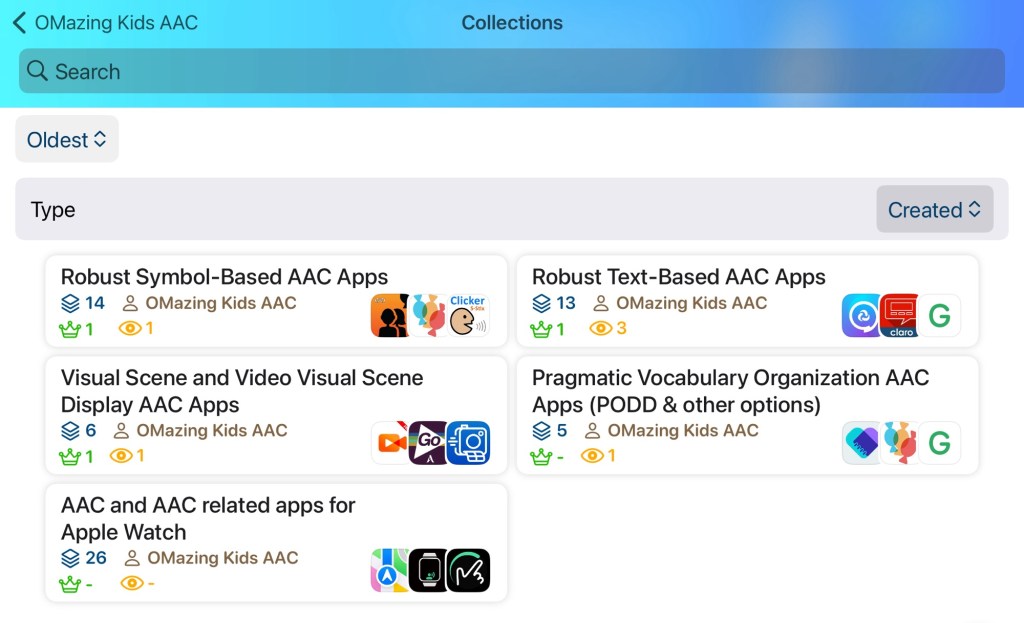
I was sad to see the AppSliced website close down but then relieved to find the same type of info available on AppRaven. It’s a free app and the basic features are free. It’s a good way to see pricing history on apps and a bit of other info. I also like the option to create collections.


App Collections I have created on App Raven:

I’ll update this post as I create other collections.


Looking in-depth AAC feature matching resources? See this blog post: https://bit.ly/5aacFeatureMatchingResources. That post also includes videos comparing the best AAC apps on various devices on various platforms.

Looking for more AAC resources? Check out the Resource Links page here on my blog: https://omazingkidsllc.com/omazing-kids-aac-resource-links


Have a question? The best way to reach me is via Facebook messaging over on my OMazing Kids page: https://www.facebook.com/OMazingKidsAAC/


Angela Moorad, MS, CCC-SLP, Founder of OMazing Kids, LLC, OMazing Kids AAC Consulting

• Teachers Pay Teachers Store: https://www.teacherspayteachers.com/Store/Omazing-Kids-Aac-Consulting

• YouTube: https://youtube.com/user/amoorad1

• Ko-Fi: https://ko-fi.com/omazingkidsaac

• OMazing Kids AAC Consulting Facebook Page: https://www.facebook.com/OMazingKidsAAC/

• AppPeeps Facebook Group: https://www.facebook.com/groups/OMazingKidsAppPeeps/

• GoTalk Now AAC & GoVisual Visual Scene Apps – Ideas and Sharing Facebook Group: https://bit.ly/GoTalkNowAACappGroup

• Instagram: https://www.instagram.com/omazingkidsaac

• Twitter: https://www.twitter.com/amoorad

• Pinterest: http://pinterest.com/OMazingKids/

• Linktree: https://linktr.ee/amoorad1

• LinkedIn: https://www.linkedin.com/in/angelamooradomazingkidsaac

• AppRaven AAC App Collections: https://bit.ly/AAConAppRaven

• Blog: https://omazingkidsllc.com / Resource Links page: https://omazingkidsllc.com/omazing-kids-aac-resource-links

🎉 New Resource 🎉 Feature Matching Basics & Tips: AAC Apps for the Apple Watch

Have you ever considered using AAC on an Apple Watch but weren’t sure about the options or how to set it up? I’ve made it simple.


Check out my brand new resource “Feature Matching Basics & Tips: AAC Apps for the Apple Watch”: https://bit.ly/AppleWatchAAC.


This resource contains a 6 page PDF handout & exclusive access to three unlisted YouTube videos with easy to understand information about :

  • An overview of things to consider when deciding to use AAC apps on an Apple Watch
  • How to pair the Apple Watch with a wearable Bluetooth speaker (simple demo video)
  • How to use the Apple Watch app on a paired iPhone to set up apps on the Apple Watch
  • How to find info about setting up an Apple Watch for a family member who doesn’t have their own iPhone, tech safety considerations & parental controls
  • Two recommended watch face options well-suited for AAC users (using one app or using multiple apps)
  • Apple Watch face “Complications” made simple: What these are on an Apple Watch and how to set them up (simple tutorial video)
  • Basic info about features of 33 apps and features available for the Apple Watch (8 apps and a feature specifically designed for AAC + 25 AAC-related apps and features that can be used to communicate in a variety of creative ways… including some that allow you to play short video and audio clips. Particularly helpful for Gestalt Language Processors)
  • ✅ Designation of particularly helpful apps as “top picks
  • 🔎 Designation of AAC apps that are robust with many more features when used on an iPhone or iPad
  • Exclusive access to an unlisted YouTube video where I demo these “top picks” and show what the robust apps look like on an Apple Watch
  • 9 other apps that I explored and reasons that I ruled those out
  • Exclusive access to those three unlisted YouTube videos (2:30 min, 3:18 min, 48:27 min – with time stamped chapters to quickly jump to info)

The PDF handout is formatted to be printed or viewed on a PDF reader or in the Apple Books app where you can tap on blue underlined text that links directly to additional or related information.


The 48:27 demo video of the “top picks” and robust AAC apps has time-stamped chapters to help you quickly jump to the info about a particular app. 


See my list on AppRaven: AAC and AAC related apps for Apple Watch

https://appraven.net/collection/102811024


Looking for other in-depth AAC feature matching resources? See this blog post: https://bit.ly/5aacFeatureMatchingResources. That post also includes videos comparing the best AAC apps on various devices on various platforms.


Looking for more AAC resources? Check out the Resource Links page here on my blog: https://omazingkidsllc.com/omazing-kids-aac-resource-links


Have a question? The best way to reach me is via Facebook messaging over on my OMazing Kids page: https://www.facebook.com/OMazingKidsAAC/


Angela Moorad, MS, CCC-SLP, Founder of OMazing Kids, LLC, OMazing Kids AAC Consulting

• Teachers Pay Teachers Store: https://www.teacherspayteachers.com/Store/Omazing-Kids-Aac-Consulting

• YouTube: https://youtube.com/user/amoorad1

• Ko-Fi: https://ko-fi.com/omazingkidsaac

• OMazing Kids AAC Consulting Facebook Page: https://www.facebook.com/OMazingKidsAAC/

• AppPeeps Facebook Group: https://www.facebook.com/groups/OMazingKidsAppPeeps/

• GoTalk Now AAC & GoVisual Visual Scene Apps – Ideas and Sharing Facebook Group: https://bit.ly/GoTalkNowAACappGroup

• Instagram: https://www.instagram.com/omazingkidsaac

• Twitter: https://www.twitter.com/amoorad

• Pinterest: http://pinterest.com/OMazingKids/

• Linktree: https://linktr.ee/amoorad1

• LinkedIn: https://www.linkedin.com/in/angelamooradomazingkidsaac

• Blog: https://omazingkidsllc.com / Resource Links page: https://omazingkidsllc.com/omazing-kids-aac-resource-links

Two Resource Updates: Feature Matching Chart for Pragmatic Vocabulary Organization AAC Apps & the AAC Apps and Features At-a-Glance (Single Page Handouts)

These two resources have been updated:

The Feature Matching Chart for Pragmatic Vocabulary Organization AAC Apps has been updated (8/7/24). Those who have previously purchased it on TPT can download the newest version for no additional cost: https://bit.ly/PragmaticOrgVocabAAC-FeatureMatching-TPT. Ko-fi subscribers will be able to access a copy on the pinned resource post: https://ko-fi.com/Post/Links-to-posts-about-most-current-feature-matching-F1F5C9DMD


Updated Resource 8/5/24: AAC Apps and Features At-a-Glance (Single Page Handouts): https://bit.ly/AAC-At-a-Glance. This 90 page PDF resource has been updated to add Weave Chat AAC, to reflect new features in apps and to update info about pricing. See the new Table of Contents: https://bit.ly/-TOC-AACAppsandFeaturesAt-a-Glance. Those who have previously purchased it on TPT can download the most current version for no additional cost: https://bit.ly/AAC-At-a-Glance.


Looking for other in-depth AAC feature matching resources? See this blog post: https://bit.ly/5aacFeatureMatchingResources. That post also includes videos comparing the best AAC apps on various devices on various platforms.

Looking for more AAC resources? Check out the Resource Links page here on my blog: https://omazingkidsllc.com/omazing-kids-aac-resource-links


Have a question? The best way to reach me is via Facebook messaging over on my OMazing Kids page: https://www.facebook.com/OMazingKidsAAC/


Angela Moorad, MS, CCC-SLP, Founder of OMazing Kids, LLC, OMazing Kids AAC Consulting

• Teachers Pay Teachers Store: https://www.teacherspayteachers.com/Store/Omazing-Kids-Aac-Consulting

• YouTube: https://youtube.com/user/amoorad1

• Ko-Fi: https://ko-fi.com/omazingkidsaac

• OMazing Kids AAC Consulting Facebook Page: https://www.facebook.com/OMazingKidsAAC/

• AppPeeps Facebook Group: https://www.facebook.com/groups/OMazingKidsAppPeeps/

• GoTalk Now AAC & GoVisual Visual Scene Apps – Ideas and Sharing Facebook Group: https://bit.ly/GoTalkNowAACappGroup

• Instagram: https://www.instagram.com/omazingkidsaac

• Twitter: https://www.twitter.com/amoorad

• Pinterest: http://pinterest.com/OMazingKids/

• Linktree: https://linktr.ee/amoorad1

• LinkedIn: https://www.linkedin.com/in/angelamooradomazingkidsaac

• Blog: https://omazingkidsllc.com / Resource Links page: https://omazingkidsllc.com/omazing-kids-aac-resource-links