.
{Appy AAC Awareness Month}: Favorite Apps for Teaching AAC Core Vocabulary
3/13/22: Thanks to Vicki Clarke for the mention of this post in your article today on PrAACtical AAC: AAC Implementation Framework: Step 2, TRAIN: https://praacticalaac.org/praactical/aac-implementation-framework-step-2-train.
Welcome to anyone visiting this 2016 blog post. I’ve updated app availability below. Sadly several of these apps are no longer available. App prices have changed since I wrote this post over 6 years ago.
.
A more current resource about apps is my Ultimate App and Digital Resource Guide for SLPs (I’ll be working on doing the 2023 update for that soon. Anyone who has previously purchased it will be able to download the updated version when it’s available: https://bit.ly/UltimateAppDigitalResourceGuideSLP.
- Interactive PDF (256 pages with linked Table of Contents) full of lists of hundreds of apps and digital resources organized by SLP goal areas and themes
- App demo videos (links to 29 unlisted YouTube videos)
.
100 Great Kids Picture Books to Target Core Vocabulary for AAC Users: https://bit.ly/PictureBooks4CoreAAC
.
To make things easier to find on my blog see the new Resources Links page: https://omazingkidsllc.com/omazing-kids-aac-resource-links/
7/22/20: See this newer blog post for current info: https://omazingkidsllc.com/2020/07/22/over-100-free-affordable-apps-boom-cards-to-target-aac-core-vocabulary-list-compiled-by-angela-moorad-ms-ccc-slp-omazing-kids/
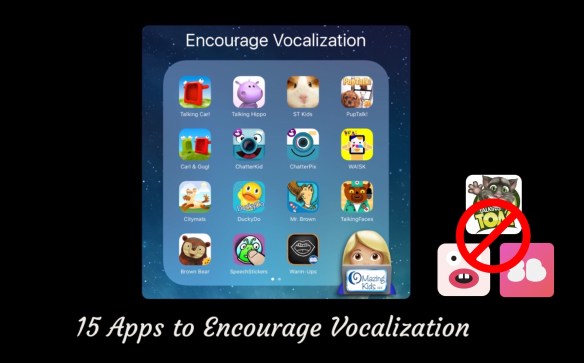
I’m always looking for fun and motivating ways to target core vocabulary for my patients that are AAC users. I use a variety of toys, books, sensory activities & apps to provide lots of opportunities for practice in the short amount of time I have with them in OMazing Kids speech therapy each week. My iPad loaded with fabulous apps is one of the best tools in my SLP therapy toolbox!
.
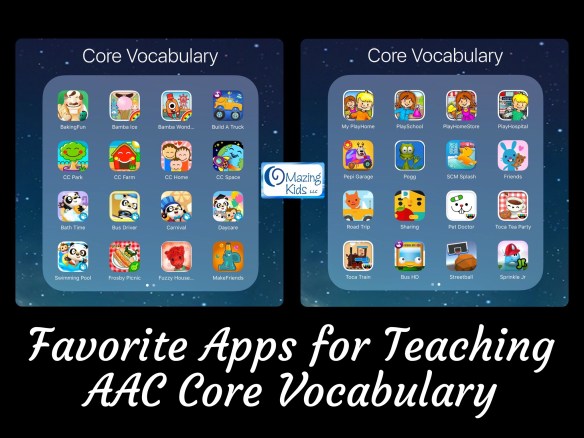
Here are some of my favorite iOS apps for targeting core vocabulary (listed in alphabetical order, prices were verified and all were available in the USA App Store at the time of this post. I have no way to know if these apps are available in other countries or what the prices would be if they are):
* BakingFun for Kids, $1.99, https://appsto.re/us/HZYAQ.i (free printable core vocab mini book to go with the app: https://omazingkidsllc.com/2014/08/25/core-vocabulary-app-of-the-week-free-printable-booklet-baking-fun-by-kujifun/)
* Bamba apps (my faves are: Ice-Cream, FREE, https://appsto.re/us/gkz-F.i & Wonderland, FREE, https://appsto.re/us/Frwzcb.i)
* Build A Truck – Duck Duck Moose, FREE, https://appsto.re/us/tSBYR.i
* Choo Choo Park, $.99 -> currently FREE, https://appsto.re/us/V2G_9.i (definitely worth grabbing all 6 of their apps while they are free. I rotate them on/off my iPad seasonally or based on themes. Update 3/13/23: Sadly all of these apps have totally disappeared from the App Store)
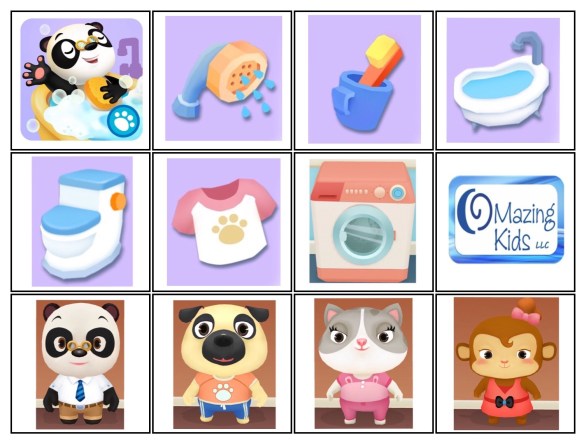
* Dr. Panda apps (tons of great apps… some of my faves: Bus Driver, $2.99. -> currently on sale for $.99, https://appsto.re/us/JhJlS.i; Carnival, $2.99, https://appsto.re/us/KvVQ7.i; Bath Time,
$2.99, https://appsto.re/us/iek0bb.i; Daycare, $2.99, https://appsto.re/us/fuJuI.i & Swimming Pool, $1.99, https://appsto.re/us/xKWM2.i)
* Frosby Picnic Camp, $1.99, https://appsto.re/us/1H16O.i
* Fuzzy House, $2.99, https://appsto.re/us/jPZBbb.i
* Let’s Make Friends – Play Toy, $2.99, https://appsto.re/us/Rvk-Q.i
* My PlayHome, $3.99, https://appsto.re/us/5fdnA.i (they also have Stores (https://appsto.re/us/slcXO.i), School (https://appsto.re/us/zL392.i) & Hospital (https://appsto.re/us/FAksbb.i) apps that are $2.99 each and the cool thing is the apps all link to each other so you can easily explore the town. Update 3/13/23: They also have a newer My PlayHome Plus app)
* Pepi Garage, FREE, https://appsto.re/us/a0Me9.i (Update 3/13/23: Sadly this app has disappeared from the App Store)
* Pogg, $.99, https://appsto.re/us/L4HUt.i
* Sago Mini apps (lots of great apps…. some of my faves: Friends, FREE, https://appsto.re/us/61Qh0.i (Update 3/12/23: $3.99, new link: https://apps.apple.com/us/app/sago-mini-friends/id1245748156. This app developer has primarily switched to a subscription based model with their Sago Mini World app: https://apps.apple.com/us/app/sago-mini-world-kids-games/id874425722); Road Trip, $2.99, https://appsto.re/us/M1E7Z.i (Update 3/12/23: no longer available as a stand alone app but it’s available within Sago Mini World)
* Science Museum Splash!, $.99, https://appsto.re/us/sfoDQ.i (very excited to see this app reappear in the App Store. Update 3/12/23: Sadly this app has disappeared again)
* Sharing with Duckie Deck, $2.99, https://appsto.re/us/la7qI.i (Update 3/12/23: Sadly this app has disappeared from the App Store)
* Toca Boca apps (several great apps… some of my faves: Pet Doctor, $2.99, https://appsto.re/us/HnSkW.i, Tea Party, $2.99, https://appsto.re/us/Kogsz.i & Train, $2.99, https://appsto.re/us/JM5fF.i)
* Wheels on the Bus HD by Duck Duck Moose, FREE, https://appsto.re/us/kg7kw.i
For older kids & teens, I also use a variety of sports-themed and game apps (ex: Streetball Game, $2.99, https://appsto.re/us/Vv80bb.i (Update 3/12/23: Sadly this app has disappeared from the App Store); Galaxy Bowling, $3.99,
https://appsto.re/us/FwitA.i; Air Hockey by Acceleroto, $.99, https://appsto.re/us/LrAdr.i, Sprinkle Junior, $1.99, https://appsto.re/us/KB7sC.i (Update 3/12/23: Sadly this app has disappeared from the App Store), Thinkrolls Logic Puzzles Bundle – 2 apps, $5.99, https://appsto.re/us/sr_0db.i, Update 3/12/23: That bundle is no longer available but you can still purchase the apps separately: Thinkrolls: https://apps.apple.com/us/app/thinkrolls-kids-logic-puzzles/id917176209, Thinkrolls 2: https://apps.apple.com/us/app/thinkrolls-2-kids-puzzles/id968707176)
.
Tips: Apps come and go frequently in the App Store. New apps are released. Sometimes older apps disappear while they are being updated. Sometimes they never reappear. So it’s always wise to periodically back up your iPad by plugging it into a computer logged into your iTunes account. This insures you won’t lose any apps that may disappear from the App Store. I originally got most of these apps by grabbing them quickly when they were free for a day or two. Watch my OMazing Kids Facebook page and AppPeeps Facebook group where I share these as “free app alerts”. Others I got on sale or via doing app reviews.
The main thing I look for when searching for apps to use for targeting core vocabulary for AAC users in therapy sessions are open-ended play apps that are intuitive, have large engaging graphics, are ad-free, have the option to toggle off any background music or it is very subtle (not over stimulating) while still leaving on any sound effects or voiceovers and any outside links are well hidden behind a parental gate.
.
Of course these apps should be on a separate iPad from their “talker” so you can “talk” while playing (Update 3/12/23: Some apps could also be used in Split View or Slide Over)
.
I use these apps to target the same core vocabulary that I would with a “real” toy or activity. Think of it as the “virtual” version of that. I lock the “play” iPad into the app that I have selected by enabling Guided Access. If the child is using an iPad as their “talker”, then it is also locked into their AAC app via Guided Access.
(Update 3/12/23: please read this blog post for the most current info about Tech Safety. There are more options now. It no longer has to be all or nothing: https://bit.ly/TechSafetyAndAAC-BlogPost)
.
Need ideas for how to target core vocabulary? I’m LOVING the Core Word 5-Minute Fillers on the NEW AssistiveWare Core Word Classroom website. Here’s a screenshot of the one for Mr. Potato Head.
.
You could use these ideas with a “real” Mr. Potato Head or the app version (Mr. Potato Head – Create & Play: School Edition by Originator Inc., $4.99, https://appsto.re/us/Y6JCI.i. Update 3/12/23: Sadly this app has disappeared from the App Store)
http://coreword.assistiveware.com – It’s only free for a short time while the website is in “beta” development so I’d suggest that you save any PDFs that you love.
.
I also love this free resource from Saltillo (maker of NovaChat and ChatFusion SGDs & the TouchChat AAC app): https://www.facebook.com/OMazingKidsYoga/photos/a.433610663356611.117461.174264525957894/1192093340841669/?type=3
.
Other helpful resources:
Balanced AAC approach: http://praacticalaac.org/praactical/the-baby-the-bathwater-and-core-vocabulary/
Tons of great info: http://praacticalaac.org/?s=Core
Quick handout: http://www.handyhandouts.com/pdf/405_CoreVocabulary.pdf
Need help getting FREE access to AAC apps to trial with patients? Check out this post:
Update 3/12/23: The most current info about how SLPs/SLTs can get access to robust AAC apps can be found on this post: https://bit.ly/AACtestdrive
#SLPeeps #AAC #AidedLanguageStimulation #augcomm
.
Updated contact info 3/12/23
Angela Moorad, MS, CCC-SLP, Founder of OMazing Kids, LLC, OMazing Kids AAC Consulting
• Teachers Pay Teachers Store: https://www.teacherspayteachers.com/Store/Omazing-Kids-Aac-Consulting
• YouTube: https://youtube.com/user/amoorad1
• Ko-Fi: https://ko-fi.com/omazingkidsaac
• OMazing Kids AAC Consulting Facebook Page: https://www.facebook.com/OMazingKidsAAC/
• AppPeeps Facebook Group: https://www.facebook.com/groups/OMazingKidsAppPeeps/
• GoTalk Now AAC & GoVisual Visual Scene Apps – Ideas and Sharing Facebook Group: https://bit.ly/GoTalkNowAACappGroup
• Instagram: https://www.instagram.com/omazingkidsaac
• Twitter: https://www.twitter.com/amoorad
• Pinterest: http://pinterest.com/OMazingKids/
• Linktree: https://linktr.ee/amoorad1
• LinkedIn: https://www.linkedin.com/in/angelamooradomazingkidsaac
• Blog: https://omazingkidsllc.com / Resource Links page: https://omazingkidsllc.com/omazing-kids-aac-resource-links








 OMazing Kids AAC Consulting