

.
Symbol Supported Language Stimulation: visual supports to expand verbal utterances
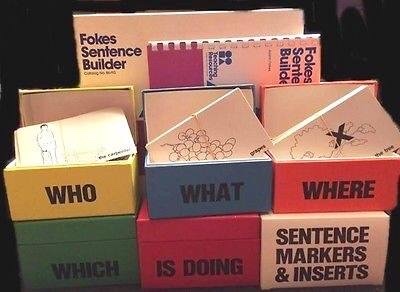
You are a “vintage” SLP if you remember using the Fokes Sentence Builder as a visual means of teaching kids how words go together to form sentences. For the past 27 years, I’ve infused that concept into how I model language. The pictures in the old Fokes were very outdated plus the copy of it at the facility where I work was very musty. So I use Boardmaker, the Custom Boards app by Smarty Ears, the GoTalk Now Plus AAC app with SymbolStix and PCS library add-ons (can export as PDF) or the Tools2Talk+ app to make my own customized visual supports. I’m “old school” and am still using a Boardmaker CD on a computer. I’ve considered using one of the many online options but haven’t so far since I didn’t want to have to pay for an ongoing subscription.
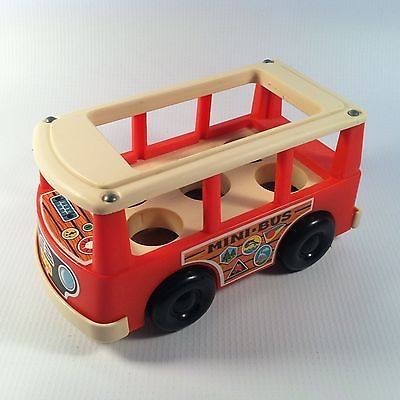
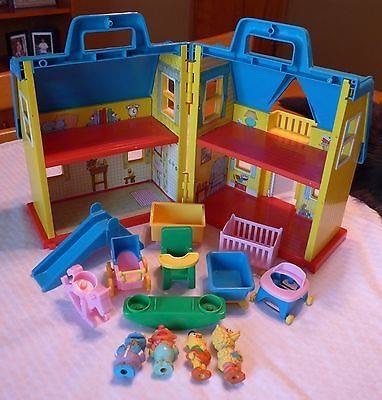
Most of the kids on my caseload have Autism or similar diagnoses and respond well to use of visual supports. For kids who are verbal, I use a variety of visual supports to show them how to create sentences. The picture at the top of this post is an example of my latest creation to go with my vintage Illco Sesame Street House (circa 1988) and wooden Fisher Price Mini Bus and Little People (circa 1969). It’s always cool to see how well my patients respond with use of these visual supports. Instead of imitating a word or maybe two, they are much more likely to imitate a whole utterance and then often use that utterance again spontaneously within that session.
For kids who are AAC users, I use aided language stimulation in activities that are interesting and highly motivating for them to model creation of sentences either directly on their device or on a companion device with the same vocabulary.
.
I also use several great sentence building apps (yeah… I’m a cool mix of vintage & modern 😉 ):
.
I use and love the Storyteller Writing Box from Lakeshore. I use it both to create sentences and as a visual support for answering Wh-questions: https://www.lakeshorelearning.com/products/ca/p/LL904
.
If you have Boardmaker, check out these free printable symbols and frames for the vocabulary in the Fokes Sentence Builder:
.
(Update: 6/1/20 – That website has disappeared. Thankfully I had these saved a modified version of the Boardmaker Fokes Sentence Builder on my computer and just uploaded them to my blog as three PDF files:
1) https://omazingkidsllc.com/wp-content/uploads/2020/06/fokes-sentence-frames-prints-on-fewer-pages.pdf
2) https://omazingkidsllc.com/wp-content/uploads/2020/06/fokes-sentence-builder-who-what-doing-modified.pdf
3) https://omazingkidsllc.com/wp-content/uploads/2020/06/fokes-sentence-builder-which-where-modified.pdf
.
Subscription-based symbol site where you can easily make your own visual supports:
* http://www.boardmakeronline.com (has free 30-day trial)
* https://www.n2y.com/store/n2y-Products/SSX
* https://smartysymbols.com/our-plans-pricing/
Updated 6/24/23:
A few of the resources that I purchased on TPT and used:
Describe the Dog with Adjective + Noun (Book + Boom Cards!), https://www.teacherspayteachers.com/Product/Describe-the-Dog-with-Adjective-Noun-Book-Boom-Cards-1732379?st=05b867d6d339d81c22b48d4153a52f4a
Who, What, Where Scenes: Wh-Questions w. BOOM CARDS, https://www.teacherspayteachers.com/Product/Who-What-Where-Scenes-Wh-Questions-w-BOOM-CARDS-2651065
Freebie Interactive Book! “What Are They Doing?” Noun + Verb, https://www.teacherspayteachers.com/Product/Freebie-Interactive-Book-What-Are-They-Doing-Noun-Verb-1769864
Describing Cats Interactive Book: Adjective + Noun Combinations w. BOOM CARDS, https://www.teacherspayteachers.com/Product/Describing-Cats-Interactive-Book-Adjective-Noun-Combinations-w-BOOM-CARDS-1859578
Form-a-Phrase Dough Mats: Practice Combining Word + Boom Cards!, https://www.teacherspayteachers.com/Product/Form-a-Phrase-Dough-Mats-Practice-Combining-Word-Boom-Cards-2368240
Form-a-Phrase Dough Mats: DESCRIBING! MLU: Phrases + Sentences with Boom Cards!, https://www.teacherspayteachers.com/Product/Form-a-Phrase-Dough-Mats-DESCRIBING-MLU-Phrases-Sentences-with-Boom-Cards-2976117
Looking for sentence building resources with GIFs? https://www.teacherspayteachers.com/Browse/Search:Sentence%20building%20GIFs
Important Note: Use of these types of visual supports for combining words into phrases or sentences is NOT promoting “symbolated text” for reading (an outdated practice that has now been found to interfere with learning to read). Use of these symbols is NOT PECS®. I used these types of visuals to help kids see how words could be combined and found them very helpful. When working with AAC users I created visual supports that matched whatever AAC they were using along with modeling on that app on my iPad.
Have a question? The best way to reach me is via Facebook messaging over on my OMazing Kids page: https://www.facebook.com/OMazingKidsAAC/
Angela Moorad, MS, CCC-SLP, Founder of OMazing Kids, LLC, OMazing Kids AAC Consulting
• Teachers Pay Teachers Store: https://www.teacherspayteachers.com/Store/Omazing-Kids-Aac-Consulting
• YouTube: https://youtube.com/user/amoorad1
• Ko-Fi: https://ko-fi.com/omazingkidsaac
• OMazing Kids AAC Consulting Facebook Page: https://www.facebook.com/OMazingKidsAAC/
• AppPeeps Facebook Group: https://www.facebook.com/groups/OMazingKidsAppPeeps/
• GoTalk Now AAC & GoVisual Visual Scene Apps – Ideas and Sharing Facebook Group: https://bit.ly/GoTalkNowAACappGroup
• Instagram: https://www.instagram.com/omazingkidsaac
• Twitter: https://www.twitter.com/amoorad
• Pinterest: http://pinterest.com/OMazingKids/
• Linktree: https://linktr.ee/amoorad1
• LinkedIn: https://www.linkedin.com/in/angelamooradomazingkidsaac
• Blog: https://omazingkidsllc.com / Resource Links page: https://omazingkidsllc.com/omazing-kids-aac-resource-links




 OMazing Kids AAC Consulting