
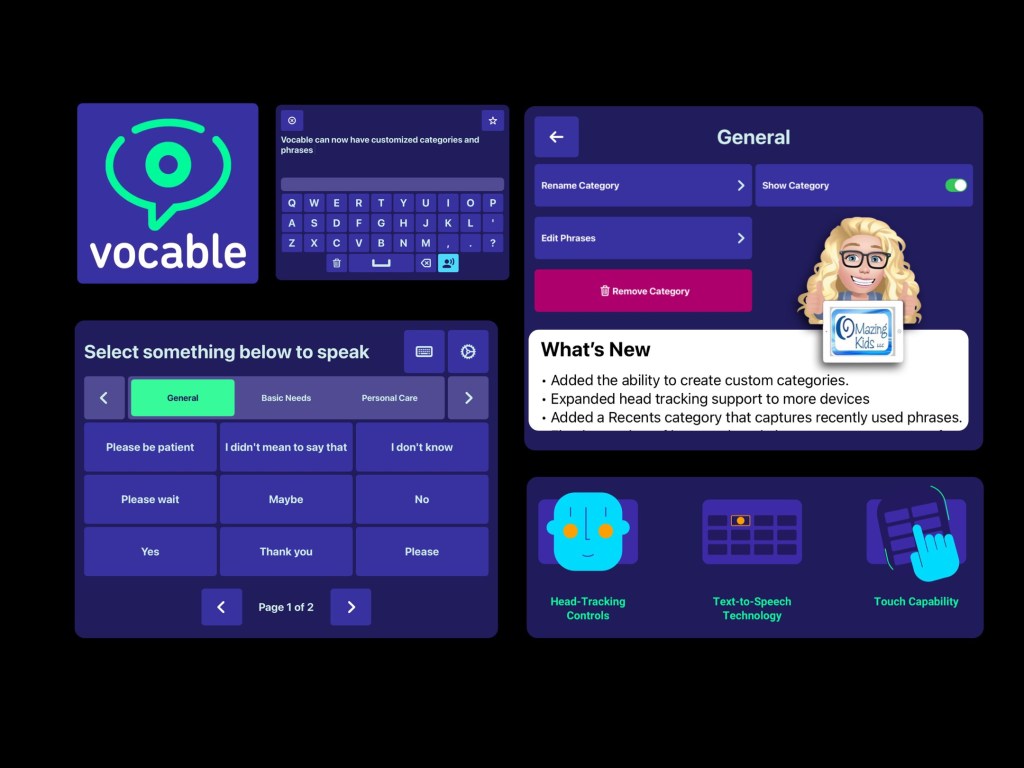
I was SO excited to see today’s update for the iOS version of the free Vocable text-based AAC app added a way to edit all of the premade content (categories and phrases).
I have corresponded with the app developer several times via email and had a great Zoom call with one of their team members on 4/8/22 to provide feedback regarding new features.
It was refreshing to connect with an app development team that is totally made up of volunteers committed to offering an open source app. It is quite impressive that they released this update so quickly 😊
This allows the app to be totally customized to a particular user’s needs and will make this app usable for a wider range of ages.
Can be used via direct touch or head tracking (without needing extra equipment)
Video of the app on my iPad 8th gen on iOS 14.5:
iOS: https://apps.apple.com/us/app/vocable-aac/id1497040547 (iOS Universal (iPad/iPadOS 14.0 or later. iPhone & iPod Touch/iOS 14.0 or later) + Mac with Apple M1 chip/macOS 11.0 or later)
There is also an Android version but it doesn’t have these new features yet: https://play.google.com/store/apps/details?id=com.willowtree.vocable. I’ll update this blog post if that version of this app is updated.
Website: https://www.vocable.app
I’ve been getting quite a few requests for info from parents and pediatric SLPs looking for text-based AAC apps. It’s very interesting how many young kids are preferring a text-only setup. The recurring themes are hyperlexia, a high interest in letters and being visually overstimulated by symbols.
I typically recommend that folks try a text-only set up in one of the robust symbol-based AAC apps since those have high quality child voices & premade vocabulary more suitable for children (https://omazingkidsllc.com/2021/10/19/creating-a-text-only-set-up-for-kids-in-symbol-based-aac-apps/) + also explore true text-based AAC apps. Then determine what combination of AAC options might best meet the needs.
Updated 3/6/25 – Looking for more free and affordable AAC apps? Check out my Basic Feature Chart for Affordable and Free AAC apps & AAC-Related Apps (iOS, Android Google Play, Amazon Fire, Windows + a few Web-Based options): https://bit.ly/BasicAffordableAACchart.
In addition to Vocable two other top picks for free AAC apps are Weave Chat AAC & GoTalk Now Lite.
Weave Chat AAC is robust, can be text-based or symbol-based (or customized with pictures), is available in several languages and the app developer updates it frequently. It’s available on iOS, Android and Amazon Fire: https://www.weavechat.com. Be sure to join their Weave Chat AAC Community group on Facebook: https://www.facebook.com/groups/676728011274573/
I’m leery of apps that require a log-in and had an in-depth discussion with the developer of Weave Chat AAC about that before signing up to use the app. The log in info is solely used for their cloud based system that backs up and syncs the app across devices.
If you want a totally free AAC app with no log in and can be customized with photos take a look at GoTalk Now Lite by Attainment Company, Inc.. (https://apps.apple.com/us/app/gotalk-now-lite/id953164338). I have a GoTalk Now AAC & GoVisual Scene Apps – Ideas and Sharing group on Facebook for it: https://bit.ly/GoTalkNowAACappGroup
Have a question? The best way to reach me is via Facebook messaging over on my OMazing Kids page: https://www.facebook.com/OMazingKidsAAC/
Angela Moorad, MS, CCC-SLP, Founder of OMazing Kids, LLC, OMazing Kids AAC Consulting
- Teachers Pay Teachers Store: https://www.teacherspayteachers.com/Store/Omazing-Kids-Aac-Consulting
- YouTube: https://youtube.com/user/amoorad1
- Ko-Fi: https://ko-fi.com/omazingkidsaac
- OMazing Kids AAC Consulting Facebook Page: https://www.facebook.com/OMazingKidsAAC/
- AppPeeps Facebook Group: https://www.facebook.com/groups/OMazingKidsAppPeeps/
- GoTalk Now AAC & GoVisual Visual Scene Apps – Ideas and Sharing Facebook Group: https://bit.ly/GoTalkNowAACappGroup
- Instagram: https://www.instagram.com/omazingkidsaac
- Twitter: https://www.twitter.com/amoorad
- Pinterest: http://pinterest.com/OMazingKids/
- Linktree: https://linktr.ee/amoorad1
- LinkedIn: https://www.linkedin.com/in/angelamooradomazingkidsaac
- Blog: https://omazingkidsllc.com
 OMazing Kids AAC Consulting