
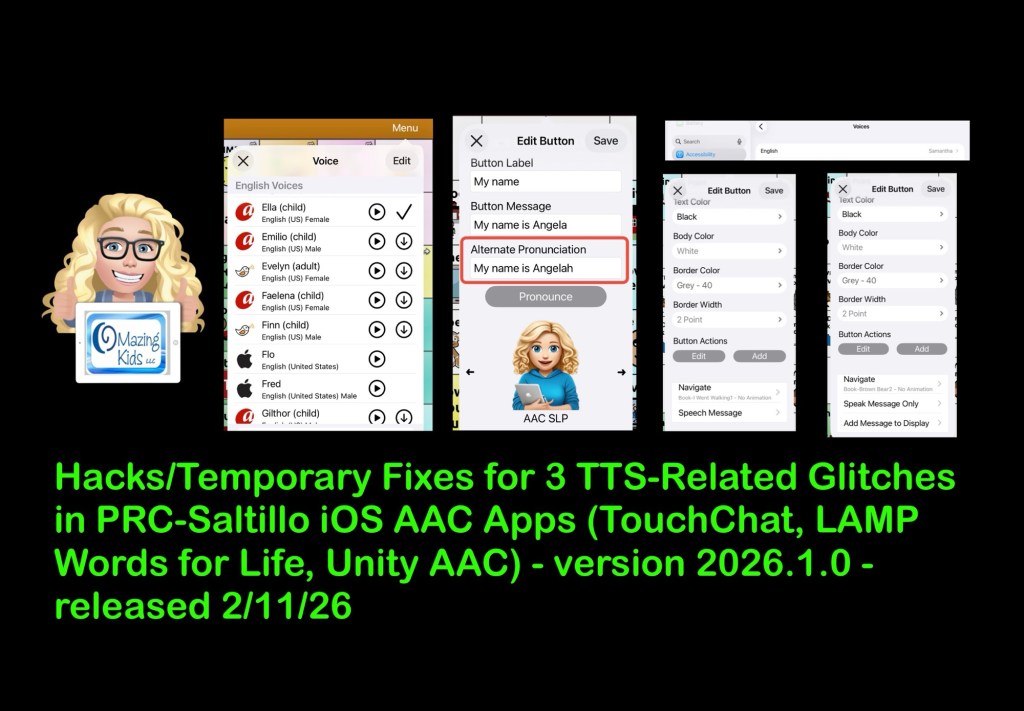
There are three distinct glitches related to text to speech (TTS) voices in the most recent 2026.1.0 app updates for the PRC-Saltillo AAC apps on 2/11/26. I know I’m not the only one experiencing these glitches based on numerous posts and comments on social media:
- Dot glitch (Acapela TTS voices speak “dot” if you tap an empty Message Window
- Alternate Pronunciation at button level glitch that causes the content of the Message Window to be spoken 3-4 times regardless of the type of TTS voice being used
- iOS Accessibility TTS voice being used on random buttons instead of the voice set in the app
Here are three screen recording videos so you can see what’s occurring and the short term hacks / solutions that I’m recommending to folks until PRC-Saltillo gets these glitches fixed:
- LAMP WFL: https://youtu.be/4NR7qokUbvo?si=JeuC7taP_yVsaP4-. I didn’t encounter the third glitch in this app yet but did see it documented in this video over in the user group on Facebook: https://www.facebook.com/groups/LAMPWordsForLife/permalink/4432054063695738/. The fix that I show in my TouchChat video should also fix it in this app.
- Unity AAC: https://youtu.be/Mh0nRt6XIBk?si=8as1upDvc5ajlaAw. I didn’t encounter the third glitch in this app yet. If you do the fix I show in my TouchChat video should also fix it there.
These glitches are also occurring in Dialogue AAC. I didn’t make a video for it since there isn’t a user group for that app on Facebook and I haven’t received any messages about it these issues in that app.
Hopefully my videos will be helpful in figuring what’s happening and help contribute to getting it fixed.
On 2/23/26 I emailed the company this information to the customer support email address listed for each app:
I received a reply from the LAMP WFL app support that same day and supplied the following details that they requested.
1. What Version of the LAMP app you are on. Select Vocab > Choose New Vocab > LAMP – Version #.##.# (bottom of the screen): LAMP version 2026.1.0 (real app, NOT an upgrade from LAMP WFL Discover)
2. What Version of iOS is running on your iPad. Go to Settings > General > About > Version ##.#.#: iPadOS 26.3
3. What model of iPad are you using: iOS settings->General->About->Model Number: iPad 10th gen (personal iPad, NOT on any type of MDM management system)
4. How much storage is available on the iOS device. iOS settings->General->iPad (or iPhone) Storage: 11.47GB of free storage
5. Which of the following Vocabulary sets are you using?LAMP WFL 1-Hit, LAMP WFL Transition, LAMP WFL Full, LAMP WFL 1-Hit Spanish/English (LAMP Version 1.6.0 and Higher), LAMP WFL Full Spanish/English (LAMP Version 1.6.0 and Higher), LAMP WFL 1-Hit VI, LAMP WFL Full VI, Blank Vocabulary that has be Customized from the ground up without using a copy of the Template as a base: LAMP WFL Full – USA English (not highly edited)
6. Is Vocabulary Builder ON or OFF? Select MENU – Select VOCAB BUILDER – The ON / OFF status is at the bottom of the window: Not using Vocabulary Builder
7. Are you using Guided Access: Not using Guided Access
8. What Access Method are you using? (Touch or Look device, Scanning): Direct touch access method. No Dwell Time, No Release Time.
9. When was the file created? File created today (2/23/26) but these same issues are occurring in other Vocab files.
10. When did you first notice this happen? Noticed immediately after the most recent app update on 2/11/26.
Note: As of 11:30am Central Time on Tuesday 2/24/26 I haven’t received a reply yet from the Customer Support for TouchChat or for Unity. If/when I do I will provide them the same detailed information and will update this blog post.
Update 3/18/26: See this post on my Facebook page: https://www.facebook.com/share/p/1B8i1u6chj/?mibextid=wwXIfr
I’m no longer recommending any of the PRC-Saltillo AAC apps until the lagging and text-to-speech voice glitches are resolved.
It’s been over a month since the 2/11/26 app updates caused increased issues.
I never received a reply from TouchChat customer support or from Unity customer support.
I’m seeing posts and comments from parents, SLPs, and AAC users everyday asking how to fix the text to speech glitches. Additionally there is significant lagging in TouchChat in the most recent update.
This is unacceptable.
I’m baffled as to why we aren’t seeing the same level of concern and outcry like we did when they had an update that drastically changed the appearance of TouchChat that sparked a petition and the company acted pretty quickly to reverse that.
Looking for in-depth AAC feature matching resources? See this blog post: https://bit.ly/5aacFeatureMatchingResources. That post also includes videos comparing the best AAC apps on various devices on various platforms.
Looking for AAC resources? Check out the Resource Links page here on my blog: https://omazingkidsllc.com/omazing-kids-aac-resource-links. I do my best to keep links updated but some companies are making this challenging.
Have a question? The best way to reach me is via Facebook messaging over on my OMazing Kids page: https://www.facebook.com/OMazingKidsAAC/
Angela Moorad, MS, CCC-SLP, Founder of OMazing Kids, LLC, OMazing Kids AAC Consulting
• Teachers Pay Teachers Store: https://www.teacherspayteachers.com/Store/Omazing-Kids-Aac-Consulting
• YouTube: https://youtube.com/user/amoorad1
• Ko-Fi: https://ko-fi.com/omazingkidsaac
• OMazing Kids AAC Consulting Facebook Page: https://www.facebook.com/OMazingKidsAAC/
• AppPeeps Facebook Group: https://www.facebook.com/groups/OMazingKidsAppPeeps/
• GoTalk Now AAC & GoVisual Visual Scene Apps – Ideas and Sharing Facebook Group: https://bit.ly/GoTalkNowAACappGroup
• Instagram: https://www.instagram.com/omazingkidsaac
• X (formerly Twitter): https://www.x.com/amoorad
• Pinterest: http://pinterest.com/OMazingKids/
• Linktree: https://linktr.ee/amoorad1
• LinkedIn: https://www.linkedin.com/in/angelamooradomazingkidsaac
• AppRaven AAC App Collections: https://bit.ly/AAConAppRaven
• Blog: https://omazingkidsllc.com / Resource Links page: https://omazingkidsllc.com/omazing-kids-aac-resource-links
 OMazing Kids AAC Consulting