Wanting to get a bundled iPad with a robust AAC app in a durable case funded as a “dedicated” SGD (speech generating device) / DME (durable medical equipment) through Medicaid or insurance?
There are several companies that offer locked/managed/dedicated iOS based devices with a variety of iOS AAC apps as an option. You’ll need to contact each company’s funding department to find out if they are in-network for the funding sources that you are considering. This varies state-by-state:
- Ablenet: https://quicktalkerfreestyle.com
- Certified Seating and Mobility (partnered with Smartbox): https://certifiedatp.com/speech-generating-devices/
- Cook Medical Supply: https://cookmedicalsupply.com/aac-speech-devices
- Forbes: https://www.forbesaac.com/proslate-series
- Lincare AAC: https://www.lincare.com/en/services/speech-generating-devices/devices
- Logan Tech: https://logantech.com/collections/logans-voice-ipad-bundle. Might be an option depending on your state & funding source: https://logantech.com/pages/funding-2019
- Numotion: might be an option as a reseller of devices by a few different companies: https://www.numotion.com/products/speech-devices
- ProTech: the Nuvo device: https://protechdelivers.com/aac
- RM Speech: https://www.rmspeech.com
- Talk to Me Technologies: the Wego series of devices:https://www.talktometechnologies.com/pages/wegofamily & Talk Pad Wego 8 & Talk Pad Wego 10 – https://www.talktometechnologies.com/pages/talkpadfamily (part of Smartbox)
Find other Smartbox USA partners: https://thinksmartbox.com/how-to-try-usa/
If you are considering one of the PRC-Saltillo apps (TouchChat with WordPower, LAMP Words for Life & Dialogue AAC), see this post about their authorized PRC-Saltillo app resellers: https://www.prc-saltillo.com/articles/authorized-app-reseller. For more information, please visit PRC-Saltillo Authorized App Reseller.
See this announcement on 10/23/25 about Avaz joining the PRC-Saltillo community. Their blog post specifically answers the question about whether or not the app will now be available as an option on their SGDs: https://www.prc-saltillo.com/articles/avaz-acquisition?mode=view
“Will I be able to get the Avaz app on a Via/NovaChat device?” This will depend on what part of the world you are in! For example, Avaz will not be available on Via or NovaChat devices within the United States or the European Union due to certification requirements. Please check with your local representative for more specific information.“
(My note: I checked the EyeTech website on 10/23/25 and it still shows that the Android version of Avaz is available on their fundable Android-based EyeOn Go (direct access via touch) and EyeOn Air (eye tracking access) SGDs: https://eyetechds.com)
If you are considering TD Snap, Tobii Dynavox has the following information on their website (https://us.tobiidynavox.com/products/td-snap): “Tobii Dynavox cannot guarantee the compatibility of TD Snap with any other brand of hardware, and as such, Tobii Dynavox will not offer technical support for hardware compatibility issues related to TD Snap installed on non-Tobii Dynavox approved hardware, by non-licensed resellers. Downloads by individuals of TD Snap for individual use on personal devices is permitted pursuant to the TD Snap License Agreement for Download. TD Snap may only be downloaded for re-sale and re-distribution by Tobii Dynavox resellers with a specific license to do so. To download TD Snap for commercial use, re-sale, and re-distribution on non-Tobii Dynavox devices contact Tobii Dynavox directly at css@tobiidynavox.com in North America and order.eu@tobiidynavox.com in all other countries.”
For those wanting to make an app-only purchase, as of 5/21/24 the only option for *new app-only purchases* available to the general public to purchase TD Snap is via what was formerly called TD Snap Lite (renamed to TD Snap). There is a 30-day free trial and then a subscription is required. Separate additional subscriptions are required if you need PODD pagesets, Gateway pagesets or METACOM symbols. You can see the subscription prices in the description for this app in the App Store.
The “TD Snap AAC” app (full version that used to be available for $49.99) is no longer available for *new purchases*. Those who previously purchased it can find it in their purchases.
Organizations that have an Apple Business Manager or Apple School Manager account and meet the necessary Tobii Dynavox requirements can complete a form to submit a request to purchase the TD Snap Enterprise app for iPadOS. Once submitted, that request will be reviewed by Tobii Dynavox, and you should receive a response within 10 business days. The price for TD Snap Enterprise is $149.99. This comes with: Pageset editing, speech output + the PODD pagesets. Link: https://www.tobiidynavox.com/pages/td-snap-enterprise-allowlist
Several companies that sell traditional SGDs also offer their own iOS-based devices:
PRC-Saltillo:
- Via Pro, Via Mini & Via Nano – https://store.prc-saltillo.com/via-pro-device [AAC options: TouchChat with WordPower, LAMP Words for Life, Unity AAC, or Dialogue AAC (text-based)]
Those outside of the USA can check with these branches of the PRC company:
- Liberator Communications Canada
- Liberator Ltd. (UK)
- Prentke Romich Deutchland (Germany)
- Liberator Pty Ltd. (Australia)
https://www.prc-saltillo.com/international
Smartbox:
- Talk Pad – https://thinksmartbox.com/product/talk-pad/ (Grid for iPad)
Talk to Me Technologies (part of Smartbox):
- Talk Pad Wego 8 & Talk Pad Wego 10 – https://www.talktometechnologies.com/pages/talkpadfamily
Tobii Dynavox:
- TD Navio- https://us.tobiidynavox.com/pages/td-navio (TD Snap & TD Talk)
- TD Pilot (eye gaze) – https://us.tobiidynavox.com/pages/tdpilot (TD Snap & TD Talk)
See this post for info about how to find your local vendor rep: https://omazingkidsllc.com/2021/02/14/how-to-find-info-about-aac-at-companies-and-local-vendor-reps/
If a particular company has a waiting list to borrow a loaner device to trial then you may want to also check with the AT Lending Program in your state.
All states in the USA are supposed to have an Assistive Technology Lending Library program where parents & professionals can borrow AAC devices, iPads with AAC apps & other AT for short-term trial. It’s a great way to try various options out before making purchasing decisions. Find the AT Lending Library in your state: https://www.at3center.net/stateprogram
Even if your state’s program isn’t loaning out equipment due to the pandemic they might have the option to do a short term loan of the software/app.
Another “bundled” option is the Talk Tablet. Based on my experience, that app is not very intuitive to program or to use but I am sharing the info here in case anyone is looking for a less expensive alternative in situations where a funding source isn’t available. Their website is geared towards private pay but be sure to compare the cost of what they offer vs. just putting together your own by buying an iPad, AAC app & case: https://gusinc.com. The iOS version of the app: https://apps.apple.com/us/app/talktablet-pro-autism-aphasia/id1436382584 (+ extra cost of adding a high quality voice via in-app purchase)

We are fortunate in Oklahoma that SoonerCare / Medicaid will consider funding an iPad with a robust AAC app in a durable case as a SGD / DME but they require us to try the full version of the app in order to do a complete feature-match, submit a video of the patient using it and extensive justification as to why that particular option us being recommended. Here in Oklahoma, we can typically only get funding once every 5 years for AAC (with very rare exceptions) so it’s very important to be able to get a good match for that individual’s needs. See details here: https://www.okabletech.org/community/soonercare-provider-for-speech-generating-devices/
{Note: This video is a couple of years old so be sure to check with Oklahoma AbleTech about the current process and requirements}
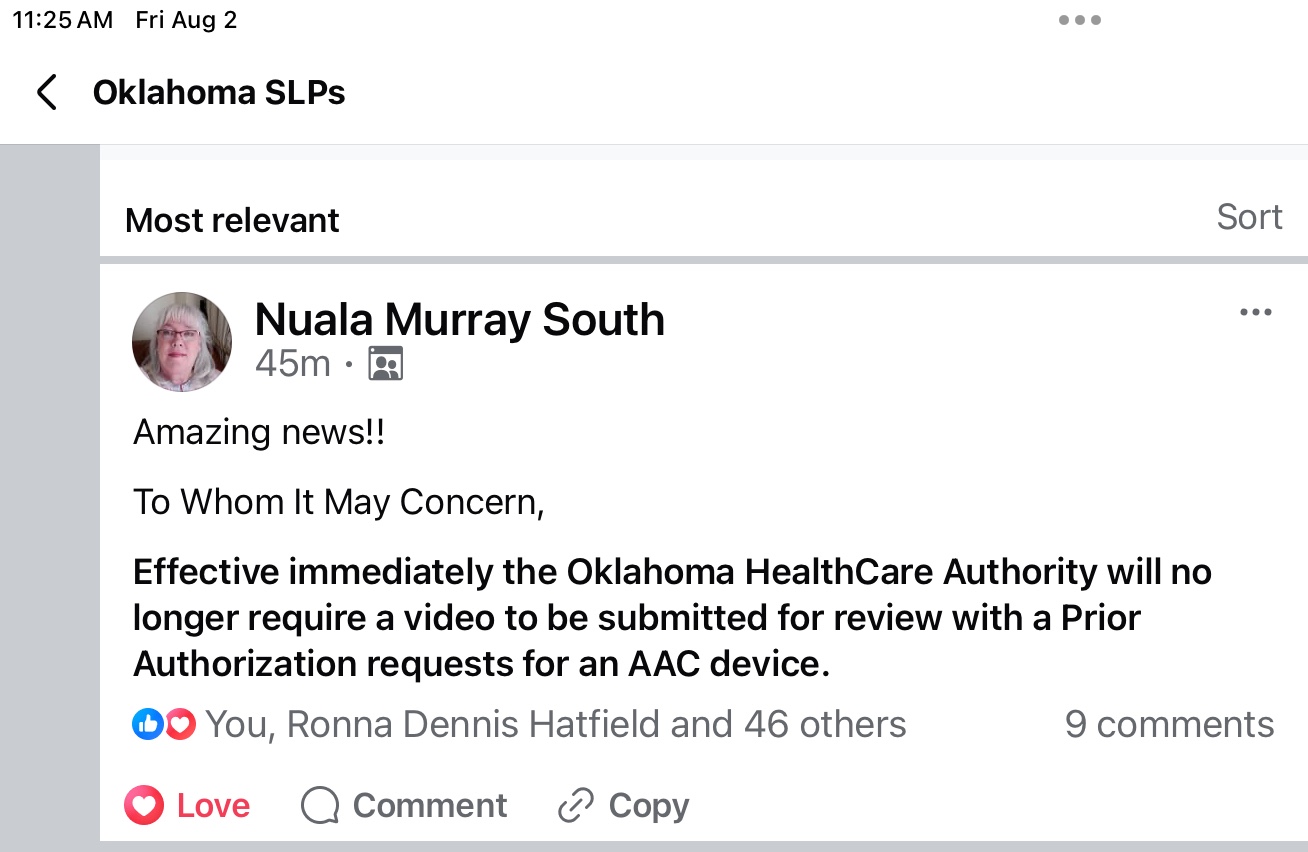
Update 8/2/24: I just saw a post from our Tobii Dynavox rep in Oklahoma:
Amazing news!!
To Whom It May Concern,
Effective immediately the Oklahoma HealthCare Authority will no longer require a video to be submitted for review with a Prior Authorization requests for an AAC device.
Oklahoma Able Tech: https://www.ok.gov/abletech/# & great info here: https://www.okabletech.org/at-discovery/speech-communication/
Device Loan Program: https://www.okabletech.org/guide-to-all-services/device-loan-program/
SoonerStart Early Intervention Collaboration: https://www.okabletech.org/community/soonerstart-collaboration/
PreK-12: https://www.okabletech.org/education-services/at-services-for-pk-12/
Another source that I’ve had good success with for funding an iPad with a robust AAC app in a durable case here in Oklahoma is the New Voices grant through Ability Connections Oklahoma: https://www.acok.org (the funding comes and goes on this grant. See their Facebook page for updates: https://www.facebook.com/abilityconnectionoklahoma/).
If you are in Oklahoma, also check out the AAC Funding Guide: https://www.okabletech.org/resources/at-funding-guide/ (those outside of Oklahoma should ask the AT Lending Program in your state if they have a similar resource)
This website has good info regarding potential funding sources: http://ectacenter.org/topics/atech/funding.asp

- It is best practice to do an AAC eval, feature matching & trial of options. It is important to try out any device and app with the potential user before making a purchasing recommendation or decision. This is also important when using any extra hardware (keyguards, switches, switch interfaces, carrying straps, stands, mounts, etc…) to support AAC use. Many funding sources require documentation regarding a certain number of options being considered and trialed. It is wise to get as much information as you can before you start the process.
- The funding department for the company selling the devices should provide info regarding what’s needed. Read through the definition of “medical necessity” and all the required elements for purchase of a speech generating device (SGD) as durable medical equipment (DME) for that insurance company and/or Medicaid in your state. This will give you both verbiage to include in your report and a checklist of all the bases you need to cover.
- Once you start the funding process you have to be willing to do what it takes under very short timeframes when they request additional video or ask for an addendum for additional information. If you don’t meet their very short timeframes then the request may automatically be denied and you may have to start all over. If you get a denial, find out why and submit an appeal.
- There are many reasons why one would consider a traditional SGD vs. an iPad or any other tablet with an app: durability, warranty, tech support, built-in switch ports for scanning, eye gaze access, etc… (see more info at: https://bit.ly/3sUNINw)
- But there are many folks who may not have a funding source for a traditional SGD. And there are things about having AAC on an iPad or iPhone that make it a great option for particular users.
- There are situations where you may need to consider an Android tablet instead of an iPad. I recently received info about that platform having many more voice options compared to the iOS voices or voices within AAC apps on an iPad. In some instances an Android tablet may be the only option for voice output in a particular language. An example of this is Vietnamese. Which explains why the Vietnamese version of Avaz & Talk Tablet are only offered on that platform. CoughDrop can be translated into that language but only has access to a Vietnamese voice on the Android platform. (Updated 1/30/23: iOS 16 added voices for several more languages including Vietnamese). See info about Android AAC apps on this post: https://omazingkidsllc.com/2020/12/01/android-aac-apps/
Resources:
Five Feature Matching Resources for AAC Apps (comparing features in AAC apps) + several videos comparing AAC apps across platforms (iPad, Android, Amazon Fire, Windows): https://bit.ly/5aacFeatureMatchingResources
.
AAC Funding: Jumping Through Hoops & Proving Accuracy: https://omazingkidsllc.com/2018/02/14/aac-funding-jumping-through-hoops-proving-accuracy/
Disclaimer: I assume no liability for device or app purchases and am not making patient-specific recommendations.
The best way to reach me with any questions is via messaging on the OMazing Kids Facebook page: https://www.facebook.com/OMazingKidsAAC/. That way AAC related messages don’t get lost among the spam in my e-mail
Angela Moorad, MS, CCC-SLP, Founder of OMazing Kids, LLC, OMazing Kids AAC Consulting
- Teachers Pay Teachers Store: https://www.teacherspayteachers.com/Store/Omazing-Kids-Aac-Consulting
- YouTube: https://youtube.com/user/amoorad1
- Ko-Fi: https://ko-fi.com/omazingkidsaac
- OMazing Kids AAC Consulting Facebook Page: https://www.facebook.com/OMazingKidsAAC/
- AppPeeps Facebook Group: https://www.facebook.com/groups/OMazingKidsAppPeeps/
- GoTalk Now AAC & GoVisual Visual Scene Apps – Ideas and Sharing Facebook Group: https://bit.ly/GoTalkNowAACappGroup
- Instagram: https://www.instagram.com/omazingkidsaac
- Twitter: https://www.twitter.com/amoorad
- Pinterest: http://pinterest.com/OMazingKids/
- Linktree: https://linktr.ee/amoorad1
- LinkedIn: https://www.linkedin.com/in/angelamooradomazingkidsaac
- Blog: https://omazingkidsllc.com
 OMazing Kids AAC Consulting